
RIENOK Rienok S1 mini
RIENOK bærbar Bluetooth-høyttaler S1 Mini brukerhåndbok
Model: Rienok S1 mini
Introduksjon
Thank you for choosing the RIENOK Portable Bluetooth Speaker S1 Mini. This manual provides essential information for the safe and efficient operation of your new speaker. Please read this manual thoroughly before use and retain it for future reference.

Figure 1: RIENOK Portable Bluetooth Speaker S1 Mini
Sikkerhetsinformasjon
For å sikre sikker drift og forhindre skade, må du følge følgende forholdsregler:
- Do not expose the speaker to extreme temperatures (hot or cold) or direct sunlight for prolonged periods.
- Unngå å miste eller utsett høyttaleren for sterke støt.
- While the speaker is IPX7 waterproof, ensure the charging port cover is securely closed before exposure to water. Do not submerge for extended periods or beyond specified depth.
- Ikke forsøk å demontere, reparere eller modifisere høyttaleren. Dette vil ugyldiggjøre garantien og kan forårsake skade på person eller personskade.
- Hold høyttaleren unna medisinsk utstyr, da de magnetiske komponentene kan forstyrre driften av dem.
- Bruk kun den medfølgende ladekabelen eller en tilsvarende sertifisert kabel.
Pakkeinnhold
Bekreft at alle varene er til stede i pakken:
- RIENOK Portable Bluetooth Speaker S1 Mini
- USB ladekabel
- AUX-kabel
- Snørebånd
- Brukerhåndbok (dette dokumentet)

Figur 2: Pakkeinnhold
Produkt overview
Kontroller og porter
Familiarize yourself with the speaker's buttons and connection points:
- Strømknapp: Slår høyttaleren av/på.
- Volum opp (+): Øker volumet. Trykk og hold inne for å hoppe til neste spor.
- Volum ned (-): Reduserer volumet. Trykk og hold inne for å hoppe til forrige spor.
- Spill av/pause-knapp: Plays or pauses audio. Also used for answering/ending calls and controlling RGB lights.
- Bass Boost-knapp: Forbedrer basslyden.
- Modusknapp: Switches between Bluetooth, Micro SD card, and AUX-In modes.
- USB-C ladeport: For å lade høyttaleren.
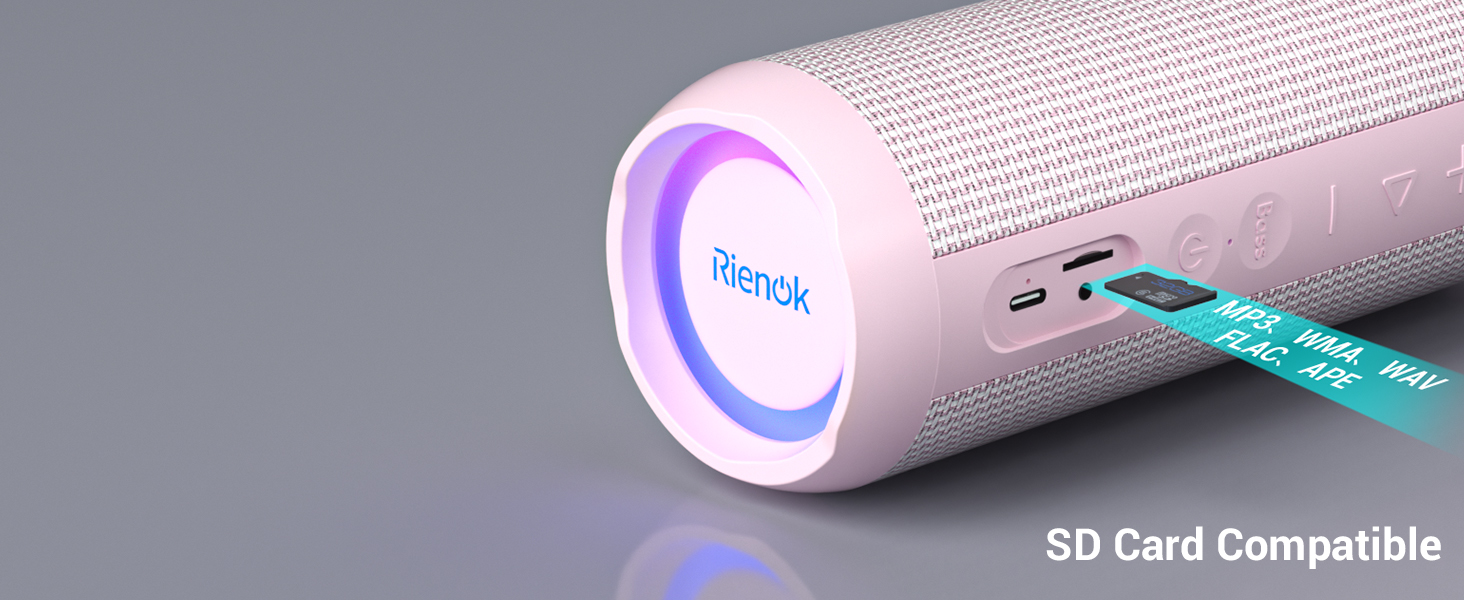
- Micro SD -kortspor: For avspilling av lyd fra et Micro SD-kort.
- AUX-In Port: For kablet lydtilkobling.

Figure 3: Speaker Controls (Bass Boost Button Highlighted)

Figure 4: Connectivity Ports (SD Card and AUX-In)
Oppsett
1. Lading av høyttaleren
Before first use, fully charge the speaker. Connect the provided USB-C charging cable to the speaker's charging port and the other end to a USB power adapter (not included) or a computer USB port. The charging indicator light will illuminate red during charging and turn off when fully charged. A full charge takes approximately 30 hours.

Figur 5: Utvidet spilletid
2. Slå på/av
- For å slå på: Trykk og hold inne av/på-knappen i 2–3 sekunder til du hører en lydmelding og indikatorlampen lyser.
- Slik slår du av: Trykk og hold inne av/på-knappen i 2–3 sekunder til du hører en lydmelding og indikatorlampen slukkes.
3. Bluetooth-paring
Høyttaleren bruker Bluetooth 5.3 for stabil og effektiv trådløs tilkobling.
- Ensure the speaker is powered on and in Bluetooth pairing mode (indicated by a flashing blue light). If not, press the Mode button to switch to Bluetooth mode.
- Aktiver Bluetooth på enheten din (smarttelefon, nettbrett, datamaskin) og søk etter tilgjengelige enheter.
- Select "RIENOK S1 mini" from the list of devices.
- Once paired, the speaker will emit an audible confirmation, and the blue indicator light will become solid.
Figur 6: Bluetooth 5.3-tilkobling
4. Ekte trådløs stereo (TWS)-paring
You can pair two RIENOK S1 Mini speakers together for a true stereo sound experience.
- Sørg for at begge høyttalerne er slått på og ikke koblet til noen Bluetooth-enhet.
- On one speaker (this will be the primary speaker), double-press the Power button. It will enter TWS pairing mode.
- Primærhøyttaleren vil automatisk søke etter og koble til den andre høyttaleren.
- Once successfully paired, both speakers will emit an audible confirmation, and their indicator lights will synchronize.
- Koble nå enheten til hovedhøyttaleren via Bluetooth som beskrevet i trinn 3. Lyden spilles av gjennom begge høyttalerne i stereo.

Figure 7: True Wireless Stereo Pairing
Bruksanvisning
Grunnleggende lydkontroll
- Volumjustering: Trykk på + knappen for å øke volumet, og - knappen for å redusere volumet.
- Spill av/pause: Trykk på Spill av/pause knappen én gang for å spille av eller sette det gjeldende sporet på pause.
- Neste spor: Trykk og hold inne + knappen i mer enn to sekunder.
- Forrige spor: Trykk og hold inne - knappen i mer enn to sekunder.
Bass Boost Function
Trykk på den dedikerte Bass button to activate or deactivate the bass boost feature, enhancing the low-frequency audio output.
RGB lyskontroll
The speaker features RGB breathing lights that can synchronize with music. To turn off the LED light, double-press the Spill av/pause knapp.
Anropsfunksjonalitet
Når den er koblet til en smarttelefon via Bluetooth:
- Svar/avslutt samtale: Trykk på Spill av/pause knappen én gang.
- Avvis anrop: Trykk og hold inne Spill av/pause knapp.
Micro SD -kortmodus
Insert a Micro SD card containing MP3, WMA, WAV, FLAC, or APE audio files into the Micro SD card slot. The speaker will automatically switch to Micro SD card mode and begin playback. If it doesn't, press the Modus button to select Micro SD mode.
AUX-In-modus
Connect an external audio device (e.g., MP3 player, computer) to the speaker's AUX-In port using the provided 3.5mm AUX cable. The speaker will automatically switch to AUX-In mode. If it doesn't, press the Modus button to select AUX-In mode.
Vedlikehold
Rengjøring
Tørk av høyttaleren med en myk, damp klut. Ikke bruk slipende rengjøringsmidler, alkohol eller kjemiske løsemidler, da disse kan skade overflaten eller de indre komponentene.
Vannmotstand (IPX7)
The speaker is IPX7 waterproof, meaning it can be submerged in water up to 1 meter (3.3 feet) for up to 30 minutes. Ensure the charging port cover is fully sealed before exposing the speaker to water. After exposure to water, wipe the speaker dry before charging.

Figur 8: IPX7 vanntetthetsfunksjon
Lagring
Oppbevar høyttaleren på et kjølig og tørt sted, unna direkte sollys og ekstreme temperaturer. Hvis du oppbevarer den over lengre tid, bør du lade batteriet til omtrent 50 % annenhver måned for å opprettholde batteristatusen.
Feilsøking
Hvis du støter på problemer med høyttaleren, kan du se følgende vanlige problemer og løsninger:
| Problem | Mulig årsak | Løsning |
|---|---|---|
| Høyttaleren slås ikke på. | Lavt batteri; Av/på-knappen er ikke trykket lenge nok. | Lad høyttaleren helt opp. Trykk og hold inne av/på-knappen i 2–3 sekunder. |
| Kan ikke pares via Bluetooth. | Speaker not in pairing mode; Device Bluetooth off; Speaker already connected to another device; Distance too far. | Ensure speaker is flashing blue. Turn on device Bluetooth. Disconnect from other devices. Move speaker closer to device (within 10 meters). |
| Ingen lyd eller lavt volum. | Volume too low on speaker or device; Incorrect mode selected; Corrupted audio file (SD card). | Increase volume on both speaker and device. Press Mode button to select correct input. Try a different audio file. |
| Dårlig lydkvalitet. | Bluetooth interference; Speaker too far from device; Low battery. | Move speaker closer to device. Ensure no obstacles. Charge speaker. |
| TWS-paring mislykkes. | Speakers already connected to other devices; Not in TWS pairing mode. | Ensure both speakers are disconnected from all devices. Double-press Power button on one speaker to initiate TWS pairing. |
Spesifikasjoner
| Trekk | Detalj |
|---|---|
| Modellnavn | Rienok S1 mini |
| Bluetooth-versjon | 5.3 |
| Utgangseffekt | 30 watt |
| Batterikapasitet | 3600 mAh |
| Spilletid | Up to 30 hours (varies by volume/bass) |
| Vanntett vurdering | IPX7 |
| Produktdimensjoner (L x B x H) | 8.31" D x 3.32" B x 3.24" H |
| Varevekt | 1.03 pund (466 gram) |
| Tilkobling | Bluetooth, Micro SD Card, AUX-In |
| Ladetid | Ca. 30 timer |
| Inkluderte komponenter | Speaker, Charge Cable, AUX Cable, Lanyard |
Garanti og støtte
Garantiinformasjon
This RIENOK product comes with a Limited Warranty. Please refer to the warranty card included in your package for specific terms and conditions. The warranty covers manufacturing defects and issues arising from normal use.
Kundestøtte
For any questions, technical assistance, or warranty claims, please contact RIENOK customer support. You can typically find contact information on the product packaging, the official RIENOK webnettstedet, eller gjennom kjøpsplattformen din.
Visit the official RIENOK Store for more information: RIENOK Store on Amazon