
1. Introduksjon
Takk for kjøpetasing the LFF LDR113-EU Kitchen Radio. This manual provides essential information for the safe and efficient operation of your device. Please read it thoroughly before use and retain it for future reference.
The LFF LDR113-EU is a versatile kitchen radio featuring DAB+, FM, and Bluetooth connectivity. It includes dual alarms, a sleep timer, and 60 station presets, designed for both tabletop use and under-cabinet mounting.
2. Sikkerhetsinformasjon
- Strømkilde: Bruk kun den medfølgende strømadapteren. Sørg for at volumettage samsvarer med din lokale strømforsyning.
- Vann og fuktighet: Do not expose the device to water, rain, or excessive moisture. Avoid placing liquids near the radio.
- Ventilasjon: Sørg for tilstrekkelig ventilasjon rundt enheten. Ikke blokker ventilasjonsåpningene.
- Varme: Hold enheten unna varmekilder som radiatorer, varmeovner, ovner eller andre varmeproduserende apparater.
- Rengjøring: Koble fra strømmen før rengjøring. Bruk en myk, tørr klut. Ikke bruk flytende rengjøringsmidler eller sprayrengjøringsmidler.
- Service: Ikke prøv å utføre service på dette produktet selv. Henvis all service til kvalifisert servicepersonell.
- Plassering: Place the radio on a stable, level surface or mount it securely according to the instructions.
3. Pakkens innhold
Vennligst sjekk at alle varene er til stede i pakken:
- LFF LDR113-EU Kitchen Radio
- Strømadapter
- Mounting Kit (screws, spacers, mounting template)
- Brukerhåndbok (dette dokumentet)
4. Produktet er overview
Gjør deg kjent med radioens komponenter og kontroller.

Figur 4.1: Front view of the LFF LDR113-EU Kitchen Radio, showing the LCD display on the left, control buttons in the center, and a large rotary knob on the right. The buttons include power, mode, menu, info, preset, timer/sleep, and navigation arrows. The rotary knob is for volume and selection.

Figur 4.2: Diagram illustrating the key features of the LFF Kitchen Radio, including DAB/DAB+ radio, FM radio, two alarms, sleep timer, Bluetooth connectivity, and 60 station presets.
4.1. Kontroller og skjerm
- LCD fargeskjerm: Shows current mode, station information, time, and settings.
- Strømknapp: Slår radioen på/av.
- Modusknapp: Veksler mellom DAB+-, FM- og Bluetooth-modus.
- Meny/Info-knapp: Accesses menu options or displays station information.
- Forhåndsinnstilte knapper (1–5): Rask tilgang til lagrede stasjoner.
- Timer/Sleep Button: Sets sleep timer or alarm functions.
- Navigasjonsknapper (opp/ned/venstre/høyre): Navigates through menus and station lists.
- Rotary Knob (Volume/Enter): Adjusts volume, scrolls through options, and confirms selections.
5. Oppsett
5.1. Strømtilkobling
- Connect the power adapter to the DC IN port on the back of the radio.
- Koble strømadapteren til en stikkontakt.
- Radioen vil slå seg på eller gå inn i standby-modus.
5.2. Initial Scan (DAB+ and FM)
Upon first power-on, the radio will typically perform an automatic scan for DAB+ and FM stations. If not, follow these steps:
- Trykk på Modus button to select DAB+ or FM mode.
- For DAB+, the radio will usually initiate a full scan automatically. If not, navigate to the 'Full Scan' option in the DAB+ menu and press the rotary knob to confirm.
- For FM, navigate to the 'Auto Scan' option in the FM menu and press the rotary knob to confirm.
- The radio will search for available stations and store them.

Figur 5.1: The LFF Kitchen Radio's LCD color screen displaying the main menu with icons for Digital Radio (DAB+), FM Radio, and Bluetooth, indicating available modes.
6. Bruksanvisning
6.1. Slå på/av
Trykk på Makt button to turn the radio on or off (standby mode).
6.2. Valg av modus
Trykk på Modus button repeatedly to cycle through DAB+, FM, and Bluetooth modes.
6.3. DAB+ radiodrift
- In DAB+ mode, use the Opp/Ned navigation buttons or the rotary knob to browse available stations.
- Press the rotary knob to select a station.
- Pressen Meny/Info til view station information (e.g., program type, signal strength).
6.4. FM-radiodrift
- I FM-modus, bruk Opp/Ned navigation buttons to tune to stations manually.
- Trykk og hold inne Opp/Ned buttons for automatic station seeking.
- Pressen Meny/Info til view stasjonsinformasjon.
6.5. Bluetooth-tilkobling
Connect your smartphone or other Bluetooth-enabled device to the radio.
- Trykk på Modus button to select Bluetooth mode. The display will show 'Bluetooth Pairing'.
- Aktiver Bluetooth på mobilenheten din og søk etter tilgjengelige enheter.
- Select 'LFF LDR113-EU' from the list of devices.
- Once connected, the radio display will show 'Bluetooth Connected'. You can now play audio from your device through the radio.
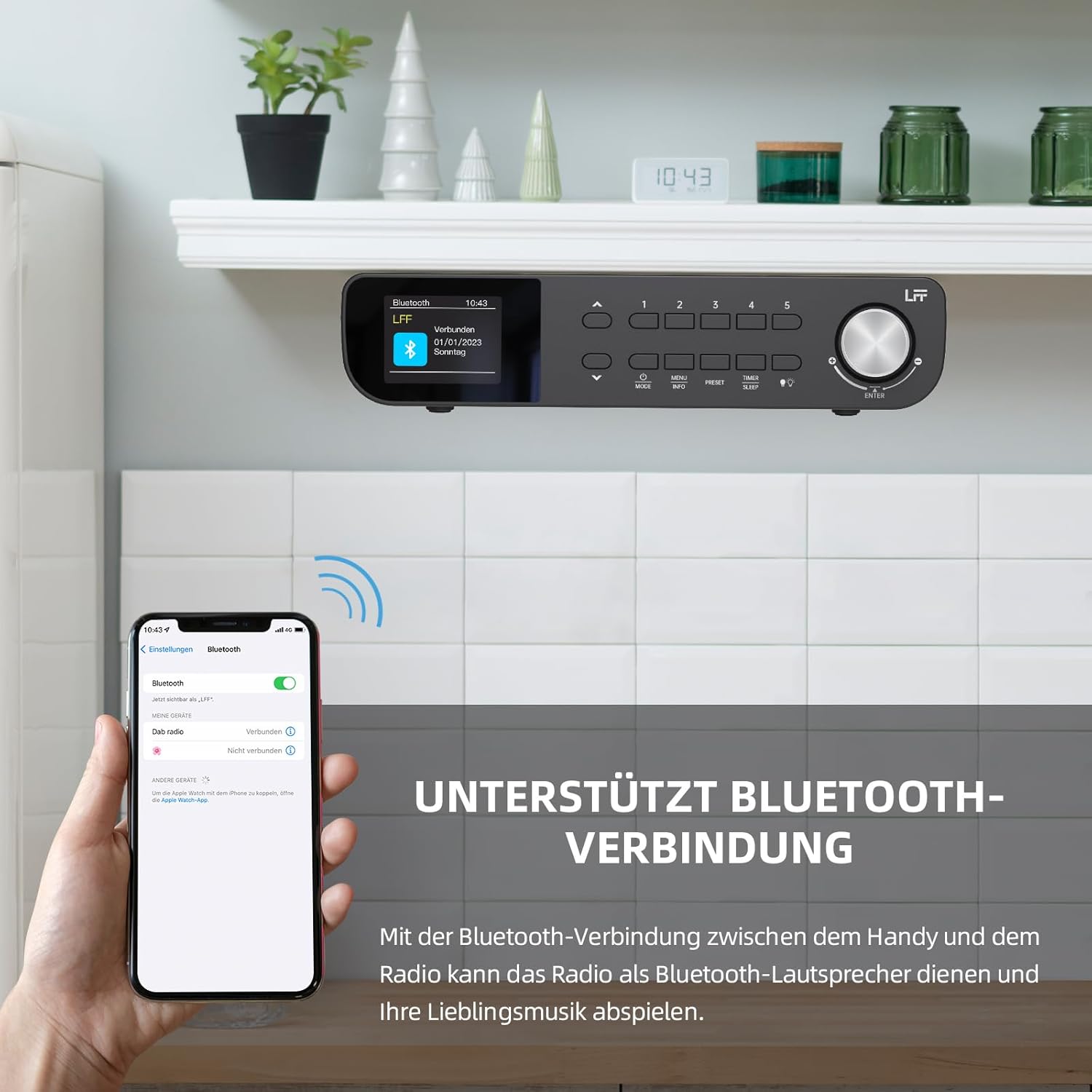
Figur 6.1: The LFF Kitchen Radio displaying a successful Bluetooth connection, with a smartphone screen showing the radio as a connected device.

Figur 6.2: Nærbilde view of the radio's display indicating 'LFF' and 'Connected' under the Bluetooth menu, confirming a successful pairing.
6.6. Stille inn alarmer
The radio features two independent alarms.
- Trykk på Timer/Søvn button repeatedly until 'Alarm 1' or 'Alarm 2' appears.
- Use the navigation buttons and rotary knob to set the alarm time, source (DAB+, FM, or Buzzer), and frequency (daily, weekdays, weekends, once).
- Confirm settings by pressing the rotary knob.

Figur 6.3: Close-up of the radio's display showing the current time and options to activate or deactivate Alarm 1 and Alarm 2.
6.7. Sleep Timer
Søvntimeren lar radioen slå seg av automatisk etter en angitt periode.
- Trykk på Timer/Søvn button repeatedly until 'Sleep Timer' appears.
- Use the navigation buttons or rotary knob to select the desired sleep duration (e.g., 15, 30, 60 minutes).
- Bekreft ved å trykke på dreieknappen.

Figur 6.4: Close-up of the radio's display showing the 'Sleep Timer' setting, with an option to set the duration, for example, to 30 minutes.
6.8. Forhåndsinnstillinger
Save up to 60 favorite stations for quick access.
- Slik lagrer du en forhåndsinnstilling: Still inn på ønsket stasjon. Trykk og hold inne en av Forhåndsinnstilling (1–5) buttons until 'Preset Saved' appears. For additional presets, use the 'Preset Store' option in the menu.
- For å hente frem en forhåndsinnstilling: Trykk kort på en av Forhåndsinnstilling (1–5) buttons. For other presets, navigate to 'Preset Recall' in the menu.
6.9. LED-lys
The radio includes an integrated LED light, useful for illuminating the area below if mounted under a cabinet.
- Trykk på Lys button (if available, or navigate through menu) to turn the LED light on or off.

Figur 6.5: The LFF Kitchen Radio mounted under a kitchen cabinet, with its integrated LED light providing illumination to the countertop below.
6.10. Vis lysstyrke
Adjust the display backlight brightness to suit your environment.
- Access the 'Display' or 'Settings' menu.
- Select 'Brightness' and choose from High, Medium, or Low settings.

Figur 6.6: A visual comparison of the LFF Kitchen Radio's display at three different backlight brightness levels: High, Medium, and Low, demonstrating the adjustable visibility.
7. Monteringsanvisning
The LFF LDR113-EU Kitchen Radio offers flexible placement options: tabletop or under-cabinet mounting.
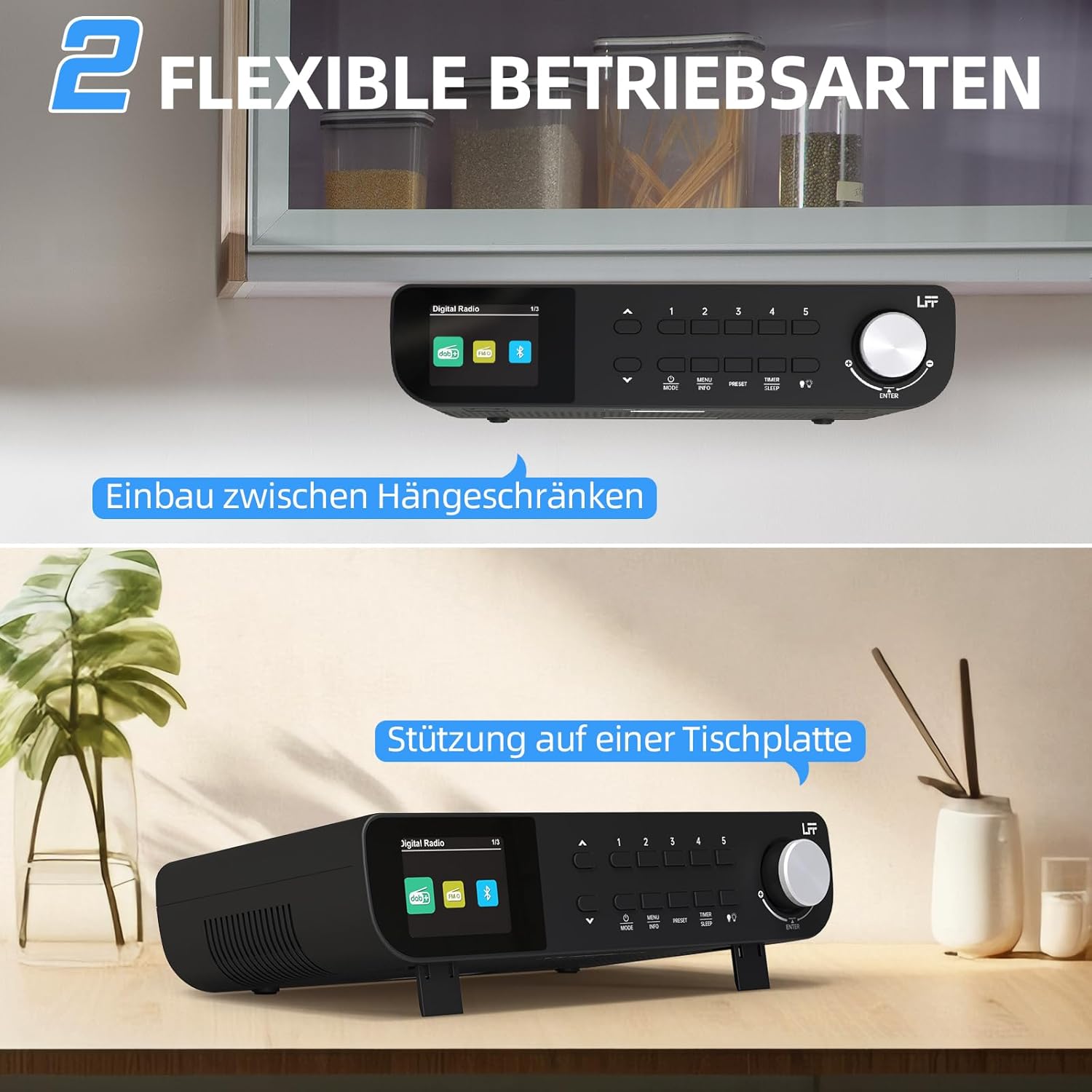
Figur 7.1: The LFF Kitchen Radio displayed in two common installation scenarios: mounted underneath a kitchen cabinet and placed freestanding on a tabletop.
7.1. Tabletop Placement
Simply place the radio on a stable, flat surface. Ensure it is not near the edge to prevent accidental falls.
7.2. Under-Cabinet Mounting
For under-cabinet installation, use the provided mounting kit.
- Forbered stedet: Choose a suitable location under a kitchen cabinet, ensuring there is enough space and access to a power outlet.
- Marker borehull: Use the provided mounting template to mark the drill holes on the underside of the cabinet.
- Bor pilothull: Bor pilothull på de merkede posisjonene.
- Attach Mounting Plate (if applicable): Some models may include a separate mounting plate. Attach this to the cabinet using the screws.
- Secure the Radio: Align the radio with the mounting holes or plate and secure it using the provided screws. Ensure it is firmly attached.
- Koble til strøm: Koble til strømadapteren.

Figur 7.2: Detailed diagram showing the steps for under-cabinet mounting, including measuring distances (e.g., 58mm) and securing the radio with screws.
8. Vedlikehold
- Rengjøring: To clean the radio, disconnect it from the power supply. Use a soft, dry, lint-free cloth. Do not use abrasive cleaners, waxes, or solvents.
- Antenne: Ensure the antenna is extended for optimal reception in DAB+ and FM modes. Handle it gently to avoid damage.
- Lagring: Hvis du oppbevarer radioen over lengre tid, må du koble den fra strømmen og oppbevare den på et kjølig og tørt sted.
9. Feilsøking
| Problem | Mulig årsak | Løsning |
|---|---|---|
| Ingen strøm | Strømadapteren er ikke tilkoblet, eller stikkontakten er defekt. | Sjekk strømtilkoblingen. Prøv en annen stikkontakt. |
| Dårlig DAB+/FM-mottak | Antennen er ikke strukket ut, svakt signal eller interferens. | Fully extend the antenna. Reposition the radio. Perform a full scan. |
| Bluetooth kobler ikke til | Radio not in pairing mode, device too far, or already connected to another device. | Ensure radio is in Bluetooth mode. Move device closer. Disconnect from other devices. |
| Ingen lyd | Volumet er for lavt, lydløs aktivert eller feil modus. | Increase volume. Check if mute is active. Ensure correct mode (DAB+, FM, Bluetooth). |
| Skjermen fungerer ikke | Brightness too low or device malfunction. | Adjust display brightness. If problem persists, contact support. |
10. Spesifikasjoner

Figur 10.1: Diagram showing the dimensions of the LFF Kitchen Radio: 250mm length, 146mm width, and 55mm height.
| Trekk | Detalj |
|---|---|
| Merke | LFF utvidelse |
| Modellnummer | LDR113-EU |
| Farge | Svart |
| Tilkobling | Bluetooth |
| Tuningteknologi | DAB Plus, FM |
| Strømkilde | Elektrisk kabel |
| Hyppighet | 108 MHz (FM max) |
| Dimensjoner (L x B x H) | 250 mm x 146 mm x 55 mm |
| Forhåndsinnstillinger | 60 |
| Utstilling | LCD-fargeskjerm |
| Spesielle funksjoner | Dual Alarms, Sleep Timer, Under-cabinet mounting option, LED Light |
11. Garanti og støtte
This product comes with a standard manufacturer's warranty. Please refer to the warranty card included in your package for specific terms and conditions. For technical support, troubleshooting assistance, or warranty claims, please contact your retailer or the LFF customer service department.