
Introduksjon
Thank you for choosing the Baseus Super Energy Pro 1600A Car Jump Starter. This device is designed to provide a reliable and powerful solution for starting vehicles with dead batteries, and also functions as a portable power bank. Please read this manual thoroughly before use to ensure safe and proper operation. Keep this manual for future reference.
Sikkerhetsinformasjon
- Always read the vehicle's owner's manual before attempting to jump start it.
- Ikke prøv å starte et frossent batteri.
- Sørg for tilstrekkelig ventilasjon når du bruker enheten.
- Hold enheten unna barn og kjæledyr.
- Ikke utsett enheten for regn eller ekstreme temperaturer.
- Unngå kortslutning av jumperen clamps. Ikke koble den røde og svarte kabelenamps sammen.
- If the device or cables are damaged, do not use them. Contact support.
- Koble alltid til cl-enamptil de riktige batteripolene (rød til positiv, svart til negativ).
- Remove the jump starter immediately after the vehicle starts.
Pakkeinnhold
Bekreft at alle varene er til stede i pakken din:
- Baseus Super Energy Pro Car Jump Starter Unit
- Smarte startkabler med Clamps
- USB-C ladekabel
- Brukerhåndbok (dette dokumentet)
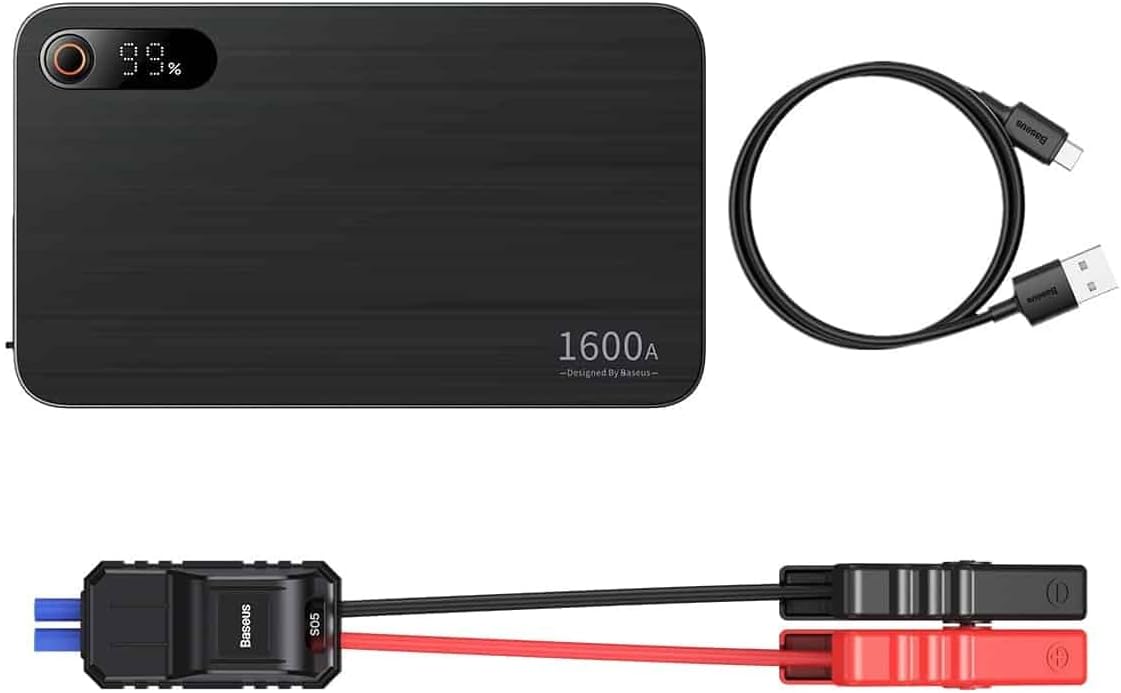
Image: Contents of the Baseus Super Energy Pro Car Jump Starter package, showing the main unit, smart jumper cables, and a USB-C charging cable.
Produkt overview
Familiarize yourself with the components of your Baseus Super Energy Pro Car Jump Starter:
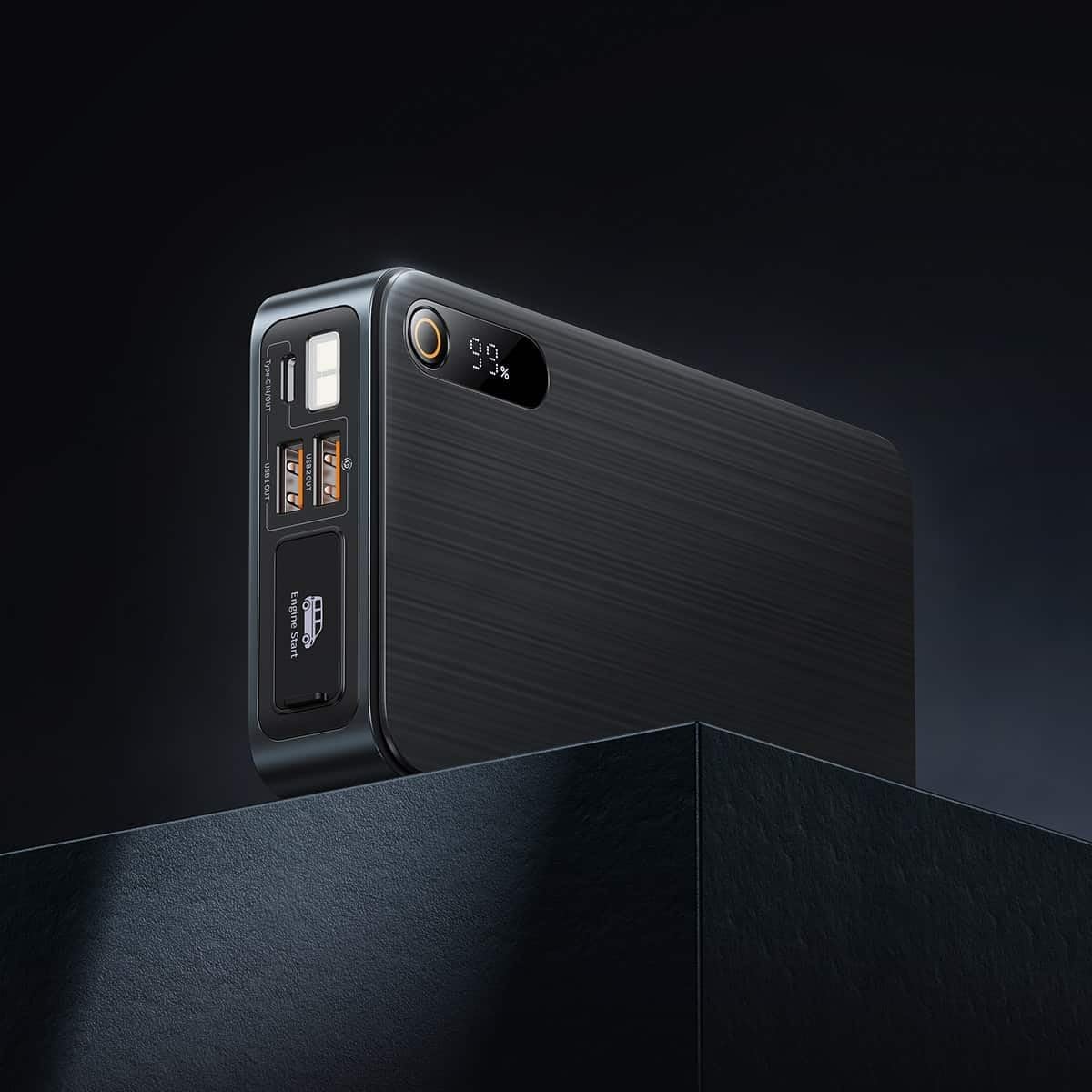
Image: Close-up of the jump starter's side panel, highlighting the various ports and the digital display.
- Digital skjerm: Viser gjenværende batteriprosenttage.
- Strømknapp: Activates the device and turns on the LED light.
- USB-A utgangsporter: For charging external devices like smartphones or tablets.
- Type-C Input/Output Port: Used for charging the jump starter itself or charging other devices.
- Motorstartport: Dedicated port for connecting the smart jumper cables.
- LED lommelykt: Gir belysning i mørke omgivelser.

Image: The Baseus Super Energy Pro Car Jump Starter unit, displaying its digital battery indicator.
Lader enheten
Before first use, fully charge the Baseus Super Energy Pro Car Jump Starter. It is recommended to keep the device charged above 50% for optimal performance and longevity.
- Connect the provided USB-C charging cable to the Type-C port on the jump starter.
- Connect the other end of the USB-C cable to a suitable USB power adapter (not included).
- The digital display will show the charging progress. The device is fully charged when the display shows 100%.
Setup for Jump Starting
Ensure your vehicle is in Park (P) or Neutral (N) and the parking brake is engaged. Turn off all vehicle accessories (headlights, radio, air conditioning).
- Ensure the jump starter has sufficient charge (at least 50%).
- Connect the blue end of the smart jumper cables into the Engine Start port on the jump starter. Ensure it is firmly seated.
Operating Instructions (Jump Starting)
Følg disse trinnene nøye for å starte kjøretøyet med startkabler:
- Koble til rød Clamp: Fest den røde (+) clamp of the jumper cables to the positive (+) terminal of your vehicle's dead battery.
- Koble til Black Clamp: Fest den svarte (-) clamp of the jumper cables to the negative (-) terminal of your vehicle's dead battery.
- Sjekk indikator: Observe the indicator light on the smart jumper cable. A solid green light indicates a correct connection and that the device is ready to start. If it's red or flashing, check connections or refer to troubleshooting.
- Start kjøretøy: Once the indicator is green, start your vehicle's engine.
- Fjern startkabler: As soon as the engine starts, immediately remove the blue plug of the jumper cables from the jump starter.
- Koble fra Clamps: Deretter kobler du fra den svarte (-) kabelenamp fra bilbatteriet, etterfulgt av den røde (+) klypenamp.
Allow your vehicle's engine to run for at least 20-30 minutes to recharge its battery.
Vedlikehold
- Lagring: Store the jump starter in a cool, dry place, away from direct sunlight and moisture.
- Lader: For optimal battery life, recharge the device every 3-6 months, even if not in use.
- Rengjøring: Rengjør enheten med en myk, tørr klut. Ikke bruk sterke kjemikalier eller slipende materialer.
- Batteriavhending: Do not dispose of the device in household waste. Follow local regulations for proper disposal of lithium-ion batteries.
Feilsøking
| Problem | Mulig årsak | Løsning |
|---|---|---|
| Kjøretøyet starter ikke | Jump starter battery is low. Feil kabeltilkobling. Bilbatteriet er alvorlig skadet. | Lad opp startstarteren. Sjekk klamp connections to battery terminals. Rådfør deg med en profesjonell mekaniker. |
| Jumpstarteren lader ikke | Ladekabel eller adapter defekt. Type-C port damaged. | Prøv en annen USB-C-kabel og strømadapter. Kontakt kundestøtte. |
| Smart cable indicator is red/flashing | Omvendt polaritetstilkobling. Kortslutning oppdaget. Overstrøm/overvoltage. | Koble fra og til igjen clamps correctly (red to +, black to -). Sørg for at clamps are not touching each other. Disconnect and try again after a few minutes. If problem persists, contact support. |
Spesifikasjoner
| Trekk | Detalj |
|---|---|
| Merke | Baseus |
| Modellnummer | CGNL070001 |
| Toppstrøm | 1600 A |
| Batterisammensetning | Litium-ion |
| Type kjøretøy | Bil |
| Produktdimensjoner (L x B x H) | 10 x 5 x 1.27 cm |
| Varevekt | 920 g |
| Inngang/utgang | USB-A Output, Type-C Input/Output |
Garanti og støtte
For warranty information or technical support, please refer to the warranty card included with your product or contact the retailer where you purchased the device. You may also visit the official Baseus webnettstedet for ytterligere hjelp og kontaktinformasjon.