
1. Sikkerhetsinformasjon
Les alle instruksjonene nøye før montering og bruk. Ta vare på denne håndboken for senere referanse.
- Ikke overskrid den maksimale vektkapasiteten på 40 kg.
- Ensure your TV's VESA pattern is compatible (100x100mm to 400x400mm).
- Verify that all screws are securely tightened before placing the TV on the stand.
- Ikke la barn klatre opp på eller leke med TV-stativet.
- Plasser stativet på en stabil, jevn overflate for å forhindre at det velter.
- Avoid placing heavy objects on the stand's base that could compromise stability.
2. Pakkens innhold
Kontroller at alle komponenter er til stede og uskadet før monteringen starter. Hvis noen deler mangler eller er skadet, kontakt kundestøtte.

Bilde: Eksplodert view of the TV stand components.
- Base av herdet glass
- Støttekolonne
- TV-monteringsplate
- VESA Extension Brackets (if applicable for larger VESA patterns)
- Various Screws, Washers, and Spacers for TV attachment
- Monteringsutstyr (bolter, muttere, unbrakonøkkel)
- Sklisikre gummiføtter
3. Oppsett og montering
Follow these steps to assemble your XINLEI Universal TV Stand Base.
- Attach Non-Slip Feet to Base: Secure the non-slip rubber feet to the underside of the tempered glass base.
- Assemble Support Column: Attach the support column to the tempered glass base using the provided hardware. Ensure it is firmly secured.
- Attach TV Mounting Plate: Secure the TV mounting plate to the top of the support column.
- Klargjør TV-en for montering:
- Identify your TV's VESA mounting holes on the back.
- Select the appropriate screws and spacers from the provided hardware kit that fit your TV's VESA pattern.
- Attach the VESA extension brackets to the TV mounting plate if your TV's VESA pattern requires them (e.g., 400x400mm).
- Viktig: Before attaching the TV to the stand, ensure that the mounting plate and screws will not block any ports or cables on the back of your television.
- Monter TV-en: Carefully lift your TV and align its VESA holes with the mounting plate/brackets. Secure the TV using the selected screws and spacers. Ensure the TV is level and stable.

Image: Detail of the tempered glass base with non-slip feet.
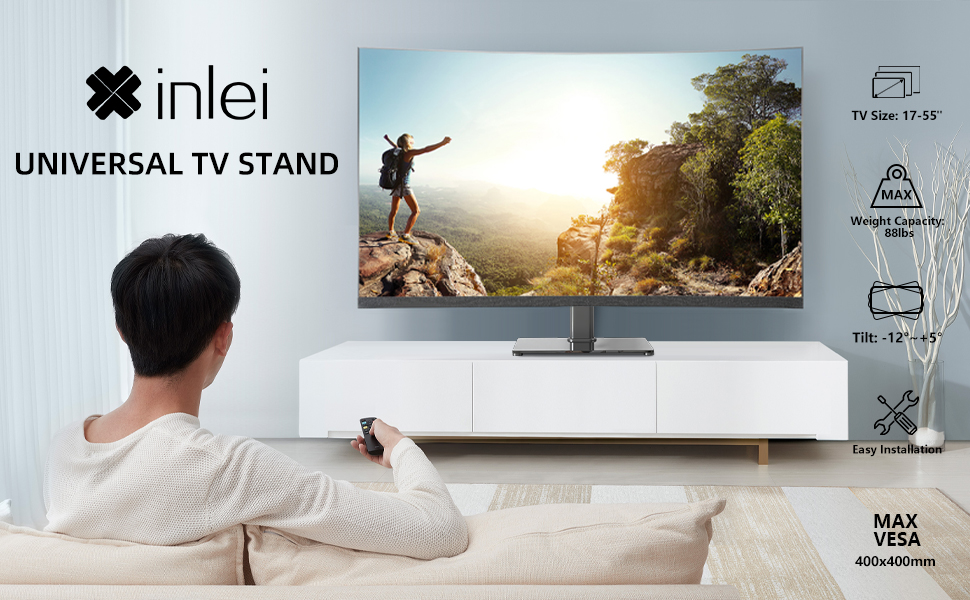
Image: Illustration emphasizing checking for port obstruction.

Image: Fully assembled TV stand with a television.
4. Bruksanvisning
The XINLEI Universal TV Stand Base offers height adjustment and tilt functionality for optimal viewing.
4.1 Høydejustering
This stand provides 3 adjustable height levels. To adjust the height:
- Carefully remove the TV from the mounting plate.
- Adjust the mounting plate's position on the support column to one of the three available height settings (11.1", 13.03", or 14.96" from the base).
- Secure the mounting plate at the desired height using the provided fasteners.
- Re-mount the TV onto the adjusted plate.
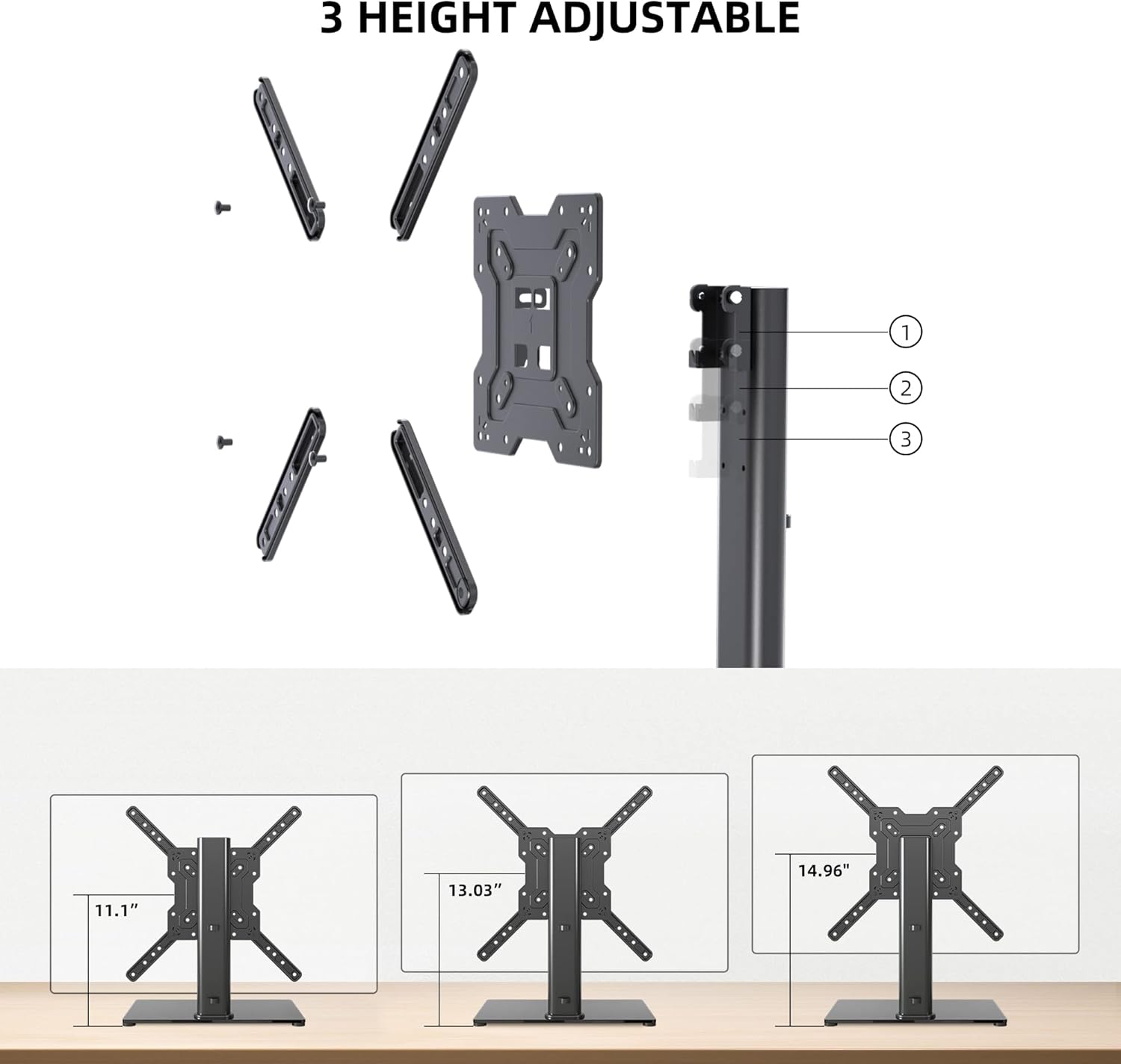
Image: Visual representation of the three height settings.
4.2 Tiltjustering
The TV mounting plate allows for a tilt range of -12 to +5 degrees.
- Loosen the tilt adjustment screws on the side of the mounting plate.
- Gently tilt the TV to your preferred viewing vinkel.
- Tighten the tilt adjustment screws to secure the TV in position.

Image: Diagram demonstrating the tilt functionality.
4.3 Kabelhåndtering
Utilize the integrated cable management system within the support column to keep cables organized and out of sight.

Bilde: Eksample of cable management through the stand's column.
5. Vedlikehold
Regelmessig vedlikehold sikrer TV-stativets levetid og trygg drift.
- Rengjøring: Wipe the tempered glass base and metal components with a soft, damp klut. Unngå slipende rengjøringsmidler eller løsemidler som kan skade overflaten.
- Undersøkelse: Kontroller regelmessig alle skruer og tilkoblinger for å sikre at de sitter godt fast. Stram til om nødvendig.
- Stabilitet: Ensure the stand remains on a level surface and that the non-slip feet are intact.
6. Feilsøking
Hvis du støter på problemer under montering eller bruk, kan du se følgende vanlige løsninger.
- TV-en er ikke i vater: Ensure the stand is on a flat surface. Check that the TV mounting plate is securely attached and that the VESA screws are tightened evenly.
- Screws Too Long/Short: The kit includes various screw lengths and spacers. Refer to your TV's manual for recommended screw sizes for VESA mounting. Use the appropriate spacers to ensure a secure fit without over-tightening or damaging the TV.
- Mount Blocks Ports: Before final mounting, always verify that the mounting plate does not obstruct any necessary ports on your TV. If it does, adjust the TV's position on the VESA plate or consider using longer spacers if safe and compatible.
- Stativet føles ustabilt: Confirm that all assembly bolts are fully tightened. Ensure the tempered glass base is placed on a solid, flat surface and that the non-slip feet are properly installed.
7. Spesifikasjoner
| Trekk | Spesifikasjon |
|---|---|
| Modell | TS102 |
| Kompatible TV-størrelser | 17 til 55 tommer |
| Vekt kapasitet | 88 lbs (40 kg) |
| VESA-kompatibilitet | 100x100mm til 400x400mm |
| Høydejustering | 3 levels (11.1", 13.03", 14.96") |
| Tiltvinkel | -12° til +5° |
| Grunnmål | 10.24 cm x 15.75 cm |
| Materiale | Herdet glass, stål |
| Farge | Svart |
| Varevekt | 9.86 pund |

Image: Technical specifications and dimensions.
8. Garanti og støtte
XINLEI products are designed for durability and performance. For warranty information or technical support, please refer to the product packaging or contact XINLEI customer service directly.
Please have your model number (TS102) and purchase information ready when contacting support.