
1. Introduksjon
Thank you for choosing the MLOVE BV230 Portable Bluetooth Speaker. This manual provides essential information for setting up, operating, and maintaining your speaker. The BV230 is designed for portability, delivering high-quality audio with enhanced bass, and features IP56 dust and water resistance, making it suitable for various environments.
2. Pakkens innhold
Sørg for at alle varene er til stede i pakken:
- 1 x MLOVE BV230 Bluetooth Speaker
- 1 x USB Type-C Laderkabel
- 1 x Nøkkelbånd
- 1 x bruksanvisning (dette dokumentet)
3. Produktet er overview
Gjør deg kjent med høyttalerens komponenter og kontroller.
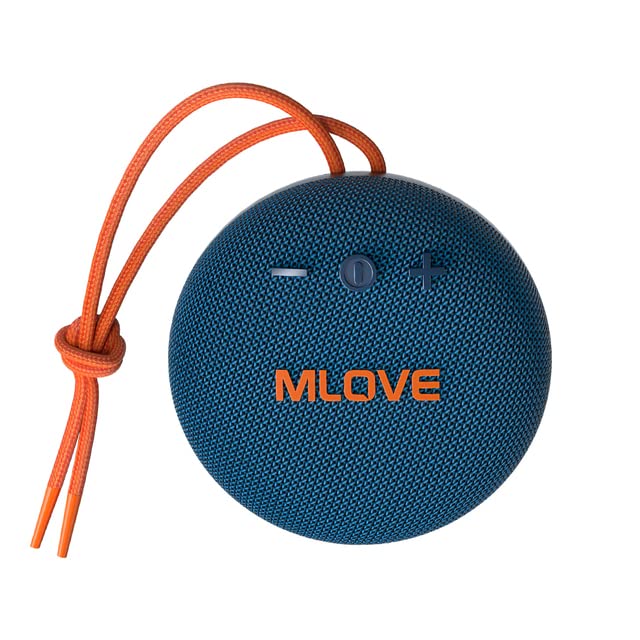
Figur 3.1: Front view of the MLOVE BV230 speaker, showing the power button, volume controls, and MLOVE branding.
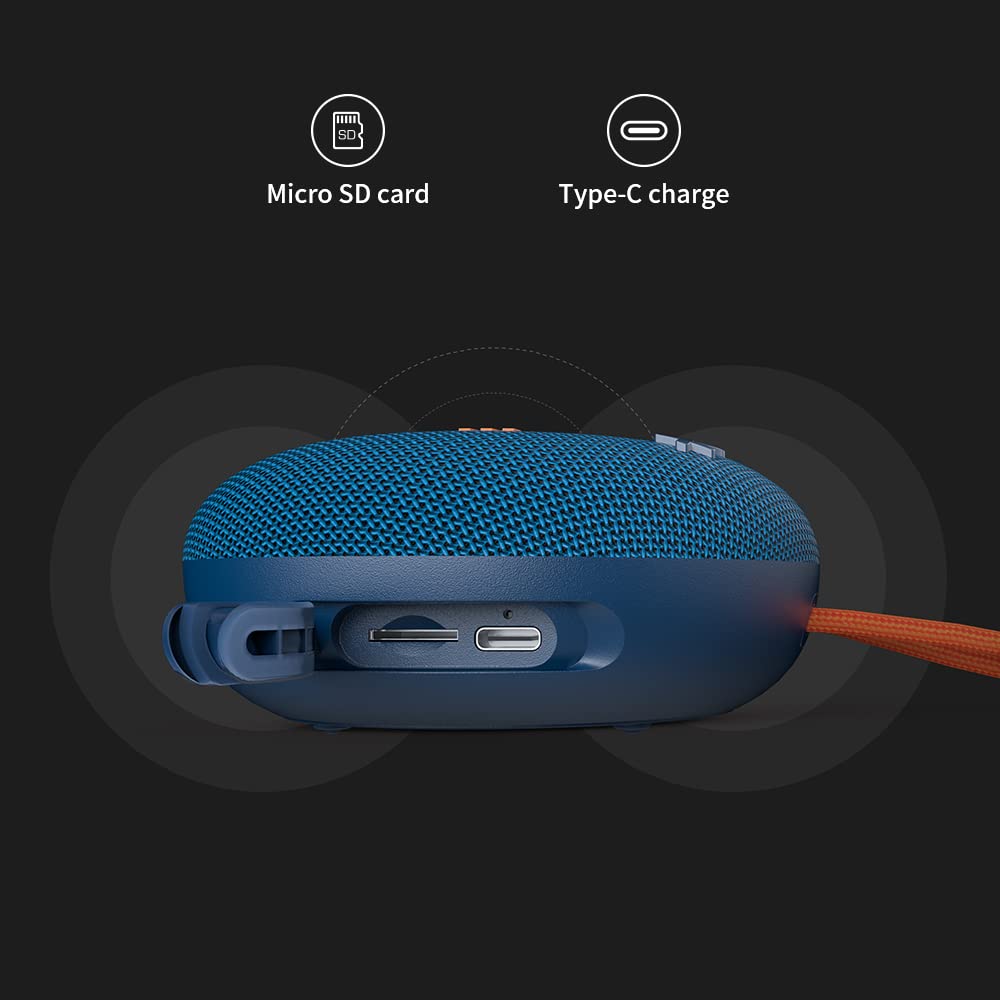
Figur 3.2: Side view of the MLOVE BV230 speaker, highlighting the Micro-SD card slot and the USB Type-C charging port, protected by a rubber flap.
Kontrollknapper:
- Strømknapp: Trykk og hold inne for å slå av/på. Kort trykk for å spille av/pause musikk eller svare på/avslutte samtaler.
- Volum opp (+): Kort trykk for å øke volumet. Langt trykk for neste spor.
- Volum ned (-): Kort trykk for å redusere volumet. Langt trykk for forrige spor.
4. Oppsett
4.1 Lade høyttaleren
Lad høyttaleren helt opp før første gangs bruk.
- Open the rubber flap on the side of the speaker to expose the charging port.
- Connect the included USB Type-C charging cable to the speaker's charging port.
- Koble den andre enden av kabelen til en USB-strømadapter (ikke inkludert) eller en datamaskins USB-port.
- The charging indicator light will illuminate during charging and turn off once fully charged. A full charge takes approximately 3 hours.
4.2 Slå på/av
- For å slå på: Press and hold the Power button for approximately 2-3 seconds until you hear an audible prompt.
- Slik slår du av: Press and hold the Power button for approximately 2-3 seconds until you hear an audible prompt.
4.3 Bluetooth-paring
Connect your BV230 speaker to a Bluetooth-enabled device.
- Sørg for at høyttaleren er slått på og i Bluetooth-paringsmodus (indikeres av en blinkende LED-lampe).
- Aktiver Bluetooth på enheten din (smarttelefon, nettbrett osv.) og søk etter tilgjengelige enheter.
- Select "BV230" from the list of found devices.
- Once connected, the speaker will provide an audible confirmation, and the LED indicator will stop flashing.
- The speaker will automatically reconnect to the last paired device when powered on, if within range (up to 10 meters).
4.4 Ekte trådløs stereo (TWS)-paring
Connect two MLOVE BV230 speakers for a true wireless stereo experience.

Figur 4.1: Two BV230 speakers demonstrating True Wireless Stereo (TWS) pairing for enhanced audio.
- Ensure both BV230 speakers are powered on and not connected to any other Bluetooth device.
- On one of the speakers (this will be the primary speaker), double-press the Power button. The speaker will enter TWS pairing mode.
- The two speakers will automatically search for and connect to each other. You will hear an audible confirmation once TWS pairing is successful.
- Now, connect your Bluetooth device to the primary speaker (the one you initiated TWS pairing on) as described in Section 4.3.
- Lyden vil nå spilles av i stereo på begge høyttalerne.
4.5 Avspilling fra mikro-SD-kort
Play music directly from a Micro-SD card.
- Åpne gummiklaffen på siden av høyttaleren.
- Sett inn et Micro-SD-kort (med støttet lyd files) into the Micro-SD card slot until it clicks into place.
- The speaker will automatically switch to Micro-SD card playback mode.
- Use the Power button for play/pause and the Volume +/- buttons for track control.
5. Bruksanvisning
5.1 Musikkavspilling
- Spill av/pause: Trykk kort på strømknappen.
- Volum opp: Trykk kort på '+'-knappen.
- Volum ned: Trykk kort på '-'-knappen.
- Neste spor: Trykk lenge på «+»-knappen.
- Forrige spor: Trykk lenge på '-'-knappen.
5.2 Håndfri telefonering
Den innebygde mikrofonen muliggjør håndfrie samtaler når den er koblet til via Bluetooth.

Figur 5.1: The BV230 speaker facilitating a hands-free call, demonstrating its built-in microphone functionality.
- Svar på anrop: Short press the Power button when an incoming call is received.
- Avslutt samtale: Trykk kort på av/på-knappen under en samtale.
- Avvis anrop: Long press the Power button when an incoming call is received.
6. Vedlikehold
6.1 Rengjøring
To maintain the speaker's appearance and functionality:
- Tørk av høyttaleren med en myk, damp klut.
- Ikke bruk slipende rengjøringsmidler, alkohol eller kjemiske løsemidler.
- Ensure the charging port and Micro-SD slot are dry before use or charging.
6.2 Vann- og støvmotstand (IP56)
The MLOVE BV230 speaker is rated IP56, meaning it is protected against dust ingress and can withstand water jets from any direction. This makes it suitable for outdoor use and splashes.

Figur 6.1: The BV230 speaker in water, illustrating its IP56 water resistance.
- Ensure the rubber flap covering the charging port and Micro-SD slot is securely closed to maintain water and dust resistance.
- Do not intentionally submerge the speaker in water for extended periods.
- Avoid exposing the speaker to saltwater or other chemicals, as this may damage the seals.
- If the speaker gets wet, wipe it dry before charging or opening the port flap.
6.3 Oppbevaring
- Oppbevar høyttaleren på et kjølig og tørt sted, unna direkte sollys og ekstreme temperaturer.
- Hvis du oppbevarer batteriet over lengre tid, bør du lade det til omtrent 50 % med noen få måneders mellomrom for å forlenge levetiden.
7. Feilsøking
If you encounter issues with your speaker, refer to the following solutions:
| Problem | Mulig løsning |
|---|---|
| Høyttaleren slår seg ikke på. | Sørg for at batteriet er ladet. Koble høyttaleren til en strømkilde med USB Type-C-kabelen. |
| Kan ikke pares via Bluetooth. |
|
| Ingen lyd eller lavt volum. |
|
| TWS-paring mislykkes. |
|
| Ladeproblem. |
|
8. Spesifikasjoner
Key technical specifications for the MLOVE BV230 speaker:
| Trekk | Detalj |
|---|---|
| Modellnavn | BV230 |
| Dimensjoner (L x B x H) | 100.8 x 100.8 x 46 mm (approx. 108D x 46W x 108H Millimeters) |
| Varevekt | 198 g (approx. 280 g with packaging) |
| Høyttalerutgangseffekt | 5 watt |
| Batterikapasitet | 1500 mAh litiumpolymer |
| Spilletid | Opptil 8 timer (ved 70 % volum) |
| Ladetid | Omtrent 3 timer |
| Ladeport | USB Type-C |
| Bluetooth-versjon | 5.0 |
| Wireless Range | Opptil 10 meter (33 fot) |
| Vann- og støvbestandighet | IP56 |
| Materiale | Stoff |
| Kontrollmetode | Røre |
| Lydutgangsmodus | Stereo (med TWS-paring) |
9. Garanti og støtte
The MLOVE BV230 Portable Bluetooth Speaker comes with a 12 måneders garanti fra kjøpsdatoen, som dekker produksjonsfeil.
For technical support, warranty claims, or further assistance, please contact your retailer or the manufacturer directly. Please retain your proof of purchase for warranty service.