
Introduksjon
Takk for kjøpetasing the Robosen Elite Optimus Prime HR30. This fully automatic transforming robot is designed to provide an interactive experience with voice control, app functionality, and programmable actions. Please read this manual thoroughly before operating your robot to ensure proper use and to maximize its features.
Produkt overview
The Robosen Elite Optimus Prime HR30 is an advanced, interactive robot that brings the iconic character to life with cutting-edge technology. It features:
- Fully Automatic Transformation: Seamlessly transforms between robot and vehicle modes.
- Stemmekontroll: Responds to over 40 pre-programmed voice commands for dynamic interactions.
- Appkontroll: Utilize the dedicated iOS/Android application for remote control and advanced functionalities.
- Programmerbare handlinger: Create custom sequences and movements with four programming options.
- Advanced Robotics: Equipped with 27 servo motors and 60 microchips for precise movements and realistic articulation, built from over 5000 individual parts.
- Autentisk design: Faithfully reproduces the classic G1 design.

Figure 1: Robosen Elite Optimus Prime in robot mode, highlighting its core features including G1 design, automatic transformation, free movement, voice interaction, and powerful internal motors.

Figure 2: The robot in both robot and vehicle forms, illustrating its technical capabilities such as smartphone app control, voice command recognition, programming options, 27 servo motors, microchips, Bluetooth connectivity, built-in microphone, and speaker.
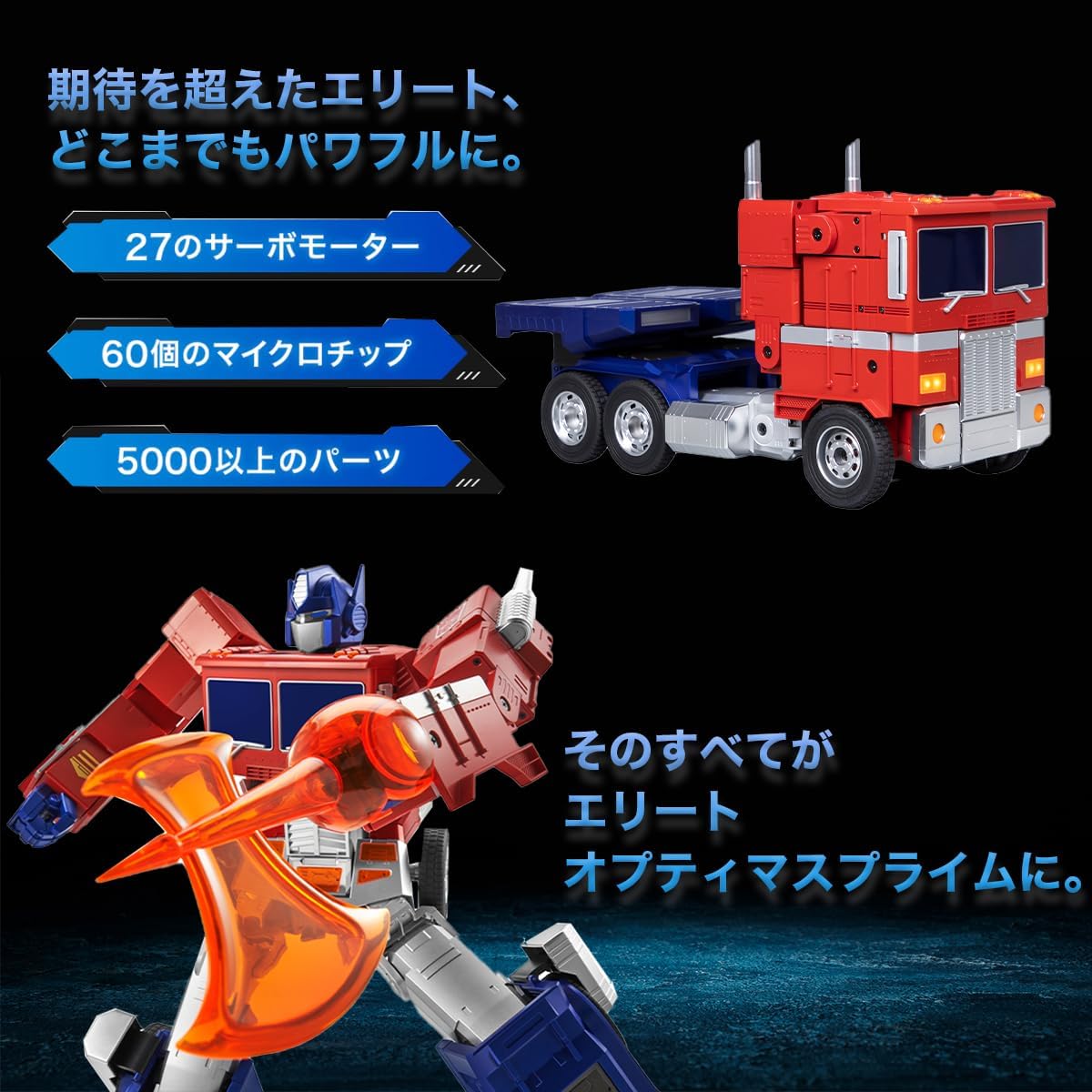
Figure 3: An illustration of the robot in both modes, emphasizing the complex engineering with 27 servo motors, 60 microchips, and over 5000 precision parts that enable its advanced functionality.
Pakkeinnhold
Vennligst sjekk at alle varene som er oppført nedenfor er inkludert i pakken din. Hvis noen varer mangler eller er skadet, vennligst kontakt kundestøtte.

Figure 4: The complete packing list for the Robosen Elite Optimus Prime HR30. It includes the main Optimus Prime unit, an axe accessory, a blaster accessory, the instruction manual, a data cable for charging/connection, and a power adapter.
- Optimus Prime Unit
- Øksetilbehør
- Blaster Accessory
- Bruksanvisning
- Datakabel
- Strømadapter
Oppsett
1. Lading av roboten
Before first use, fully charge your Robosen Elite Optimus Prime. Connect the provided data cable to the robot's charging port and the power adapter. Plug the adapter into a standard wall outlet. The charging indicator will show the charging status.
2. Slå på/av
To power on the robot, press and hold the power button located on its back for a few seconds until it activates. To power off, press and hold the same button until it shuts down.
3. Appinstallasjon (valgfritt)
For enhanced control and programming features, download the official Robosen app from your device's app store (available for iOS and Android). Søk etter "Robosen" and follow the on-screen instructions to install.
4. Bluetooth-paring
Ensure Bluetooth is enabled on your smartphone or tablet. Open the Robosen app and follow the in-app instructions to pair your device with the Elite Optimus Prime HR30. The robot's Bluetooth name will typically appear as "Robosen Optimus Prime HR30".
Bruksanvisning
Stemmekontroll
The Robosen Elite Optimus Prime HR30 responds to over 40 pre-programmed voice commands. Please note that the primary voice commands for this model are in Japanese, as indicated by the product's localization. Ensure you are in a quiet environment for optimal voice recognition. Speak clearly and at a normal volume. Some example kommandoer inkluderer:
- "Hello Optimus" (or equivalent Japanese command)
- "Transform" (or equivalent Japanese command)
- "Walk forward" (or equivalent Japanese command)
- "Attack" (or equivalent Japanese command)
Refer to the in-app command list for a complete list of supported voice commands in Japanese.
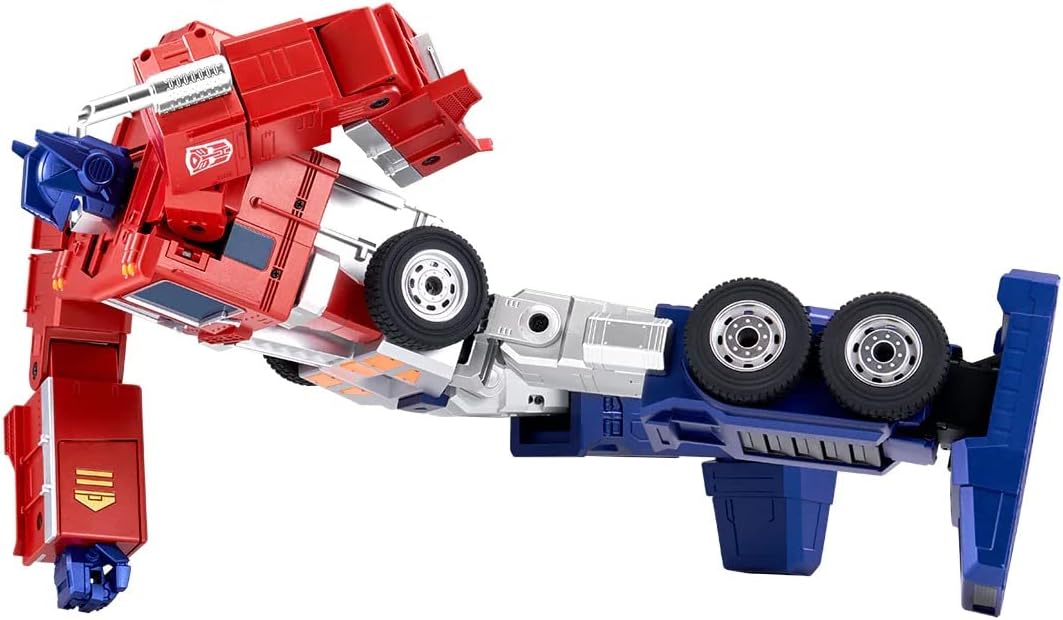
Figure 5: Optimus Prime demonstrating a dynamic action pose, showcasing its articulation and movement capabilities.
Appkontroll
The Robosen app provides comprehensive control over your Optimus Prime. After successful Bluetooth pairing, you can:
- Fjernkontroll: Use the virtual joystick and buttons to control movement and actions.
- Pre-set Actions: Trigger various pre-programmed actions and poses.
- Tilpasning: Adjust settings and preferences for your robot.

Figure 6: The Robosen app interface, demonstrating options for voice commands, remote control, and programming. The app allows users to select various actions and customize the robot's movements.
Programmering
The app offers four programming options to create custom action sequences. This feature allows you to design unique movements and interactions for your Optimus Prime. Detailed tutorials are available within the app to guide you through the programming process.

Figure 7: Optimus Prime in a bipedal walking stance, illustrating its ability to move and pose dynamically.
Vedlikehold
To ensure the longevity and optimal performance of your Robosen Elite Optimus Prime HR30, follow these maintenance guidelines:
- Rengjøring: Use a soft, dry cloth to wipe the robot's surface. Avoid using harsh chemicals or abrasive materials.
- Lagring: Oppbevar roboten på et kjølig og tørt sted, unna direkte sollys og ekstreme temperaturer.
- Batteripleie: Do not overcharge the battery. If storing for an extended period, charge the battery to approximately 50% and recharge every three months to prevent deep discharge.
- Unngå innvirkning: The robot contains delicate internal mechanisms. Avoid dropping or subjecting it to strong impacts.
Feilsøking
| Problem | Mulig årsak | Løsning |
|---|---|---|
| Roboten slår seg ikke på. | Lavt batteri eller av/på-knappen er ikke trykket riktig inn. | Charge the robot fully. Ensure the power button is pressed and held for a few seconds. |
| Stemmekommandoer gjenkjennes ikke. | Noisy environment, unclear speech, or robot too far. | Move to a quieter area. Speak clearly and closer to the robot. Check the app for a list of supported commands. |
| App cannot connect to the robot. | Bluetooth is off, robot is off, or app needs restart. | Ensure robot is powered on and Bluetooth is enabled on your device. Restart the app and try pairing again. |
| Robot's movements are erratic or incomplete. | Low battery, obstruction, or software glitch. | Charge the robot. Check for any physical obstructions. Restart the robot and the app. If issues persist, check for firmware updates. |
Spesifikasjoner

Figure 8: Technical specifications and physical dimensions of the Robosen Elite Optimus Prime HR30, including its height and width in robot mode, and length, width, and height in vehicle mode. Also details internal components and power requirements.
- Modellnummer: HR30
- Materiale: ABS Plastic, Aluminum Alloy Frame
- Vekt: Omtrent 1.9 kg
- Batteri: 1200mAh litiumionbatteri (oppladbart)
- Adapterinngang: 100V-240V~50/60Hz 1A
- Adapterutgang: DC 12.6V 1A
- Tilkobling: Bluetooth 5.0 BLE
- Motorer: 27 Servo Motors
- Microchips: 60 Microchips
- Kontroll: Smartphone App (iOS/Android), Voice Control
- Språk: Product supports Japanese voice commands; this manual is in English.
Garanti og støtte
Produsentens garanti
The Robosen Elite Optimus Prime HR30 comes with a one-year manufacturer's warranty from the date of purchase. This warranty covers defects in materials and workmanship under normal use. It does not cover damage caused by misuse, accidents, unauthorized modifications, or normal wear and tear.
Kundestøtte
For technical assistance, troubleshooting, or warranty claims, please contact Robosen customer support. You can find contact information on the official Robosen website or through the Robosen app.
Please have your product model number (HR30) and proof of purchase ready when contacting support.