
1. Introduksjon
This manual provides detailed instructions for the setup, operation, and maintenance of your Creative Sound Blaster Katana SE Multi-Channel Gaming Soundbar. Designed for an immersive audio experience, this soundbar features 180W peak power, a bi-amplified 4-driver design, Super X-Fi technology, and customizable RGB lighting. Please read this manual thoroughly before using your device to ensure optimal performance and safety.

Figure 1: Creative Sound Blaster Katana SE Gaming Soundbar
2. Viktig sikkerhetsinformasjon
- Les disse instruksjonene.
- Ta vare på disse instruksjonene.
- Følg alle advarsler.
- Følg alle instruksjoner.
- Ikke bruk dette apparatet i nærheten av vann.
- Rengjør kun med en tørr klut.
- Ikke blokker noen ventilasjonsåpninger. Installer i samsvar med produsentens instruksjoner.
- Ikke installer i nærheten av varmekilder som radiatorer, varmeelementer, ovner eller andre apparater (inkludert ampløftere) som produserer varme.
- Beskytt strømledningen mot å bli tråkket på eller klemt, spesielt ved støpsler, stikkontakter og punktet der de kommer ut av apparatet.
- Bruk kun vedlegg/tilbehør spesifisert av produsenten.
- Koble fra dette apparatet under tordenvær eller når det ikke skal brukes i lengre perioder.
3. Pakkens innhold
Bekreft at alle varene er til stede i pakken din:
- Creative Sound Blaster Katana SE Soundbar
- Subwoofer (wired)
- Fjernkontroll
- Strømadapter
- USB-C-kabel
- Optisk kabel
4. Produktet er overview
The Sound Blaster Katana SE is an all-in-one soundbar designed for powerful and immersive audio. It features a sleek design with integrated controls and a front-facing display.
4.1. Soundbar Components
- Topppanelkontroller: Power, Volume Up/Down, Source, Mode, SXFI.
- Frontskjerm: Shows current source (USB, AUX, OPTICAL, BT, TV), volume level, and selected sound mode.
- Front Headphone Jack: For connecting headphones directly.
- Innebygd mikrofon: For talekommunikasjon.
- RGB-lysstripe: Customizable lighting effects located at the bottom of the soundbar.
- Drivere: bi-amplified 4-driver design for clear and precise audio.

Figur 2: Foran view of the Sound Blaster Katana SE with RGB lighting
4.2. Tilkoblinger på bakpanelet
The rear panel provides various ports for connecting to your devices:
- HDMI Out (ARC): For connecting to a TV with Audio Return Channel support.
- SXFI Out: Dedicated port for Super X-Fi enabled headphones.
- USB-lydinngang: For digital audio connection to PC/Mac.
- Aux In: 3.5 mm analog lydinngang.
- Optisk inn: Digital optisk lydinngang.
- Sub Out: For connecting the wired subwoofer.
- Strøminngang: For strømadapteren.

Figure 3: Rear panel with HDMI ARC, SXFI Out, USB Audio In, Aux In, Optical In, Sub Out, and Power Input.
4.3. Subwoofer
The included wired subwoofer enhances bass response for a more dynamic audio experience.

Figur 4: Intern view showing the soundbar's bi-amplified drivers and the subwoofer's design.
5. Oppsett
Follow these steps to set up your Sound Blaster Katana SE:
- Plassering: Place the soundbar on a stable surface below your TV or monitor. Position the subwoofer on the floor near the soundbar for optimal bass.
- Koble til subwoofer: Connect the wired subwoofer cable to the 'Sub Out' port on the soundbar's rear panel.
- Koble til strøm: Connect the power adapter to the soundbar's power input and then plug it into a wall outlet.
- Koble til lydkilde: Choose your preferred audio connection method (HDMI ARC, Optical, USB, Aux, or Bluetooth) and connect the appropriate cable.
Video 1: Official product video demonstrating the Sound Blaster Katana SE's features and connectivity options.
6. Tilkoblingsalternativer
The Sound Blaster Katana SE offers a wide range of connectivity to suit various devices:
- HDMI Out (ARC): Koble til TV-ens HDMI ARC-port for lyd og kontroll av høy kvalitet.
- USB-lydinngang: Ideal for connecting to PCs, Macs, or gaming consoles that support USB audio.
- Aux In: Use a 3.5mm audio cable to connect to devices with an analog audio output.
- Optisk inn: For digital audio connection from TVs, game consoles, or other media players.
- Bluetooth 5.0: Pair wirelessly with your mobile devices, tablets, or computers for convenient audio streaming.
- SXFI Out: Connect Super X-Fi certified headphones for a personalized holographic audio experience.

Figure 5: Soundbar showcasing versatile connectivity with gaming consoles and mobile devices.
7. Bruksanvisning
7.1. Slå på/av
Trykk på av/på-knappen på lydplankens toppanel eller fjernkontrollen for å slå enheten av eller på.
7.2. Volumkontroll
Use the Volume Up (+) and Volume Down (-) buttons on the soundbar or remote to adjust the audio level. The current volume will be displayed on the front panel.
7.3. Kildevalg
Press the 'Source' button on the soundbar or remote to cycle through available input sources (HDMI ARC, USB, Aux, Optical, Bluetooth).
7.4. Lydmoduser
The soundbar features optimized sound modes for different content types. Press the 'Mode' button on the soundbar or remote to switch between:
- Musikk: Enhanced for musical playback.
- Filmer: Optimalisert for kinolyd.
- Spill: Tailored for immersive gaming soundscapes.
- Effects Off: Neutral audio profile.
7.5. Bruke fjernkontrollen
The included remote control provides full functionality for the soundbar, including power, volume, source, mode, SXFI, RGB lighting, and custom buttons.
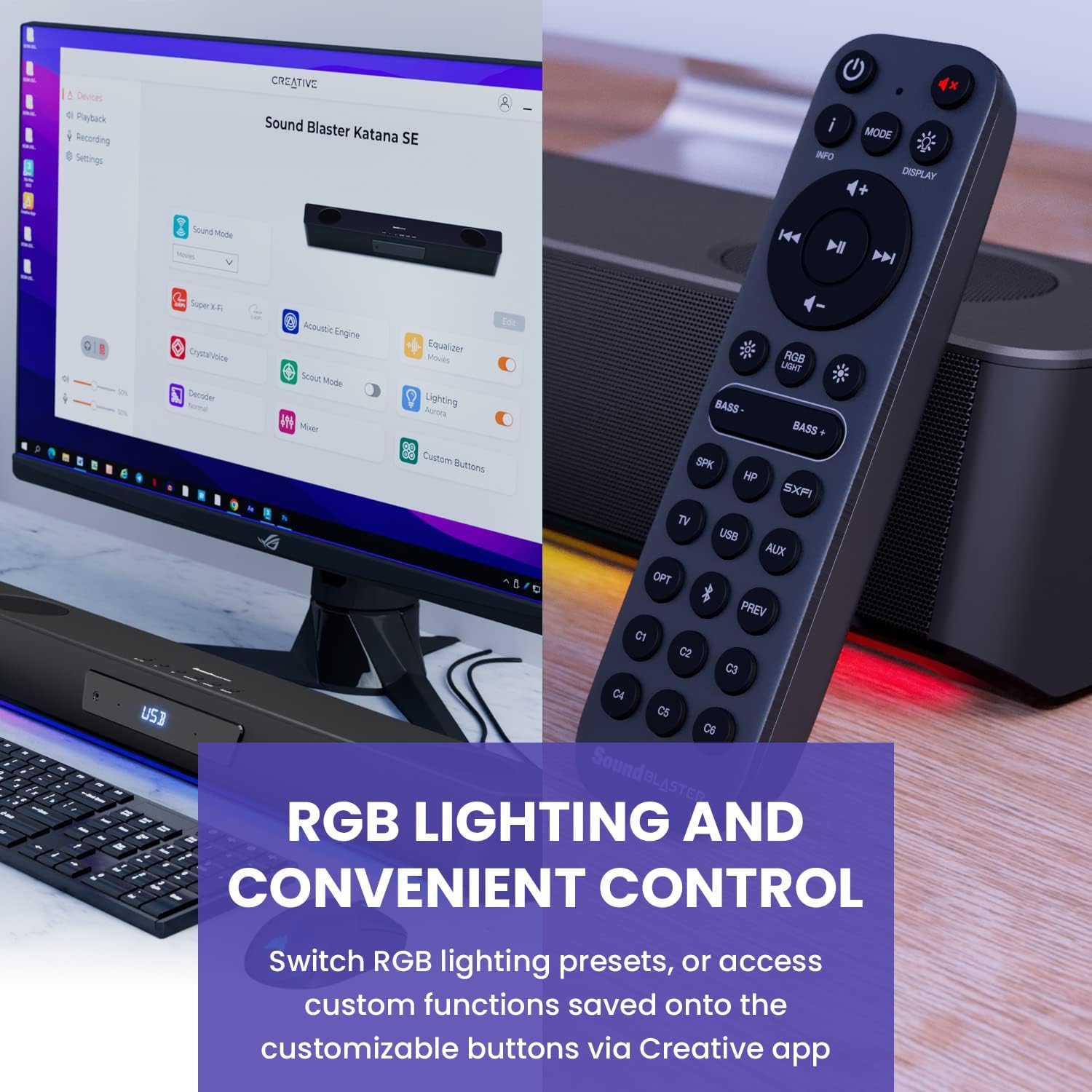
Figure 6: Remote control for the Sound Blaster Katana SE.
7.6. Creative App Customization
For advanced customization, download the Creative app on your PC or Mac. The app allows you to:
- Tune Audio Performance: Adjust EQ settings and activate Sound Blaster processing technologies.
- Tilpass RGB-belysning: Select from various RGB presets or create your own custom lighting effects.
- Map Custom Functions: Assign specific commands to the six customizable buttons on the remote control.

Figure 7: Creative app interface showing sound mode, Super X-Fi, Acoustic Engine, Equalizer, CrystalVoice, Scout Mode, Lighting, Decoder, Mixer, and Custom Buttons.
8. Super X-Fi Technology
Super X-Fi technology personalizes your headphone audio experience for optimized and realistic listening. It recreates the soundstage of a multi-speaker system in your headphones.
- SXFI-kampmodus: Skaff deg et konkurransefortrinntage in FPS games by accurately pinpointing enemy locations through enhanced audio cues.

Figure 8: Super X-Fi and SXFI Battle Mode for enhanced gaming audio.
9. Innebygd mikrofon
The Sound Blaster Katana SE includes a built-in beamforming microphone, allowing you to participate in calls or in-game voice chat directly through the soundbar.
10. RGB-belysning
The integrated RGB lighting strip can be customized to match your setup or mood. Use the remote control to cycle through presets or the Creative app for advanced color and effect adjustments.
11. Vedlikehold
To ensure the longevity and performance of your Sound Blaster Katana SE:
- Hold enheten ren ved å tørke av den med en myk, tørr klut.
- Avoid using liquid cleaners or aerosols.
- Sørg for at ventilasjonsåpningene ikke er blokkert.
- Ikke utsett enheten for ekstreme temperaturer eller fuktighet.
12. Feilsøking
Hvis du støter på problemer med lydplanken, kan du se følgende vanlige løsninger:
- Ingen lyd: Check all cable connections (power, audio source, subwoofer). Ensure the correct input source is selected on the soundbar. Verify the volume is not muted or too low.
- Forvrengt lyd: Try reducing the volume. Check audio cable integrity. Ensure the audio source is providing a clean signal.
- Problemer med Bluetooth-tilkobling: Ensure the soundbar is in Bluetooth pairing mode. Delete the soundbar from your device's Bluetooth list and re-pair. Move closer to the soundbar to reduce interference.
- Fjernkontrollen fungerer ikke: Check battery levels and replace if necessary. Ensure there are no obstructions between the remote and the soundbar.
- RGB-lys fungerer ikke: Check settings in the Creative app. Ensure RGB lighting is enabled via the remote or app.
13. Spesifikasjoner
| Trekk | Spesifikasjon |
|---|---|
| Modellnavn | 51MF8415AA000 27585486 |
| Høyttalertype | Soundbar |
| Monteringstype | Bordfeste |
| Spesialfunksjon | Bass Boost, Built In Microphone, Radio, Stereo Pairing, USB Port |
| Anbefalt bruk for produktet | For Gaming Consoles, For Computers |
| Kompatible enheter | Stasjonær, bærbar PC, MP3-spiller, projektor, smarttelefon, nettbrett, TV |
| Antall enheter | 1.0 telling |
| Surround Sound Channel Configuration | 5.1 |
| Farge | 180W Peak Power with Bluetooth 5.0 |
| Inkluderte komponenter | Fjernkontroll |
| Produktdimensjoner | 25.6" D x 4.3" B x 3.1" H |
| Varevekt | 5.9 pund |
| Er vanntett | FALSK |
| Garantitype | Begrenset |
| Antall varer | 1 |
| Kontrollmetode | Fjernkontroll |
| Trådløs kommunikasjonsteknologi | Bluetooth |
| Høyttalerstørrelse | 1 tommer |
| Strømkilde | Elektrisk med ledning |
| Diskanthøyttalerens diameter | 1 tommer |
| Vannmotstandsnivå | Ikke vannbestandig |
| Kundepakketype | FFP |
| Type lyddriver | Dynamisk driver |
| Subwoofer-tilkoblingsteknologi | Trådløs |
| Antall effektnivåer | 1 |
| Spesifikke bruksområder for produktet | Gaming Consoles, Computers |
| UPC | 054651195639 |
| Produsent | Creative Labs |
| Form | rektangulært prisme |
| Varevekt | 5.9 pund |
| ASIN | B0C5DFMB93 |
| Vare modellnummer | MF8415 |
| Dato først tilgjengelig | 16. mai 2023 |
| Merke | Kreativ |
| Høyttaler Maksimal utgangseffekt | 100 watt |
| Frekvensrespons | 20000 Hz |
| Tilkoblingsteknologi | Bluetooth |
| Lydutgangsmodus | Surround, stereo |
14. Garanti og støtte
Your Creative Sound Blaster Katana SE comes with a Limited Warranty. For detailed warranty information, product registration, technical support, and customer service, please visit the official Creative webnettstedet eller se garantikortet som følger med i pakken.