
1. Introduksjon
This manual provides instructions for the proper use and care of your Docooler Portable USB Cassette Player. This device allows you to play audio cassettes and convert their content into digital MP3 files via a USB connection to a computer. Please read this manual thoroughly before operating the device to ensure optimal performance and longevity.
2. Produktet er overview
The Docooler Portable USB Cassette Player is a compact, handheld device designed for playing and digitizing audio cassettes. It features a transparent casing, allowing visibility of the internal mechanism.
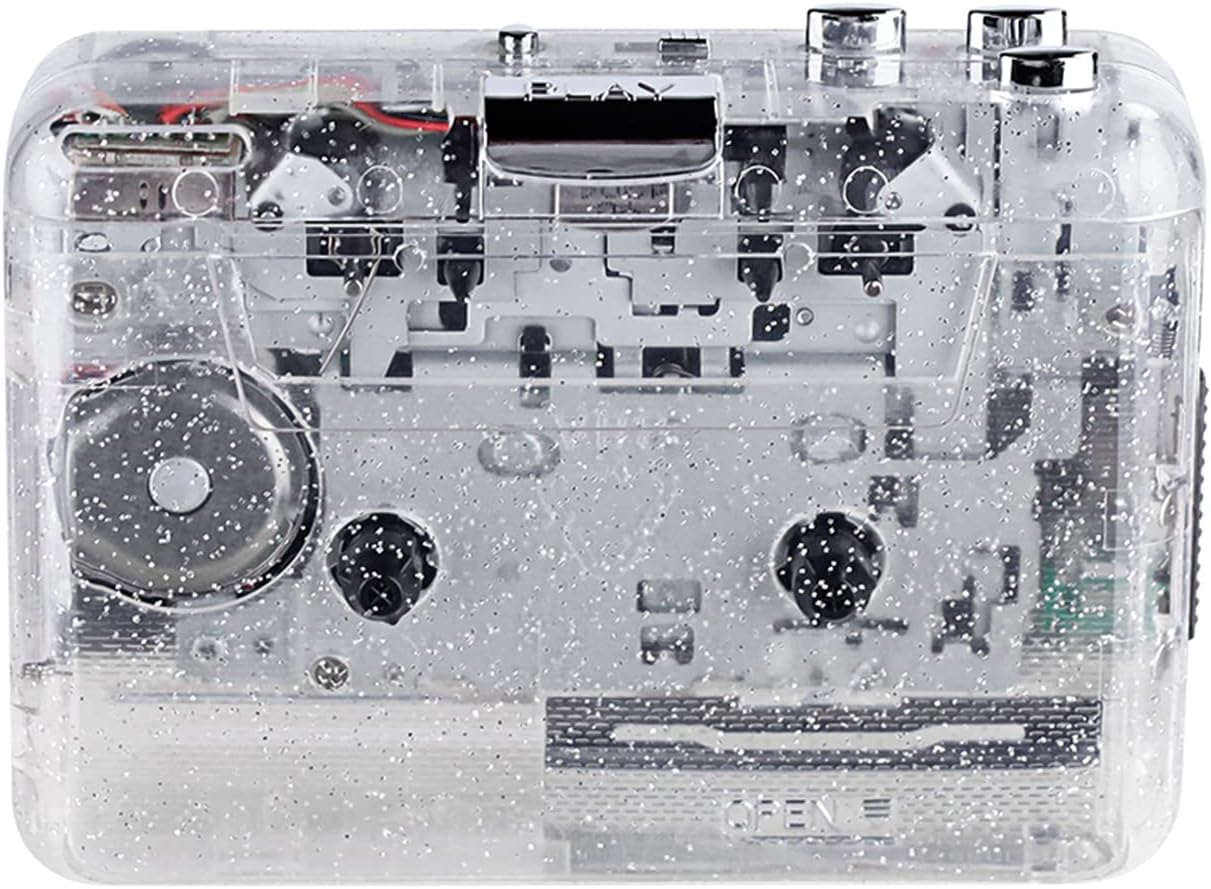
Figur 1: Foran view of the Docooler Portable USB Cassette Player, showcasing its transparent design.

Figure 2: Various angles of the cassette player, including top, side, and open views.
Pakkeinnhold:
- Docooler Portable USB Cassette Player
- USB-kabel
- Brukerhåndbok (dette dokumentet)
- Headphones (may vary by package)
3. Oppsett
3.1 Strømforsyning
The cassette player can be powered by either batteries or a USB connection.
Batteriinstallasjon:
- Finn batterirommet på enheten.
- Åpne batteridekselet.
- Sett inn 2 x AA-batterier (ikke inkludert), og sørg for riktig polaritet (+/-).
- Lukk batteridekselet godt.
USB-strøm:
Connect the provided USB cable to the player's USB port and the other end to a powered USB port on your computer or a USB wall adapter. The device will draw power from the USB connection.
4. Bruksanvisning
4.1 Spille av en kassett
- Åpne dekselet til kassettrommet.
- Insert an audio cassette tape with the open edge facing upwards.
- Lukk dekselet til kassettrommet godt.
- Connect headphones or external speakers to the 3.5mm audio output jack.
- Trykk på SPILLE knappen for å starte avspilling.
- Bruk STOPPE knappen for å stoppe avspillingen.
- Bruk FF (Spol fremover) og REW (spol tilbake) knapper for å navigere gjennom båndet.
- Adjust the volume using the volume control dial.
- The "DIR" button allows you to quickly flip the tape direction. The "play mode" button can be used to reverse playback once or an unlimited number of times.

Figure 3: The cassette player in use, demonstrating tape insertion and playback setup.

Figure 4: Users listening to audio through headphones connected to the cassette player.
4.2 Converting Tapes to MP3 Files
The Docooler Portable USB Cassette Player can convert your analog cassette audio into digital MP3 files. This process requires a computer and compatible audio recording software (not included).
- Ensure the cassette player is powered (via batteries or USB).
- Connect the cassette player to your computer using the provided USB cable.
- Install and open your preferred audio recording software on your computer. Software such as Audacity (free and open-source) is commonly used for this purpose.
- Configure your recording software to recognize the cassette player as an audio input device.
- Insert the cassette tape you wish to convert into the player.
- Start recording in your software, then press the SPILLE button on the cassette player.
- Monitor the recording process. Once the tape has finished playing, stop the recording in your software.
- Lagre den innspilte lyden som en MP3 file på datamaskinen din.

Figure 5: Illustration of the process to convert cassette audio to MP3 files using the player and a computer.
5. Vedlikehold
5.1 Rengjøre enheten
- Tørk av utsiden av spilleren med en myk, tørr klut.
- Do not use liquid cleaners or abrasive materials, as they may damage the surface.
- Periodically clean the tape heads and pinch rollers using a cotton swab lightly dampenn med isopropylalkohol for å sikre optimal lydkvalitet og forhindre skade på båndet.
5.2 Oppbevaring
- Når de ikke er i bruk over lengre tid, fjern batteriene for å forhindre lekkasje.
- Oppbevar spilleren på et kjølig og tørt sted, unna direkte sollys og ekstreme temperaturer.
6. Feilsøking
| Problem | Mulig årsak | Løsning |
|---|---|---|
| Ingen strøm | Dead batteries; USB cable not connected properly. | Replace batteries; ensure USB cable is securely connected. |
| Ingen lyd | Headphones/speakers not connected; volume too low; dirty tape heads. | Connect audio output device; increase volume; clean tape heads. |
| Poor sound quality (hissing, muffled) | Dirty tape heads; worn-out tape; low battery. | Clean tape heads; try a different tape; replace batteries. |
| Kassett spiller ikke av eller beveger seg | Tape jammed; mechanism issue; low battery. | Check tape for damage; replace batteries. |
| Cannot convert to MP3 | USB connection issue; software not configured correctly; no recording software. | Ensure USB is connected; check software settings; install compatible recording software. |
7. Spesifikasjoner
- Modell: B0C69FDZF6
- Strømforsyning: 2 x AA Batteries or USB 5V DC
- Grensesnitt: USB 2.0
- Lydutgang: 3.5 mm stereo jack
- Dimensjoner: 7.2 x 5.91 x 1.54 tommer (ca.)
- Vekt: 9.6 unser (ca.)
- Produsent: Docooler
8. Sikkerhetsinformasjon
- Ikke utsett enheten for vann eller overdreven fuktighet.
- Unngå å miste eller utsette enheten for sterke støt.
- Ikke forsøk å demontere eller reparere enheten selv. Kontakt kvalifisert servicepersonell.
- Oppbevares utilgjengelig for barn.
- Kast batterier i henhold til lokale forskrifter.
9. Garanti og støtte
For warranty information or technical support, please refer to the documentation included with your purchase or contact Docooler customer service through their official website or the retailer where the product was purchased. Please have your model number (B0C69FDZF6) and purchase date available when contacting support.