
1. Introduksjon
Takk for kjøpetasing the CANYON BSP-8 Bluetooth Speaker. This manual provides essential information for the safe and efficient use of your device. Please read it thoroughly before operation and retain it for future reference.
Nøkkelfunksjoner:
- 10W Audio Output: Gir klar og kraftig lyd.
- Bluetooth 5.2: For stable and energy-efficient wireless connection up to 10 meters.
- RGB-bakgrunnsbelysning: Integrated lighting for enhanced ambiance.
- True Wireless Stereo (TWS): Connect two BSP-8 speakers for a full stereo sound experience.
- Flere avspillingsalternativer: Supports Bluetooth, AUX, USB, and MicroSD card inputs.
- Bærbar design: Compact size with a convenient hanger for easy transport.
- Lang batterilevetid: Opptil 3 timers spilletid på en enkelt lading.
2. Sikkerhetsinformasjon
- Ikke utsett høyttaleren for ekstreme temperaturer, direkte sollys eller høy luftfuktighet.
- Unngå å miste eller utsett høyttaleren for sterke støt.
- Ikke demonter eller forsøk å reparere høyttaleren selv. Kontakt kvalifisert servicepersonell.
- Hold høyttaleren unna vann og andre væsker. Den er ikke vanntett.
- Bruk kun den medfølgende ladekabelen eller en sertifisert Type-C-kabel til lading.
- Kast batteriet og høyttaleren i henhold til lokale forskrifter.
3. Pakkens innhold
- CANYON BSP-8 Bluetooth Speaker
- USB Type-C ladekabel
- Brukerhåndbok
4. Produktet er overview
Gjør deg kjent med høyttalerens komponenter og kontroller.
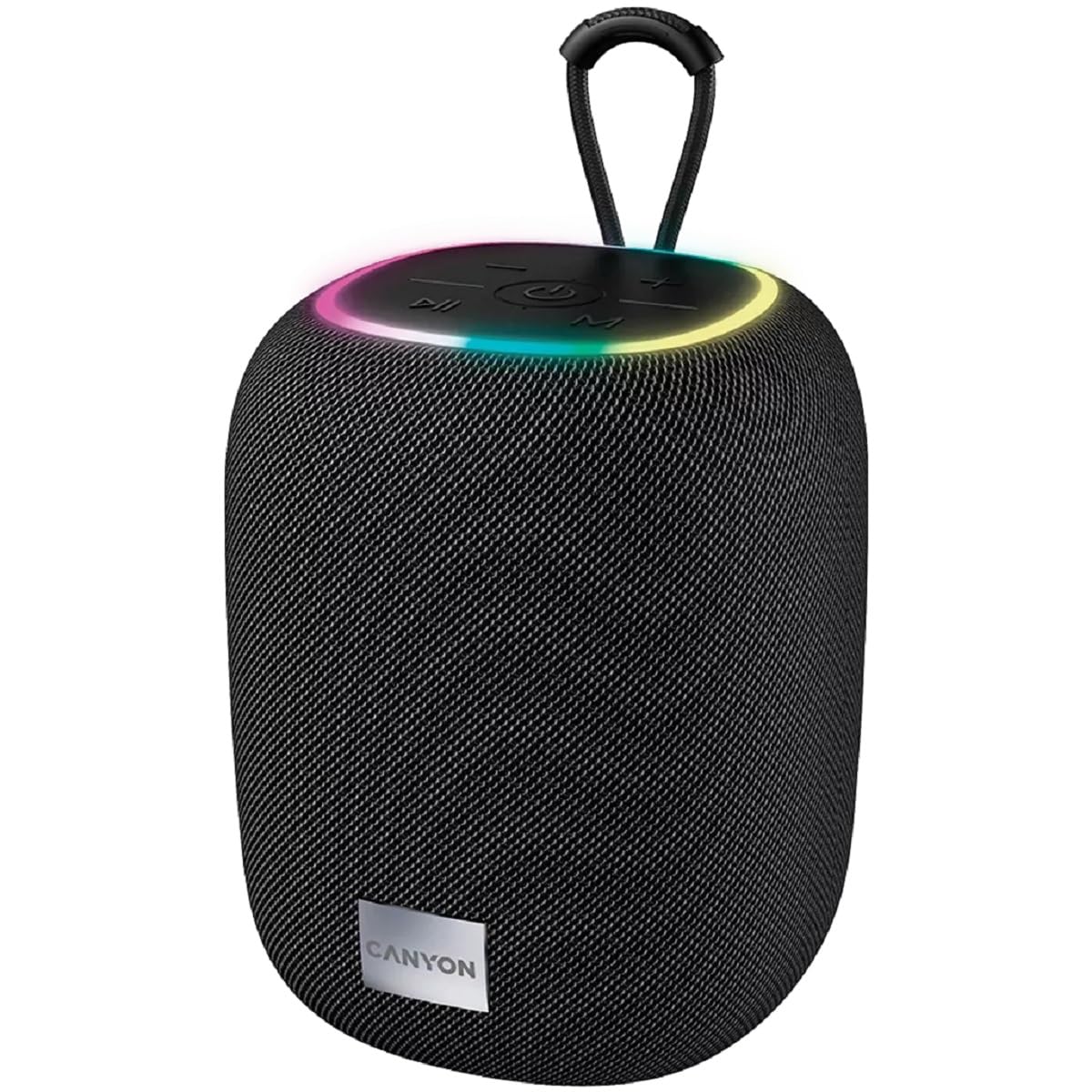
Bilde 1: Topp view of the CANYON BSP-8 speaker, showing the control buttons, RGB backlight, and integrated hanger.
Kontrollknapper (topppanel):
- Strømknapp: Press and hold to turn on/off. Short press to play/pause.
- Volum ned / Forrige spor-knapp: Kort trykk for volum ned. Langt trykk for forrige spor.
- Volum opp / Neste spor-knapp: Kort trykk for volumøkning. Langt trykk for neste spor.
- Modusknapp (M): Kort trykk for å veksle mellom Bluetooth-, AUX-, USB- og MicroSD-modus.

Bilde 2: Bak view of the CANYON BSP-8 speaker, illustrating the various input ports including AUX, USB, TF (MicroSD) card slot, and DC5V Type-C charging port.
Input Ports (Rear Panel):
- AUX-port: For tilkobling av eksterne lydenheter via en 3.5 mm lydkabel.
- USB-port: For avspilling av lyd fra en USB-minnepinne.
- TF Card Slot (MicroSD): For playing audio from a MicroSD card.
- DC5V (Type-C) Port: For å lade høyttaleren.
5. Oppsett
5.1 Lade høyttaleren
- Connect the provided USB Type-C cable to the DC5V port on the speaker.
- Koble den andre enden av kabelen til en USB-strømadapter (5V/1A anbefales) eller en datamaskins USB-port.
- Ladeindikatorlampen vil lyse. Den vil slå seg av eller endre farge når den er fulladet.
Merk: For optimal batterilevetid, lad høyttaleren helt opp før første gangs bruk.

Image 3: Illustration showing the 1800 mAh battery capacity and up to 3 hours of playtime for the CANYON BSP-8 speaker.
5.2 Slå på/av
- For å slå på: Trykk og hold inne av/på-knappen i omtrent 3 sekunder. Du vil høre en lydmelding.
- Slik slår du av: Trykk og hold inne av/på-knappen i omtrent 3 sekunder. Du vil høre en lydmelding.
5.3 Bluetooth-paring
- Slå på høyttaleren. Den vil automatisk gå inn i Bluetooth-paringsmodus, indikert av et blinkende LED-lys.
- Enable Bluetooth on your mobile device (smartphone, tablet, computer).
- Søk etter available Bluetooth devices and select "CANYON BSP-8" from the list.
- Når paringen er fullført, vil LED-lampen slutte å blinke, og du vil høre en bekreftelseslyd.
Note: The speaker will automatically reconnect to the last paired device if it is within range and Bluetooth is enabled.

Image 4: Illustration highlighting the stable and energy-efficient Bluetooth 5.2 connection with an operating range of up to 10 meters.
5.4 Ekte trådløs stereo (TWS)-paring
To connect two CANYON BSP-8 speakers for a stereo sound experience:
- Ensure both BSP-8 speakers are powered on and not connected to any Bluetooth device.
- On one speaker (this will be the primary speaker), double-press the Power button. It will enter TWS pairing mode.
- De to høyttalerne vil automatisk søke etter og koble til hverandre. Du vil høre en bekreftelseslyd når de er koblet til.
- Once TWS is established, connect your mobile device to the primary speaker via Bluetooth as described in section 5.3.
Note: TWS mode only works with two identical CANYON BSP-8 speakers.
6. Bruksanvisning
6.1 Spille av lyd
- Bluetooth-modus: Etter vellykket paring vil lyd fra den tilkoblede enheten spilles av gjennom høyttaleren.
- AUX-modus: Connect a 3.5mm audio cable from your external audio device to the AUX port on the speaker. Press the 'M' button to switch to AUX mode.
- USB-modus: Sett inn en USB-minnepinne i USB-porten. Høyttaleren vil automatisk bytte til USB-modus og begynne å spille av lyd. files. If not, press the 'M' button.
- MicroSD-kortmodus: Insert a MicroSD card into the TF card slot. The speaker will automatically switch to MicroSD mode and begin playing audio files. If not, press the 'M' button.
6.2 Avspillingskontroll
- Spill av/pause: Trykk kort på strømknappen.
- Volum opp: Trykk kort på volum opp-knappen (+).
- Volum ned: Trykk kort på volum ned-knappen (-).
- Neste spor: Trykk lenge på volum opp-knappen (+).
- Forrige spor: Trykk lenge på volum ned-knappen (-).
6.3 RGB Backlight
The speaker features an integrated RGB backlight on the top panel. The backlight activates automatically when the speaker is powered on. There are no specific controls for changing the RGB pattern or turning it off/on independently of the speaker's power state.