
Coby CETW534
Coby Sports True Wireless Earbuds
Brukerhåndbok
Modell: CETW534
Introduksjon
This manual provides comprehensive instructions for the safe and effective use of your Coby Sports True Wireless Earbuds. Please read this manual thoroughly before using the product and retain it for future reference. These earbuds are designed for active individuals, offering secure fit, sweat resistance, and noise-isolating capabilities for an immersive audio experience.
Produkt overview

The Coby Sports True Wireless Earbuds, shown here with their retail packaging and charging case. The package highlights key features such as "True Wireless" and "Up to 12 Hours Total Playtime."

Et nærbilde view of the Coby Sports True Wireless Earbuds, with one earbud placed inside the open charging case and the other resting beside it. The sleek black design is visible.

The earbuds are securely seated within their charging case, which displays a green indicator light, signifying charging status or full charge. Two earbuds are visible outside the case.

This image highlights key features: Secure-Fit Ear Tips for stability, On-Ear Controls for easy management, and a Durable Charging Case for protection and portability.
Nøkkelfunksjoner:
- Up to 12 Hours of Total Playtime: Forlenget batterilevetid for lengre lytting.
- Svettebestandig design: Built to withstand moisture from workouts or light rain.
- Noise-Isolating Capabilities: Minimizes external distractions for an immersive audio experience.
- Secure-Fit Ear Tips: Ensures stability and comfort during physical activities.
- Sleek and Sporty Design: Combines functionality with aesthetic appeal.
- Bluetooth 5.3-tilkobling: Provides fast pairing and stable, uninterrupted audio streaming.
- Ørekontroller: Convenient media control directly on the earbuds.
- Stemmekontroll: Supports voice commands for hands-free operation.
Oppsett
1. Første lading:
Before first use, fully charge the earbuds and the charging case. Connect the provided USB-C cable to the charging port on the case and a compatible USB power source. The indicator light on the case will show charging status.

The charging case connected via a USB-C cable to a power adapter, illustrating the charging process for the earbuds.
2. Bluetooth -sammenkobling:
- Sørg for at øreproppene er i ladeetuiet og at etuiet har tilstrekkelig strøm.
- Åpne ladeetuiet. Øreproppene vil automatisk gå inn i paringsmodus.
- Naviger til Bluetooth-innstillingene på enheten din (smarttelefon, nettbrett osv.).
- Søk etter available devices and select "CETW534" from the list.
- Once connected, your device will indicate successful pairing.
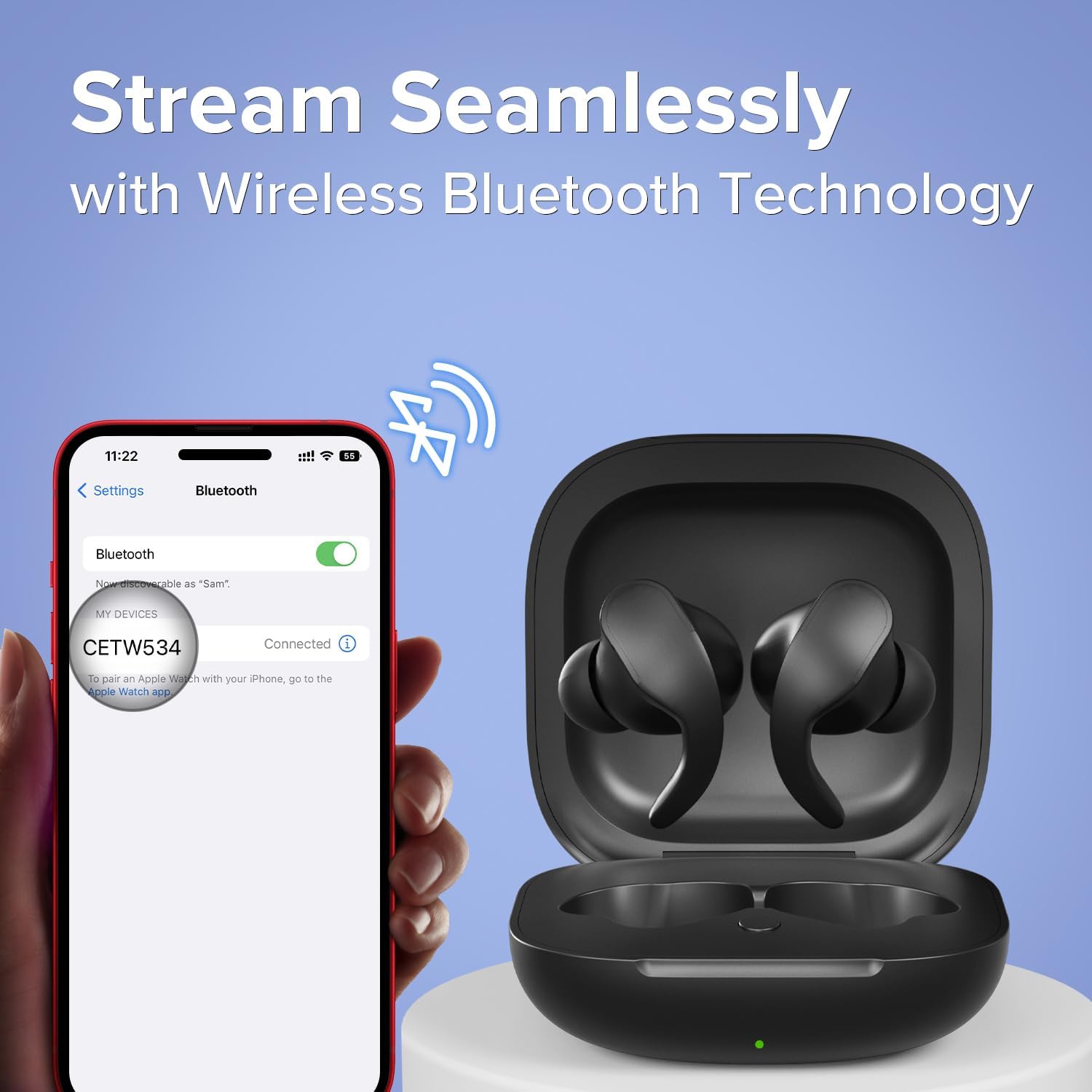
A smartphone screen displaying the Bluetooth settings, with "CETW534" listed as a connected device, demonstrating the one-step pairing process.
Ved senere bruk vil øreproppene automatisk koble seg til den sist parede enheten når de tas ut av etuiet, forutsatt at Bluetooth er aktivert på enheten.
Bruksanvisning
Bruk av ørepluggene:
Gently insert the earbuds into your ears, ensuring the secure-fit ear tips are properly seated for optimal comfort and sound isolation. Adjust as needed for a snug fit, especially during physical activity.

A man wearing one of the Coby Sports True Wireless Earbuds, demonstrating the comfortable and secure fit for all-day listening.
Basic Controls (On-Ear):
The earbuds feature intuitive on-ear controls for managing your audio and calls. Specific touch or button functions may vary slightly, but generally include:
- Spill av/pause: Ett trykk på begge øreproppene.
- Neste spor: Dobbelttrykk på den høyre ørepluggen.
- Forrige spor: Dobbelttrykk på venstre ørepropp.
- Svar/avslutt samtale: Enkelttrykk på en av øreproppene under et innkommende anrop.
- Avvis anrop: Trykk og hold inne på en av øreproppene under et innkommende anrop.
- Aktiver stemmeassistent: Trippeltrykk på en av øreproppene (f.eks. Siri, Google Assistant).

A man smiling and wearing the earbuds, illustrating the ease of using the on-ear controls to manage music and calls.
Lydopplevelse:
The earbuds are engineered with noise-isolating technology to provide clear, immersive sound. This feature helps to reduce ambient noise, allowing you to focus on your audio content whether you are exercising, commuting, or relaxing.

En eksploderte view diagram of an earbud speaker, with blue sound waves emanating, visually representing the immersive sound and noise-isolating technology.

A woman wearing a Coby Sports True Wireless Earbud, demonstrating the ability to enjoy music anywhere, anytime.
Vedlikehold
- Rengjøring: Rengjør øreproppene og ladeetuiet regelmessig med en myk, tørr og lofri klut. Ikke bruk slipende rengjøringsmidler, alkohol eller kjemiske løsemidler.
- Øretips: Fjern øreproppene med jevne mellomrom og rengjør dem med en annonse.amp klut. Sørg for at de er helt tørre før du setter dem på igjen.
- Lagring: Når de ikke er i bruk, oppbevar øreproppene i ladeetuiet for å beskytte dem mot støv og skader. Oppbevar dem på et kjølig og tørt sted, unna ekstreme temperaturer.
- Batteripleie: For å forlenge batterilevetiden, unngå å lade ut øreproppene helt ofte. Lad dem regelmessig, selv om de ikke er i konstant bruk.
- Vanneksponering: While sweat-resistant, avoid submerging the earbuds in water or exposing them to heavy rain. Dry them thoroughly if they get wet.
Feilsøking
| Problem | Mulig årsak | Løsning |
|---|---|---|
| Øreproppene pares/kobler ikke til. | Bluetooth is off on device; earbuds not in pairing mode; interference; previously paired device connected. |
|
| Ingen lyd fra øreproppene. | Volume too low; earbuds not connected; media paused; earbud battery low. |
|
| Ladeetuiet lader ikke. | Cable issue; power source issue; dirty charging port. |
|
| En ørepropp fungerer ikke. | Low battery; connection issue; earbud not properly seated in case. |
|
Spesifikasjoner
| Trekk | Detalj |
|---|---|
| Modellnavn | Ekte trådløse sportsøretelefoner |
| Modellnummer | CETW534 |
| Tilkoblingsteknologi | Trådløs (Bluetooth) |
| Bluetooth-versjon | 5.3 |
| Bluetooth-rekkevidde | 10 meter |
| Batterilevetid | Up to 12 Hours (Total Playtime) |
| Øreplassering | In Ear |
| Støykontroll | Lydisolasjon |
| Kontroll Type | Mediekontroll, stemme |
| Materiale | Akrylnitrilbutadienstyren (ABS) |
| Varevekt | 1.76 unser |
| Produktdimensjoner | 1.18 x 2.46 x 2.46 tommer |
| Produsent | Summit Electronics, LLC |
| UPC | 810071493409 |
Garanti og støtte
For detailed warranty information, please refer to the warranty card included with your product packaging or visit the official Coby website. For product support, frequently asked questions, or to contact customer service, please visit the Coby Store on Amazon eller produsentens offisielle supportkanaler.
Ask a question about this manual
Ask about setup, troubleshooting, compatibility, parts, safety, or missing instructions. Manuals+ will review the question and use this page’s manual context to help answer it.