
Introduksjon
Thank you for choosing the Nuvance Professional Hair Clipper. This manual provides essential information for the safe and effective use, maintenance, and troubleshooting of your new hair clipper. Please read these instructions thoroughly before first use and keep them for future reference.
Viktige sikkerhetsinstruksjoner
For å redusere risikoen for elektrisk støt, skade eller brann, følg alltid disse grunnleggende sikkerhetsreglene:
- Ikke senk apparatet i vann eller andre væsker.
- Keep the appliance away from water sources, especially when charging.
- Do not use the clipper if it has a damaged cord or plug, or if it is not working properly.
- Dette apparatet er ikke beregnet for bruk av personer med reduserte fysiske, sensoriske eller mentale evner, eller mangel på erfaring og kunnskap, med mindre de har fått veiledning eller instruksjoner om bruk av apparatet av en person som er ansvarlig for deres sikkerhet.
- Barn bør overvåkes for å sikre at de ikke leker med apparatet.
- Only use attachments supplied by the manufacturer.
- Unplug the clipper before cleaning or performing maintenance.
- Store the clipper in a dry place when not in use.
Pakkeinnhold
Bekreft at alle varene er til stede i pakken:
- Nuvance Professional Hair Clipper
- 12 Guide Combs (various lengths)
- USB ladekabel
- Rengjøringsbørste
- Bladolje
- Brukerhåndbok
Produkt overview
Familiarize yourself with the components of your Nuvance Hair Clipper.

Figur 1: Nuvance Hair Clipper components. This image shows the clipper from the side, highlighting the stainless steel blade, the blade adjustment lever, the power on/off switch, the battery indicator screen, and the USB charging port. The overall height of the clipper is indicated as 18.5 cm.
- Blad i rustfritt stål: High-quality cutting blades for precise trimming.
- Blade Adjustment Lever: Allows fine-tuning of cutting length from 0.8mm to 2.0mm without a guide comb.
- På/av-bryter: Activates and deactivates the clipper.
- Digital skjerm: Viser batterinivå og ladestatus.
- USB-ladeport: For tilkobling av USB-ladekabelen.
- Guide Comb Attachments: Various sizes for different hair lengths.
Oppsett
Lader Clipper
Before first use, fully charge the clipper. A full charge typically takes approximately 3 hours and provides extended cordless operation.
- Sørg for at klipperen er slått av.
- Insert the USB charging cable into the charging port at the bottom of the clipper.
- Connect the other end of the USB cable to a USB power adapter (not included) or a compatible USB port (e.g., computer, power bank).
- The digital display will show the charging progress. Once fully charged, the display will indicate 100%.

Figur 2: USB charging and digital display. The image illustrates the clipper being charged via a USB cable, with the digital screen showing the battery percentage. It also highlights the power switch for quick operation.
Feste av føringskammer
The clipper comes with 12 guide combs to achieve various hair lengths from 0.8mm to 25mm.

Figur 3: Guide comb lengths. This image displays different guide comb attachments, indicating their respective trimming lengths: 1.5mm, 3mm, 4.5mm, 6mm, 10mm, 13mm, 19mm, and 25mm. It also mentions 4 reserve attachments for 1, 2, 3, and 4.
- Velg ønsket føringskamm for din foretrukne hårlengde.
- Align the guide comb with the clipper blade and push it firmly until it clicks into place.
- For å fjerne den, trekk kammen forsiktig vekk fra bladet.
Bruksanvisning
Grunnleggende operasjon
- Ensure the clipper is charged and a guide comb is securely attached (if desired).
- Press the Power On/Off switch to turn on the clipper.
- Hold the clipper with the blade pointing downwards.
- Beveg klipperen sakte mot hårets vekstretning.
- After use, press the Power On/Off switch to turn off the clipper.
Adjusting Cutting Length (without guide comb)
The blade adjustment lever allows for precise cutting length adjustments from 0.8mm to 2.0mm without a guide comb.
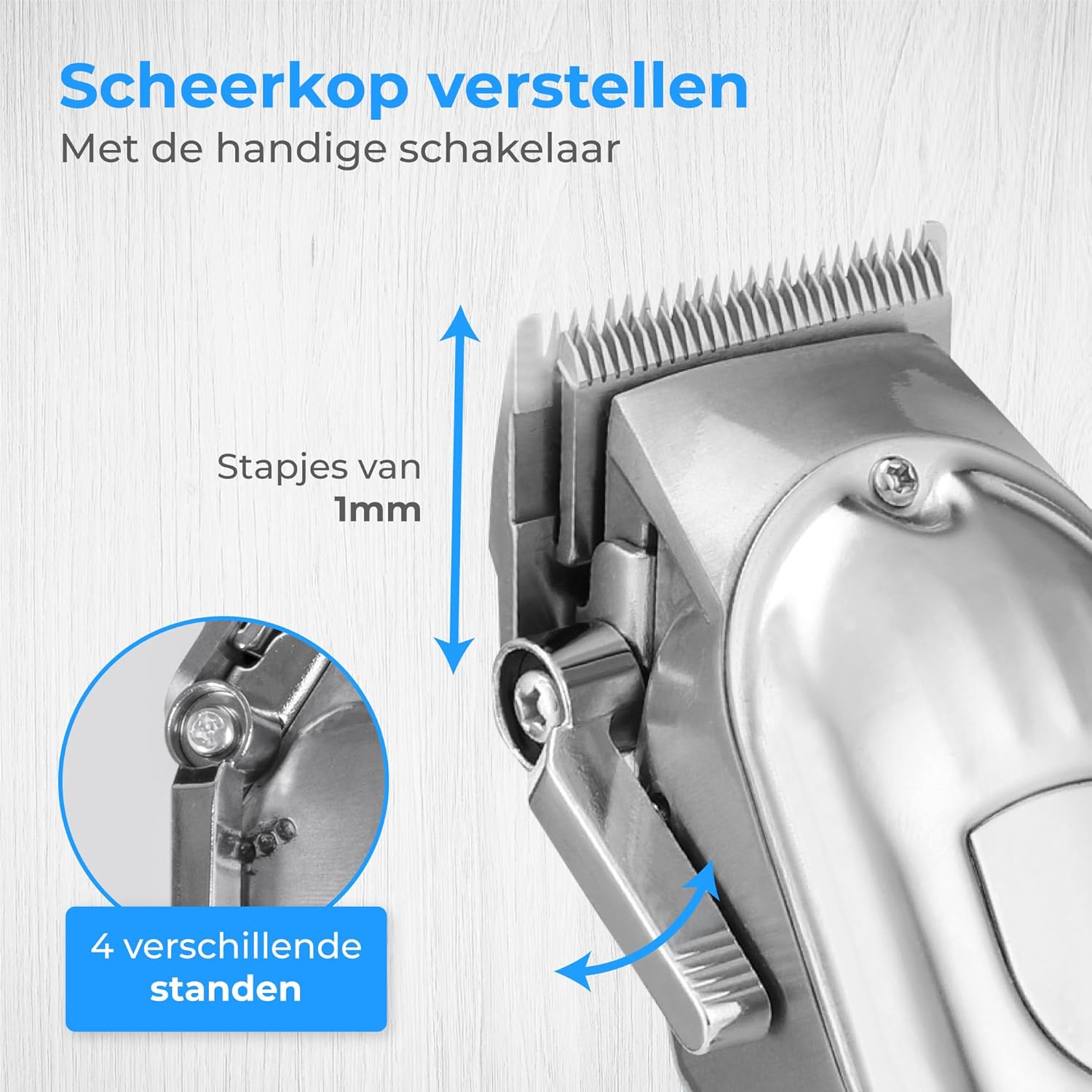
Figur 4: Blade adjustment lever. This image focuses on the side of the clipper, illustrating the lever that allows for fine adjustment of the blade's cutting length in 1mm increments, offering 4 different settings.
- Move the lever up for a shorter cut (closer to 0.8mm).
- Move the lever down for a longer cut (closer to 2.0mm).
Trimming av hår og skjegg
This clipper is suitable for various grooming needs, including head hair, beard, and body hair.

Figur 5: Multi-functional use. This image highlights the clipper's ability to trim hair on various body parts, including head hair, beard, chest, and stomach, indicating its versatile application.
- For head hair: Start with a longer guide comb and gradually reduce the length until the desired style is achieved.
- For beard trimming: Use a guide comb to maintain an even length. For detailing, remove the guide comb and use the blade adjustment lever.
- For body hair: Use appropriate guide combs for sensitive areas.
Vedlikehold
Rengjøring av knivene
Regelmessig rengjøring sikrer optimal ytelse og forlenger levetiden til klipperen din.
- Slå av og trekk ut støpselet fra klipperen.
- Fjern eventuelle påsatte føringskammer.
- Bruk den medfølgende rengjøringsbørsten til å fjerne løse hår fra bladene.
- For a more thorough clean, the blades can be carefully detached (refer to specific instructions if provided in the physical manual for blade removal). Rinse detached blades under running water and ensure they are completely dry before reattaching. Do not rinse the clipper body.
Olje knivene
Apply a few drops of the supplied blade oil to the blades after every few uses to maintain sharpness and smooth operation.
- Apply 1-2 drops of oil to the top of the blades.
- Slå på klipperen i noen sekunder for å fordele oljen jevnt.
- Tørk av overflødig olje med en myk klut.
Feilsøking
| Problem | Mulig årsak | Løsning |
|---|---|---|
| Klipperen slår seg ikke på. | Batteriet er utladet. | Lad klipperen helt opp. |
| Klippemaskinen drar i hår eller klipper dårlig. | Bladene er sløve, skitne eller ikke oljet. | Rengjør og smør bladene. Hvis problemet vedvarer, kan det hende bladene må byttes ut. |
| Clipperen lager uvanlig lyd. | Bladene er ikke riktig justert eller smurt. | Ensure blades are clean and oiled. Check for proper blade attachment. |
| Digitalt display fungerer ikke. | Unit is off or battery is completely dead. | Turn on the clipper or connect to charger. |
Spesifikasjoner
- Modell: HF-8933
- Merke: Nyhet
- Strømkilde: USB oppladbar
- Bladmateriale: Rustfritt stål
- Klippelengder: 0.8mm - 25mm (with 12 guide combs)
- Batteriindikator: Digital skjerm
Garanti og støtte
Nuvance products are manufactured to high-quality standards. For warranty information or technical support, please refer to the contact details provided with your purchase or visit the official Nuvance webnettstedet.
Vennligst ta vare på kjøpsbeviset for eventuelle garantikrav.