
Introduksjon
This manual provides detailed instructions for the installation, operation, and maintenance of your Lian-Li Galahad II Trinity SL-INF 360mm All-In-One (AIO) ARGB CPU Liquid Cooler. This cooler is designed to provide efficient thermal management for desktop CPUs, featuring a 360mm radiator and customizable Addressable RGB (ARGB) lighting.
Pakkeinnhold
Kontroller at alle komponentene som er oppført nedenfor er til stede i pakken før du fortsetter med installasjonen.
- 360mm Radiator with pre-installed fans
- CPU Water Block/Pump Unit
- Mounting Brackets for various CPU sockets (Intel and AMD)
- Bakplater
- Skruer og skiver
- Termisk pasta
- L-Connect 3 Controller
- Cables for power and ARGB synchronization
- Interchangeable Pump Cover Designs

Figur 1: Included components for the Lian-Li Galahad II Trinity SL-INF 360mm AIO Liquid Cooler. This image displays the radiator with fans, CPU block, various mounting hardware for Intel and AMD sockets, thermal paste, controller, and interchangeable pump covers.
Oppsett og installasjon
Before beginning installation, ensure your system is powered off and disconnected from the power source. Refer to your motherboard manual for specific CPU socket information.
1. Klargjør CPU-sokkelen
- Identify the correct mounting bracket and backplate for your CPU socket (Intel or AMD).
- Install the backplate on the rear of the motherboard, aligning it with the CPU socket holes.
- Secure the standoffs to the front of the motherboard through the backplate.
2. Installer radiatoren og viftene
The Galahad II Trinity SL-INF 360mm comes with fans pre-installed on the radiator for convenience. Determine the optimal mounting location within your PC case (e.g., top, front) for the 360mm radiator.

Figur 2: Front view of the Lian-Li Galahad II Trinity SL-INF 360mm AIO Liquid Cooler, showing the radiator with three fans and the pump unit. The fans are pre-installed for ease of setup.

Figur 3: Side view of the Lian-Li Galahad II Trinity SL-INF 360mm AIO Liquid Cooler, highlighting the radiator's profile and the integrated fans. This view helps in assessing clearance within the PC case.
- Mount the radiator to your chosen location using the provided screws. Ensure proper airflow direction (intake or exhaust) based on your case's cooling design.
3. Install the CPU Water Block/Pump Unit
- Apply a thin, even layer of thermal paste to the center of your CPU's Integrated Heat Spreader (IHS).
- Carefully place the CPU water block onto the CPU, aligning the mounting holes with the standoffs.
- Secure the water block with the appropriate thumb screws, tightening them in a cross pattern until snug. Avoid over-tightening.
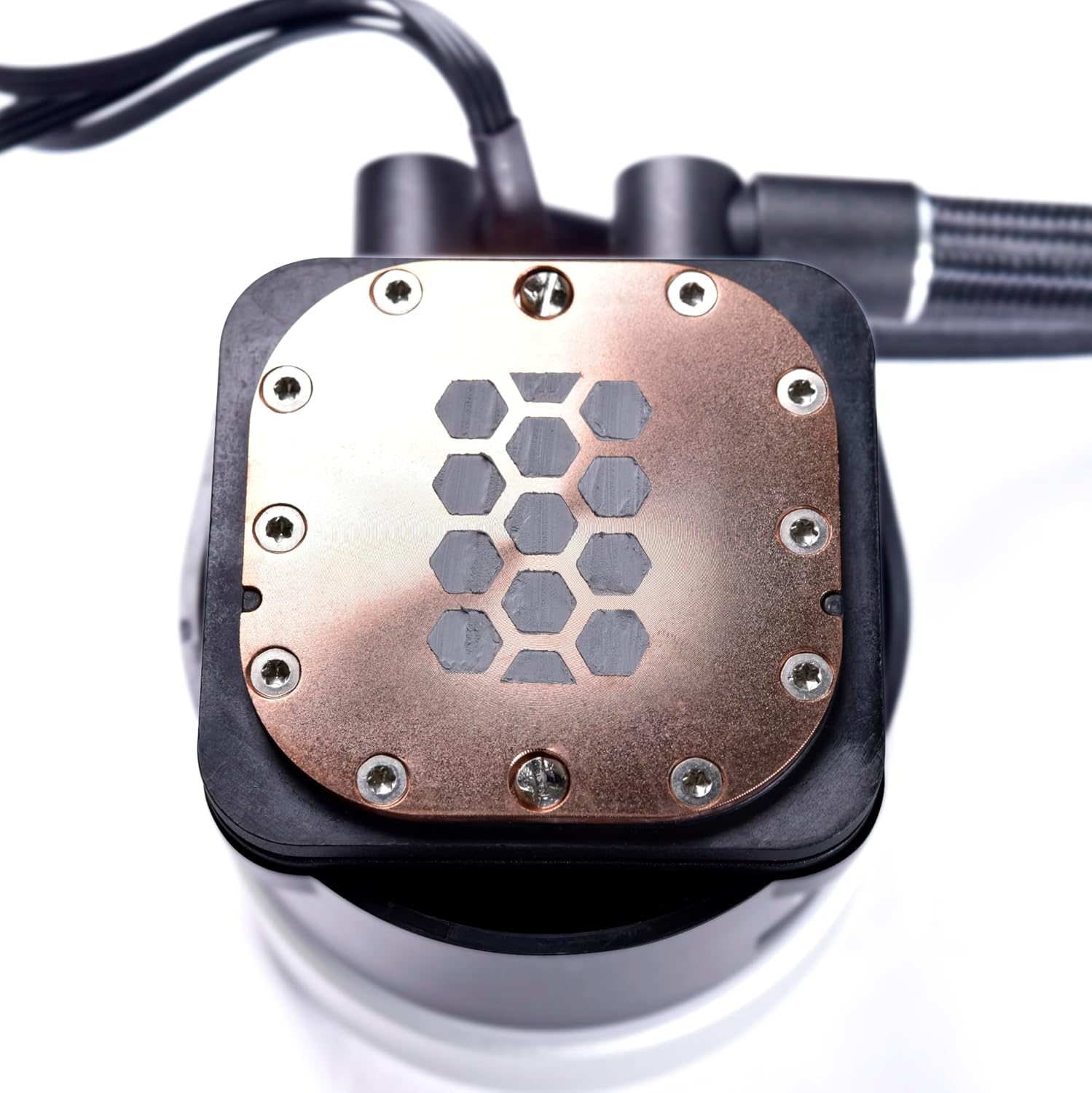
Figur 4: Nærbilde view of the copper cold plate on the Lian-Li Galahad II Trinity SL-INF 360mm AIO Liquid Cooler's pump unit. This plate makes direct contact with the CPU for heat transfer.
4. Koble til kabler
- Connect the pump power cable to the CPU_FAN or AIO_PUMP header on your motherboard.
- Connect the fan cables to the L-Connect 3 controller.
- Connect the L-Connect 3 controller to a SATA power connector from your power supply and a USB 2.0 header on your motherboard.
- Connect the ARGB cable from the pump to the L-Connect 3 controller or directly to a compatible 5V ARGB header on your motherboard for synchronization.
Bruksanvisning
Once installed, the cooler will operate automatically. For advanced control and customization, use the Lian-Li L-Connect 3 software.
ARGB Lighting Customization
The Galahad II Trinity series features extensive ARGB lighting on both the fans and the pump unit. The pump cap offers three interchangeable designs, each with unique visual effects and two individually controllable color rings.

Figur 5: Close-up of the pump cap on the Lian-Li Galahad II Trinity SL-INF 360mm AIO Liquid Cooler, showcasing its vibrant ARGB lighting and infinity mirror effect. The lighting can be customized via software.

Figur 6: En annen view of the pump cap, demonstrating a different ARGB lighting pattern, specifically a red illumination. This highlights the customizable nature of the lighting effects.

Figur 7: A top-down perspective of the pump cap, displaying a rainbow ARGB effect. This illustrates the dynamic lighting capabilities and the various aesthetic options available.
- Download and install the L-Connect 3 software from the official Lian-Li webnettstedet.
- Use the software to adjust fan speeds, pump speeds, and customize ARGB lighting effects and colors.
- Experiment with the different pump cover designs to achieve your preferred aesthetic.
Vedlikehold
Regelmessig vedlikehold bidrar til å sikre optimal ytelse og levetid for væskekjøleren din.
- Støvfjerning: Periodically clean the radiator fins and fan blades using compressed air to prevent dust buildup, which can impede cooling performance.
- Kabeladministrasjon: Ensure all cables are securely connected and not obstructing airflow.
- Visuell inspeksjon: Occasionally inspect the tubing for any signs of leaks or damage. While rare, addressing issues promptly can prevent system damage.
Feilsøking
Hvis du støter på problemer med kjøleren, kan du se følgende vanlige feilsøkingstrinn:
- Ingen strøm/viftene spinner ikke:
- Check all power connections, especially the SATA power to the L-Connect 3 controller and the pump power to the motherboard.
- Ensure the L-Connect 3 software is installed and running correctly.
- ARGB-belysning fungerer ikke/feil farger:
- Verify ARGB cables are correctly connected to the L-Connect 3 controller or motherboard header.
- Ensure the L-Connect 3 software is updated and configured for your specific cooler model.
- Check for conflicts with other RGB software.
- Høye CPU-temperaturer:
- Confirm the water block is securely mounted to the CPU and thermal paste was applied correctly.
- Check if the pump is running (you may hear a faint hum or feel vibrations in the tubing).
- Ensure fans are spinning and the radiator is free of dust.
- Verify fan and pump speeds are set appropriately in the L-Connect 3 software.
For further assistance, contact Lian-Li customer support.
Spesifikasjoner
| Trekk | Detalj |
|---|---|
| Produktdimensjoner | 13 cm L x 10 cm B x 6 cm H |
| Merke | Lian Li |
| Strømkontaktype | 4-pin |
| Voltage | 5 volt |
| Kjølemetode | Luft, vann |
| Kompatible enheter | Skrivebord |
| Støynivå | 35.4 desibel |
| Materiale | Plast |
| Maksimal rotasjonshastighet | 3200 RPM (Pump) |
| Luftstrømskapasitet | 61.3 Cubic Feet Per Minute (Fan) |
| UPC | 840353044388 |
Garanti og støtte
This product is listed with "No Warranty" information in the provided specifications. For any product-related inquiries, technical support, or warranty claims (if applicable through your retailer), please contact Lian-Li customer service directly or visit their official webnettsted for støtteressurser.
Du finner mer informasjon og støtte på Lian Li Store on Amazon.