
1. Introduksjon
This manual provides detailed instructions for the proper use and maintenance of your Arlec Remote SS3136. This remote control is specifically designed to operate the Arlec Wall Fan AWDC001HA, offering convenient and effortless control over your fan's functions. Please read this manual thoroughly before first use to ensure optimal performance and longevity of your device.
2. Produktfunksjoner
- Enkel kontroll: Utilizes Infrared technology for seamless communication with your Arlec Wall Fan AWDC001HA from up to 10 meters away.
- Langvarig kraft: Requires 3 alkaline batteries for extended use.
- Elegant design: Finished in a sophisticated black color.
- Allsidig kompatibilitet: Designed to control Arlec Wall Fans, specifically model AWDC001HA.
- Enkel betjening: Features 3 intuitive buttons for easy fan control.
3. Pakkens innhold
Bekreft at alle varene er til stede i pakken:
- 1 x Arlec Remote SS3136
- 1 x veggmonteringsholder
- 2 x monteringsskruer
- 2 x veggplugger
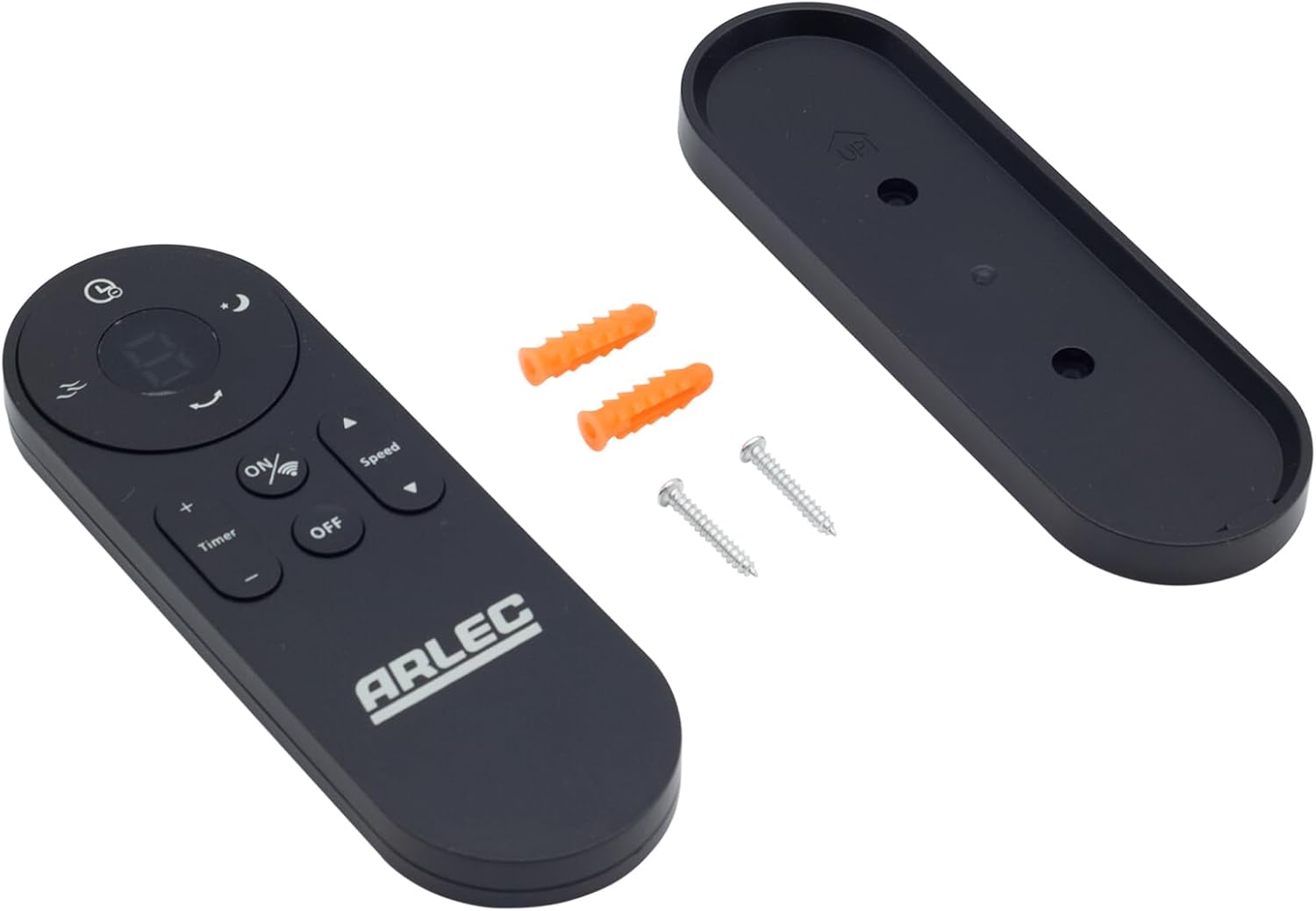
Image: Arlec Remote SS3136 shown with its included wall mount holder, two mounting screws, and two wall plugs, indicating the complete package contents.
4. Oppsett
4.1 Installasjon av batteri
- Finn batterirommet på baksiden av fjernkontrollen.
- Åpne batteridekselet.
- Insert 3 Alkaline batteries (not included) into the compartment, ensuring the correct polarity (+ and -) as indicated inside the compartment. The remote requires 3 Volts (DC).
- Lukk batteridekselet godt.
4.2 Veggmontering (valgfritt)
- Choose a suitable location on a wall for the remote holder.
- Mark the positions for the two mounting screws using the holder as a template.
- Drill pilot holes at the marked positions. Insert the wall plugs if drilling into drywall or masonry.
- Secure the wall mount holder to the wall using the provided screws.
- Place the remote control into the installed holder for convenient storage.
5. Bruksanvisning
The Arlec Remote SS3136 features a simple 3-button layout for controlling your Arlec Wall Fan AWDC001HA. Ensure there is a clear line of sight between the remote and the fan's infrared receiver for optimal performance.

Bilde: Nærbilde view of the Arlec Remote SS3136, highlighting its three main control buttons: ON/OFF, Speed, and Timer.
- PÅ/AV-knapp: Trykk på denne knappen for å slå viften på eller av.
- Hastighetsknapp: Use this button to cycle through the available fan speed settings (e.g., Low, Medium, High).
- Timerknapp: Press this button to set or adjust the fan's timer function. Refer to your Arlec Wall Fan AWDC001HA manual for specific timer intervals.
The remote operates using Infrared (IR) technology. Point the remote directly towards the fan's IR receiver. The effective operating range is up to 10 meters (approximately 33 feet).
6. Vedlikehold
- Rengjøring: Tørk av fjernkontrollen med en myk, tørr klut. Ikke bruk slipende rengjøringsmidler eller løsemidler.
- Batteribytte: Replace batteries when the remote's performance degrades or it stops responding. Always replace all 3 batteries at the same time with new alkaline batteries.
- Lagring: Hvis fjernkontrollen ikke skal brukes over lengre tid, ta ut batteriene for å forhindre lekkasje. Oppbevar den på et kjølig og tørt sted.
7. Feilsøking
| Problem | Mulig årsak | Løsning |
|---|---|---|
| Remote not responding to fan. |
|
|
| Knappene er klissete eller reagerer ikke. | Smuss eller rusk under knappene. | Clean the remote surface with a soft, dry cloth. Avoid liquids. |
8. Spesifikasjoner
| Attributt | Detalj |
|---|---|
| Modell | SS3136 |
| Produsent | Arlec |
| Kompatible enheter | Arlec Wall Fan AWDC001HA |
| Tilkoblingsteknologi | Infrarød (IR) |
| Antall knapper | 3 |
| Kontrollertype | Knappkontroll |
| Batteritype | Alkaline (3 required) |
| Voltage | 3 volt (DC) |
| Driftsområde | Opp til 10 meter |
9. Garanti og støtte
For warranty information and technical support, please refer to the documentation provided with your Arlec Wall Fan AWDC001HA or contact Arlec customer service directly. Keep your purchase receipt as proof of purchase.
For ytterligere hjelp, vennligst besøk produsentens offisielle webnettstedet eller kontakt kundesupportlinjen deres.