
1. Introduksjon
This manual provides essential information for the safe and efficient operation of your Seplos Smart BMS 48V 100A 16S LiFePO4 Battery Management System with LCD. Please read this manual thoroughly before installation and use to ensure proper functionality and to prevent damage to the unit or connected equipment.
The Seplos Smart BMS is designed for high-precision detection and control of LiFePO4 batteries, monitoring critical parameters such as voltage, current, and temperature. It also manages pre-charge functions, state of charge (SOC), power limits, and cell balancing. The system offers comprehensive protection against overcharge, over-discharge, overcurrent, short circuits, and extreme temperatures, thereby extending battery lifespan.
2. Sikkerhetsinformasjon
- Always disconnect the battery pack before performing any maintenance or installation.
- Ensure all wiring connections are correct and secure to prevent short circuits or damage.
- Do not expose the BMS to water, moisture, or extreme temperatures.
- Kun kvalifisert personell skal utføre installasjon og kabling.
- Verify battery cell voltage and polarity before connecting to the BMS.
- Oppbevares utilgjengelig for barn.
3. Produktet er overview
The Seplos Smart BMS consists of the main PCB battery protection board and an external LCD display for real-time monitoring. It integrates advanced features for robust battery management.

Figure 3.1: Seplos Smart BMS main board with connected LCD display. This image shows the primary circuit board responsible for battery management functions, connected to a separate LCD screen for displaying information.

Figure 3.2: Seplos Smart BMS board with LCD display and labels. This image highlights the main PCB Battery Protection Board and the LCD Screen, indicating their respective components.

Figure 3.3: Seplos Smart BMS board with heatsink. This view shows the robust design of the BMS board, including a large heatsink for thermal management of power components.
4. Spesifikasjoner
| Trekk | Beskrivelse |
|---|---|
| Merke | Seplos |
| Modellnavn | seplos BMS 10E |
| Konfigurasjon | 48V 100A 16S LiFePO4 |
| Inngang Voltage | 48 volt |
| Kommunikasjon | Bluetooth, CANbus, RS485 |
| Utstilling | External LCD |
| Beskyttelsesfunksjoner | Overcharge, Over-discharge, Overcurrent, Short Circuit, Temperature |
| Søknad | Solar energy systems, Inverters, Home energy storage, EVs, etc. |
5. Oppsett og installasjon
5.1 Komponentidentifikasjon

Figure 5.1: Seplos Smart BMS and LCD display. This image shows the main BMS unit and the separate LCD display module, ready for connection.
5.2 Kablingsinstruksjoner
Proper wiring is crucial for the safe and correct operation of the BMS. Refer to the detailed wiring diagram provided with your product packaging for specific connections. General steps include:
- Koble til balanseledningene: Connect the balance wires from your 16S LiFePO4 battery pack to the corresponding ports on the BMS. Ensure correct voltage order (B0, B1, B2... B16).
- Connect Main Power Wires: Connect the main positive (B+) and negative (B-) terminals of the battery pack to the designated ports on the BMS.
- Connect Load/Charge Wires: Connect the load and charger to the P+ and P- terminals of the BMS.
- Connect LCD Display: Plug the LCD display cable into the dedicated port on the BMS.
- Connect Communication Modules (Optional): If using, connect the Bluetooth module, CANbus, or RS485 communication cables as required.
Always double-check all connections before applying power.
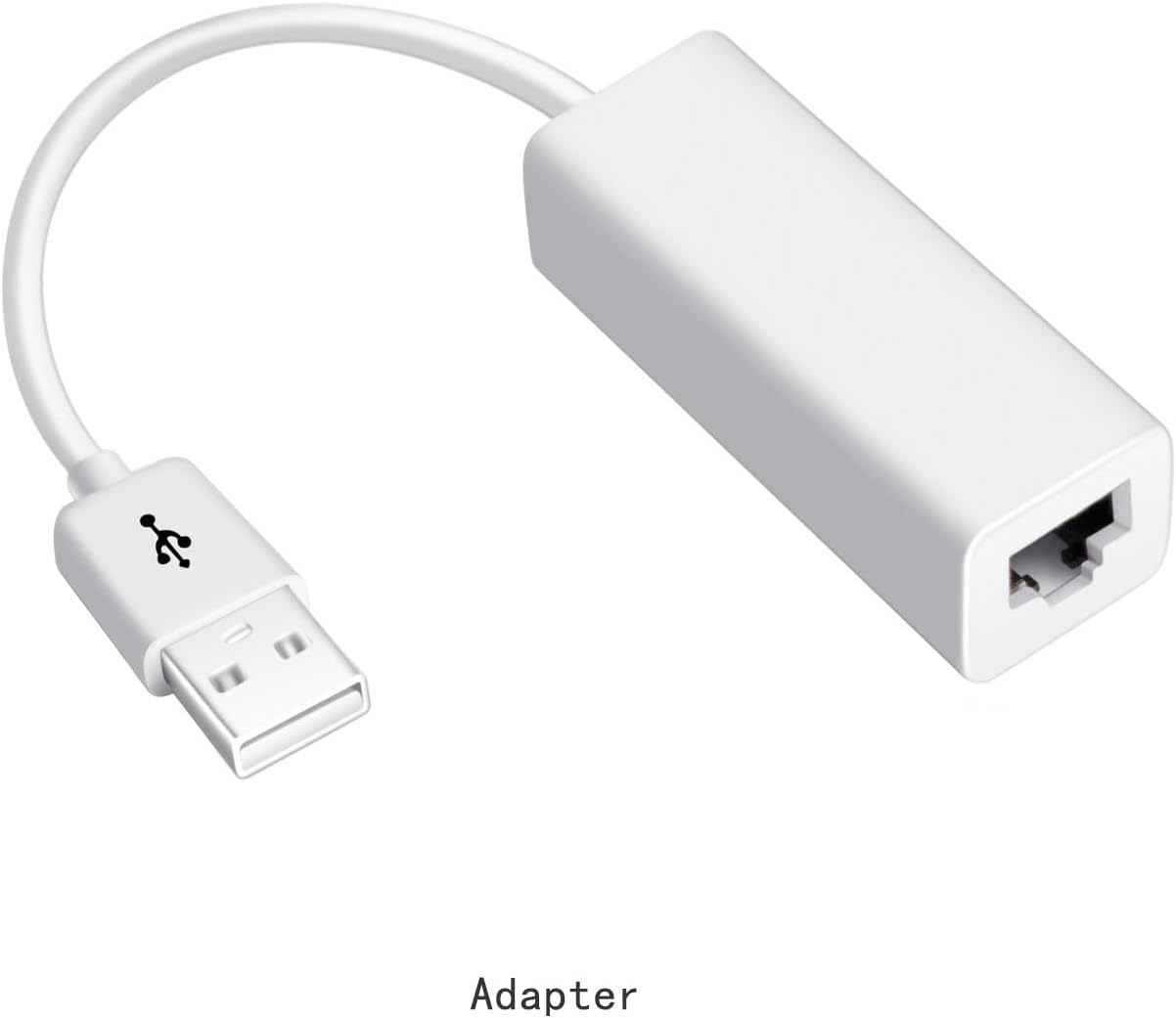
Figure 5.2: USB to Ethernet adapter. This adapter may be used for connecting the BMS to a computer for data programming or monitoring via RS485/CAN if your computer lacks the native port.
6. Bruksanvisning
6.1 Monitoring via LCD Display
Once the BMS is powered on, the external LCD display will show real-time battery parameters such as total voltage, individuell celle voltages, current, temperature, and State of Charge (SOC). Use the buttons on the LCD module to navigate through different display screens and settings.
6.2 Monitoring via Bluetooth App
Download the official Seplos BMS app from your smartphone's app store. Enable Bluetooth on your phone and pair it with the BMS. The app provides a detailed interface to monitor battery status, view historical data, and adjust certain parameters wirelessly.
6.3 Monitoring and Programming via PC Software
The Seplos BMS supports connection to a computer for advanced monitoring, data logging, and programming. Install the 'Battery Monitor' software on your PC. Connect the BMS to your computer using an appropriate communication cable (e.g., USB to RS485 adapter). The software allows you to:
- View real-time battery data in detail.
- Program specific battery parameters.
- Save and analyze historical data.

Figure 6.1: Seplos Battery Monitor PC software interface. This image displays the graphical user interface of the PC software used for monitoring and managing the BMS, showing various battery parameters and controls.
7. Communication Protocols
The Seplos Smart BMS supports multiple communication protocols for integration with various systems, including inverters.
7.1 CANbus and RS485
The BMS is equipped with CANbus and RS485 interfaces, enabling robust communication with compatible inverters and other devices. These protocols allow for data exchange, ensuring synchronized operation and optimal performance of your energy system.
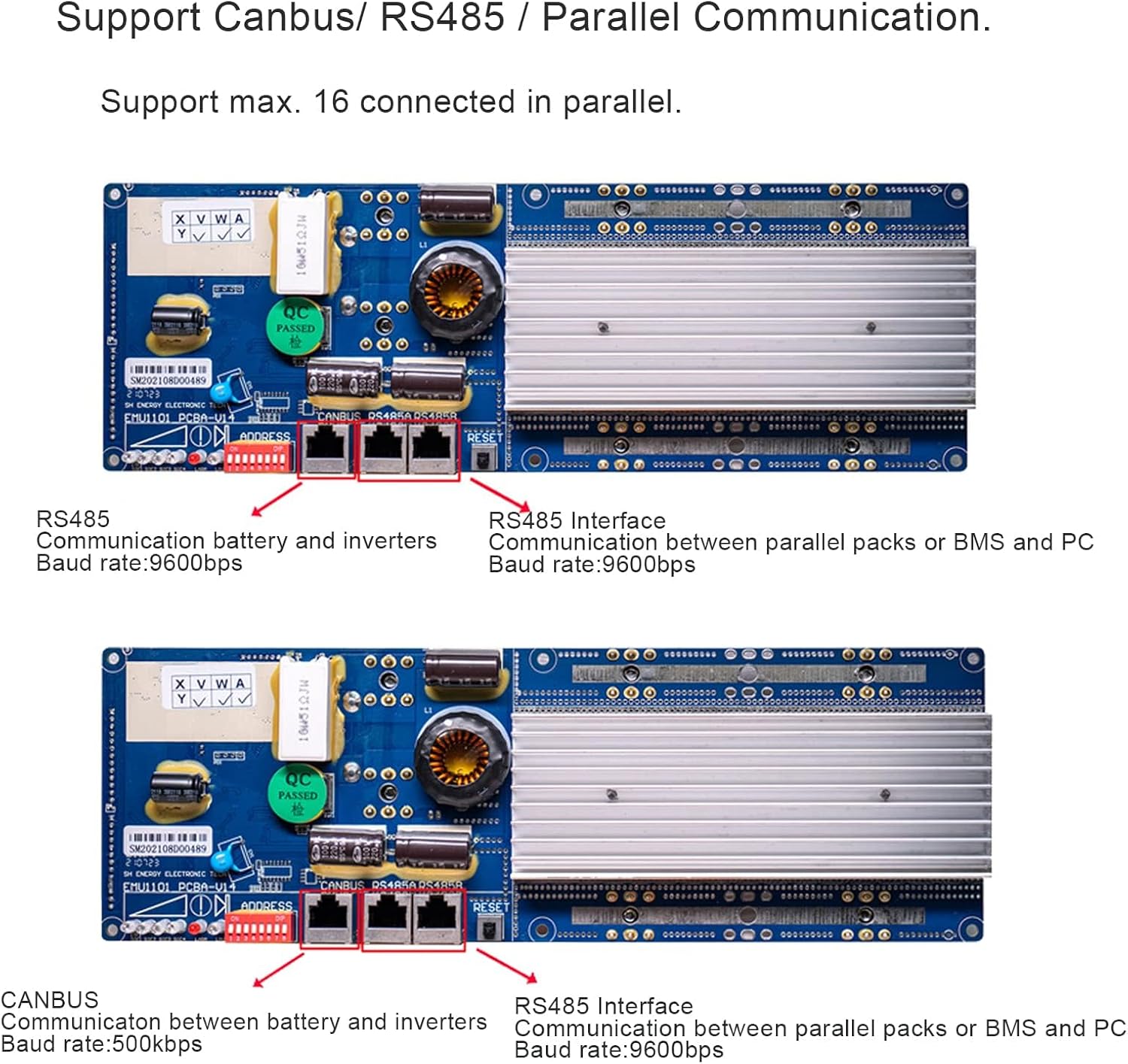
Figure 7.1: Seplos Smart BMS communication ports (RS485, CANbus). This image shows the physical RS485 and CANbus ports on the BMS board, used for connecting to inverters and other communication devices.
7.2 Inverter Compatibility
The BMS is compatible with a wide range of inverters, including those from Growatt, Goodwe, Sofar, SMA, Victron, DEYE, Luxpower, Sermatec, Renac, TBB Power, Solis, Foxess, and IMEON. Refer to your inverter's manual for specific connection and configuration details.
8. Vedlikehold
The Seplos Smart BMS is designed for minimal maintenance. However, regular checks can help ensure its longevity and optimal performance:
- Visuell inspeksjon: Periodically inspect the BMS and its connections for any signs of damage, corrosion, or loose wiring.
- Renslighet: Keep the BMS free from dust and debris. Use a soft, dry cloth for cleaning.
- Fastvareoppdateringer: Check the official Seplos website or app for any available firmware updates. Follow the provided instructions carefully for any update procedures.
- Miljøforhold: Ensure the BMS operates within its specified temperature and humidity ranges.
9. Feilsøking
If you encounter issues with your Seplos Smart BMS, refer to the following common problems and solutions:
| Problem | Mulig årsak | Løsning |
|---|---|---|
| BMS not powering on | Incorrect wiring, low battery voltage, faulty connection. | Check all power and balance wire connections. Ensure battery voltage er innenfor driftsområdet. |
| LCD display blank or not showing data | Loose LCD cable, BMS not powered, display fault. | Verify LCD cable connection. Confirm BMS is powered. |
| Batteriet lader/utlades ikke | Over-protection triggered (voltage, current, temperature), incorrect load/charger connection. | Check BMS status for protection alerts. Verify load/charger wiring. Allow battery to recover if protection was triggered. |
| Problemer med Bluetooth-tilkobling | Bluetooth module not powered, out of range, app issues. | Ensure Bluetooth module is connected and powered. Move closer to the BMS. Restart app/phone. |
If the problem persists, please contact Seplos customer support for further assistance.
10. Garanti og støtte
Seplos provides customer support for its products. For any technical issues, warranty claims, or general inquiries, please contact the seller or Seplos customer service through the platform where the product was purchased. Please have your product model number (seplos BMS 10E) and purchase details ready when contacting support.
For the most up-to-date support information and resources, please visit the official Seplos website or contact the seller directly via Amazon's online chat system as mentioned in the product description.