
Jxrev J53
Bruksanvisning for Jxrev J53 trådløse ørepropper
Model: J53 | Brand: Jxrev
Introduksjon
The Jxrev J53 Wireless Earbuds offer a high-fidelity audio experience with advanced features designed for convenience and durability. Equipped with Bluetooth 5.4 technology, an LED power display, and IP7 waterproofing, these earbuds are suitable for various activities, from daily commutes to sports. This manual provides detailed instructions for setup, operation, and maintenance to ensure optimal performance.

Image: Jxrev J53 Wireless Earbuds in their rose gold charging case, displaying 100% battery on the LED screen.
Hva er i esken
- Wireless earbuds *2 (L/R)
- Super portable charging case with LED power display *1
- USB C fast charging cable *1
- Brukerhåndbok
Produkt overview
The Jxrev J53 earbuds feature a semi-in-ear design for comfortable wear and sensitive touch controls for easy management of audio and calls. The charging case includes an LED display to show battery levels.

Image: A woman holding a single Jxrev J53 earbud and the compact charging case, highlighting their small size and LED display.
Lader
Lad øreproppene og ladeetuiet helt opp før første gangs bruk.
- Lader dekselet: Connect the provided USB-C cable to the charging port on the case and to a compatible USB power source. The LED display on the case will show the charging progress. A full charge takes approximately 1 hour.
- Lading av ørepluggene: Place the earbuds into their respective slots in the charging case. They will automatically begin charging. The LED display on the case will indicate the battery level of each earbud.
A fully charged case can provide approximately 4 recharges for the earbuds, offering up to 40 hours of total playback time. Each earbud provides up to 8 hours of continuous use on a single charge.

Image: Jxrev J53 Wireless Earbuds in their charging case, illustrating the 8 hours of earbud playback, 40 hours with the case, and 1 hour charging time.
Sammenkobling
- Innledende sammenkobling: Åpne lokket på ladeetuiet. Øreproppene vil automatisk gå inn i paringsmodus.
- Aktiver Bluetooth: On your iOS or Android device (smartphone, tablet, computer, laptop, TV), go to the Bluetooth settings and turn on Bluetooth.
- Velg enhet: Look for "J53" in the list of available devices and select it to connect.
- Automatisk tilkobling: After the first successful pairing, the earbuds will automatically reconnect to your device when you open the charging case lid, provided Bluetooth is enabled on your device.

Image: Jxrev J53 Wireless Earbuds demonstrating advanced Bluetooth 5.4 connectivity, showing a quick and stable connection to various devices.
Driftskontroller
The Jxrev J53 earbuds feature sensitive touch controls on each earbud, allowing you to manage music, calls, and voice assistance without needing to access your device.
- Spill av/pause: Trykk to ganger på en av øreproppene.
- Neste spor: Trykk og hold inne høyre ørepropp i 2 sekunder.
- Forrige spor: Trykk og hold venstre ørepropp i 2 sekunder.
- Volum opp/ned: Tap either earbud once (specific earbud for up/down may vary, refer to quick guide for precise assignment).
- Svar/avslutt samtale: Trykk to ganger på en av øreproppene.
- Avvis anrop: Trykk og hold en av øreproppene i 2 sekunder.
- Aktiver stemmeassistent: Trykk tre ganger på en av øreproppene.

Image: Visual guide to the touch controls on the Jxrev J53 Wireless Earbuds, detailing actions for music, calls, and voice assistant.
Lydkvalitet
Experience Hi-Fi stereo sound with crisp, clear high notes and deep, rich bass, delivered by 13mm dynamic speakers. The built-in microphones feature ENC noise reduction, reducing environmental noise by up to 35dB for clearer calls.

Image: Jxrev J53 Wireless Earbuds shown with sound waves, emphasizing Hi-Fi stereo sound and clear calls.

Bilde: En detaljert view of the 13mm dynamic driver within the Jxrev J53 earbud, responsible for deep bass.
Vannmotstand
The Jxrev J53 Wireless Earbuds are IP7 waterproof. The internal components are coated with a nano-coating to prevent sweat immersion and protect against damage. This makes them suitable for sports and use in light rain.
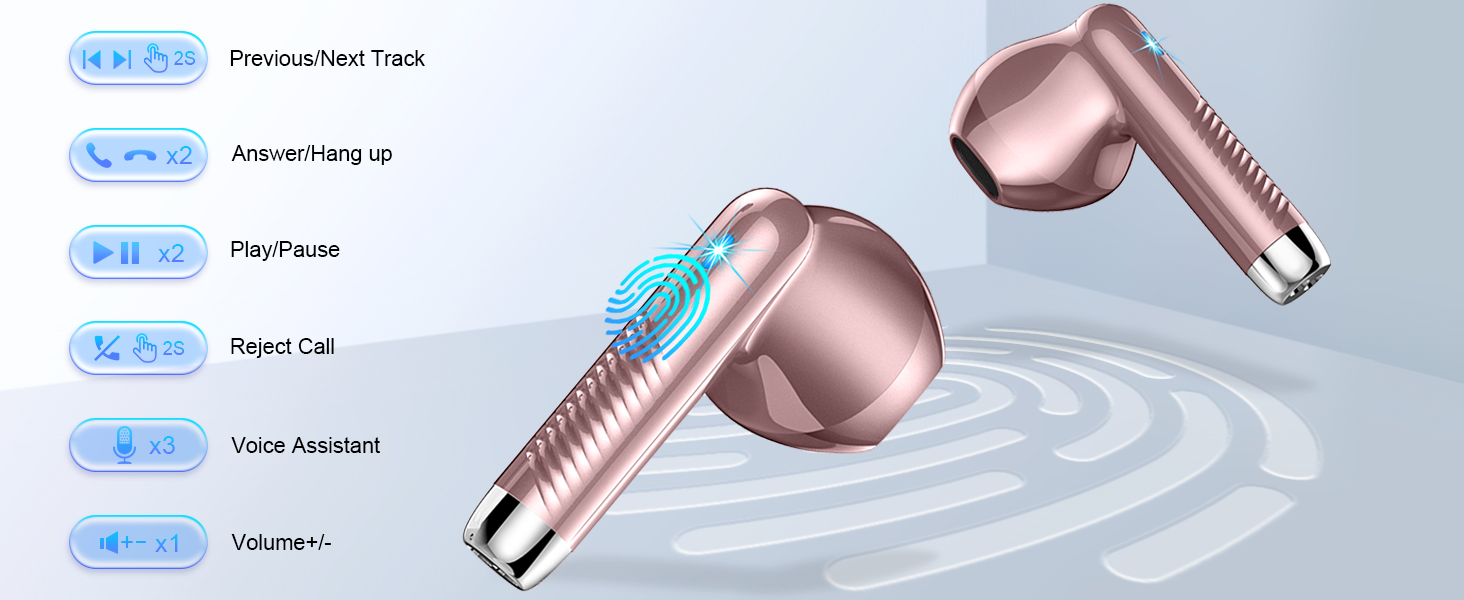
Image: Jxrev J53 Wireless Earbuds shown underwater, demonstrating their IP7 waterproof capability.
Vedlikehold
- Rengjøring: Bruk en myk, tørr klut til å rengjøre øreproppene og ladeetuiet. Unngå bruk av sterke kjemikalier eller slipende materialer.
- Lagring: Oppbevar øreproppene i ladeetuiet når de ikke er i bruk for å beskytte dem og sikre at de holder seg ladet.
- Unngå ekstreme forhold: Ikke utsett øreproppene eller etuiet for ekstreme temperaturer, fuktighet eller direkte sollys over lengre tid.
Feilsøking
| Problem | Løsning |
|---|---|
| Øreplugger kan ikke pares | Ensure earbuds are charged. Turn off and on Bluetooth on your device. Delete "J53" from your device's Bluetooth list and re-pair. |
| Ingen lyd / lavt volum | Check device volume and earbud volume. Ensure earbuds are properly seated in your ears. Reconnect Bluetooth. |
| Øreplugger lader ikke | Ensure charging case is charged. Check USB-C cable connection. Ensure earbuds are correctly placed in the case. |
| Intermitterende tilkobling | Sørg for at det ikke er noen hindringer mellom øreproppene og enheten. Flytt deg nærmere enheten. Unngå sterk elektromagnetisk interferens. |
Spesifikasjoner
- Modellnavn: J53
- Tilkoblingsteknologi: Trådløs (Bluetooth 5.4)
- Lyddrivertype: Dynamisk driver
- Lyddriverstørrelse: 13 millimeter
- Batterilevetid (øreplugger): 8 timer
- Total Playback Time (with Case): 40 timer
- Ladetid: 1 time
- Vannmotstandsnivå: IP7 vanntett
- Kontrollmetode: Røre
- Item Weight (single earbud): 3 gram
- Støykontroll: Sound Isolation (ENC Noise Cancelling Mic)
- Kompatible enheter: Cellphones (Android, iOS)
Garanti og støtte
For warranty information, technical support, or customer service inquiries, please refer to the contact details provided on the product packaging or visit the official Jxrev webnettstedet. Ta vare på kjøpskvitteringen for garantikrav.
Ask a question about this manual
Ask about setup, troubleshooting, compatibility, parts, safety, or missing instructions. Manuals+ will review the question and use this page’s manual context to help answer it.