
Amazon Echo Show 21
Amazon Echo Show 21 brukerhåndbok
Modell: Echo Show 21
1. Introduksjon
Welcome to your new Amazon Echo Show 21. This smart display is designed to be the central hub for your home, offering a large Full HD screen for entertainment, organization, and communication. With built-in Fire TV and Alexa, you can stream content, manage your smart home, make video calls, and keep your family organized with customizable widgets.

Figure 1.1: Amazon Echo Show 21 Overview
The Echo Show 21 integrates seamlessly into your daily life, providing a visual and interactive experience for all your Alexa commands.
2. Komme i gang: Oppsett
2.1 Hva er i esken
- Echo Show 21-enhet
- Alexa Voice Remote with batteries (2 AAA included)
- Power adapter (30W) and 5 ft. cord (white)
- Wall mount, anchors, screws, mounting template
- Hurtigstartguide
2.2 Første oppsett
The Echo Show 21 is designed for simple setup. You will need a Wi-Fi connection.
- Strøm på: Koble strømadapteren til Echo Show 21 og koble den til en stikkontakt. Enheten slår seg på automatisk.
- Wi-Fi-tilkobling: Follow the on-screen instructions to connect your device to your Wi-Fi network. Amazon Wi-Fi simple setup can automatically connect your device if you are a Prime member and have previously saved your Wi-Fi credentials.
- Pålogging for Amazon-konto: Logg inn med Amazon-kontoinformasjonen din.
- Personlig tilpasning: Customize your home screen, set up profiles, and configure your preferred settings.
- Ekstern sammenkobling: The included Alexa Voice Remote should pair automatically. If not, follow the on-screen instructions or refer to the quick start guide for manual pairing.
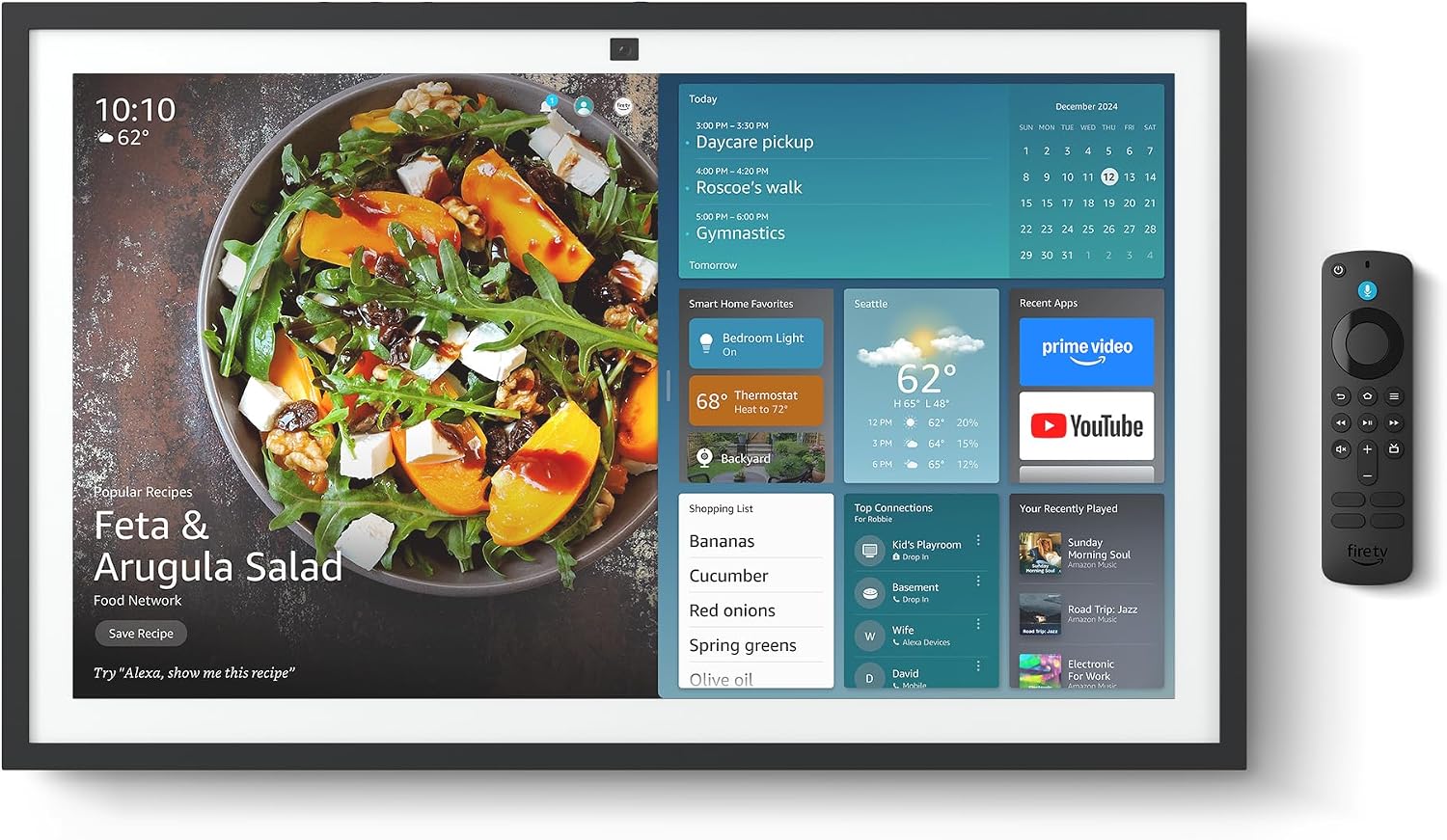
Figure 2.1: Echo Show 21 with Alexa Voice Remote
2.3 Monteringsalternativer
The Echo Show 21 can be wall-mounted using the included hardware or placed on a stand (sold separately). Wall mounting requires an electric drill.
3. Betjening av Echo Show 21
3.1 Stemmekontroll med Alexa
Your Echo Show 21 is primarily controlled by voice using Alexa. Simply say the wake word "Alexa" followed by your command or question.
- Generelle kommandoer: «Alexa, hvordan er været?», «Alexa, sett en timer på 10 minutter.»
- Musikk og lyd: "Alexa, play pop music," "Alexa, play my morning playlist."
- Video & Entertainment: "Alexa, open Prime Video," "Alexa, play The Boys on Netflix."
3.2 Fire TV-integrasjon
Enjoy endless entertainment with built-in Fire TV. Use the included Alexa Voice Remote or voice commands to navigate.

Figure 3.1: Fire TV Interface
- Access thousands of apps like Prime Video, Netflix, YouTube, Apple TV.
- Stream movies, TV shows, and live content.
- The Fire TV remote allows for traditional navigation and playback control.
3.3 Home Screen & Widgets
The 21-inch display is ideal for organizing your day with customizable widgets.

Figure 3.2: Customizable Home Screen Widgets
- Keep important information like calendars, shopping lists, and weather in view.
- Personalize your home screen with family photos.
3.4 Smart hjemkontroll
Control compatible smart devices using your voice or the smart home dashboard.

Figure 3.3: Smart Home Dashboard
- Turn lights on/off, adjust thermostats, or view direktesendte kamerafeeder.
- Supports Zigbee, Matter, and Thread Border Router for broad compatibility.
3.5 Videosamtaler
Connect with family and friends using the 13 MP camera with auto-framing, wide field of vision, 3.3x zoom, and noise reduction.

Figure 3.4: Echo Show 21 as a Digital Photo Frame
The camera can also be used to display your favorite memories as a digital photo frame.
4. Vedlikehold
For å sikre at Echo Show 21 varer lenge og har optimal ytelse, følg disse vedlikeholdsretningslinjene:
- Rengjøring av skjermen: Bruk en myk, lofri klut til å tørke forsiktig av skjermen. For gjenstridige flekker, tørk forsiktig avampen the cloth with water. Avoid abrasive cleaners or sprays directly on the screen.
- Rengjøring av enhetens kropp: Wipe the exterior surfaces with a dry, soft cloth. Do not use harsh chemicals or solvents.
- Ventilasjon: Sørg for at enhetens ventilasjonsåpninger ikke er blokkert for å forhindre overoppheting.
- Programvareoppdateringer: Your Echo Show 21 receives automatic software security updates. Ensure your device is connected to Wi-Fi to receive these updates.
5. Feilsøking
If you encounter issues with your Echo Show 21, try the following common solutions:
- Enheten svarer ikke: Try saying "Alexa" again clearly. If unresponsive, unplug the power adapter for a few seconds and then plug it back in to restart the device.
- Ingen Wi-Fi-tilkobling: Check your router and modem to ensure they are working correctly. Restart your router. On the Echo Show 21, go to Settings > Network to re-select your Wi-Fi network and re-enter the password.
- Lydproblemer: Ensure the volume is not muted or too low. Say "Alexa, turn up the volume." Check audio settings in the device menu.
- Kameraet fungerer ikke: Ensure the physical camera shutter is open and the mic/camera-off button is not activated (red light indicates off).
- Fjernkontrollen svarer ikke: Check the batteries in the Alexa Voice Remote. If necessary, replace them. Re-pair the remote if it becomes disconnected.
6. Tekniske spesifikasjoner
| Trekk | Spesifikasjon |
|---|---|
| Størrelse | 21.4 cm B x 13.2 cm H x 1.5 cm D |
| Vekt | 10.7 lb |
| Utstilling | 21” with 1920 x 1080 resolution (landscape or portrait) |
| Kamera | 13 MP + Shutter |
| Lyd | Two 2” woofers + two 0.6” tweeters |
| Wi-Fi-tilkobling | Wi-Fi 6E (802.1ax), Tri-band, dual-antenna (MIMO). Supports 802.11a/b/g/n/ac. |
| Smart hjemme-hub | Zigbee + Matter + Trådkantruter |
| Prosessor | Octa-core SoC with Amazon AZ2 neural network engine |
| Sensorer | ALS RGB + Accelerometer |
| Språk | engelsk og spansk |

Figure 6.1: Echo Show 15 vs. Echo Show 21 Dimensions
7. Personvernfunksjoner
Echo Show 21 er designet med flere lag med personvernkontroller:
- Mic/Camera-Off Button: En fysisk knapp for elektronisk å koble fra mikrofonene og kameraet.
- Kamerautløser: A built-in physical shutter to cover the camera lens.
- Wake Word-teknologi: Alexa devices only begin recording and sending audio to the cloud after detecting the wake word.
- Strømmeindikatorer: Visuelle indikatorer viser når lyd eller video strømmes til skyen.
- Voice Recording Control: Evne til view og slett stemmeopptakene dine.

Figure 7.1: Mic/Camera-Off Button and Camera Shutter
For more details, visit the Alexa Privacy Hub.
8. Tilgjengelighetsfunksjoner
The Echo Show 21 includes various accessibility features to personalize Alexa to your abilities:
- Trykk til Alexa: Få tilgang til Alexa via berøring via skjermfliser eller et tastatur.
- Adaptiv lytting: Gir mer tid til å fullføre talen før Alexa svarer.
- Foretrukket talefrekvens: Kontroller hvor raskt eller sakte Alexa snakker.
- Teksting: Alexa Captioning, Call Captioning og Closed Captioning gir tekst for støttet innhold.
- Vis og fortell: Helps users who are blind or visually impaired identify products.
- StemmeView Skjermleser: Enables access for customers who are blind or visually impaired.
- Skjermforstørrelse: Zoom inn/ut og panorer rundt på skjermen.
- Kindle Les høyt: Få Alexa til å lese Kindle-bøkene dine høyt.
- Sanntidstekst: Skriv inn direktetekst i en videosamtale.
These features can be enabled via Settings > Accessibility on your device.
9. Garanti og støtte
9.1 Produktgaranti
Your Echo Show 21 comes with a 1 års begrenset garanti og service. Optional 1-year, 2-year, and 3-year extended warranties are available for U.S. customers, sold separately.
Use of Echo Show 21 and Fire TV on Echo Show 21 is subject to their respective terms of service.
9.2 Kundestøtte
For further assistance, troubleshooting, or to learn more about your device, please visit the Amazon support webnettstedet eller kontakt Amazons kundeservice.