
1. Introduksjon
The CALEX Smart Home Indoor Ambiance Aroma Diffuser 590100500 is designed to enhance your indoor environment by improving air quality, diffusing pleasant aromas, and providing ambient lighting. This smart device integrates seamlessly into your smart home ecosystem, offering control through the Calex app, voice commands, and programmable features.
Nøkkelfunksjoner inkluderer:
- Aroma diffusion with essential oils.
- Realistic flame effect for ambiance.
- Adjustable ambient lighting with 16 million color options.
- Smart control via Calex app (timers, programmable scenarios).
- Voice control compatibility with Google Assistant, Siri, and Amazon Alexa.
- 300ml water tank capacity with automatic shut-off.
2. Sikkerhetsinformasjon
Les alle sikkerhetsinstruksjoner før du bruker enheten for å unngå skade eller materielle skader.
- Always place the diffuser on a stable, flat surface away from direct sunlight, heat sources, and electronic devices.
- Do not exceed the maximum water fill line (300ml) to prevent overflow.
- Bruk kun rent vann fra springen eller destillert vann. Ikke bruk varmt vann.
- Only use 100% pure, water-soluble essential oils. Other oils or corrosive liquids may damage the device.
- Hold enheten utilgjengelig for barn og kjæledyr.
- Ikke dekk til tåkeutløpet under drift.
- Unplug the device from the power outlet before cleaning or refilling.
- The device features an automatic shut-off function when the water tank is empty, and sends a notification to your phone.
- A built-in safety configuration will cause the diffuser to flash if the remaining water in the tank needs to cool down after a maximum of 72 hours of continuous operation.
- Ikke forsøk å reparere eller modifisere enheten selv. Kontakt kundestøtte for å få hjelp.
3. Pakkens innhold
Bekreft at alle varene er til stede i pakken:
- CALEX Smart Home Indoor Ambiance Aroma Diffuser (Model 5901000500)
- Strømadapter
- Brukerhåndbok
4. Produktet er overview
Familiarize yourself with the components of your aroma diffuser.
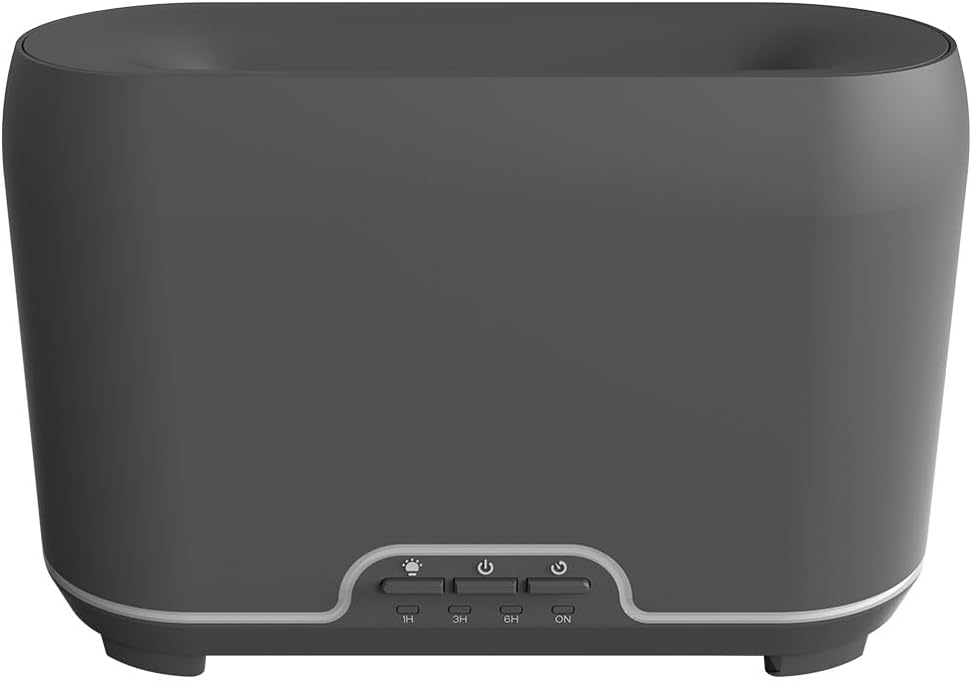
Bilde: Foran view of the CALEX Smart Home Aroma Diffuser, showing the control panel with buttons for light, power, and timer settings (1H, 3H, 6H, ON).

Image: The CALEX Smart Home Aroma Diffuser operating on a wooden table, displaying its ambient flame effect and mist output.
The diffuser typically consists of a water tank, an ultrasonic plate, a mist outlet, and a control panel with buttons for power, light, and timer functions. The power input port is usually located at the back or bottom of the device.
5. Oppsett
Følg disse trinnene for innledende oppsett:
- Plassering: Plasser diffusoren på en flat, stabil overflate.
- Åpent lokk: Fjern forsiktig toppdekselet på diffuseren.
- Fyll vanntank: Fill the water tank with clean water up to the 300ml maximum fill line. Do not overfill.
- Tilsett essensiell olje: Tilsett noen dråper av din foretrukne eteriske olje direkte i vannbeholderen.
- Lukk lokket: Sett toppdekselet sikkert på plass.
- Koble til strøm: Plug the power adapter into the diffuser's power input port, then plug the adapter into a wall outlet.
- Download Calex App: Download the free Calex Smart app from your smartphone's app store (available for iOS and Android).
- Koble til WiFi: Follow the in-app instructions to connect your diffuser to your home WiFi network. Ensure your WiFi is 2.4GHz.
6. Bruksanvisning
The CALEX Smart Home Aroma Diffuser can be operated via the Calex app or its integrated control buttons.
6.1 Using the Calex Smart App
The Calex app provides full control over your diffuser's functions:
- Slå på/av: Turn the diffuser on or off remotely.
- Tåkekontroll: Adjust the mist output level.
- Lyskontroll: Change the ambient light color from over 16 million options, adjust brightness, and select lighting modes.
- Flammeeffekt: Activate or deactivate the flame effect.
- Tidtakere: Set schedules for the diffuser to turn on or off automatically.
- Programmable Scenarios: Create custom scenarios based on time, weather, or other smart home triggers.
- Varsler: Receive alerts when the water tank is empty.
6.2 Stemmekontroll
Integrate your diffuser with voice assistants for hands-free control:
- Google Assistant: Link your Calex account in the Google Home app. Use commands like "Hey Google, turn on the diffuser."
- Siri: Create custom shortcuts in the Apple Home app or through the Calex app for Siri commands.
- Amazon Alexa: Enable the Calex skill in the Alexa app. Use commands like "Alexa, set diffuser light to blue."
6.3 Manual Control Buttons
The control panel on the diffuser allows for basic operation:
- Strømknapp: Press once to turn on/off the mist and flame effect.
- Lysknapp: Press to cycle through light colors or turn the light on/off.
- Timer Buttons (1H, 3H, 6H, ON): Select a desired operating duration. The diffuser will automatically shut off after the selected time. 'ON' typically means continuous operation until water runs out or manually turned off.
7. Vedlikehold
Regelmessig rengjøring sikrer optimal ytelse og forlenger levetiden til diffuseren din.
- Daglig rengjøring: After each use, empty any remaining water from the tank. Wipe the inside of the tank with a clean, soft cloth.
- Ukentlig rengjøring: For a more thorough clean, unplug the device. Add a small amount of white vinegar (about 10ml) to the water tank and let it sit for 10-15 minutes to dissolve mineral buildup. Gently wipe the ultrasonic plate with a cotton swab or soft brush. Rinse the tank thoroughly with clean water, avoiding the air outlet.
- Utvendig rengjøring: Tørk av utsiden av diffuseren med en myk klutamp klut. Ikke bruk skurende rengjøringsmidler eller løsemidler.
- Ensure the device is completely dry before refilling or storing.
8. Feilsøking
Hvis du støter på problemer, kan du se følgende vanlige problemer og løsninger:
| Problem | Mulig årsak | Løsning |
|---|---|---|
| Ingen tåke eller svak tåke | Lav vannstand Ultralydplaten er skitten Tåkeutløp blokkert | Fyll på vann til riktig nivå. Rengjør ultralydplaten i henhold til vedlikeholdsinstruksjonene. Sørg for at tåkeutløpet er klart. |
| Enheten slår seg ikke på | Ingen strøm Vanntank tom Enhetsfeil | Sjekk strømtilkoblingen og stikkontakten. Fyll vanntanken på nytt. Kontakt kundestøtte hvis problemet vedvarer. |
| Problemer med apptilkobling | Feil WiFi-passord Ruteren er for langt unna 2.4GHz vs 5GHz WiFi | Bekreft WiFi-passordet. Move diffuser closer to the router. Ensure your router is broadcasting a 2.4GHz network and connect to it. |
| Flammeeffekt virker ikke | Feature deactivated in app Enhetsfeil | Check app settings to ensure flame effect is enabled. Kontakt kundestøtte. |
9. Spesifikasjoner
| Trekk | Spesifikasjon |
|---|---|
| Modellnummer | 5901000500 |
| Merke | CALEX |
| Kapasitet | 300 milliliter |
| Materiale | Plast |
| Automatisk avstenging | Ja |
| Tilkobling | WiFi (2.4 GHz) |
| Kontrollmetoder | Calex Smart App, Voice Control (Google Assistant, Siri, Amazon Alexa), Manual Buttons |
| Lysalternativer | 16 millioner farger |
| Recommended Use Area | Medium space |
| Internasjonal artikkelkode (EAN/UPC) | 08712879157090 |
10. Garanti og støtte
For garantiinformasjon eller teknisk støtte, se dokumentasjonen som fulgte med kjøpet, eller kontakt forhandleren/produsenten direkte. Ta vare på kjøpsbeviset for garantikrav.