
1. Introduksjon
Thank you for choosing the FLEXISPOT L-Shaped Electric Standing Desk. This manual provides essential information for the safe assembly, operation, and maintenance of your new desk. Please read these instructions carefully before use and retain them for future reference. This desk is designed to provide a versatile and ergonomic workspace, allowing seamless transitions between sitting and standing positions.
2. Sikkerhetsinstruksjoner
For å sikre sikker bruk og forhindre skade eller materielle skader, følg følgende sikkerhetsretningslinjer:
- Sørg for at alle komponenter er godt festet før bruk.
- Hold barn og kjæledyr unna skrivebordet under bruk.
- Do not place hands or other body parts near moving parts of the desk frame.
- Avoid overloading the desk. The maximum load capacity is 80 kg.
- Ikke sitt eller stå på skrivebordet.
- Bruk kun skrivebordet innendørs i et tørt miljø.
- Koble fra strømmen før rengjøring eller vedlikehold.
- If any parts are damaged or missing, contact customer support immediately. Do not attempt to repair the desk yourself.
3. Pakkens innhold
Please verify that all parts are present and undamaged before beginning assembly. Refer to the assembly diagram for a complete list of components.
- L-Shaped Desktop (2 parts)
- 4-Leg Frame (Dual Motor Mechanism)
- Intelligent kontrollpanel
- Strømadapter og kabler
- Monteringsutstyr (skruer, verktøy osv.)
- Brukerhåndbok
4. Oppsett og montering
Montering krever vanligvis to personer. Følg disse trinnene nøye:
- Pakk ut komponenter: Ta forsiktig alle delene ut av emballasjen og legg dem på en myk, ren overflate for å unngå riper.
- Assemble the 4-Leg Frame: Connect the frame components according to the included diagram. Ensure all bolts are tightened securely. The 4-leg design provides enhanced stability.
- Install Dual Motor Mechanism: The dual motor system is integrated into the frame. Ensure all motor connections are secure. This mechanism allows for smooth and precise height adjustments.
- Fest skrivebordspaneler: Carefully place the two desktop panels onto the assembled frame. Align the pre-drilled holes and secure the desktop to the frame using the provided screws. The L-shaped design offers amparbeidsområdet.
- Monter kontrollpanel: Attach the intelligent control panel to the underside of the desktop in an easily accessible location. Connect the control panel cable to the main control box.
- Koble til strøm: Plug the power adapter into the control box, then plug the power cord into a standard electrical outlet.
- Initial Reset: After connecting power, perform an initial reset. Press and hold the 'Reset' button (usually marked with a circular arrow) until the desk reaches its lowest position and then slightly rises. This calibrates the desk.
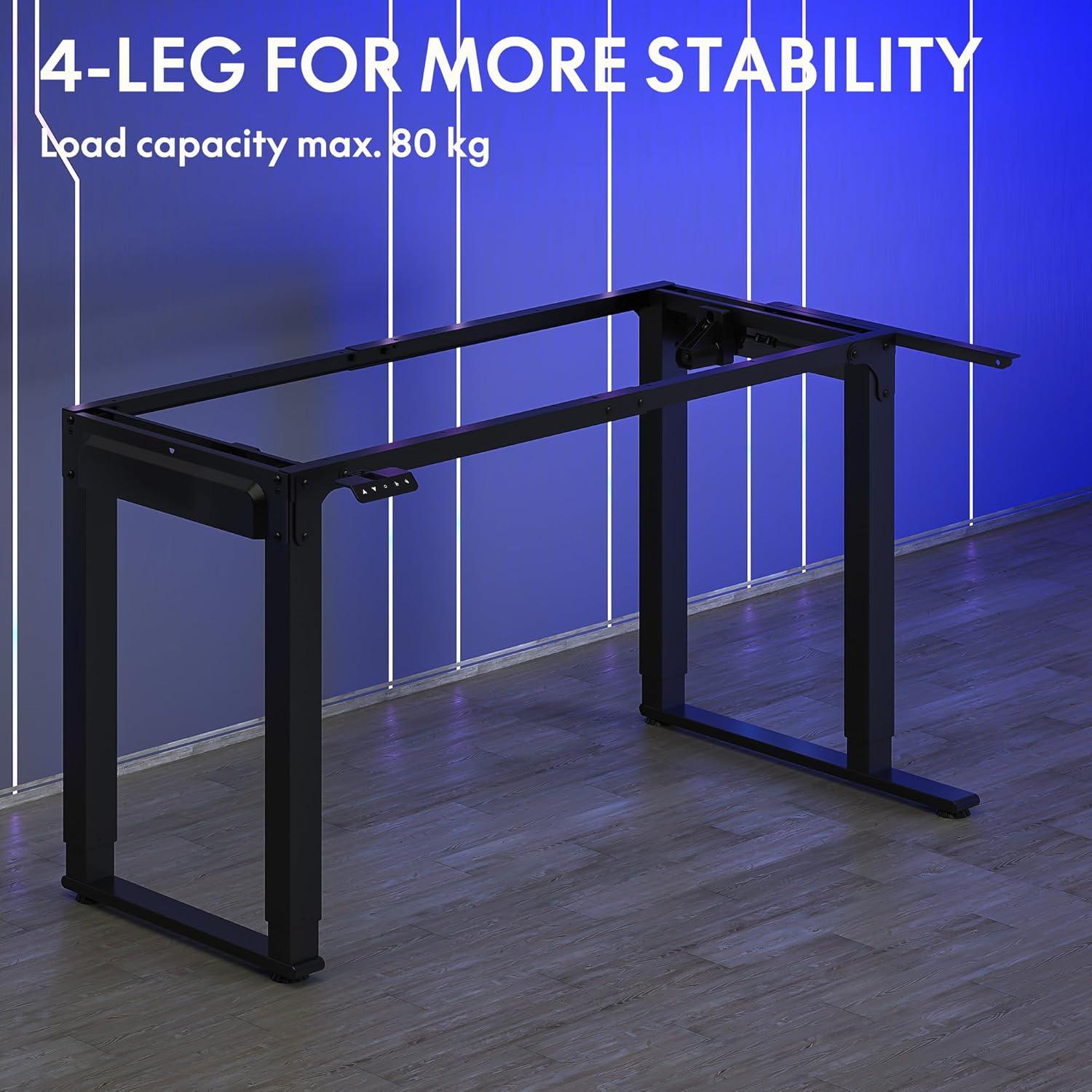
Image: The robust 4-leg frame provides superior stability for the L-shaped standing desk.

Image: Detail of the dual-motor mechanism, ensuring accurate and smooth height positioning.
5. Bruksanvisning
Your FLEXISPOT L-Shaped Electric Standing Desk features an intelligent control panel for easy height adjustment and memory presets.
5.1 Kontrollpanelfunksjoner

Image: The intelligent control panel with clearly labeled buttons for desk operation.
- Opp/ned-knapper (▲ / ▼): Press and hold to continuously adjust the desk height up or down. Release to stop at the desired height.
- Reset Button (↺): Used for initial calibration or to reset the desk if an error occurs. Press and hold until the desk moves to its lowest point and slightly rises.
- Sitting Preset Button (👭): Press to automatically move the desk to your programmed sitting height.
- Standing Preset Button (👭 with upward arrow): Press to automatically move the desk to your programmed standing height.
5.2 Setting Memory Presets
To save your preferred sitting or standing height:
- Juster skrivebordet til ønsket høyde ved hjelp av opp/ned-knappene.
- Press and hold the desired preset button (Sitting or Standing) for approximately 3-5 seconds until you hear a beep or see the display flash. This indicates the height has been saved.

Image: The desk can be adjusted from a minimum height of 72cm to a maximum of 117cm.

Image: The spacious L-shaped desktop (180cm x 110cm) provides ample room for multiple computers and accessories.
6. Vedlikehold
Regular maintenance ensures the longevity and optimal performance of your desk.
- Rengjøring: Tørk av skrivebordet og rammen med en myk klutamp klut. Unngå sterke kjemikalier eller slipende rengjøringsmidler.
- Undersøkelse: Sjekk regelmessig alle skruer og tilkoblinger for å sikre at de er stramme. Stram til om nødvendig.
- Kabeladministrasjon: Ensure power cables and other device cables are properly managed to prevent entanglement or damage during height adjustments.
- Motorpleie: The dual motors are designed for durability. Avoid obstructing the desk's movement or exceeding the weight limit to prevent strain on the motors.

Image: The desk features safe and stylish rounded corners.
7. Feilsøking
Hvis du støter på problemer med skrivebordet ditt, kan du se følgende vanlige problemer og løsninger:
| Problem | Mulig årsak | Løsning |
|---|---|---|
| Skrivebordet beveger seg ikke. | Power cable disconnected; Control panel cable loose; Overload protection activated. | Check power connections; Ensure control panel cable is secure; Reduce weight on desk and perform a reset. |
| Skrivebordet beveger seg ujevnt eller lager uvanlige lyder. | Unbalanced load; Loose connections; Obstruction. | Distribute weight evenly; Check and tighten all frame connections; Remove any obstructions. Perform a reset. |
| Height presets are not working. | Forhåndsinnstillingene er ikke lagret riktig. | Re-save the desired height by holding the preset button until confirmation. |
| Skrivebordet stopper midt i bevegelsen. | Overload protection; Overheating protection. | Reduce weight on the desk. Allow the desk to cool down for 20-30 minutes if it has been used continuously. |
If the problem persists after attempting these solutions, please contact FLEXISPOT customer support.
8. Spesifikasjoner
| Trekk | Detalj |
|---|---|
| Modellnummer | QS2LB-1811 |
| Merke | FLEXISPOT |
| Skrivebordstype | L-formet elektrisk stående skrivebord |
| Motortype | Dobbel motor |
| Rammetype | 4-Leg Frame |
| Høydejusteringsområde | 72 cm til 117 cm |
| Mål på skrivebordet (L x B) | 180 cm x 110 cm |
| Maksimal lastekapasitet | 80 kg |
| Støynivå | < 50 dB |
| Materiale | Alloy Steel (Frame) |
| Farge | Svart |
| Varevekt | 30 kilo |
9. Garanti og støtte
FLEXISPOT products are designed for quality and durability. For specific warranty information, please refer to the warranty card included with your purchase or visit the official FLEXISPOT website. If you require technical assistance, have questions about assembly, or need to report a missing/damaged part, please contact FLEXISPOT customer support directly. Ensure you have your model number (QS2LB-1811) and purchase details available when contacting support.
Kontaktinformasjon: Please refer to the contact details provided on the FLEXISPOT official webnettstedet eller kjøpsdokumentasjonen din for de mest oppdaterte støttekanalene.