
Introduksjon
This manual provides detailed instructions for the SUNOL GM20 True Wireless Earbuds. Please read this manual carefully before using the product to ensure proper operation and to maximize your listening experience. These earbuds feature Bluetooth 5.3 connectivity, a waterproof design, and a charging case with an LED display.
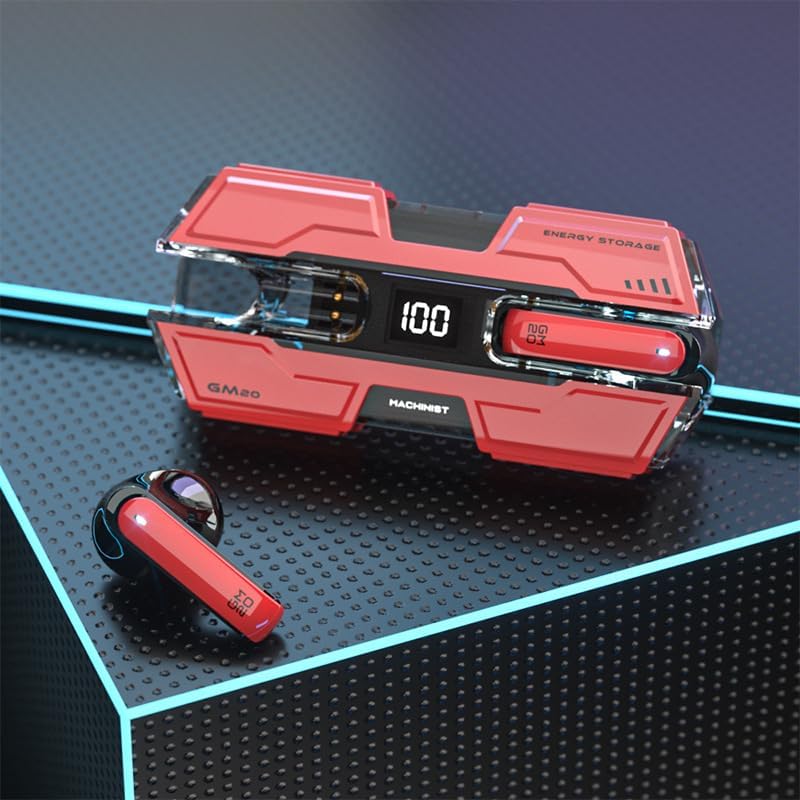
Image: The SUNOL GM20 True Wireless Earbuds with their charging case, showcasing the design and LED display.
Pakkeinnhold
Sørg for at alle varene er til stede i pakken:
- GM20 True Wireless Earbuds (Left and Right)
- Ladeetui
- Ladekabel
- Brukerhåndbok
- Flere størrelser på ørepropper
Produktfunksjoner
- Bluetooth 5.3-teknologi: Offers faster pairing, stable connection, and lower power consumption with an effective range of up to 10 meters.
- 48-timers avspilling: The charging case provides multiple charges, extending total listening time.
- IPX8 Vanntett: Designed to withstand water exposure, suitable for sports and outdoor activities.
- LED display: The charging case features an LED display to show battery life.
- Deep Bass Audio: Equipped with a 14mm dynamic bass unit for enhanced sound quality.
- Innebygd mikrofon: Supports hands-free calls with environmental noise reduction.
- Ergonomisk design: Lightweight and comfortable for extended wear.

Image: The GM20 earbuds and charging case, emphasizing Bluetooth 5.3 and high-definition sound quality.

Bilde: En eksplodert view diagram illustrating the internal components of the earbud, highlighting the 13mm moving coil and composite diaphragm for high-fidelity sound.
Oppsett
1. Lade øreproppene og ladeetuiet
Before first use, fully charge the earbuds and the charging case. Connect the provided charging cable to the charging case and a USB power source. The LED display on the charging case will indicate the charging status and battery level. When charging the earbuds inside the case, the display will show their individual battery life.
2. Slå på/av
- Strøm på: Ørepluggene slås automatisk på når de tas ut av ladevesken.
- Slå av: Plasser øreproppene tilbake i ladeetuiet for å slå dem av automatisk og starte ladingen.
3. Paring med en enhet
Øreproppene støtter ett-trinns paring for enkelhets skyld.
- Sørg for at øreproppene er ladet.
- Åpne ladeetuiet og ta ut begge øreproppene. De vil automatisk slå seg på og forsøke å koble til hverandre.
- After approximately 10 seconds, the earbuds will enter pairing mode.
- Aktiver Bluetooth på enheten din (smarttelefon, nettbrett osv.) og søk etter tilgjengelige enheter.
- Select "GM20 TWS" from the list of found devices to complete the pairing process.
- Once paired, the earbuds will automatically connect to the last paired device when removed from the charging case.

Image: The GM20 earbuds and charging case, illustrating the quick connect and pairing process with a smartphone.
Bruksanvisning
1. Bruk av øreproppene
Select the ear tips that provide the most comfortable and secure fit. Insert the earbuds gently into your ear canal and rotate slightly until they feel snug. A proper fit ensures optimal sound quality and noise isolation.
2. Grunnleggende kontroller
The earbuds feature a multifunction button for various controls:
- Spill av/sett musikk på pause: Single press the multifunction button on either earbud.
- Neste sang: Double press the multifunction button on the right earbud.
- Forrige sang: Double press the multifunction button on the left earbud.
- Svar/avslutt samtale: Single press the multifunction button on either earbud during an incoming call or active call.
- Avvis anrop: Press and hold the multifunction button on either earbud during an incoming call.
- Volumkontroll: (Note: Specific volume control via earbuds is not detailed in product information. Adjust volume via your connected device.)
3. Vanntett funksjonalitet
The GM20 earbuds are designed with an IPX8 waterproof nano-coating, making them resistant to water. This feature makes them suitable for activities such as running, cycling, and other sports where exposure to sweat or light rain may occur. Avoid prolonged submersion in water.

Image: The GM20 earbuds and charging case in a gaming context, highlighting fast transmission and no delay for an enhanced experience.
Vedlikehold
1. Rengjøring
Regularly clean your earbuds and charging case to maintain optimal performance and hygiene. Use a soft, dry, lint-free cloth. For stubborn dirt, a slightly damp cloth can be used, but ensure no moisture enters the earbud openings or charging ports. Do not use harsh chemicals or abrasive materials.
2. Oppbevaring
Når øreproppene ikke er i bruk, bør de oppbevares i ladeetuiet for å beskytte dem mot støv og skader, og for å holde dem ladet. Oppbevar etuiet på et kjølig og tørt sted, unna direkte sollys og ekstreme temperaturer.
3. Batteripleie
To prolong battery life, avoid fully discharging the earbuds and charging case frequently. Charge them regularly, even if not in constant use. Do not expose batteries to excessive heat.
Feilsøking
- Øreproppene kobler seg ikke sammen: Place both earbuds back into the charging case, close the lid, wait a few seconds, then remove them again. They should automatically connect.
- Øreproppene kobler seg ikke til enheten: Ensure Bluetooth is enabled on your device and the earbuds are in pairing mode. Forget "GM20 TWS" from your device's Bluetooth list and try pairing again.
- Ingen lyd fra den ene øreproppen: Check if both earbuds are charged. Try resetting them by placing them in the case and then removing them.
- Ladeproblemer: Ensure the charging cable is securely connected and the power source is functional. Clean the charging contacts on both the earbuds and the case.
- Dårlig lydkvalitet: Ensure the earbuds are properly seated in your ears. Try different sized ear tips for a better seal. Check the audio source device for any issues.
Tekniske spesifikasjoner
| Modellnavn | GM20 (K8) |
| Bluetooth-versjon | 5.3 |
| Bluetooth-rekkevidde | Opp til 10 meter |
| Batterilevetid (ørepropper) | Approximately 48 hours with charging case |
| Ladeetui batteri | 600mAh |
| Vannmotstandsnivå | IPX8 |
| Type lyddriver | 14 mm dynamisk driver |
| Frekvensområde | 20 Hz–20 kHz |
| Kontrollmetode | Berøring/knapp |
| Materiale | Akrylnitrilbutadienstyren (ABS) |
Garantiinformasjon
The SUNOL GM20 True Wireless Earbuds come with a standard manufacturer's warranty. Please refer to the warranty card included in your package or contact customer support for specific details regarding warranty coverage and duration. Keep your proof of purchase for warranty claims.
Kundestøtte
If you encounter any issues not covered in this manual or require further assistance, please contact SUNOL customer support. Contact information can typically be found on the product packaging or the official SUNOL webnettstedet.