
Introduksjon
This manual provides essential instructions for the installation, operation, and maintenance of your Fermax Sup Milo Digital Intercom System. Please read this manual thoroughly before installation and use to ensure proper function and safety. Keep this manual for future reference.
The Fermax Sup Milo Digital Intercom System is designed to provide clear communication and enhanced security for residential and commercial premises. It integrates advanced technology with a robust design to offer reliable access control and communication solutions.
Sikkerhetsinformasjon
Always follow basic safety precautions to reduce the risk of fire, electric shock, and injury to persons. This product should only be installed and serviced by qualified personnel.
- Koble fra strømmen før installasjon eller service.
- Ikke utsett enheten for regn eller fuktighet.
- Sørg for at alle ledningstilkoblinger er sikre og i samsvar med lokale elektriske forskrifter.
- Ikke forsøk å reparere enheten selv. Overlat all service til kvalifisert servicepersonell.
Pakkeinnhold
Kontroller at alle komponenter er til stede før installasjonen starter. Pakken inneholder vanligvis:
- Fermax Sup Milo Digital Intercom Unit (Aluminum Plate)
- Monteringsutstyr
- Connection cables (may vary by kit)
- Brukerhåndbok (dette dokumentet)
Note: Specific components may vary based on the purchased kit.
Oppsett og installasjon
This section outlines the general steps for installing the Fermax Sup Milo Digital Intercom System. Professional installation is recommended.
1. Forberedelse av nettstedet
- Choose a suitable mounting location, typically near an entrance, at an accessible height.
- Sørg for at overflaten er flat og stabil.
- Verify access to necessary power and communication wiring.
2. Montering av enheten
- Carefully remove the front panel of the intercom unit to access mounting holes.
- Position the unit and mark the drilling points on the wall.
- Bor hull og sett inn passende veggplugger om nødvendig.
- Secure the intercom unit to the wall using the provided mounting screws.
3. Kablingstilkoblinger
Refer to the wiring diagram specific to your system configuration. General connections include:
- Strømforsyning: Connect to a stable 100V power source. Ensure correct polarity.
- Communication Bus: Connect the digital bus lines to the indoor units and central control unit.
- Døråpner: Connect the door release mechanism (e.g., electric strike) to the designated terminals.
- Ekstra innganger/utganger: Connect any additional devices such as external cameras or sensors as required.
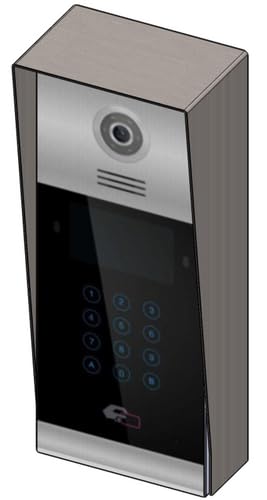 Bilde 1: Foran view of the Fermax Sup Milo Digital Intercom System, showing the aluminum plate and digital keypad. This image illustrates the exterior design of the main unit.
4. Første oppstart og konfigurasjon
- Once all wiring is complete and secure, restore power to the system.
- The unit will perform a self-test. Observe any indicator lights or sounds.
- Follow the system's programming guide (usually provided separately or accessible via a master unit) to configure apartment numbers, access codes, and other settings.
Bruksanvisning
Making a Call from the Outdoor Panel
- To call an apartment: Enter the apartment number using the digital keypad.
- Press the "Call" button (often represented by a bell icon or similar).
- The indoor unit will ring. Once answered, communication can begin.
Receiving a Call and Opening the Door (Indoor Unit)
- When the indoor unit rings, press the "Answer" button to establish communication with the visitor.
- To open the door, press the "Door Release" button on your indoor unit.
- The door will unlock for a short period.
Using Access Codes
If configured, authorized users can enter a pre-programmed access code on the outdoor digital keypad to unlock the door without needing to call an indoor unit.
- Enter your personal access code using the digital keypad.
- Press the "Enter" or "Door Release" button.
- Døren vil låses opp.
Vedlikehold
Regular maintenance ensures the longevity and optimal performance of your Fermax intercom system.
Rengjøring
- Rengjør utsiden av enheten med en myk, damp klut.
- Ikke bruk slipende rengjøringsmidler, løsemidler eller kjemiske spraymidler, da disse kan skade overflaten og de elektroniske komponentene.
- Sørg for at det ikke kommer væske inn i åpningene på enheten.
Inspeksjoner
- Periodically check for any visible damage to the unit or wiring.
- Ensure all mounting screws are tight.
- Test the communication and door release functions regularly.
Programvareoppdateringer
If applicable, consult your installer or Fermax support for information on firmware updates that may improve performance or add new features.
Feilsøking
Denne delen tar for seg vanlige problemer du kan støte på. Kontakt teknisk støtte for mer komplekse problemer.
| Problem | Mulig årsak | Løsning |
|---|---|---|
| No communication with indoor unit. |
|
|
| Døråpneren fungerer ikke. |
|
|
| Tastaturet reagerer ikke. |
|
|
Spesifikasjoner
Technical specifications for the Fermax Sup Milo Digital Intercom System (Model: 8424299951713).
- Modell: Fermax Sup Milo Digital Intercom System
- Delenummer: 8424299951713
- Produsent: Fermax
- Dimensjoner (pakke): Omtrent 0.1 x 0.1 x 0.1 cm
- Weight (Unit): 108 gram
- Materiale: Metal, Plastic, Polycarbonate (Aluminum Plate)
- Strømkilde: External Power Supply (100V)
- Voltage: 100V
- Wattage: 100W
- Batterier som kreves: Ingen
- Farge: Multicolored (referring to internal components or subtle design elements, main plate is aluminum)
Garantiinformasjon
Fermax products are manufactured to high-quality standards. For specific warranty terms and conditions, please refer to the warranty card included with your product or visit the official Fermax webnettstedet. Ta vare på kjøpsbeviset for garantikrav.
Typically, warranty covers manufacturing defects for a specified period from the date of purchase. Damage due to improper installation, misuse, or unauthorized repairs is generally not covered.
Kundestøtte
If you require technical assistance, have questions about your product, or need to report a problem, please contact your local Fermax distributor or visit the official Fermax webnettsted for støtteressurser.
Webnettsted: www.fermax.com
Ha modellnummeret (8424299951713) og kjøpsinformasjonen klar når du kontakter kundestøtte.