
1. Introduksjon
Welcome to the KRUPS Sensation C10 EA910A10 Superautomatic Coffee Machine user manual. This guide provides comprehensive instructions for the safe and efficient operation, maintenance, and troubleshooting of your new coffee machine. Please read this manual thoroughly before first use and keep it for future reference.
2. Viktige sikkerhetsinstruksjoner
For å sikre sikker drift, følg alltid disse grunnleggende sikkerhetsreglene:
- Les alle instruksjonene før du bruker apparatet.
- Ikke senk apparatet, strømledningen eller støpselet ned i vann eller andre væsker.
- Dette apparatet er kun beregnet for husholdningsbruk.
- Sørg for at voltagVolumnivået som er angitt på apparatet samsvarer med strømnettets volum.tage.
- Trekk alltid støpselet til apparatet ut av stikkontakten før rengjøring eller når det ikke er i bruk.
- Ikke bruk noe apparat med en skadet ledning eller støpsel, eller etter at apparatet ikke fungerer eller har blitt skadet på noen måte.
- Hold barn unna apparatet under bruk.
- Bruk kun tilbehør anbefalt av produsenten.
- Avoid contact with hot surfaces, such as the coffee spouts or steam nozzle.
3. Produktkomponenter
Familiarize yourself with the main components of your KRUPS Sensation C10 EA910A10 coffee machine:
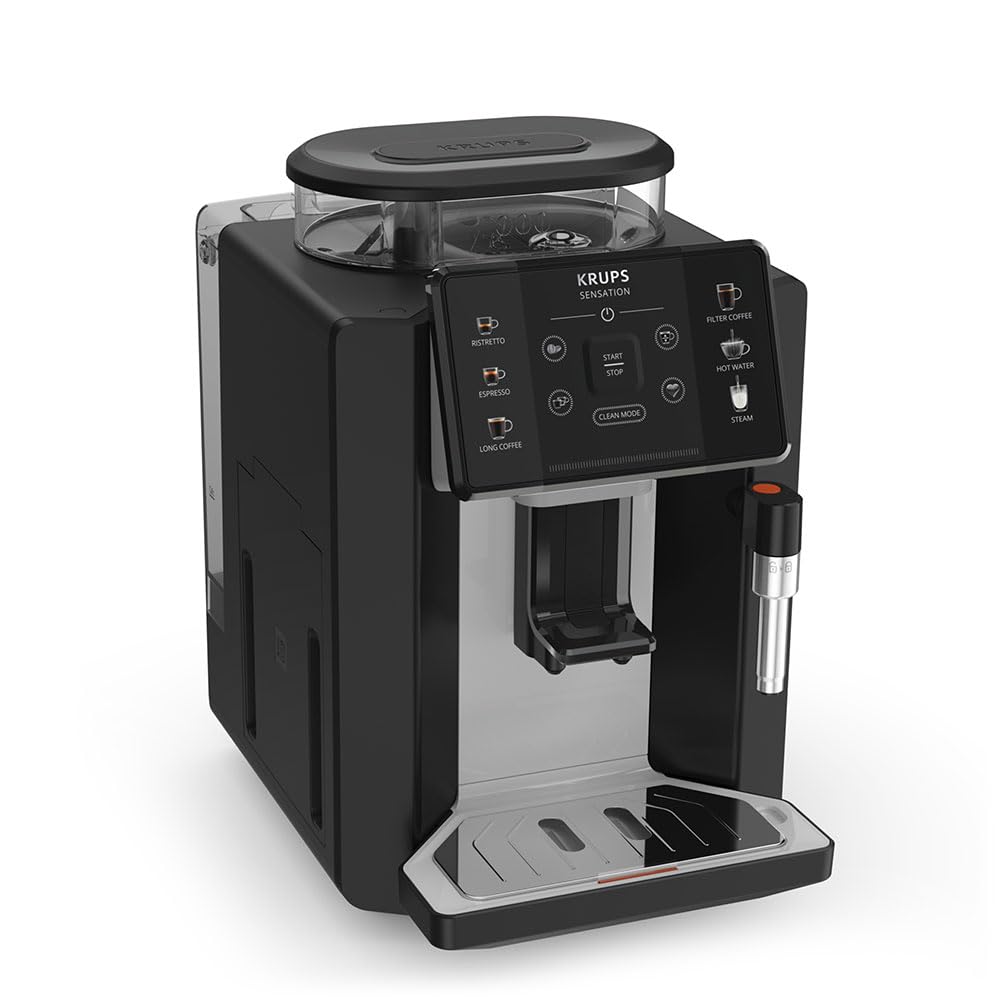
Bilde: Foran til høyre view of the KRUPS Sensation C10 EA910A10 Superautomatic Coffee Machine, showing the bean hopper, control panel, coffee spouts, and drip tray. Two cups of coffee are being dispensed.
- Bønnebeholder med lokk
- Vanntank
- Control Panel (Touchscreen)
- Coffee Spouts (Adjustable)
- Drip Tray with Grid
- Kaffegrutbeholder
- Steam Nozzle / Hot Water Spout
- Tilkobling av strømledning
4. Første oppsett
4.1. Pakker ut
- Ta kaffemaskinen forsiktig ut av emballasjen.
- Remove all packaging materials, including protective films and stickers.
- Plasser maskinen på en stabil, flat og varmebestandig overflate, unna vannkilder og varme.
4.2. Forberedelse til første gangs bruk
- Skyll vanntanken: Remove the water tank, rinse it thoroughly with fresh water, and fill it to the MAX level. Reinsert the tank securely.
- Fyll bønnebeholderen: Open the lid of the bean hopper and fill it with fresh coffee beans. Do not use ground coffee in the bean hopper.
- Strømtilkobling: Koble strømledningen til maskinen og deretter til en jordet stikkontakt.
- Første skyllesyklus: The machine will prompt you to perform an initial rinse cycle. Follow the instructions on the touchscreen. This primes the system and cleans internal components.
5. Bruksanvisning
5.1. Kontrollpanel overview

Image: A hand interacting with the intuitive touchscreen control panel of the KRUPS Sensation C10 EA910A10, highlighting its ease of use.
The KRUPS Sensation C10 EA910A10 features an intuitive touchscreen control panel for easy operation. Key functions include:
- Ristretto: For a very short, concentrated espresso.
- Espresso: For a classic espresso shot.
- Lang kaffe: For en større mengde kaffe.
- Filterkaffe: For a milder, filter-style coffee.
- Varmt vann: Til te eller andre varme drikker.
- Damp: For å skumme melk.
- Start/stopp: To begin or end a brewing cycle.
- Rengjøringsmodus: Initiates cleaning cycles.
- Coffee Strength/Volume Adjustment: Icons to customize your drink.
5.2. Lage kaffe
To brew a coffee beverage:
- Sørg for at vanntanken er fylt og at bønnebeholderen inneholder nok bønner.
- Place a cup under the coffee spouts. Adjust the spout height if necessary.
- Select your desired coffee type (e.g., Espresso, Long Coffee) from the touchscreen.
- Adjust coffee strength and volume using the on-screen options if desired.
- Press the "Start" button to begin brewing.
- Maskinen vil male bønnene, brygge kaffen og dispensere den i koppen din.
- The machine will automatically stop when the brewing is complete.

Image: A selection of coffee beverages, including espresso, long coffee, and a milk-based drink, demonstrating the versatility of the KRUPS Sensation C10 EA910A10.
5.3. Varmtvannsfunksjon
- Sett en kopp under varmtvannstuten.
- Select the "Hot Water" option on the touchscreen.
- Press "Start" to dispense hot water. Press "Stop" to cease dispensing.
5.4. Steam Function (for milk frothing)
- Fyll en mugge med kald melk.
- Plasser dampdysen i melken.
- Select the "Steam" option on the touchscreen.
- Press "Start" to activate the steam. Move the pitcher up and down to froth the milk.
- Press "Stop" when desired froth is achieved.
- Viktig: Clean the steam nozzle immediately after use to prevent milk residue buildup.
6. Vedlikehold og rengjøring
Regelmessig rengjøring og vedlikehold sikrer optimal ytelse og levetid for kaffemaskinen din.
6.1. Daglig rengjøring
- Dryppbrett og kaffegrutbeholder: Tøm og skyll dryppskålen og kaffegrutbeholderen daglig, eller når maskinen ber om det.
- Kaffetutler: Tørk av kaffetutene med annonseamp klut.
- Vanntank: Skyll vanntanken med friskt vann daglig.
6.2. Avkalking
The machine will indicate when descaling is required. Follow the on-screen instructions and use a KRUPS-approved descaling solution.

Image: A hand inserting a cleaning tablet into the designated slot of the KRUPS Sensation C10 EA910A10, illustrating the ease of the cleaning process.
6.3. Utskifting av vannfilter
If your machine uses a water filter, replace it every 2-3 months or as indicated by the machine to ensure optimal water quality and prevent limescale buildup.
7. Feilsøking
Se tabellen nedenfor for vanlige problemer og løsningene på dem.
| Problem | Mulig årsak/løsning |
|---|---|
| Maskinen slås ikke på. | Check if the power cord is securely plugged into the machine and the electrical outlet. Ensure the outlet is functional. |
| Det blir ikke servert kaffe. | Water tank empty: Fill the water tank. Bean hopper empty: Fill with coffee beans. Coffee grounds container full: Empty and clean. Descaling required: Perform descaling cycle. |
| Kaffen er for svak. | Adjust coffee strength settings on the control panel. Check if the bean hopper is sufficiently filled. Ensure fresh beans are used. |
| Det lekker vann fra maskinen. | Check if the water tank is correctly inserted. Ensure the drip tray is properly positioned. If leakage persists, contact customer support. |
| "Clean Mode" alert persists. | Perform the indicated cleaning cycle (e.g., descaling, rinsing). Ensure all removable parts are clean and correctly reinserted. |
| Steam nozzle not frothing milk effectively. | Clean the steam nozzle thoroughly after each use to prevent blockages. Ensure cold milk is used. |
| Grinder is unusually loud or not grinding. | Check for foreign objects in the bean hopper. Ensure the bean hopper is not empty. Contact customer support if the issue persists. |
8. Tekniske spesifikasjoner
| Trekk | Spesifikasjon |
|---|---|
| Modellnummer | EA910A10 |
| Merke | KRUPS |
| Voltage | 145 volt |
| Makt | 1450 watt |
| Materiale | Stål |
| Produktvekt | 7.5 kg |
| Grensesnitt | Berøringsskjerm |

Image: The KRUPS Sensation C10 EA910A10 coffee machine with indicated dimensions: 24 cm width, 34.6 cm depth, and 36.4 cm height.
9. Garantiinformasjon
Your KRUPS Sensation C10 EA910A10 Superautomatic Coffee Machine is covered by a manufacturer's warranty. Please refer to the warranty card included in your product packaging for specific terms, conditions, and duration. Keep your proof of purchase for warranty claims.
10. Kundestøtte
For further assistance, technical support, or spare parts, please contact KRUPS customer service. Contact details can typically be found on the KRUPS official webnettstedet eller i garantidokumentasjonen som fulgte med apparatet.