
1. Introduksjon
Thank you for choosing the Baseus AeQur G10 TWS Earphones. This manual provides detailed instructions on how to set up, operate, maintain, and troubleshoot your new earphones. Please read this manual thoroughly before using the product to ensure optimal performance and longevity.
2. Pakkens innhold
Pakk esken forsiktig ut og sørg for at alle varene som er oppført nedenfor er til stede og i god stand. Hvis noen av varene mangler eller er skadet, vennligst kontakt forhandleren din.
- Baseus AeQur G10 TWS Earphones (Left and Right)
- Ladeetui
- USB-A/USB-C Wireless Dongle
- USB-C ladekabel
- Flere størrelser på ørepropper
- Brukerhåndbok (dette dokumentet)

Image 2.1: Complete package contents of the Baseus AeQur G10 TWS Earphones.
3. Produktet er overview
Familiarize yourself with the components of your Baseus AeQur G10 TWS Earphones.
3.1 øretelefoner
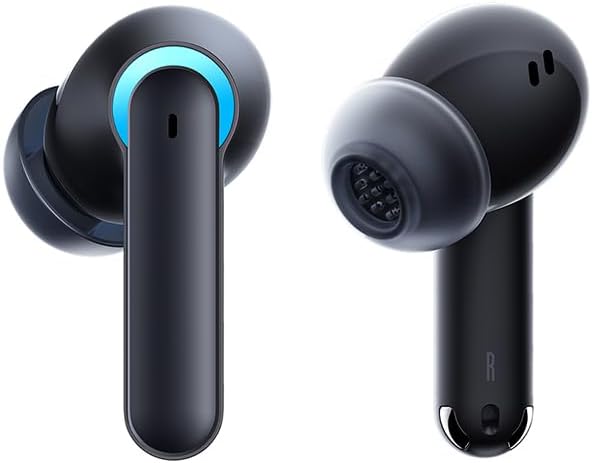
Image 3.1: Left and Right Baseus AeQur G10 Earphones. Each earphone features a touch control area, microphone, and charging contacts.
3.2 Ladeveske

Image 3.2: Baseus AeQur G10 Earphones in their charging case with the lid open. The case has charging slots for each earphone and an LED indicator for battery status.
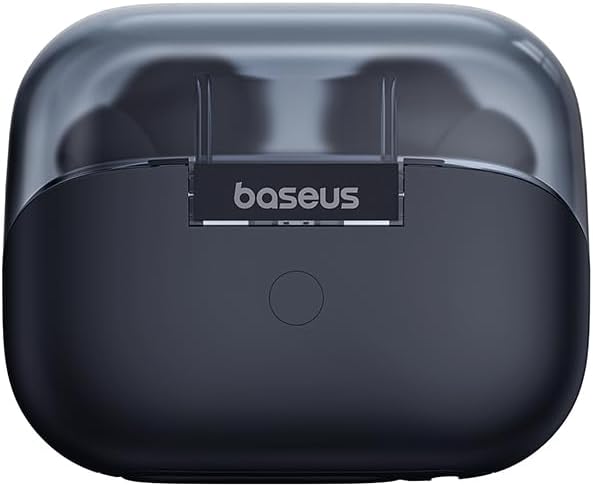
Bilde 3.3: Bak view of the Baseus AeQur G10 charging case, displaying the Baseus brand logo and a USB-C charging port (not explicitly visible but implied by common design).
3.3 USB-A/USB-C Wireless Dongle
The included wireless dongle allows for low-latency connection to various devices, including PCs, laptops, gaming consoles, and mobile devices.

Image 3.4: Compatibility diagram for the Baseus AeQur G10, illustrating connections to Type-C Androids & Tablets, Type-C/USB-A PCs & Laptops, PS5/PS4/Switch, Steam Deck, and VR devices.
4. Oppsett
4.1 Innledende lading
- Plasser begge øretelefonene i ladevesken.
- Connect the USB-C charging cable to the charging port on the case and the other end to a USB power source (e.g., computer USB port, wall adapter).
- The LED indicator on the case will show charging status. A full charge typically takes approximately 1.5 hours for the earphones and 2 hours for the case.
4.2 Paring med Bluetooth-enheter
- Sørg for at øretelefonene er i ladeetuiet og at etuiet har tilstrekkelig ladet.
- Open the charging case lid. The earphones will automatically enter pairing mode (indicated by a flashing LED on the earphones or case).
- Aktiver Bluetooth på enheten din (smarttelefon, nettbrett, bærbar PC) og søk etter nye enheter.
- Select "Baseus AeQur G10" from the list of available devices.
- Once connected, the LED indicator will stop flashing, and you will hear a confirmation tone.
4.3 Connecting via USB Wireless Dongle
- Insert the USB-A or USB-C end of the wireless dongle into the corresponding port on your device (PC, laptop, gaming console).
- Ensure the earphones are in the charging case and the lid is open.
- The earphones will automatically attempt to connect to the dongle. The dongle's LED indicator will show connection status.
- Once connected, the LED on the dongle will become solid, and you will hear a confirmation tone from the earphones.
5. Bruksanvisning
5.1 Strøm på/av
- Strøm på: Open the charging case lid, or take the earphones out of the case. They will power on automatically.
- Slå av: Place the earphones back into the charging case and close the lid. They will power off automatically and begin charging.
5.2 Bruk av øretelefoner
- Identify the 'L' (left) and 'R' (right) markings on each earphone.
- Før øretelefonene forsiktig inn i øregangene.
- Rotate them slightly to find a comfortable and secure fit. Choose the appropriate ear tip size for optimal sound quality and comfort.
5.3 Berøringskontroller
The Baseus AeQur G10 earphones feature touch-sensitive controls on each earbud. The specific functions may vary slightly depending on the device and application.
| Handling | Funksjon |
|---|---|
| Enkelttrykk (V/H) | Spill/pause musikk, svar/avslutt samtale |
| Dobbelttrykk (L) | Forrige spor |
| Dobbelttrykk (R) | Neste spor |
| Trippeltrykk (V/H) | Aktiver stemmeassistent |
| Langt trykk (V/H, 2 s) | Avvis anrop |
| Langt trykk (V/H, 3 s) | Toggle Gaming/Music Mode (if applicable) |
6. Vedlikehold
6.1 Rengjøring
- Bruk en myk, tørr og lofri klut til å rengjøre øretelefonene og ladeetuiet.
- For earwax or debris in the ear tips, gently remove the ear tips and clean them with a cotton swab lightly dampened with rubbing alcohol. Ensure they are completely dry before reattaching.
- Ikke bruk slipende rengjøringsmidler, løsemidler eller aerosolsprayer.
6.2 Oppbevaring
- Oppbevar alltid øretelefonene i ladeetuiet når de ikke er i bruk, for å beskytte dem og holde dem ladet.
- Oppbevares kjølig og tørt, unna ekstreme temperaturer og direkte sollys.
6.3 Batteristell
- Charge the earphones and case regularly, even if not used frequently, to maintain battery health.
- Unngå å utlade batteriene helt over lengre tid.
7. Feilsøking
If you encounter issues with your Baseus AeQur G10 earphones, refer to the following common solutions:
7.1 Ingen lyd eller uregelmessig forbindelse
- Ensure earphones are charged and properly connected to your device (Bluetooth or dongle).
- Sjekk volumnivået på både øretelefonene og den tilkoblede enheten.
- Flytt deg nærmere enheten for å unngå forstyrrelser eller problemer med rekkevidden.
- Try disconnecting and re-connecting the earphones.
- For Bluetooth, forget the device on your phone and re-pair.
- For dongle, unplug and re-plug the dongle.
7.2 Hodetelefonene lader ikke
- Sørg for at ladekabelen er ordentlig koblet til både etuiet og strømkilden.
- Kontroller at strømkilden er aktiv.
- Rengjør ladekontaktene på både øretelefonene og inni etuiet med en tørr bomullspinne.
- Prøv en annen ladekabel eller strømadapter.
7.3 Only One Earphone Working
- Place both earphones back into the charging case, close the lid, wait a few seconds, then open the lid and take them out again.
- Sørg for at begge øretelefonene er ladet.
- Try resetting the earphones (refer to manufacturer's webnettsted for spesifikke tilbakestillingsinstruksjoner om nødvendig).
8. Spesifikasjoner
Key technical specifications for the Baseus AeQur G10 TWS Earphones:
| Trekk | Spesifikasjon |
|---|---|
| Modellnavn | A00055400111-00 |
| Merke | Baseus |
| Farge | Svart |
| Øreplassering | In Ear |
| Formfaktor | In Ear |
| Tilkoblingsteknologi | Trådløs (Bluetooth) |
| Trådløs kommunikasjonsteknologi | Bluetooth |
| Batterier | 1 Lithium Ion-batterier kreves (inkludert) |
| Produktdimensjoner | 10 x 5 x 1.27 cm |
| Varevekt | 220 g |
| Produsent | Baseus |
| Spesifikke bruksområder | Reise |
9. Garanti og støtte
Baseus products are designed and manufactured to the highest quality standards. For information regarding warranty coverage, technical support, or service, please refer to the warranty card included with your product or visit the official Baseus webnettstedet. Ta vare på kjøpsbeviset for garantikrav.
For further assistance, you may contact Baseus customer support through their official channels.