
1. Introduksjon
This manual provides essential instructions for the safe and efficient operation of your SHARP SMC1169KS Countertop Microwave Oven. Please read all instructions thoroughly before using the appliance and retain this manual for future reference. This microwave oven features a 1.1 cubic feet capacity, 1000 watts of cooking power, and is compatible with Alexa for voice control. It also includes a removable 12.4-inch carousel turntable and a child lock function.
2. Viktig sikkerhetsinformasjon
Når du bruker elektriske apparater, bør grunnleggende sikkerhetstiltak følges, inkludert følgende:
- Les alle instruksjonene før bruk.
- Ikke bruk ovnen hvis den er skadet eller ikke fungerer.
- Sørg for god ventilasjon rundt mikrobølgeovnen.
- Ikke varm opp forseglede beholdere, da de kan eksplodere.
- Ikke bruk etsende kjemikalier eller damper i dette apparatet.
- Hold nøye oppsyn med barn når mikrobølgeovnen er i bruk.
- Ikke forsøk å utføre service eller reparasjon av ovnen selv. Kontakt kvalifisert servicepersonell.
- Bruk alltid mikrobølgeovnsikkert kokekar.
- Liquids heated in a microwave oven can boil over unexpectedly. Exercise caution when removing containers.
3. Produktet er overview
The SHARP SMC1169KS is a stainless steel countertop microwave oven designed for convenient food preparation. Key features include:
- Kapasitet: 1.1 kubikkfot
- Strømutgang: 1000 watt
- Platespiller: Removable 12.4-inch glass carousel for even cooking
- Kontroll: Digital display with touch controls and Alexa voice compatibility
- Interiør: Gray interior with LED lighting
- Sikkerhet: Child Safety Lock function
- Matlagingsfunksjoner: 10 power levels, 2-stage cooking, Auto Cook menus, Weight and Time Defrost, Express Cook, +30 seconds key.

Front view of the SHARP SMC1169KS Countertop Microwave Oven, showcasing dens rustfrie ståloverflate og kontrollpanel.
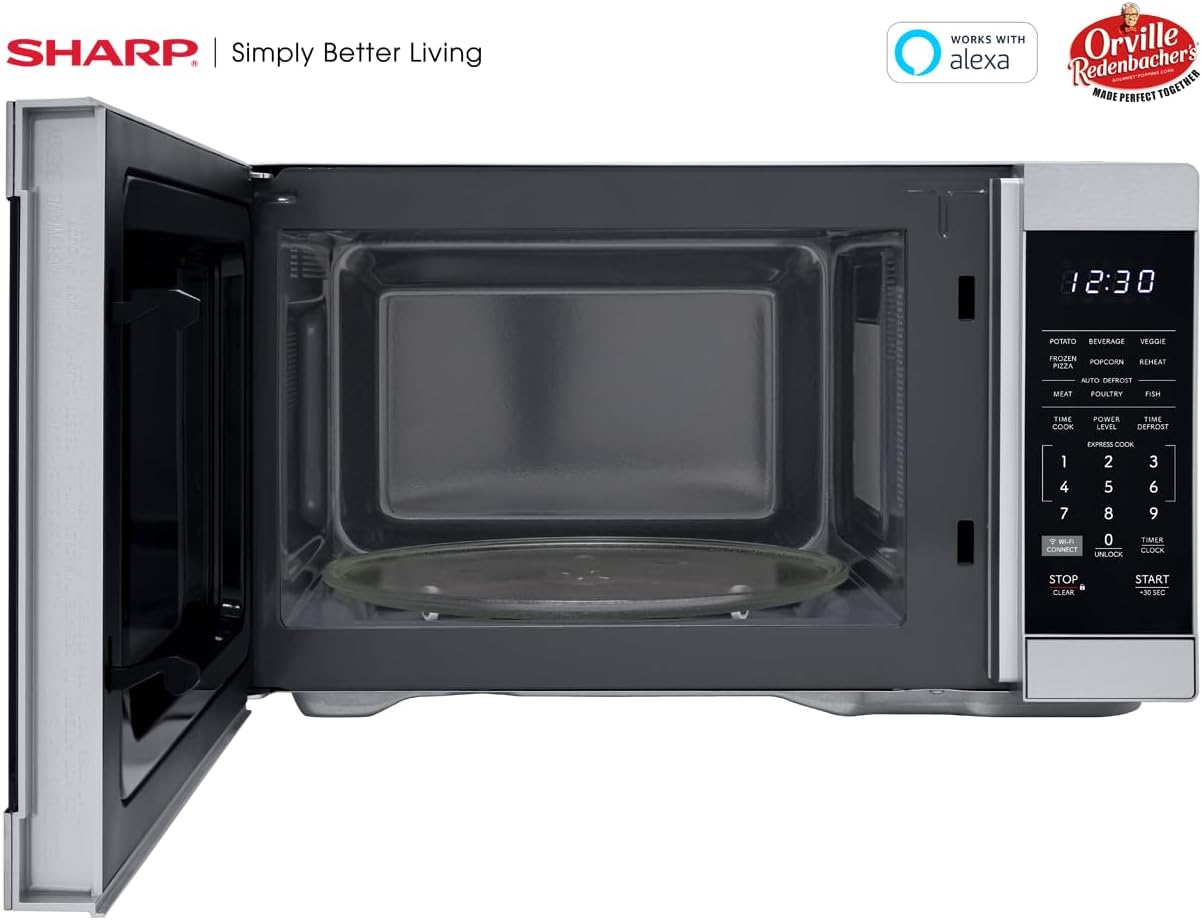
Interiør view of the SHARP SMC1169KS microwave oven, highlighting the removable glass carousel turntable for uniform heating.

Close-up of the SHARP SMC1169KS microwave oven control panel, featuring the digital display, number pad, and dedicated function buttons.
4. Oppsett
4.1 Utpakking og plassering
- Remove all packing materials from inside and outside the microwave oven.
- Place the microwave on a flat, stable surface that is strong enough to hold the oven and the food being cooked.
- Ensure there is at least 4 inches (10 cm) of space on the top, back, and sides for proper ventilation. Do not block any ventilation openings.
- Hold mikrobølgeovnen unna varmekilder og sterke magnetfelt.
4.2 Installasjon av platespiller
- Place the turntable ring inside the microwave cavity.
- Position the glass turntable plate securely on top of the turntable ring. Ensure it is centered and sits properly on the coupler.
4.3 Strømtilkobling
Koble strømledningen til en standard jordet stikkontakt med 3 pinner, 120 V AC og 60 Hz. Ikke bruk skjøteledning eller adapter.
4.4 Initial Setup (Clock & Wi-Fi/Alexa)
- Stille klokken: Trykk på TIMER/KLOKKE button once. Use the number pad to enter the current time. Press TIMER/KLOKKE igjen for å bekrefte.
- Connecting to Wi-Fi/Alexa: Refer to the separate Alexa setup guide or the Sharp Home Appliances app for detailed instructions on connecting your microwave to your home Wi-Fi network and linking it with your Amazon Alexa account. Press the WI-FI TILKOBLING button to initiate pairing mode.
5. Bruksanvisning
5.1 Basic Microwave Cooking (Time Cook)
- Plasser maten i en mikrobølgeovnsikker beholder på dreietallerkenen.
- Lukk døren.
- Trykk på TIDLIG KOK knapp.
- Skriv inn ønsket steketid ved hjelp av talltastaturet.
- Pressen START/+30 SEK.
5.2 Adjusting Power Level
- After entering cooking time (Step 3 of Basic Cooking), press KRAFTNIVÅ.
- Enter the desired power level from 1 to 10 (10 being 100% power).
- Pressen START/+30 SEK.
5.3 Ekspresskokk
For quick cooking at 100% power, simply press the number pad (1-6) for 1 to 6 minutes of cooking time. The oven will start immediately.
5.4 Auto Cook-menyer
The microwave includes preset cooking options for common food items:
- POTATO: Til baking av poteter.
- BEVERAGE: For oppvarming av drikker.
- VEGGIE: For koking av grønnsaker.
- FRYST PIZZA: For heating frozen pizza.
- POPCORN: Optimized for Orville Redenbacher's popcorn (3.3 oz Classic or 1.16 oz Mini Bag).
- VARME: For reheating various foods.
- MEAT, POULTRY, FISH: For specific meat types.
To use an Auto Cook menu: Press the desired menu button, then follow the display prompts (e.g., enter quantity) and press START/+30 SEK.
5.5 Tining
Mikrobølgeovnen tilbyr to tiningsmetoder:
- Vekt avriming: Pressen TIDSINNTINING, enter the food's weight, then press START/+30 SEK.
- Tidsavriming: Pressen TIDSINNTINING twice, enter the desired defrosting time, then press START/+30 SEK.
5.6 Barnesikringsfunksjon
Slik aktiverer du barnesikringen:
- Trykk og hold inne STOPP/SLETT button for 3 seconds. The lock indicator will appear on the display.
Slik deaktiverer du barnesikringen:
- Trykk og hold inne LÅSE OPP button (0) for 3 seconds. The lock indicator will disappear.
5.7 Alexa stemmekontroll
Once connected to Alexa, you can use voice commands for various functions. Examples inkluderer:
- "Alexa, microwave for 1 minute."
- "Alexa, defrost 1 pound of chicken."
- "Alexa, microwave Classic Popcorn."
Refer to the Alexa app or Sharp's online resources for a comprehensive list of voice commands.
6. Vedlikehold
6.1 Rengjøring av interiøret
Regularly clean the interior of the oven to prevent food particles from accumulating. Use a mild detergent and a soft cloth. For stubborn stains, place a cup of water with lemon juice in the microwave and heat for 2-3 minutes, then wipe clean.
6.2 Rengjøring utvendig
Tørk av de utvendige overflatene med en myk, damp klut. Unngå slipende rengjøringsmidler eller skuresvamper som kan ripe opp overflaten på rustfritt stål.
6.3 Stell av platespilleren
Glassdreietallerkenen og dreietallerkenringen kan fjernes og vaskes i varmt såpevann eller i oppvaskmaskinen. Sørg for at de er helt tørre før du setter dem tilbake i ovnen.
7. Feilsøking
If you encounter issues with your microwave, refer to the table below for common problems and solutions.
| Problem | Mulig årsak | Løsning |
|---|---|---|
| Ovnen starter ikke | Døren er ikke ordentlig lukket; Strømledningen er koblet fra; Sikringen er gått/sikringen er utløst. | Sørg for at døren er ordentlig lukket; Sjekk strømledningens tilkobling; Sjekk sikringen/sikringsbryteren i huset. |
| Maten stekes ikke jevnt | Maten røres ikke/roteres ikke; Dreietallerkenen roterer ikke. | Stir or rearrange food during cooking; Ensure turntable and ring are correctly placed and free of obstructions. |
| Displayet viser «LÅS» | Barnesikring er aktivert. | Trykk og hold inne LÅSE OPP button (0) for 3 seconds to deactivate. |
| Alexa-kommandoer fungerer ikke | No Wi-Fi connection; Microwave not linked to Alexa; Incorrect command. | Check Wi-Fi connection; Re-link microwave in Alexa app; Use correct voice commands. |
Hvis problemet vedvarer etter at du har prøvd disse løsningene, kan du kontakte kundestøtte.
8. Spesifikasjoner
| Trekk | Spesifikasjon |
|---|---|
| Modellnummer | SMC1169KS |
| Kapasitet | 1.1 kubikkfot |
| Wattage | 1000 watt |
| Voltage | 120 volt |
| Produktdimensjoner (D x B x H) | 14.7 cm x 20.6 cm x 11.8 cm |
| Varevekt | 34.9 pund |
| Materiale | Rustfritt stål |
| Spesialfunksjon | Child Safety Lock, Alexa Compatible |

Dimensional diagram of the SHARP SMC1169KS microwave oven.
9. Garantiinformasjon
SHARP products are manufactured to high-quality standards. For specific warranty details, including coverage period and terms, please refer to the warranty card included with your product or visit the official Sharp webnettstedet. Ta vare på kjøpskvitteringen som kjøpsbevis for garantikrav.
10. Kundestøtte
For further assistance, technical support, or service inquiries, please visit the official Sharp webnettstedet eller kontakt kundeserviceavdelingen deres. Kontaktinformasjonen finner du vanligvis på produsentens webnettstedet eller i produktemballasjen.