
1. Produktet er overview
The Irfora SZ305 is a professional digital multimeter designed for accurate and rapid measurement of various electrical parameters. It features a high-definition backlit LCD display for clear readings in diverse environments and a retractable stand for convenient use.
Viktige funksjoner inkluderer:
- AC/DC voltage og Strømmåling
- Diode, Resistance, and Capacitance testing
- Frekvensmåling
- Buzzer continuity test
- hFE Triode testing for NPN/PNP transistors
- Non-Contact Voltage (NCV) deteksjon
- Battery detection (1.5V, 3V, 9V, 12V)

Image 1.1: The Irfora SZ305 Digital Multimeter highlighting its various measurement functions including AC/DC voltage/current, diode, capacitance, frequency, buzzer, resistance, NCV induction, hFE, and battery detection.
2. Sikkerhetsinformasjon
Please read and understand all safety instructions before operating the multimeter. Failure to follow these instructions may result in electric shock, fire, or damage to the device.
- Sørg alltid for at multimeteret er innstilt på riktig funksjon og område før du foretar noen målinger.
- Ikke forsøk å måle voltages or currents exceeding the maximum specified limits for the device.
- Vær ekstremt forsiktig når du arbeider med spenningsførende kretser. Høyt volumtagdet kan være farlig.
- Inspiser testledningene for skader før hver bruk. Ikke bruk dem hvis isolasjonen er sprukket eller skadet.
- Ikke bruk multimeteret hvis det ser ut til å være skadet eller ikke fungerer som det skal.
- Avoid using the multimeter in wet environments or during electrical storms.
- Skift batteriene umiddelbart når indikatoren for lavt batteri vises for å sikre nøyaktige avlesninger.
- Koble alltid fra testledningene fra kretsen før du endrer funksjoner eller områder.
3. Oppsett og første gangs bruk
3.1 Installasjon av batteri
The multimeter requires batteries for operation. To install or replace batteries:
- Sørg for at multimeteret er slått av og at testledningene er frakoblet.
- Finn batteridekselet på baksiden av enheten.
- Bruk en skrutrekker for å åpne rommet.
- Sett inn nye batterier, og pass på riktig polaritet (+ og -).
- Sett på plass batteridekselet og fest det med skruen.
3.2 Using the Retractable Support Stand
The multimeter is equipped with a retractable stand on its back for convenient viewunder målingene.
- To deploy the stand, gently pull it outwards from the back of the device until it locks into position.
- Place the multimeter on a flat surface.
- To retract the stand, push it back into its original position until it is flush with the device body.
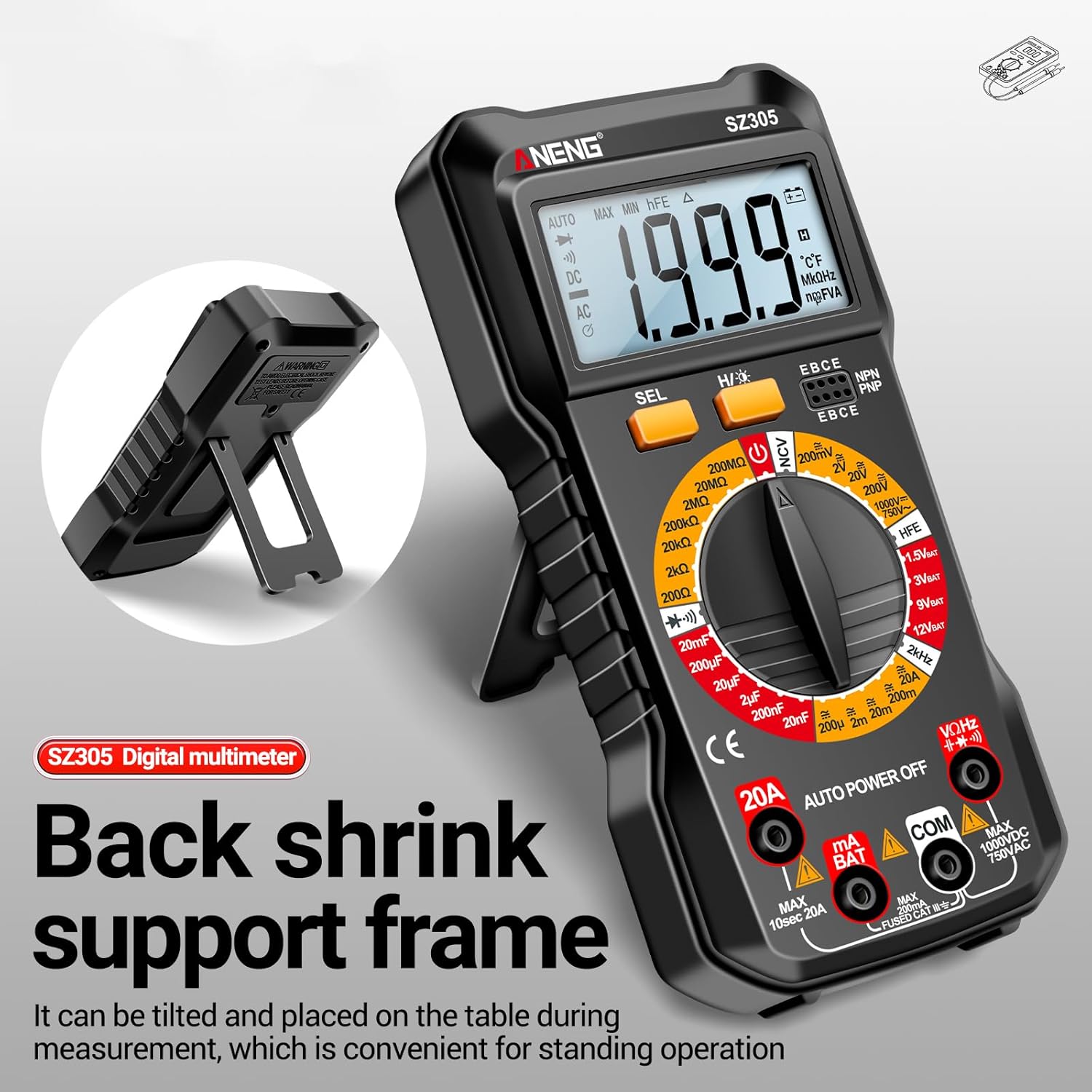
Image 3.1: The Irfora SZ305 Digital Multimeter demonstrating its retractable back support frame for angled viewing on a table.
4. Bruksanvisning
This section details how to perform various measurements with your Irfora SZ305 Digital Multimeter.
4.1 Strøm av/på og bakgrunnsbelysning
- To power on the device, rotate the rotary switch from "AUTO POWER OFF" to any desired measurement function.
- To power off, rotate the switch back to "AUTO POWER OFF". The device also features an auto-power-off function after a period of inactivity.
- To activate the LCD backlight, press and hold the "H/☝" button. The backlight will illuminate, improving visibility in dark environments. Press and hold again to turn off.

Image 4.1: The Irfora SZ305 Digital Multimeter displaying its high-definition backlit LCD screen, enhancing readability in low-light conditions.
4.2 AC/DC Voltage Måling
- Insert the red test lead into the "VHz" jack and the black test lead into the "COM" jack.
- Rotate the rotary switch to the "V~" (AC Voltage) eller "V=" (DC-volumtage) rekkevidde.
- Koble testprobene over kretsen eller komponenten som skal måles.
- Les voltage verdi som vises på LCD-skjermen.
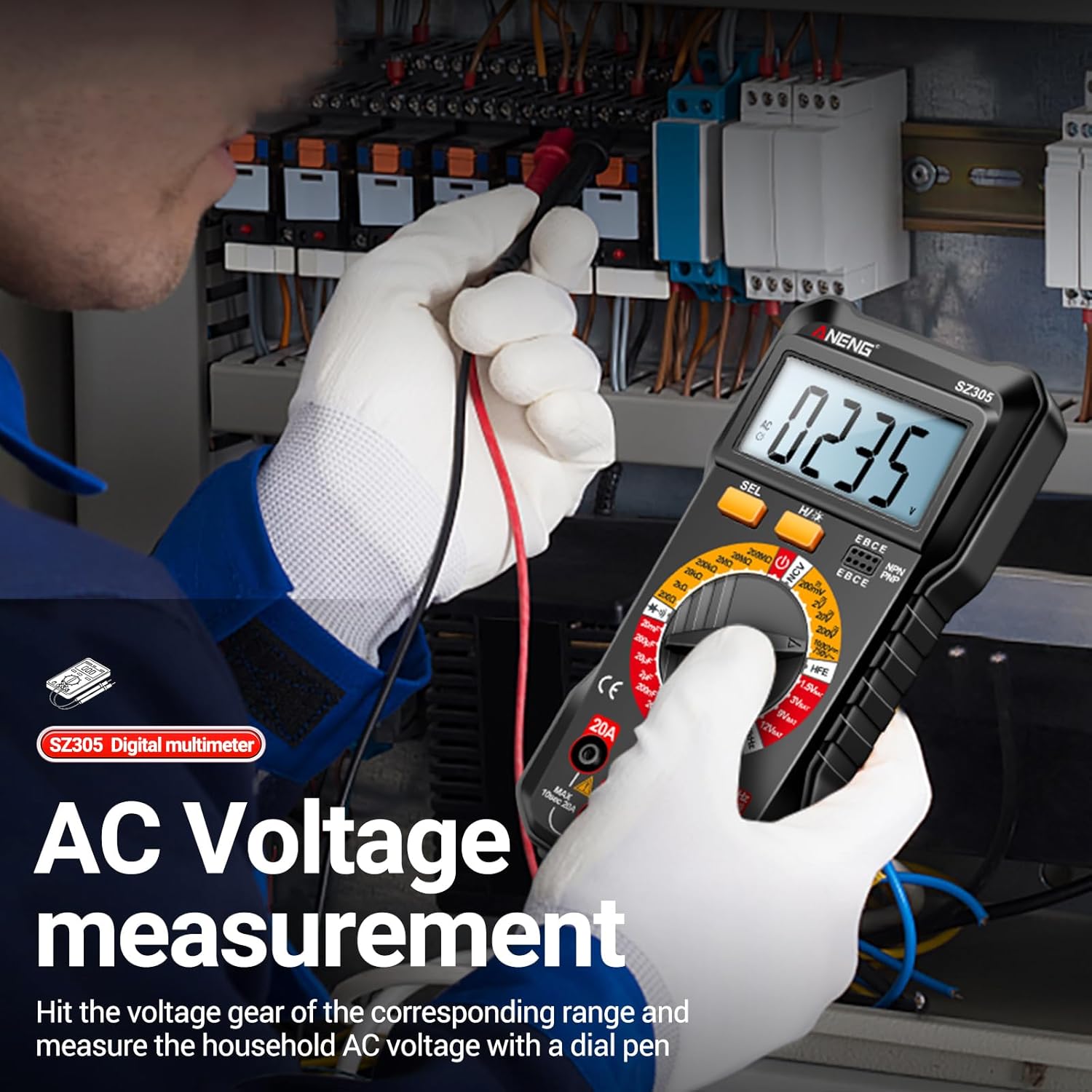
Image 4.2: A user measuring AC voltage with the Irfora SZ305 Digital Multimeter in an electrical panel, demonstrating proper probe placement.
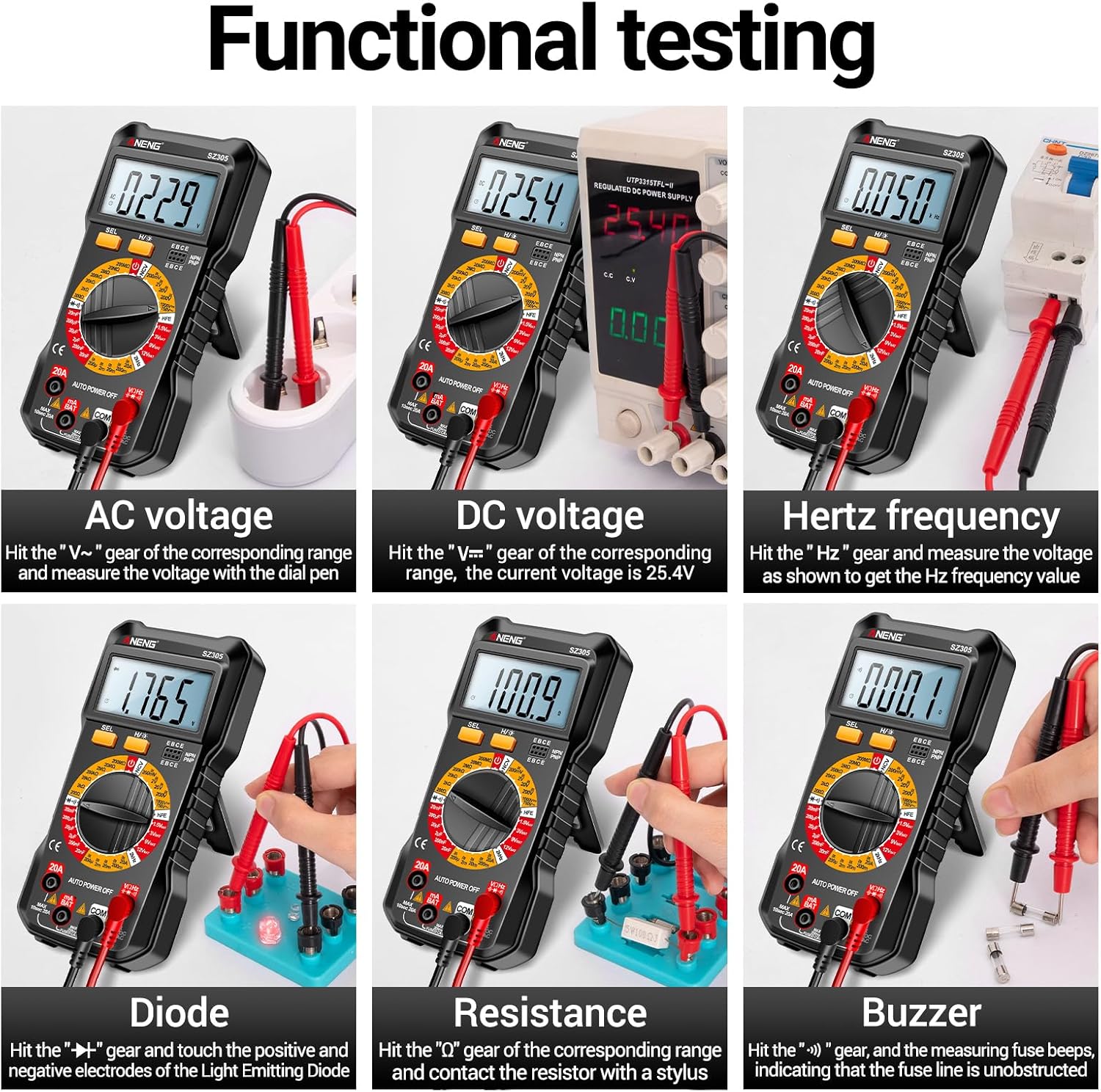
Bilde 4.3: Eks.amples of functional testing with the Irfora SZ305, showing measurements for AC voltage, DC voltage, Hertz frequency, diode, resistance, and continuity (buzzer).
4.3 Måling av AC/DC-strøm
Forsiktighet: Ensure the circuit is de-energized before connecting the multimeter in series for current measurement. Incorrect connection can blow the fuse or damage the meter.
- Insert the red test lead into the "mA" or "20A" jack (depending on expected current) and the black test lead into the "COM" jack.
- Rotate the rotary switch to the appropriate "mA~" / "mA=" or "20A~" / "20A=" range.
- Åpne kretsen der strømmen skal måles og seriekoble multimeteret.
- Sett strøm på kretsen og les av strømverdien.

Bilde 4.4: Eks.amples of functional testing with the Irfora SZ305, showing measurements for 9V, 3V, 1.5V, and 12V batteries, hFE, capacitance, AC current, and DC current.
4.4 Motstandsmåling
- Insert the red test lead into the "VHz" jack and the black test lead into the "COM" jack.
- Rotate the rotary switch to the "Ω" (Resistance) range.
- Ensure the component to be measured is de-energized. Connect the test probes across the component.
- Les av motstandsverdien.
4.5 Kapasitansmåling
- Insert the red test lead into the "VHz" jack and the black test lead into the "COM" jack.
- Rotate the rotary switch to the "F" (Capacitance) range.
- Sørg for at kondensatoren er helt utladet før måling for å unngå skade på måleren.
- Koble testprobene over kondensatorterminalene.
- Les av kapasitansverdien.
4.6 Diode Test and Continuity (Buzzer)
- Insert the red test lead into the "VHz" jack and the black test lead into the "COM" jack.
- Rotate the rotary switch to the "Diode/Buzzer" symbol.
- For diodetest: Koble den røde proben til anoden og den svarte proben til katoden på dioden. En forovergående volumstrømtage drop will be displayed. Reverse the probes; an open circuit ("OL") should be displayed.
- For kontinuitetstest: Connect the probes across the circuit or component. If resistance is below a certain threshold, the buzzer will sound, indicating continuity.
4.7 Frekvensmåling (Hz)
- Insert the red test lead into the "VHz" jack and the black test lead into the "COM" jack.
- Rotate the rotary switch to the "Hz" range.
- Koble testprobene over signalkilden.
- Read the frequency value displayed.
4.8 hFE-triodetest
This function measures the DC current gain (hFE) of transistors.
- Rotate the rotary switch to the "hFE" position.
- Identify whether the transistor is NPN or PNP type.
- Insert the transistor leads (Emitter, Base, Collector) into the corresponding sockets on the multimeter's hFE test port.
- Read the hFE value displayed on the screen.

Image 4.5: The Irfora SZ305 Digital Multimeter conducting an hFE test, showing a transistor inserted into the dedicated test socket.
4.9 Ikke-kontakt Voltage (NCV) Deteksjon
NCV-funksjonen tillater deteksjon av AC-volumtaguten direkte kontakt, noe som forbedrer sikkerheten.
- Rotate the rotary switch to the "NCV" position.
- Bring the top front part of the multimeter close to the suspected AC voltage source (e.g., a live wire, outlet).
- The multimeter will emit an audible alarm and the NCV indicator will flash. The closer the device is to the voltage source, the more urgent the alarm will be.

Image 4.6: The Irfora SZ305 Digital Multimeter demonstrating its Non-Contact Voltage (NCV) detection feature near an electrical outlet, indicating the presence of AC voltage.
4.10 Battery Detection (1.5V, 3V, 9V, 12V)
Multimeteret kan teste vanlig batterivolumtages.
- Rotate the rotary switch to the desired battery voltage range (e.g., "1.5V BAT", "3V BAT", "9V BAT", "12V BAT").
- Koble den røde testledningen til den positive polen på batteriet og den svarte testledningen til den negative polen.
- Les voltage vises på skjermen.
5. Vedlikehold
5.1 Rengjøring
For å rengjøre multimeteret, tørk av huset med enamp klut og et mildt vaskemiddel. Ikke bruk slipemidler eller løsemidler. Sørg for at enheten er slått av og koblet fra alle kretser før rengjøring.
5.2 Batteribytte
Refer to section 3.1 for instructions on battery installation and replacement. Replace batteries when the low battery indicator appears on the display to maintain measurement accuracy.
5.3 Bytte av sikring
If the current measurement function fails, the fuse may need replacement. This typically requires opening the back casing of the multimeter. Refer to the specifications for the correct fuse type and rating. If unsure, consult a qualified technician.
6. Feilsøking
- Ingen skjerm eller svak skjerm:
- Sjekk batteriladingen. Skift batteriene hvis de er lave.
- Ensure the multimeter is powered on by rotating the switch from "AUTO POWER OFF".
- Feil avlesninger:
- Sørg for at riktig funksjon og område er valgt for målingen.
- Check test leads for proper connection and damage.
- Verify battery charge. Low batteries can affect accuracy.
- Ensure the circuit or component is properly prepared (e.g., capacitor discharged).
- Strømmåling fungerer ikke:
- Check if the fuse is blown. Replace if necessary (refer to section 5.3).
- Ensure test leads are connected to the correct current jacks ("mA" or "20A").
- Verify the multimeter is connected in series with the circuit.
- NCV function not responding:
- Ensure the rotary switch is set to "NCV".
- Confirm there is an AC voltage source present.
7. Spesifikasjoner
| Trekk | Detalj |
|---|---|
| Modell | SZ305 |
| Merke | Irfora |
| Utstilling | 1999 tellere, bakgrunnsbelyst LCD |
| Funksjoner | AC/DC voltage, AC/DC Current, Resistance, Capacitance, Frequency, Diode, Continuity, hFE, NCV, Battery Test |
| Automatisk avslåing | Ja |
| Farge | Svart |
| Produsentreferanse | TYHDEE24863B |
Note: Detailed measurement ranges and accuracies are typically found in the full product datasheet.