
Introduksjon
Thank you for choosing the Hecate G3m Pro Wireless Bluetooth Gaming Mouse. This manual provides detailed instructions for setting up, operating, and maintaining your new gaming mouse. Designed for performance and versatility, the G3m Pro offers three-mode connectivity, a high-precision sensor, and a lightweight, silent design to enhance your gaming experience.
Produkt overview
The Hecate G3m Pro features a robust design with multiple buttons and connectivity options. Familiarize yourself with the mouse components before use.
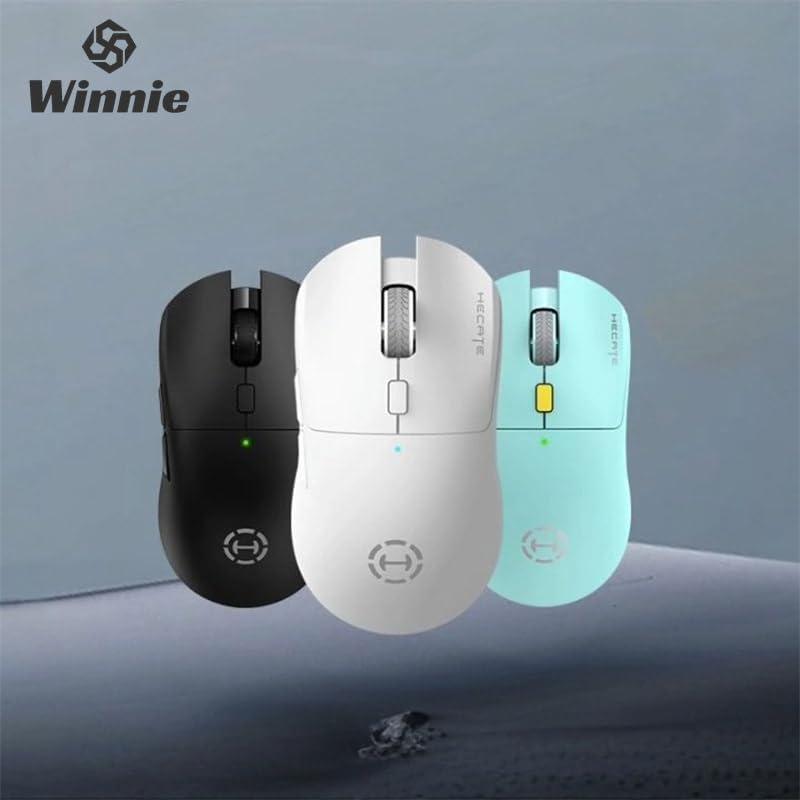
Figure 1: Hecate G3m Pro Wireless Gaming Mouse (Black)
- Venstre/høyre klikkknapper: Standard musefunksjoner.
- Rullehjul: For scrolling and middle-click functionality.
- DPI-syklusknapp: Adjusts the mouse sensitivity (DPI) on the fly.
- Sideknapper: Programmable for various in-game actions or navigation.
- Bryter for tilkoblingsmodus: Located on the underside, allows switching between 2.4GHz, Bluetooth, and Wired modes.
- USB-C-port: For kablet tilkobling og lading.
Oppsett
Follow these steps to set up your Hecate G3m Pro mouse.
1. Lade musen
Before first use, ensure the mouse is fully charged. Connect the provided USB-C cable to the mouse's USB-C port and the other end to a USB power source (e.g., computer, wall adapter). The LED indicator will show charging status.
2. Connecting via 2.4GHz Wireless (USB Dongle)
- Locate the USB 2.4GHz receiver (dongle) usually stored in a compartment on the underside of the mouse.
- Koble USB-mottakeren til en ledig USB-port på datamaskinen.
- Switch the connectivity mode selector on the mouse to the '2.4G' position.
- The mouse should automatically connect to your computer. The LED indicator may flash briefly and then become solid to indicate a successful connection.
3. Koble til via Bluetooth
- Switch the connectivity mode selector on the mouse to the 'BT' (Bluetooth) position.
- Gå til Bluetooth-innstillingene på datamaskinen eller enheten din og aktiver Bluetooth.
- The mouse LED indicator will start flashing, indicating it is in pairing mode.
- Select 'Hecate G3m Pro' from the list of available Bluetooth devices on your computer/device to pair.
- Når den er paret, vil LED-indikatoren lyse kontinuerlig.
4. Connecting via Wired Mode
- Koble den medfølgende USB-C-kabelen til musens USB-C-port.
- Koble den andre enden av USB-C-kabelen til en ledig USB-port på datamaskinen.
- Switch the connectivity mode selector on the mouse to the 'Wired' position.
- Musen vil fungere som en kablet mus og vil også lade det interne batteriet.
Bruksanvisning
Understand the functions of your mouse for optimal use.
DPI-justering
Press the DPI cycle button (usually located behind the scroll wheel) to cycle through different DPI settings. Each press will change the sensitivity, often indicated by a change in the LED color or a specific number of flashes. The mouse supports up to 26000 DPI.
Modusbytte
Use the switch on the underside of the mouse to select your preferred connection mode: 2.4GHz, Bluetooth, or Wired. Switch modes according to your device and usage scenario.
Tilpasse knapper
For advanced customization of buttons and macros, it is recommended to download the official Hecate software (if available) from the manufacturer's website. This software allows you to reassign button functions, create profiles, and fine-tune performance settings.
Vedlikehold
Proper maintenance ensures the longevity and performance of your mouse.
Rengjøring
- Bruk en myk, tørr klut til å tørke av overflaten på musen.
- For gjenstridig smuss, litt dampSkyll kluten med vann eller et mildt rengjøringsmiddel. Unngå sterke kjemikalier.
- Ikke la væske komme inn i musens indre komponenter.
- Rengjør den optiske sensoren på undersiden med jevne mellomrom med en bomullspinne for å sikre nøyaktig sporing.
Batteripleie
- Unngå å utlade batteriet helt ofte.
- Lad musen når batteriindikatoren indikerer lavt strømforbruk.
- If storing the mouse for an extended period, charge it to about 50% and store it in a cool, dry place.
Lagring
Store the mouse in a clean, dry environment away from extreme temperatures and direct sunlight. Keep it away from dust and moisture.
Feilsøking
If you encounter issues with your Hecate G3m Pro mouse, refer to the following common solutions.
Musen svarer ikke
- Sjekk batteri: Sørg for at musen er ladet. Koble den til via USB-C-kabel for å lade.
- Sjekk tilkoblingsmodus: Verify that the mode switch on the underside of the mouse is set to the correct mode (2.4G, BT, or Wired) for your connection type.
- 2.4 GHz tilkobling: Sørg for at USB-mottakeren er ordentlig koblet til en fungerende USB-port. Prøv en annen USB-port.
- Bluetooth-tilkobling: Re-pair the mouse with your device. Go to Bluetooth settings, remove the mouse, and then add it again. Ensure your device's Bluetooth is enabled.
- Kablet tilkobling: Sørg for at USB-C-kabelen er ordentlig koblet til både musen og datamaskinen. Prøv en annen USB-port eller kabel.
Inconsistent Tracking or Cursor Movement
- Rengjør sensor: Rengjør den optiske sensoren på undersiden av musen.
- Mouse Pad: Use the mouse on a clean, uniform surface or a high-quality mouse pad. Avoid reflective or glass surfaces.
- DPI -innstilling: Adjust the DPI setting using the DPI cycle button to find a comfortable sensitivity.
Knapper fungerer ikke
- Programvareforstyrrelser: Hvis du bruker tilpasset programvare, kan du prøve å tilbakestille knapptilordningene til standard.
- Test på en annen enhet: Connect the mouse to another computer to determine if the issue is with the mouse or the original device's settings.
Spesifikasjoner
Detailed technical specifications for the Hecate G3m Pro Wireless Bluetooth Gaming Mouse.
| Trekk | Beskrivelse |
|---|---|
| Modell | G3m Pro |
| Merke | Hecate |
| Tilkoblingsteknologi | 2.4GHz Wireless, Bluetooth, Wired (USB-C) |
| Bevegelsesdeteksjon | Optical (Paw3395 Sensor) |
| DPI (Dots Per Inch) | Opptil 26000 DPI |
| Akselerasjon | 50G |
| IPS (tommer per sekund) | 600 |
| Antall knapper | 6 |
| Antall ruller | 1 (Skrollhjul) |
| Håndorientering | Ambidekstrøs |
| Spesialfunksjon | Lightweight (Approx. 63g) |
| Strømtype | Oppladbart batteri |
| Anbefalt bruk | Gaming |
| Kompatible enheter | Personal Computer, Laptop, Game Console |
| Operativsystemer | Linux, Windows XP (og nyere versjoner) |
Garanti og støtte
Your Hecate G3m Pro Wireless Bluetooth Gaming Mouse comes with a warranty and dedicated support.
Garantiinformasjon
All products are covered by a 12 måneders garanti fra kjøpsdatoen. Denne garantien dekker produksjonsfeil og problemer som oppstår ved normal bruk.
Kundestøtte
If you encounter any problems with your product, such as defective or incorrect items, please do not hesitate to contact us. We are committed to providing prompt assistance and will respond to your inquiries within 24 hours. Please refer to your purchase documentation for specific contact details or visit the official Hecate support webnettstedet.