
1. Produktet er overview
The Keyscaper Star Wars Darth Vader Wireless Mouse is designed for comfort and precision, featuring a distinctive Darth Vader color block design. This wireless mouse connects via a USB nano-receiver and is powered by two AAA batteries. It offers laser-optical precision and an auto-sleep function to maximize battery life.

Figure 1: Keyscaper Star Wars Darth Vader Wireless Mouse
Nøkkelfunksjoner:
- Officially licensed Star Wars product.
- Easy plug & play functionality via included USB nano-receiver.
- Laser-optical precision for accurate and responsive tracking.
- Auto-sleep feature to conserve battery power.
- Durable full-color printed logo.
2. Installasjonsinstruksjoner
2.1 Hva er i esken
- Keyscaper Star Wars Darth Vader Wireless Mouse
- USB nano-mottaker
- 2 AAA-batterier (forhåndsinstallert eller inkludert separat)
2.2 Installasjon av batteri
- Finn batteridekselet på undersiden av musen.
- Skyv eller løft forsiktig på dekselet for å åpne rommet.
- Sett inn to AAA-batterier, og sørg for at polariteten (+/-) er riktig veiledet som angitt inni batterirommet.
- Sett på batteridekselet til det klikker ordentlig på plass.

Figure 2: Mouse components and battery installation
2.3 Connecting the USB Nano-Receiver
- Locate the USB nano-receiver, typically stored within a slot in the battery compartment for convenience.
- Remove the nano-receiver from its storage slot.
- Plug the USB nano-receiver into an available USB-A port on your computer or laptop.
- Datamaskinen din skal automatisk oppdage og installere de nødvendige driverne. Dette kan ta noen minutter.

Figure 3: USB nano-receiver storage
2.4 Slå på/av
- On the underside of the mouse, locate the ON/OFF switch.
- Slide the switch to the "ON" position to activate the mouse.
- To conserve battery life when not in use, slide the switch to the "OFF" position.
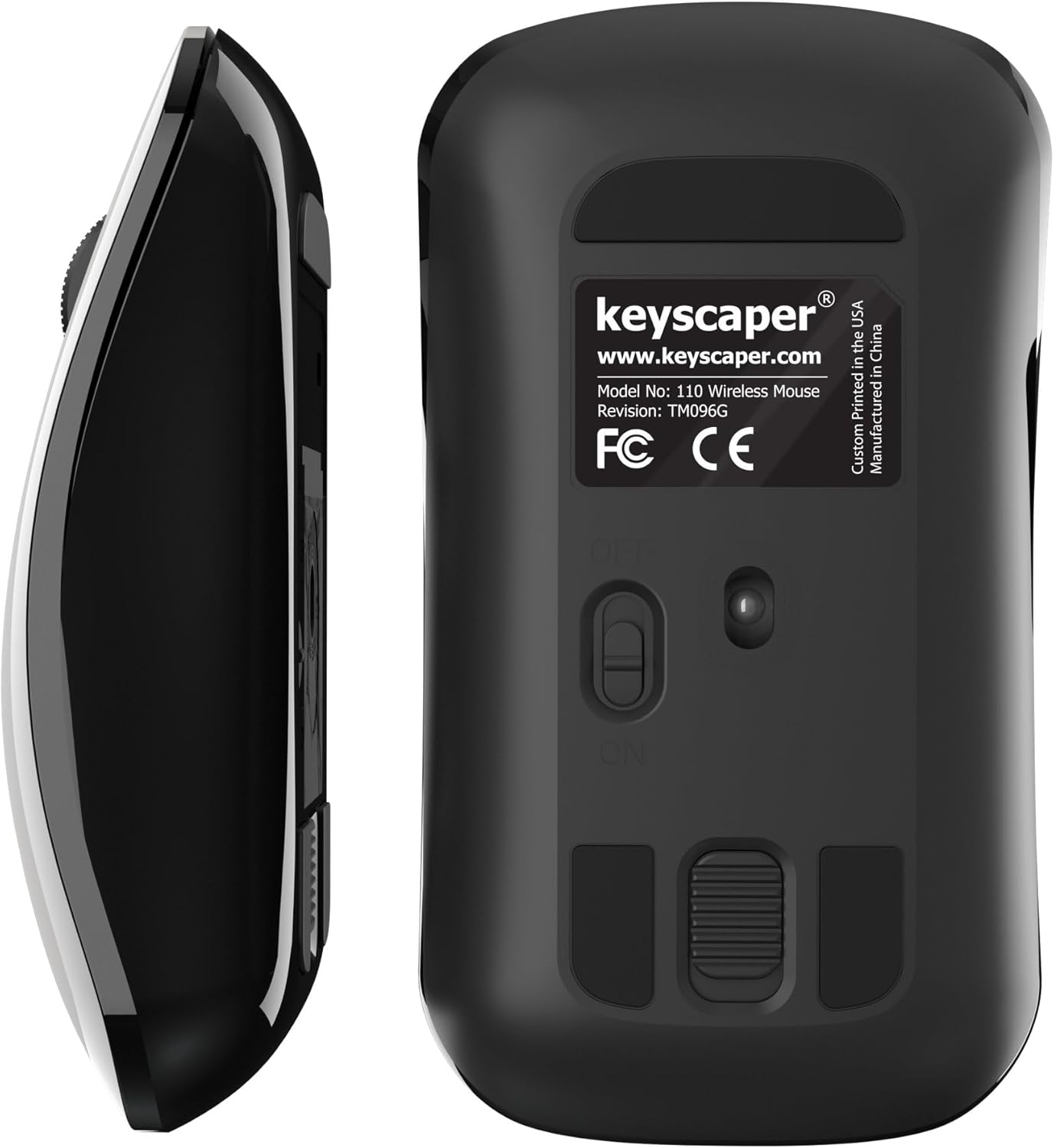
Figure 4: Underside of the mouse
3. Bruksanvisning
3.1 Grunnleggende bruk
- Venstre klikk: Press the left button for primary actions (selecting, opening).
- Høyreklikk: Press the right button for secondary actions (context menus).
- Rullehjul: Roll the wheel up or down to scroll through documents or web sider. Trykk på rullehjulet for å bruke midtklikkfunksjonaliteten (f.eks. åpne lenker i nye faner).
3.2 Automatisk hvilemodusfunksjon
The mouse is equipped with an auto-sleep feature. If inactive for a period, it will enter a low-power sleep mode to save battery. To wake the mouse, simply move it or click any button.
4. Vedlikehold
4.1 Batteribytte
When the mouse performance degrades or it stops responding, it's time to replace the AAA batteries. Follow the steps in Section 2.2 for battery installation.
4.2 Rengjøring
For å opprettholde optimal ytelse, rengjør musen med jevne mellomrom:
- Ensure the mouse is turned OFF.
- Bruk en myk, lofri klut lett damprengjøres med vann eller et mildt rengjøringsmiddel for å tørke av utsiden.
- Unngå å få fuktighet inn i noen åpninger.
- Use a dry cotton swab to gently clean the optical sensor on the underside.
5. Feilsøking
5.1 Musen svarer ikke
- Sørg for at musen er slått PÅ.
- Sjekk batteriene. Skift dem ut hvis de er lave eller utladede.
- Verify that the USB nano-receiver is securely plugged into a working USB-A port on your computer. Try a different USB port if necessary.
- Move the mouse closer to the USB nano-receiver to rule out range issues.
- Start datamaskinen på nytt.
5.2 Uregelmessig markørbevegelse
- Clean the optical sensor on the underside of the mouse (refer to Section 4.2).
- Ensure you are using the mouse on a suitable surface. Highly reflective or uneven surfaces may cause issues. A mouse pad is recommended for best performance.
6. Spesifikasjoner
- Modellnummer: 110WL
- Produktdimensjoner: 2 x 1 x 0.1 tommer
- Varevekt: 4 unser
- Tilkoblingsteknologi: Radio Frequency (via USB nano-receiver)
- Bevegelsesdeteksjonsteknologi: Optisk
- Batterier: 2 AAA-batterier (inkludert)
- Farge: Darth Vader (Color Block)
- Produsent: Dongguan Togran Electronic Technology Co, Ltd.
7. Garanti og støtte
For warranty information or technical support, please refer to the official Keyscaper webnettstedet eller kontakt kundeservicen deres. Ta vare på kjøpskvitteringen for garantikrav.
This product is designed and printed by Keyscaper in Tualatin, Oregon, USA, and manufactured by Dongguan Togran Electronic Technology Co, Ltd.