
1. Introduksjon
This manual provides detailed instructions for the safe and effective use of your Levana Nala 5.5" HD Video Baby Monitor. This system is designed to provide secure, high-definition video and audio monitoring of your child without relying on Wi-Fi, ensuring privacy and reliability.
Key features include a 5.5-inch 1080P HD display, a Pan-Tilt-Zoom (PTZ) camera with night vision, two-way talk functionality, and an extended battery life of up to 22 hours.

Image: The Levana Nala 5.5" HD Video Baby Monitor system, showing the monitor, camera, and carrying case.
2. Sikkerhetsinformasjon
- Kvelningsfare: Keep all power cords and cables out of reach of children (at least 3 feet / 1 meter away). Never place the camera or cords within a crib or playpen.
- Vann og fuktighet: Do not expose the monitor or camera to water or moisture. This product is for indoor use only.
- Varmekilder: Hold enheten unna varmekilder som radiatorer, varmeovner, ovner eller andre varmeproduserende apparater.
- Ventilasjon: Ensure proper ventilation around the camera and monitor. Do not block ventilation openings.
- Voksenoppsyn: This product is intended to assist in monitoring your child and is not a substitute for proper adult supervision.
- Secure Signal: The Levana Nala monitor utilizes GigaXtreme wireless technology, providing a secure, unhackable connection without Wi-Fi or Bluetooth, enhancing your privacy.

Image: The Levana Nala monitor highlighting its secure, unhackable signal without Wi-Fi, Bluetooth, or mobile app.
3. Pakkens innhold
Bekreft at alle varene er til stede i pakken din:
- 1 x 5.5" 1080P Monitor
- 1 x 1080P PTZ Camera
- 1 x Camera Charger (6.5 ft)
- 1 x Monitor Charger (6.5 ft)
- 1 x kameramonteringsmaskinvare
- 1 x Premium Carrying Case
- Hurtigstartguide
- 2 års garantiinformasjon
- Lifetime Support Information

Image: A visual representation of all components included in the Levana Nala baby monitor package.
4. Oppsett
4.1 Kameraplassering
- Place the camera on a flat surface or mount it to a wall using the included hardware. Ensure the camera is at least 3 feet (1 meter) away from the crib or playpen to prevent cord entanglement.
- Position the camera to provide a clear view of your child. The PTZ (Pan-Tilt-Zoom) function allows for remote adjustment after placement.
- Plug the camera charger into the camera and then into a power outlet.
4.2 Monitor Setup
- Plasser skjermen på et praktisk sted hvor du enkelt kan view skjermen.
- Plug the monitor charger into the monitor and then into a power outlet. The monitor's internal battery will begin charging.
- Press and hold the Power button on the monitor to turn it on. The monitor and camera should automatically connect.
4.3 Pairing Additional Cameras (Optional)
If you have purchased additional cameras, they may need to be manually paired. Refer to the Quick Start Guide for specific pairing instructions, typically found within the monitor's menu settings under 'Camera Management' or 'Add Camera'.

Image: The Levana Nala monitor and camera illustrating its pan, tilt, and zoom capabilities for comprehensive room coverage.
5. Bruksanvisning
5.1 Monitorkontroller
Familiarize yourself with the buttons on your monitor:
- Strømknapp: Press and hold to turn the monitor on/off. Press briefly to turn the screen on/off while audio continues.
- Menyknapp: Access settings, camera management, lullabies, and other features.
- Navigasjonsknapper (opp/ned/venstre/høyre): Used to navigate menus and control camera pan/tilt.
- OK/Velg-knapp: Bekreft valgene i menyen.
- Zoomknapp: Magnify the image on the screen (digital zoom up to 4x).
- Toveis taleknapp: Press and hold to speak through the camera to your child.
- Volumknapper: Adjust the audio level from the camera.
5.2 Videoovervåking
The 5.5" HD display provides a clear 1080P view of your child. The monitor automatically switches to night vision in low-light conditions, displaying a clear black and white image.
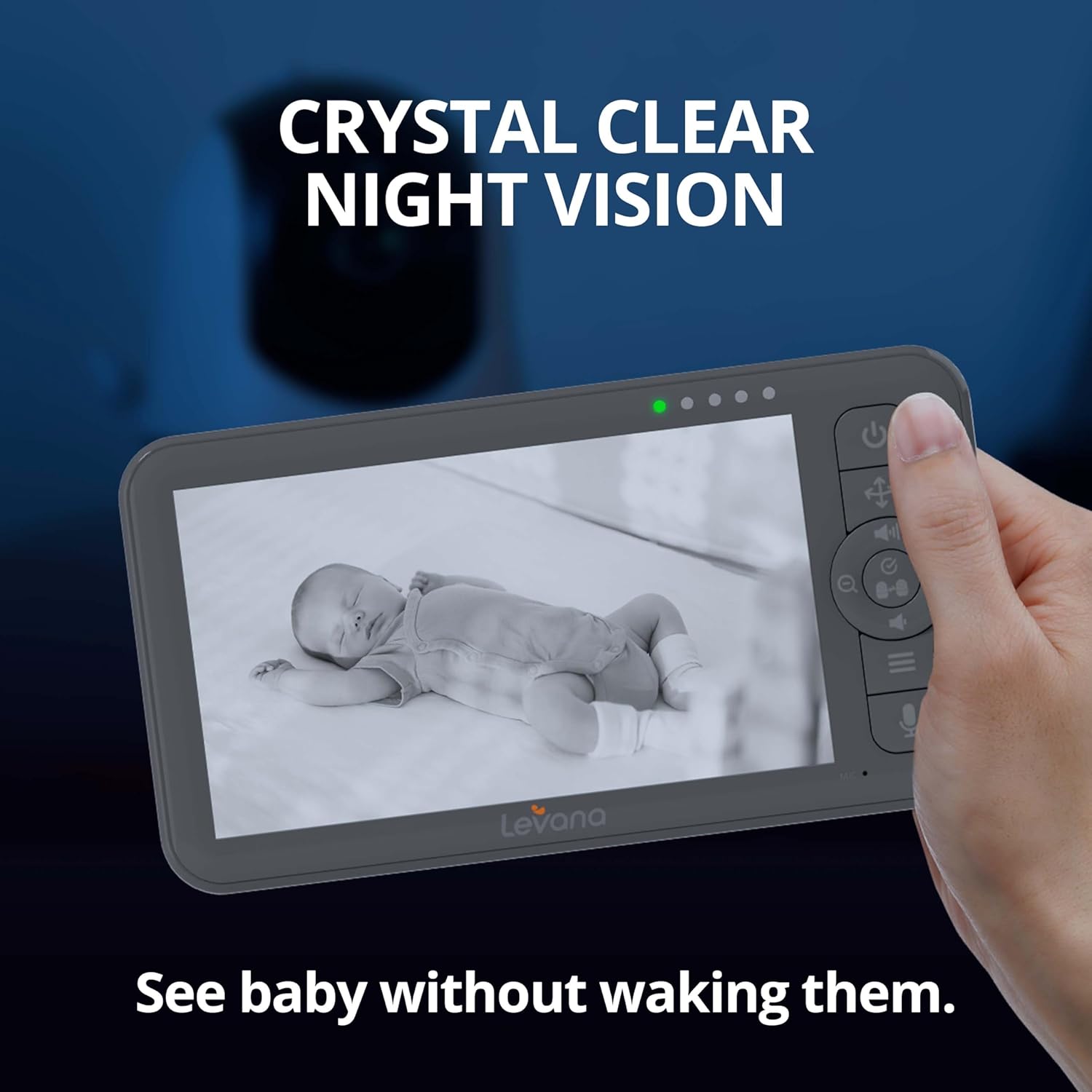
Image: The Levana Nala monitor showcasing its crystal clear night vision capability, allowing monitoring without disturbing the baby.
5.3 Toveis samtale
To comfort your child, press and hold the Two-Way Talk button on the monitor. Speak clearly into the monitor's microphone. Your voice will be transmitted through the camera's speaker.

Image: The Levana Nala monitor demonstrating the two-way talk feature, allowing parents to soothe their baby remotely.
5.4 Panorering, vipping og zoom (PTZ)
Use the navigation buttons on the monitor to remotely adjust the camera's view:
- Panne: Move the camera horizontally (left/right).
- Tilt: Move the camera vertically (up/down).
- Zoom: Press the dedicated Zoom button to digitally zoom in or out on the image.
5.5 Batterilevetid
The monitor features a powerful 5000mAh rechargeable battery, providing up to 22 hours of continuous video monitoring. Battery life may vary based on usage and settings (e.g., screen brightness, VOX mode).

Image: The Levana Nala monitor highlighting its extended 22-hour battery life for day and night use.
5.6 VOX Mode (Cry Detection)
The monitor can be set to VOX (Voice Operated eXchange) mode, where the screen and/or audio activate only when sound is detected from the camera. This conserves battery and reduces screen light during quiet periods.

Image: The monitor demonstrating its ability to activate when sound is detected, showing a sleeping baby with the screen off and an awake baby with the screen on.
5.7 vuggeviser
The camera can play built-in lullabies to help soothe your child. Access this feature through the monitor's menu.

Image: A baby sleeping peacefully with musical notes originating from the camera, illustrating the lullaby function.
6. Vedlikehold
- Rengjøring: Use a soft, dry cloth to clean the monitor and camera surfaces. Do not use liquid cleaners or aerosol sprays.
- Batteripleie: To prolong battery life, avoid fully discharging the monitor's battery frequently. Charge the monitor regularly.
- Lagring: If storing the device for an extended period, ensure the battery is partially charged (around 50%) and store in a cool, dry place.
7. Feilsøking
| Problem | Mulig årsak | Løsning |
|---|---|---|
| Ikke noe bilde/lyd på skjermen | Monitor or camera is off; Out of range; Low battery; Not paired. | Ensure both units are powered on and charged. Move monitor closer to camera. Re-pair units if necessary (refer to Section 4.3). |
| Dårlig bildekvalitet | Low light (night vision active); Camera lens dirty; Obstructions. | Ensure adequate lighting if color vision is desired. Clean camera lens. Remove any objects blocking the camera's view. |
| Ingen lyd eller lite volum | Monitor volume too low; VOX sensitivity too low. | Increase monitor volume. Adjust VOX sensitivity in the menu. |
| Monitor not charging | Charger not properly connected; Faulty charger/cable. | Ensure charger is securely plugged into both monitor and outlet. Try a different compatible charger/cable if available. |
| Camera PTZ not responding | Out of range; Interference. | Move monitor closer to the camera. Ensure no large metal objects or other wireless devices are causing interference. |
8. Spesifikasjoner
- Monitor Screen Size: 5.5 tommer
- Videooppløsning: 1080p HD
- Tilkobling: Giga Xtreme Wireless Technology (No Wi-Fi, No Bluetooth)
- Trådløs rekkevidde: Opptil 1000 fot (siktlinje)
- Kamerafunksjoner: Pan, Tilt, Zoom (PTZ), Night Vision, Two-Way Talk
- Optisk zoom: 4x digital zoom
- Monitor batteri: 5000 mAh, up to 22 hours continuous video
- Strømkilde: Battery Powered (Monitor), AC Adapter (Camera)
- Innendørs/utendørs bruk: Innendørs
- Monteringstype: Veggfeste
- Materiale: Plast
- Voltage: 5 volt
- Produktdimensjoner: 6.63 x 3.5 x 0.75 inches (Monitor)
- Varevekt: 2.75 pounds (Total package)
- UPC: 842751005596
- Internasjonal beskyttelsesvurdering: IP65 (Camera, for dust and water resistance)
9. Garanti og støtte
Your Levana Nala 5.5" HD Video Baby Monitor comes with a 2 års garanti, covering defects in materials and workmanship under normal use. Additionally, Levana provides Lifetime Support for dette produktet.
For warranty claims, technical assistance, or any questions regarding your product, please refer to the contact information provided in your Quick Start Guide or visit the official Levana support webnettstedet.