
TELLUR Obia PRO
TELLUR Obia PRO 60W Bluetooth-høyttaler brukerhåndbok
Model: Obia PRO | Brand: TELLUR
1. Introduksjon
This manual provides essential information for the safe and efficient operation of your TELLUR Obia PRO 60W Bluetooth Speaker. Please read this manual thoroughly before using the product and retain it for future reference.
2. Sikkerhetsinformasjon
- Ikke utsett høyttaleren for ekstreme temperaturer eller direkte sollys over lengre tid.
- Unngå å miste eller utsett høyttaleren for sterke støt.
- Ikke forsøk å demontere eller modifisere høyttaleren. Dette vil ugyldiggjøre garantien.
- Hold høyttaleren unna medisinsk utstyr.
- Ensure the charging port cover is securely closed when near water to maintain IPX6 water resistance.
- Bruk kun den spesifiserte ladekabelen og strømadapteren.
3. Pakkens innhold
Bekreft at alle varene er til stede i pakken:
- TELLUR Obia PRO 60W Bluetooth Speaker
- USB ladekabel
- 3.5 mm AUX lydkabel
- Brukerhåndbok (dette dokumentet)
4. Produktet er overview og kontroller
Gjør deg kjent med høyttalerens komponenter og kontrollknapper.

Figur 4.1: Front view of the TELLUR Obia PRO speaker, showcasing the main grille, control panel, and integrated LED lights on the handle and side woofers.
4.1 Kontrollpanel

Figur 4.2: Detaljert view of the control buttons located on the top panel of the speaker.
- Volum ned (-) / Forrige spor: Trykk kort for å redusere volumet. Trykk og hold inne for å gå til forrige spor.
- Volum opp (+) / Neste spor: Press briefly to increase volume. Press and hold to go to the next track.
- LED Light Mode Button: Press to cycle through different LED light modes.
- Strømknapp: Press and hold to power on/off. Briefly press to play/pause music.
- TWS-knapp (ekte trådløs stereo): Press to activate TWS pairing mode.
- Modusknapp (M): Trykk for å veksle mellom Bluetooth-, USB- og AUX-inngangsmodus.
4.2 Inn-/utgangsporter
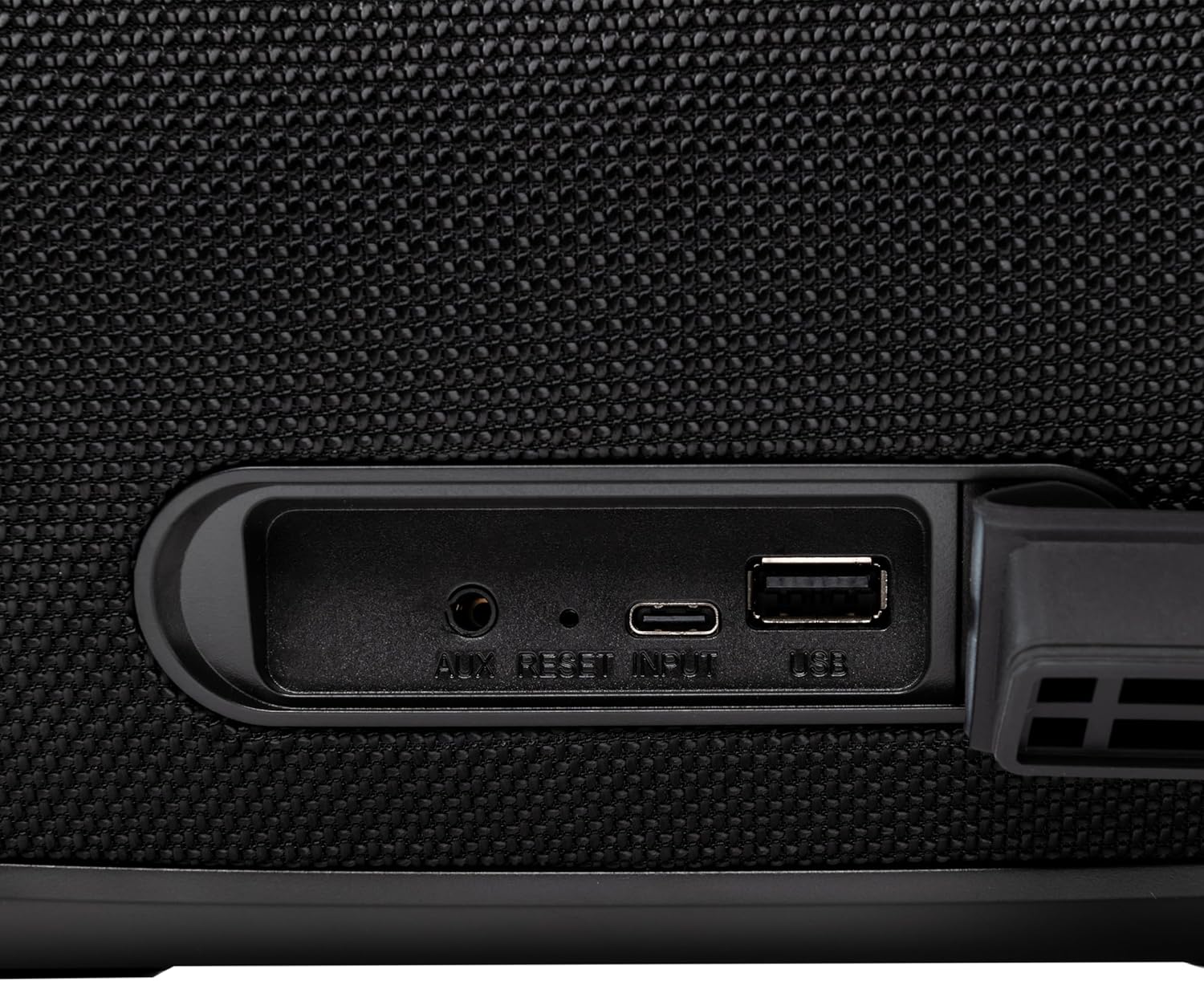
Figur 4.3: Close-up of the protected input/output ports on the rear of the speaker.
- AUX-IN-port: For tilkobling av eksterne lydenheter via en 3.5 mm lydkabel.
- Tilbakestill-knapp: Use a thin object to press and reset the speaker if necessary.
- USB-C-inngang: For å lade høyttaleren.
- USB-A-port: For avspilling av MP3-lyd files from a USB drive or for power bank functionality.
5. Oppsett
5.1 Lade høyttaleren
Before initial use, fully charge the speaker. The speaker also functions as a power bank to charge other devices via its USB-A port.
- Connect the USB charging cable to the USB-C input port on the speaker.
- Koble den andre enden av kabelen til en kompatibel USB-strømadapter (ikke inkludert).
- The charging indicator light will illuminate. It will turn off once charging is complete.
- The battery level can be displayed on your connected phone when paired via Bluetooth.
5.2 Slå på/av
- For å slå på: Trykk og hold inne Strømknapp for approximately 3 seconds until you hear an audible prompt and the LED lights activate.
- Slik slår du av: Trykk og hold inne Strømknapp for approximately 3 seconds until you hear an audible prompt and the LED lights turn off.
6. Bruksanvisning
6.1 Bluetooth-paring
The speaker uses Bluetooth v5.3 for stable wireless connection up to 10 meters.
- Ensure the speaker is powered on and in Bluetooth mode (indicated by a flashing blue LED). If not, press the Modusknapp (M) for å bytte til Bluetooth-modus.
- Aktiver Bluetooth på mobilenheten din (smarttelefon, nettbrett osv.).
- Søk etter tilgjengelige Bluetooth-enheter og velg "TELLUR Obia PRO" fra listen.
- Once paired, the speaker will emit an audible confirmation, and the blue LED will stop flashing.
- Høyttaleren vil automatisk koble seg til den sist parede enheten når den slås på, hvis tilgjengelig.

Figur 6.1: The TELLUR Obia PRO speaker wirelessly connected to a smartphone, ready for audio playback.
6.2 Ekte trådløs stereo (TWS)-funksjon
TWS allows you to pair two Obia PRO speakers for a stereo sound experience.
- Ensure both Obia PRO speakers are powered on and in Bluetooth mode, but not yet paired with any device.
- På én høyttaler (dette vil være hovedhøyttaleren), trykk på TWS-knapp. The speaker will enter TWS pairing mode, indicated by a flashing light.
- The two speakers will automatically connect to each other. Once connected, you will hear an audible confirmation, and the TWS indicator light on both speakers will become solid.
- Now, connect your mobile device to the primary speaker via Bluetooth as described in Section 6.1. The audio will play in stereo across both speakers.
6.3 Multiple Link Technology
This technology allows connecting an unlimited number of Obia PRO speakers wirelessly for a synchronized audio experience. Refer to the manufacturer's website or specific instructions for detailed setup of Multiple Link.
6.4 USB Playback (MP3)
Spill MP3-lyd files directly from a USB flash drive (up to 128GB).
- Sett inn en USB-flash-stasjon som inneholder MP3 files inn i USB-A-porten.
- Trykk på Modusknapp (M) to switch to USB mode. The speaker will automatically begin playing music from the USB drive.
- Bruk Volum opp/ned og Strømknapp (for play/pause) to control playback.
6.5 AUX-INN-tilkobling
Connect non-Bluetooth devices using the 3.5mm AUX audio cable.
- Connect one end of the 3.5mm AUX audio cable to the AUX-IN port on the speaker.
- Connect the other end to the audio output jack of your external device (e.g., MP3 player, laptop).
- Trykk på Modusknapp (M) for å bytte til AUX-modus.
- Kontroller avspilling og volum fra den eksterne enheten din.
6.6 Håndfri samtale
When connected to a smartphone via Bluetooth, the speaker's built-in microphone allows for hands-free calls.
- Svar/avslutt samtale: Trykk kort på Strømknapp.
- Avvis anrop: Trykk og hold inne Strømknapp i 2 sekunder.
6.7 LED-lysmoduser
The speaker features integrated LED lights with multiple display modes.
- Trykk på LED-lysmodusknapp to cycle through available light patterns and colors.
- Trykk og hold inne LED-lysmodusknapp to turn the lights off or on.

Figur 6.2: A user interacting with the LED light mode button to change the speaker's lighting effects.
6.8 Equalizer Settings (Indoor/Outdoor)
The speaker allows for equalizer customization for different environments. Specific controls for this are not detailed in the provided data, but typically involve a dedicated button or a combination of existing buttons. Refer to the product's quick start guide or manufacturer's website for precise instructions on adjusting the equalizer.
7. Vedlikehold
7.1 Rengjøring
- Tørk av høyttaleren med en myk, tørr klut.
- Ikke bruk slipende rengjøringsmidler, alkohol eller kjemiske løsemidler.
7.2 Vannmotstand (IPX6)
The Obia PRO speaker is rated IPX6, meaning it is protected against high-pressure water jets from any direction. This makes it suitable for outdoor use and environments where it might be exposed to splashes or rain.
- Ensure the rubber cover for the charging and AUX ports is securely closed before exposing the speaker to water.
- Ikke senk høyttaleren i vann.
- Etter eksponering for vann, tørk av høyttaleren før lading.
7.3 Batteristell
- For å forlenge batterilevetiden, unngå å utlade batteriet helt ofte.
- Lad høyttaleren regelmessig, selv om den ikke er i bruk, for å opprettholde batterilevetiden.
- Oppbevar høyttaleren på et kjølig og tørt sted når den ikke er i bruk over lengre tid.
8. Feilsøking
| Problem | Mulig årsak | Løsning |
|---|---|---|
| Høyttaleren slår seg ikke på. | Lavt batteri. | Lad høyttaleren helt opp. |
| Kan ikke pares via Bluetooth. | Høyttaleren er ikke i paringsmodus; enhetens Bluetooth er av; for langt fra høyttaleren. | Ensure speaker is in Bluetooth mode (flashing LED). Turn on Bluetooth on your device. Move device closer to speaker (within 10m). |
| Ingen lyd. | Volumet er for lavt; feil modus er valgt; enheten spiller ikke. | Øk høyttaler- og enhetsvolumet. Trykk. Modusknapp (M) to select correct input. Ensure audio is playing on the connected device. |
| TWS-paring mislykkes. | Speakers already paired to a device; not both Obia PRO models. | Disconnect both speakers from any Bluetooth devices. Ensure both speakers are Obia PRO models. Try TWS pairing again. |
| USB-avspilling fungerer ikke. | USB-stasjonen er ikke formatert riktig; støttes ikke file type; drive capacity too large. | Ensure USB drive is formatted to FAT32. Only MP3 files are supported. Max capacity 128GB. |
9. Spesifikasjoner
| Modellnavn | Obia PRO |
| Merke | TELLUR |
| Utgangseffekt | 60W (2x 20W RMS subwoofers, 2x 10W RMS tweeters) |
| Bluetooth-versjon | v5.3 |
| Wireless Range | Opp til 10 meter |
| Frekvensrespons | 80 MHz (Note: This value is unusual for speaker frequency response and may be a typo in source data. Typically measured in Hz-kHz.) |
| Impedans | 4 ohm |
| Lydmoduser | Bluetooth, USB (MP3), AUX-IN |
| USB-støtte | USB 2.0/3.0, up to 128GB (MP3 format) |
| Vannmotstand | IPX6 |
| Batterikapasitet | 5400 mAh |
| Avspillingstid | Opptil 12 timer (ved moderat volum) |
| Power Bank funksjon | Yes, via USB-A port |
| Dimensjoner (L x B x H) | 37.7 x 17 x 18 cm |
| Vekt | 3.48 kg |
| Materiale | Plast |
| Farge | Svart |
Merk: Spesifikasjoner kan endres uten forvarsel.
10. Garanti og støtte
TELLUR products are manufactured to the highest quality standards. For information regarding warranty terms, technical support, or service, please refer to the warranty card included with your product or visit the official TELLUR webnettstedet.
Kontaktinformasjon: Vennligst besøk www.tellur.com for den nyeste støtteinformasjonen.