
Produkt overview
The Yottamaster DS03CS is a versatile 10-in-1 USB C Hub that integrates an M.2 NVMe SSD enclosure. This device expands the connectivity of your USB-C enabled laptop or device, offering multiple ports for data transfer, display output, power delivery, and network access, alongside a storage solution for NVMe M.2 SSDs.

Bilde: Forside og side view of the Yottamaster DS03CS USB C Hub with M.2 NVMe SSD Enclosure.
Pakkeinnhold
Vennligst sjekk at alle varene er til stede i pakken:
- One USB-C Hub with M.2 NVMe Enclosure
- One external silicone case
- One 10Gbps USB C to C cable
- One silicone thermal pad
- One screwdriver
- En brukermanual
Oppsettinstruksjoner
1. SSD Installation (for M.2 NVMe SSD Enclosure)
This enclosure is designed exclusively for NVMe M-Key M.2 SSDs (PCIe-based) up to 8TB, compatible with sizes 2230, 2242, 2260, and 2280. It does not support M.2 SATA-based SSDs, M.2 PCIe AHCI SSDs, or any SSDs from Mac.
- Unscrew the cover: Use the provided screwdriver to carefully remove the cover of the enclosure.
- Attach the silicone sticker: Apply the silicone thermal pad to your M.2 NVMe SSD. This helps with heat dissipation.
- Insert the hard disk: Gently insert the M.2 NVMe SSD into the slot and secure it with the buckle.
- Screw back the cover lid: Replace the cover and fasten it with the screws.

Image: Step-by-step guide illustrating the installation of an M.2 NVMe SSD into the enclosure.
2. Connecting the Hub to Your Device
Connect the Yottamaster DS03CS hub to your laptop or compatible device using the provided USB C to C cable. The hub is plug-and-play and driver-free for Windows, Mac OS, and Android systems.

Image: The Yottamaster DS03CS hub connected to a laptop, demonstrating its use with an external monitor and other peripherals.
Bruksanvisning
The Yottamaster DS03CS provides 10 distinct functions through its various ports:
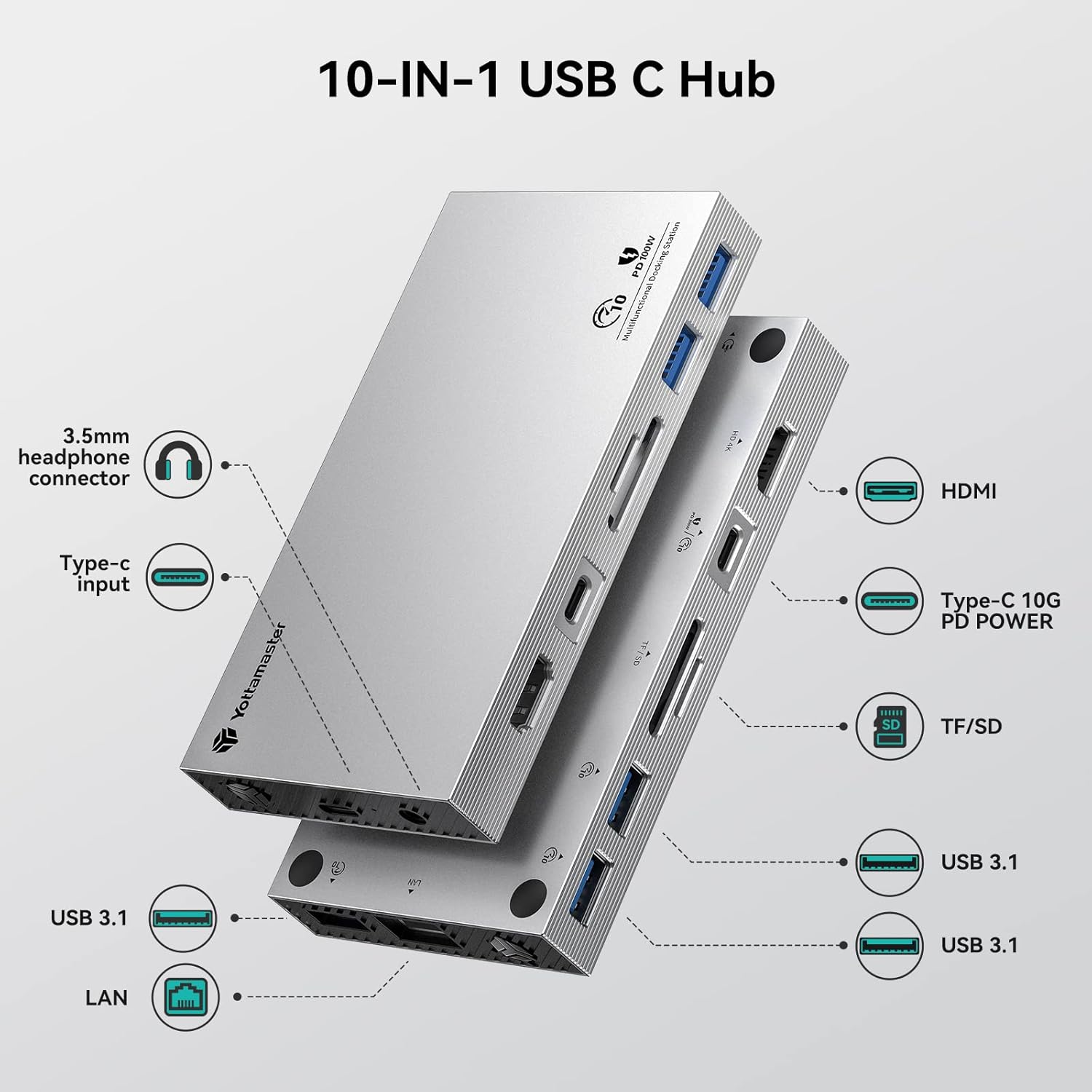
Image: A detailed diagram highlighting each of the 10 ports on the Yottamaster DS03CS and their respective functions.
- HDMI-port: Connect an external display (HDTV, monitor, or projector) to mirror or extend your screen. Supports 4K resolution at 30Hz.
- USB 3.1-A Ports (x3): These ports support data transfer speeds up to 10Gbps. Connect USB devices such as external hard drives, flash drives, keyboards, and mice.
- USB-C PD100W Port: This port supports both data transfer and Power Delivery 3.0, allowing fast charging of your laptop up to 100W (20V/5A). Ensure your power adapter supports PD.
- SD/TF-kortspor: Overføre files from SD and TF (Micro SD) cards. Note that TF and SD cards cannot be used simultaneously. The card reader supports USB 2.0 speeds.
- Gigabit Ethernet (RJ45) Port: Provides a stable wired network connection with transfer rates up to 1000Mbps, compatible with 10/100 Ethernet standards.
- 3.5mm Audio In&Output Combo: Connect headphones or speakers for audio output, or a microphone for audio input.
- M.2 NVMe SSD-spor: Functions as a portable SSD with data transfer speeds up to 10Gbps, depending on the SSD and USB connection.
Dataoverføring
The USB A ports, USB C port, and the built-in M.2 NVMe SSD slot utilize the USB 3.2 Gen2 protocol, supporting 10Gbps data transfer. This provides significantly faster speeds compared to USB 3.0. Actual transfer speeds may vary based on the SSD speed and the type of USB connection used.
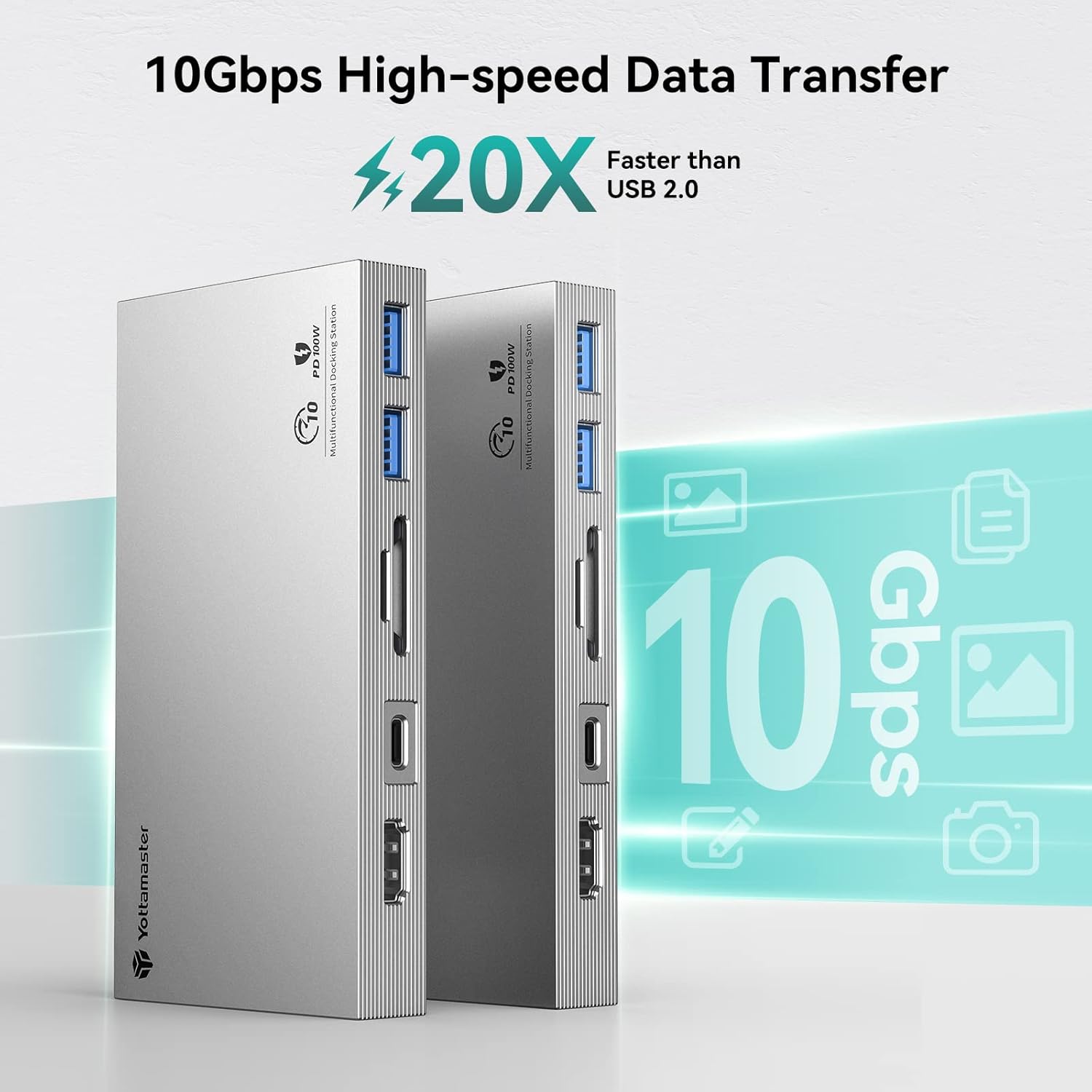
Image: Visual representation of the 10Gbps high-speed data transfer capability of the hub.
Vis utgang
The HDMI port allows you to connect an external display for extended or mirrored desktop modes. Enjoy content on a larger screen with 4K@30Hz resolution.

Image: A laptop connected to an external monitor through the Yottamaster DS03CS, demonstrating 4K@30Hz display output.
Strømforsyning
The USB-C PD port supports up to 100W power delivery, enabling fast charging for compatible laptops. Connect your laptop's original power adapter to this port to charge your laptop while using the hub's other functions.

Image: The Yottamaster DS03CS hub connected to a power adapter, illustrating its 100W fast charging capability.
Vedlikehold
To ensure optimal performance and longevity of your Yottamaster DS03CS hub, follow these maintenance guidelines:
- Rengjøring: Use a soft, dry cloth to wipe the exterior of the device. Avoid using liquid cleaners or solvents, as they may damage the aluminum finish or internal components.
- Lagring: Når den ikke er i bruk, oppbevar den på et kjølig og tørt sted, unna direkte sollys og ekstreme temperaturer.
- Håndtering: Håndter enheten forsiktig for å unngå fysisk skade. Unngå å miste den i bakken eller utsette den for harde støt.
- Ventilasjon: Ensure the hub's ventilation holes are not obstructed to allow for proper heat dissipation, especially during prolonged use or heavy data transfer.
Feilsøking
If you encounter issues with your Yottamaster DS03CS, refer to the following common problems and solutions:
- Enheten gjenkjennes ikke:
- Ensure the USB-C cable is securely connected to both the hub and your host device.
- Prøv å koble huben til en annen USB-C-port på vertsenheten din.
- Start datamaskinen eller vertsenheten på nytt.
- SSD ikke oppdaget:
- Verify that the SSD is correctly installed in the enclosure and secured.
- Confirm that your SSD is an NVMe M-Key M.2 SSD (PCIe-based). SATA-based M.2 SSDs are not supported.
- For new SSDs, ensure they are initialized and formatted in your operating system's Disk Management (Windows) or Disk Utility (Mac OS).
- Lave dataoverføringshastigheter:
- Ensure your host device's USB-C port supports USB 3.2 Gen2 (10Gbps) for optimal speeds.
- The actual transfer speed may vary depending on the speed of the SSD and the type of USB connection used.
- Avoid using long or low-quality USB-C cables, which can degrade performance.
- HDMI display issues:
- Sjekk HDMI-kabeltilkoblingen mellom huben og skjermen.
- Ensure your host device's USB-C port supports DisplayPort Alternate Mode (DP Alt Mode).
- Juster skjerminnstillingene i operativsystemet ditt.
- SD/TF card not working:
- Ensure only one card (SD or TF) is inserted at a time, as simultaneous use is not supported.
- Check if the card is inserted correctly and fully.
- Test kortet i en annen enhet for å utelukke kortfeil.
- Strømforsyningen (PD) lader ikke:
- Ensure your power adapter is connected to the hub's PD USB-C port and is a PD-compatible charger.
- Verify that your laptop supports charging via USB-C PD.
- Check the power adapter's wattage; it should be sufficient for your laptop's charging requirements.
Spesifikasjoner
| Merke | Yottamaster |
| Modellnummer | DS03CS |
| Maskinvaregrensesnitt | USB Type C |
| Antall porter | 10 (excluding host connection) |
| Totalt USB-porter | 4 (3x USB-A 3.1, 1x USB-C PD) |
| Dataoverføringshastighet | 10 gigabit per sekund (USB 3.2 Gen2) |
| HDMI-utgang | 4K@30Hz |
| Strømforsyning | Opptil 100 W (20V / 5A) |
| Ethernet | Gigabit (10/100/1000 Mbps) |
| Kortleser | SD/TF (USB 2.0 speeds, not simultaneous) |
| Lydport | 3.5mm Audio In&Output Combo |
| M.2 NVMe Enclosure | Supports NVMe M-Key M.2 SSDs (PCIe-based) up to 8TB (2230/2242/2260/2280) |
| Kompatible enheter | Laptops, Desktops, Card Readers, Digital Cameras |
| Operativsystem | Android, Windows 10, Mac OS |
| Innkapslingsmateriale | Aluminium |
| Varevekt | 20 gram |
Garantiinformasjon
The Yottamaster DS03CS comes with an 18 måneders garanti fra kjøpsdatoen. Denne garantien dekker produksjonsfeil og funksjonsfeil ved normal bruk. Vennligst ta vare på kjøpsbeviset for garantikrav.
Garantien dekker ikke skader forårsaket av:
- Improper installation or operation
- Uautoriserte modifikasjoner eller reparasjoner
- Accidental damage, misuse, or neglect
- Natural disasters or external factors
Kundestøtte
For technical assistance, warranty claims, or any questions regarding your Yottamaster DS03CS, please contact Yottamaster customer support. Refer to the contact information provided on the product packaging or the official Yottamaster webnettstedet.
When contacting support, please have your product model number (DS03CS) and proof of purchase readily available.