
1. Introduksjon og overview
The Ditec RM-L 1370 is a universal replacement remote control designed for a wide range of Sony Bravia televisions. This remote offers direct compatibility with various Sony LCD, LED, UHD, OLED, and QLED 4K Ultra HD Smart Android TV models, eliminating the need for complex programming or pairing. It features dedicated hotkeys for popular streaming services like YouTube and Netflix for convenient access.

Image: The Ditec RM-L 1370 remote control, highlighting its compatibility as a single remote solution for Sony TVs.
2. Oppsett og første gangs bruk
This remote control is designed for immediate use without any setup or programming. Simply insert the required batteries, and it will be ready to operate your compatible Sony TV.
2.1 Installasjon av batteri
- Finn batterirommet på baksiden av fjernkontrollen.
- Skyv åpningen til batterirommet.
- Insert two (2) AAA batteries (not included), ensuring correct polarity (+ and - terminals).
- Lukk batteridekselet godt.

Bilde: Bak view av fjernkontrollen, som illustrerer plasseringen av batterirommet.
2.2 Første gangs bruk
Once batteries are installed, point the remote control towards your Sony TV and press the Power button. The remote should operate your TV without any further configuration.
3. Bruksanvisning
The Ditec RM-L 1370 remote control provides all standard functions for your Sony Bravia TV, along with convenient shortcut buttons.
3.1 Grunnleggende funksjoner
- Strømknapp: Slår TV-en på eller av.
- Tallknapper (0-9): For direkte kanalvalg.
- Volum opp/ned: Justerer TV-volumet.
- Kanal opp/ned: Endrer TV-kanaler.
- Navigasjonstastatur (opp/ned/venstre/høyre/enter): For menynavigasjon og valg.
- Hjem-knapp: Accesses the TV's Smart Home screen or main menu.
- Return/Back Button: Går tilbake til forrige skjerm eller meny.
- Alternativer-knapp: Viser kontekstavhengige alternativer.
3.2 Spesialfunksjoner
- YouTube Hotkey: Starter YouTube-applikasjonen direkte.
- Netflix Hotkey: Starter Netflix-appen direkte.
The remote features an enhanced infrared sensor for a farther transmitting distance, allowing effective control up to 50 feet.

Image: The remote control demonstrating its farther distance sensor, capable of operating up to 50 feet.
4. Kompatibilitet
The Ditec RM-L 1370 universal remote is compatible with a wide range of Sony Bravia LCD, LED, UHD, OLED, and QLED 4K Ultra HD Smart Android TVs. It is designed to replace many original Sony remote models, including but not limited to:
- RMT-TX100U, RMT-TX102U
- RMF-TX200U, RMF-TX201U, RMF-TX220U
- RMT-TX300U, RMF-TX310U
- RMT-TX500U, RMF-TX520U, RMF-TX600U
- And many other Sony TV remote models.
For a comprehensive list of compatible Sony TV remote models, please refer to the image below:
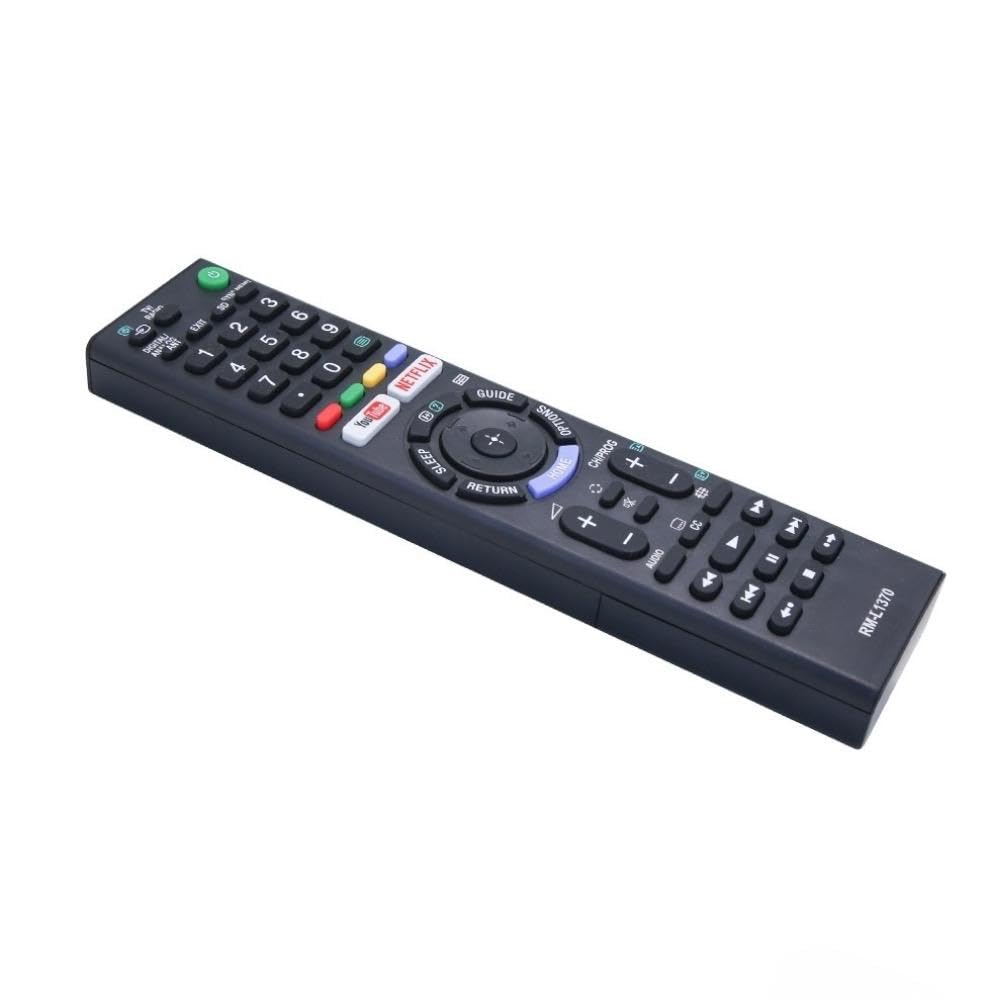
Image: A detailed list of Sony TV remote models that are compatible with the Ditec RM-L 1370.
It is recommended to compare the appearance of this remote with your original remote for visual confirmation of compatibility.
5. Vedlikehold
5.1 Batteribytte
When the remote control's performance degrades or it stops responding, replace the batteries with two new AAA alkaline batteries. Always replace both batteries at the same time. Do not mix old and new batteries or different types of batteries.
5.2 Rengjøring
To clean the remote control, use a soft, dry cloth. Do not use liquid cleaners, sprays, or abrasive materials, as these may damage the remote's surface or internal components.
6. Feilsøking
- Fjernkontrollen svarer ikke:
- Sjekk om batteriene er satt inn riktig med riktig polaritet.
- Bytt ut gamle batterier med nye.
- Sørg for at det ikke er noen hindringer mellom fjernkontrollen og TV-ens infrarøde mottaker.
- Sørg for at du er innenfor det effektive driftsområdet (opptil 50 fot).
- Spesifikke knapper fungerer ikke:
- Some advanced functions or TV-specific features might not be supported by a universal replacement remote.
- Ensure the TV is powered on and functioning correctly.
7. Spesifikasjoner
| Trekk | Detalj |
|---|---|
| Merke | Ditec |
| Modell | RM-L 1370 |
| Kompatible enheter | Sony Bravia LCD, LED, UHD, OLED, QLED 4K Ultra HD Smart Android TVs |
| Koblingstype | Infrarød (IR) |
| Batterier påkrevd | 2 x AAA (ikke inkludert) |
| Spesielle funksjoner | Ergonomic design, YouTube & Netflix Hotkeys |
| Produktdimensjoner | 3 x 3 x 12 cm |
| Varevekt | 80 g |
| Opprinnelsesland | Kina |
8. Støtte
For assistance with compatibility or any questions regarding your Ditec RM-L 1370 remote control, you may contact support by sending a picture of your old remote or your device's brand name and model number to +91 9924350801. This will help in verifying compatibility or addressing specific queries.

Image: Information on how to contact support for compatibility checks or questions.