
1. Viktige sikkerhetsinstruksjoner
Les og forstå all sikkerhetsinformasjon før du bruker dette produktet. Unnlatelse av å følge disse instruksjonene kan føre til elektrisk støt, brann eller alvorlig skade.
- Elektrisk sikkerhet: Always ensure the charger is disconnected from the power outlet before making or breaking connections to the battery. Do not expose the charger to rain or wet conditions.
- Batterisikkerhet: Batterier kan produsere eksplosive gasser. Sørg for tilstrekkelig ventilasjon under lading. Bruk øyevern og verneklær. Unngå gnister eller flammer i nærheten av batteriet.
- OBD2 Scanner Safety: Do not attempt to connect or disconnect the scanner while the vehicle's ignition is on or the engine is running. This could damage the vehicle's electronic system or the scanner.
- Generelle forholdsregler: Keep out of reach of children. Do not operate if the product or cables are damaged. Use only as intended.
2. Produktet er overview
2.1 MOTOPOWER MP00205B 12V Battery Charger/Maintainer
The MOTOPOWER MP00205B is an automatic 12-volt battery charger and maintainer designed for lead-acid, flooded, or sealed maintenance-free batteries (AGM and gel cell). It features a compact and durable design, utilizing pulse charging technology to optimize battery performance and extend life. The charger incorporates multiple safety protections, including spark-free technology and automatic shut-off to prevent overcharging.

Figure 1: MOTOPOWER MP00205B 12V Battery Charger Maintainer in use.
2.2 MOTOPOWER MP69040 OBD2 Diagnostic Scanner
The MOTOPOWER MP69040 is an OBD2 diagnostic scanner designed to support all OBDII protocols, including KWP2000, J1850 VPW, ISO9141, J1850 PWM, and CAN. It is compatible with most 1996 US-based, 2003 EU-based, and 2008 Asian-based vehicles, as well as newer OBD2 and CAN vehicles. The scanner features a 2.8-inch TFT color screen and a user-friendly interface for efficient vehicle diagnostics.
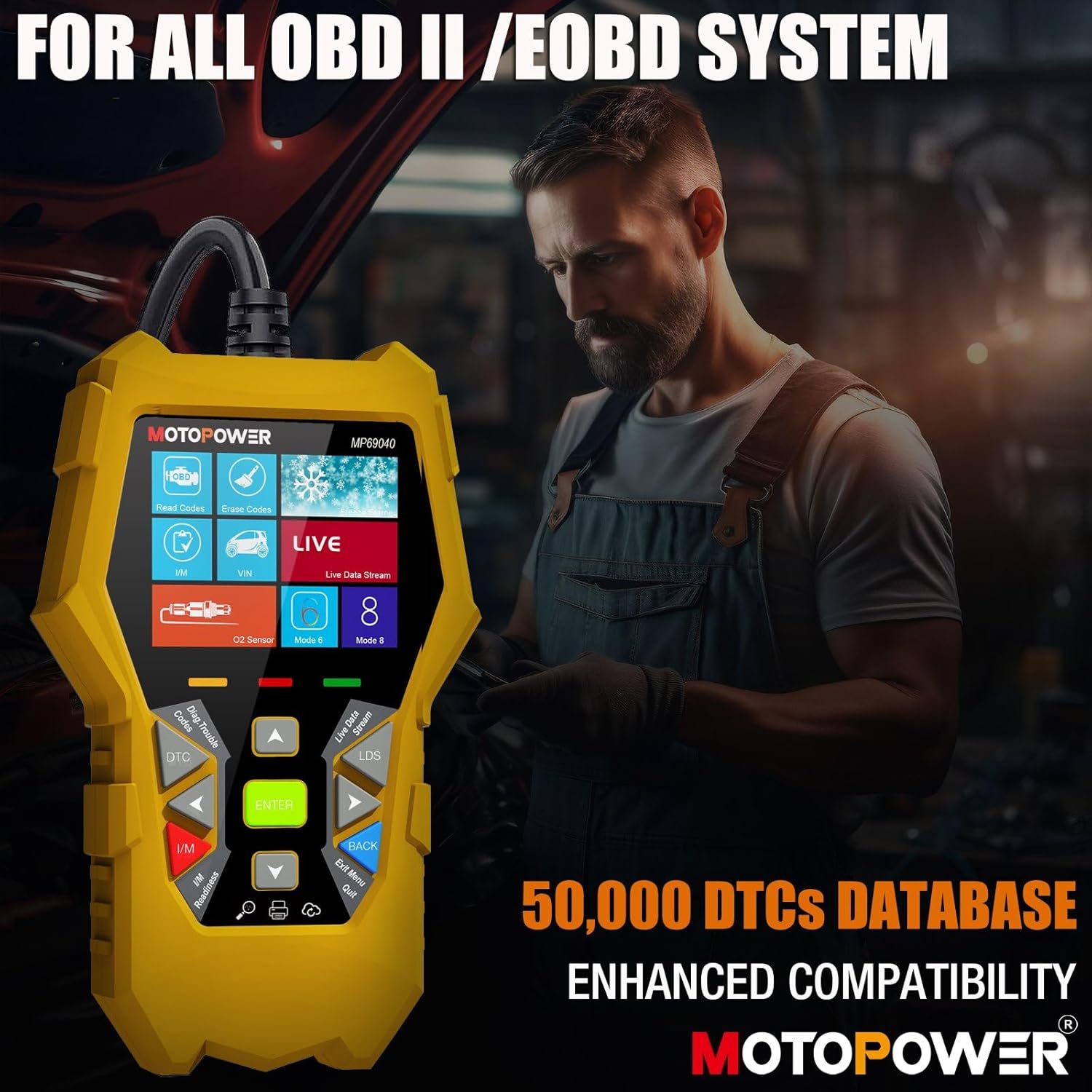
Figure 2: MOTOPOWER MP69040 OBD2 Diagnostic Scanner.
3. Pakkens innhold
Bekreft at alle varene er til stede i pakken:
- MOTOPOWER MP00205B 12V Battery Charger/Maintainer
- Alligator Clamp Harness (50amp)
- Ring Terminal Harness (7.5amp fuse protected)
- MOTOPOWER MP69040 OBD2 Diagnostic Scanner

Figure 3: MP00205B Charger and its accessories.
4. MOTOPOWER MP00205B Charger/Maintainer Setup and Operation
4.1 Tilkobling av laderen
- Sørg for at laderen er koblet fra strømuttaket.
- Velg riktig kobling:
- Alligator Clamps: Koble til den røde clamp til den positive (+) batteripolen og den svarte clamp til den negative (-) batteripolen.
- Ringterminaler: If permanently installing, connect the red ring terminal to the positive (+) battery post and the black ring terminal to the negative (-) battery post.
- Connect the SAE quick-release connector from the chosen harness to the charger's output cable.
- Plug the charger into a standard 120V AC power outlet.
4.2 Ladeprosess
The MP00205B operates automatically. Once connected and powered, it will begin its multi-stage ladeprosess:
- Desulfating: If the battery is deeply discharged or sulfated, the charger may enter a desulfation stage to recover the battery.
- Lader: The charger delivers a steady current to bring the battery to a full charge.
- Absorpsjon: The charger switches to a constant voltage, gradually reducing current as the battery approaches full capacity. This stage includes pulse charging technology to maximize battery performance.
- Charged/Maintain: Once fully charged, the charger automatically switches to maintenance mode, providing a float charge at 13.6V to keep the battery at optimal levels indefinitely without overcharging.
The LED indicators on the charger will show the current charging stage. The device features spark-free technology for enhanced safety during connection and disconnection.

Figure 4: Charger indicating Pulse Boost Technology and charging stages.

Figure 5: Charger displaying automatic operation and safety protections.
5. MOTOPOWER MP69040 OBD2 Scanner Setup and Operation
5.1 Koble til skanneren
- Locate the vehicle's 16-pin Data Link Connector (DLC), typically under the dashboard on the driver's side.
- Sørg for at kjøretøyets tenning er AV.
- Plug the scanner's OBD2 cable into the vehicle's DLC.
- Turn the vehicle's ignition to the ON position (engine can be off). The scanner will power on automatically.
5.2 Grunnleggende funksjoner
The MP69040 scanner provides various diagnostic functions through its user-friendly interface:
- Les koder: Henter diagnostiske feilkoder (DTC-er) fra kjøretøyets datamaskin.
- Slett koder: Clears DTCs from the vehicle's computer. Merk: Å slette koder løser ikke det underliggende problemet.
- Live data: Displays real-time data streams from the vehicle's sensors, such as Engine RPM, Fuel Pressure, and more.
- I/M -beredskap: Sjekker statusen til utslippsrelaterte monitorer for å avgjøre om kjøretøyet er klart for en utslippstest.
- Vehicle Identification (VIN): Reads the Vehicle Identification Number and other vehicle information.
- DTC-bibliotek: Provides definitions for generic and manufacturer-specific codes.
- Oppdatering: Supports lifetime free online updates for the latest functions and vehicle compatibility.

Figure 6: MP69040 Scanner user interface.

Figure 7: Key features of the MP69040 Scanner.

Figure 8: Live Data display on the MP69040 Scanner.
6. Vedlikehold
- Rengjøring: Tørk av enhetene med en myk, tørr klut. Ikke bruk slipende rengjøringsmidler eller løsemidler.
- Lagring: Store both the charger and scanner in a cool, dry place away from direct sunlight and extreme temperatures. Ensure cables are neatly coiled to prevent damage.
- Kabelinspeksjon: Regularly inspect all cables and connectors for any signs of damage, fraying, or corrosion. Replace if necessary.
7. Feilsøking
7.1 MP00205B Charger/Maintainer
- Laderen slår seg ikke på: Check the AC power connection. Ensure the outlet is functional. Verify the battery connections are secure.
- Ladeindikatoren lyser ikke: Bekreft batterivoltage is above 2V. If the battery is severely discharged, it might take a few minutes for the charger to detect it. Ensure proper polarity.
- Charger not maintaining charge: Ensure the charger remains connected to both the AC outlet and the battery. Check for any loose connections.
7.2 MP69040 OBD2 Scanner
- Skanneren slår seg ikke på: Ensure the OBD2 cable is securely connected to the vehicle's DLC. Verify the vehicle's ignition is in the ON position.
- Kommunikasjonsfeil: Check the vehicle's ignition status. Ensure the OBD2 cable is not damaged. Try connecting to a different vehicle (if available) to rule out a vehicle-specific issue. Verify the vehicle is OBDII compliant.
- Skjermen er frossen: Koble skanneren fra kjøretøyet, vent noen sekunder, og koble den til igjen.
8. Spesifikasjoner
8.1 MOTOPOWER MP00205B Charger/Maintainer
| Spesifikasjon | Verdi |
|---|---|
| Inngang Voltage | 120V AC (Standard) |
| Utgang Voltage | 12 volt likestrøm |
| Utgangsstrøm | 1000mA (1A) |
| Kabellengde | Up to 8.5FT (18AWG UL standard) |
| Sikkerhetsfunksjoner | Spark-free, Overcharge Protection |
| Sertifiseringer | CE, FCC, UL |
8.2 MOTOPOWER MP69040 OBD2 Scanner
| Spesifikasjon | Verdi |
|---|---|
| Utstilling | 2.8-tommers TFT-fargeskjerm |
| Støttede protokoller | KWP2000, J1850 VPW, ISO9141, J1850 PWM, CAN |
| Kompatibilitet med kjøretøy | 1996 US-based, 2003 EU-based, 2008 Asian-based and newer OBD2/CAN vehicles (excluding new energy/hybrid) |
| DTC Database | 50 000+ koder |
| Språk | 10 innebygde språk |
9. Garanti og støtte
MOTOPOWER products are designed for reliability and performance. For warranty information, technical support, or service inquiries, please contact MOTOPOWER customer support through their official webnettstedet eller forhandleren der produktet ble kjøpt. Ha produktets modellnummer og kjøpsdato tilgjengelig når du kontakter kundestøtte.