
RIDEN KCX-BT003-V1.1
RIDEN KCX BT003 Bluetooth 4.2 Audio Receiver Module User Manual
Model: KCX-BT003-V1.1 | Brand: RIDEN
1. Introduksjon
The RIDEN KCX BT003 Bluetooth 4.2 Audio Receiver Module is a compact and versatile circuit board designed to add wireless audio reception capabilities to various electronic projects. Utilizing Bluetooth 4.2 protocol, it offers stable and efficient audio streaming, making it suitable for upgrading existing audio systems, integrating into DIY speakers, or enhancing car audio setups. This manual provides detailed instructions for its installation, operation, and maintenance.
2. Funksjoner
- Excellent durability and coexistence for reliable performance.
- Ensures stability of Bluetooth transmission through various techniques.
- Intuitive LED indicator for status feedback.
- Voice prompts for convenient operation.
- Wireless transmission distance of 10 meters or more.
- Utilizes the latest Bluetooth 4.2 protocol, backward compatible with earlier versions.
- Compact and lightweight design for easy integration.
- Compatible with smartphones and various audio devices for wireless audio streaming.
3. Spesifikasjoner
| Parameter | Verdi |
|---|---|
| Strømforsyning | 3.3-5.0V |
| Arbeidsstrøm | 35mA |
| Kanal | Stereo |
| Bluetooth-versjon | 4.2 |
| Arbeidsfrekvens | 2400-2485 MHz |
| Motta følsomhet | -85dBm |
| Moduldimensjoner | Approximately 2.3cm x 1.5cm (0.91" x 0.59") |
| Kompatible enheter | Smartphone, various audio devices |
| Spesielle funksjoner | Innebygd Bluetooth |
| Type lydutgang | Høyttalere (stereo) |
| Koblingstype | Bluetooth, USB (for power/data, depending on implementation) |
| Medieformat | MP3 lyd |
| Opprinnelsesland | Kina |
4. Produktet er overview
The following images illustrate the RIDEN KCX BT003 Bluetooth Audio Receiver Module from various angles, highlighting its components and pinout.
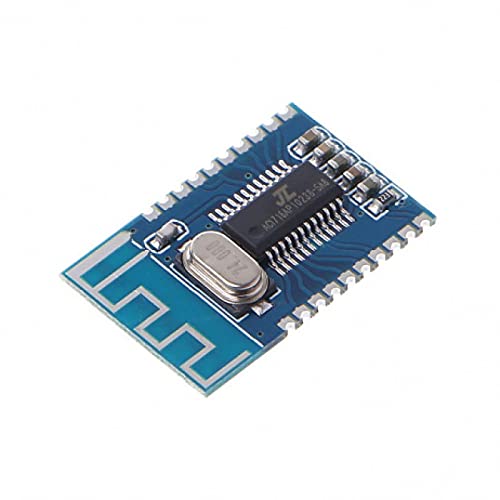
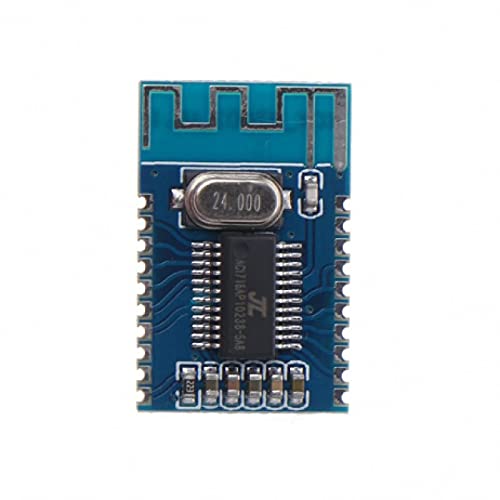
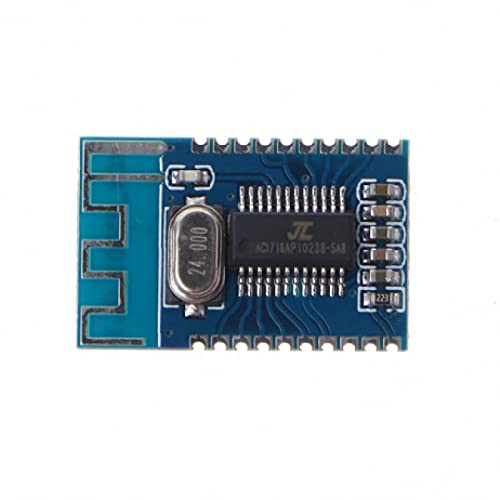

5. Oppsett og kabling
Proper wiring is essential for the correct operation of the KCX BT003 module. Refer to Figure 4.4 for the pinout diagram. Always ensure power is disconnected before making any connections.
5.1. Strømforsyningstilkobling
- Connect the positive power supply (3.3V to 5.0V DC) to the VBAT pin.
- Connect the negative power supply (Ground) to any GND pin.
- Sørg for at strømforsyningen er stabil og innenfor det angitte volumnivået.tage range to prevent damage to the module.
5.2. Audio Output Connection
The module provides stereo audio output. These pins should be connected to an audio amplifier or directly to speakers if they have an integrated amplivligere.
- Connect the left audio channel output to the DAC_L pin.
- Connect the right audio channel output to the DAC_R pin.
- Connect the audio ground to a GND pin.
5.3. Valgfrie tilkoblinger
- LED: Connect an LED (with a current-limiting resistor) to this pin to indicate Bluetooth status (e.g., pairing, connected).
- MIC: If microphone input is desired, connect a suitable microphone to this pin and a GND pin.
- USB_DP / USB_DM: These pins are typically used for USB data communication or power, depending on the specific application and firmware. Consult advanced documentation if USB functionality is required.
- SD_DAT / SD_CMD / SD_CLK / ACKEY: These pins are for SD card interface, allowing the module to play audio directly from an SD card. Specific wiring and control logic are required for this functionality.
6. Bruksanvisning
Once the module is correctly wired and powered, follow these steps to operate it:
6.1. Slå på
Apply power to the VBAT and GND pins. The module will typically emit a voice prompt indicating it is powered on and ready for pairing. If an LED is connected, it will likely flash to indicate pairing mode.
6.2. Bluetooth-paring
- Ensure the module is powered on and in pairing mode (indicated by flashing LED and/or voice prompt).
- Naviger til Bluetooth-innstillingene på smarttelefonen eller en annen Bluetooth-aktivert enhet.
- Scan for available devices. The module should appear as "BT003" or a similar identifier.
- Select the module to initiate pairing. A voice prompt will confirm successful pairing, and the LED will typically change to a solid state or a slower flash.
6.3. Lydavspilling
After successful pairing, you can play audio from your connected device. The audio will be transmitted wirelessly to the KCX BT003 module and output through the DAC_L and DAC_R pins to your connected amplifier/høyttalere.
6.4. Voice Prompts and LED Indicators
The module provides voice prompts for key actions (e.g., power on, pairing, connected). The LED indicator provides visual feedback on the module's status:
- Rask blinking: Pairing mode, waiting for connection.
- Slow Flashing / Solid: Koblet til en Bluetooth-enhet.
7. Vedlikehold
To ensure the longevity and optimal performance of your RIDEN KCX BT003 module, follow these maintenance guidelines:
- Hold tørr: Avoid exposing the module to moisture or liquids, as this can cause short circuits and damage.
- Rengjør forsiktig: Hvis rengjøring er nødvendig, bruk en myk, tørr klut. Ikke bruk sterke kjemikalier eller slipende materialer.
- Håndteres med forsiktighet: This is a sensitive electronic component. Avoid dropping it or subjecting it to strong impacts.
- Statisk elektrisitet: Take precautions against electrostatic discharge (ESD) when handling the module, as static can damage sensitive components.
- Ventilasjon: Ensure adequate ventilation if the module is enclosed in a case, especially if other heat-generating components are present.
8. Feilsøking
If you encounter issues with your KCX BT003 module, refer to the following troubleshooting steps:
8.1. No Power / Module Not Responding
- Sjekk strømtilkoblinger: Verify that VBAT and GND are correctly connected and that the power supply is providing 3.3V-5.0V DC.
- Sjekk strømforsyningen: Ensure the power supply itself is functional and providing sufficient current.
8.2. Cannot Pair with Bluetooth Device
- Module in Pairing Mode: Confirm the module is powered on and its LED is flashing rapidly, indicating it's in pairing mode.
- Enhets Bluetooth på: Ensure Bluetooth is enabled on your smartphone or audio source device.
- Avstand: Keep the module and your device within close proximity (e.g., 1 meter) during pairing.
- Interferens: Move away from other 2.4GHz wireless devices that might cause interference.
- Glem enhet: If previously paired, try forgetting the module from your device's Bluetooth list and re-pairing.
8.3. No Audio Output / Poor Audio Quality
- Check Audio Connections: Verify that DAC_L, DAC_R, and audio GND are correctly connected to your amplifier/høyttalere.
- Amplifier/Speaker Functionality: Sørg for din amplifier and speakers are working correctly.
- Volumnivåer: Check the volume settings on both your source device and your amplivligere.
- Avstand og hindringer: Ensure the Bluetooth connection is stable and within range (up to 10m). Walls or other obstacles can degrade signal quality.
- Kildelyd: Test with different audio sources or files to rule out issues with the source material.
9. Garanti og støtte
Specific warranty information for the RIDEN KCX BT003 module is not provided in this manual. For details regarding warranty coverage, technical support, or service, please contact your retailer or the manufacturer directly. Keep your purchase receipt as proof of purchase.
Relaterte dokumenter - KCX-BT003-V1.1
 |
Shenzhen Yuanpeng Xing Technology Co. BT003 Cactus Dancer: User Guide and FCC Compliance This document provides instructions for operating the Shenzhen Yuanpeng Xing Technology Co. BT003 Cactus Dancer, including button functions, Bluetooth connectivity, and details on FCC compliance for Class B digital devices. |
 |
BT003 Bluetooth 5.0 Low Power Module User Manual User manual for the BT003 intelligent lighting module, a Bluetooth 5.0 low power module based on the TLSR8253F512AT32 chip, featuring BLE and Bluetooth mesh networking. Details general information, FCC and ISED compliance statements, OEM guidance, and RF exposure considerations. |
 |
CoutureBridal BT003 Dansende Kaktus Leketøy Brukerhåndbok: Funksjoner og FCC-samsvar Brukerhåndbok for CoutureBridal BT003 Dancing Cactus oppladbar plysjleke. Lær om opptak, sang, Bluetooth-funksjoner og FCC-samsvarsinformasjon. |
 |
Alpine i209-GM Installation Manual for Chevrolet/GMC Full Size Truck Comprehensive installation manual for the Alpine i209-GM head unit in 2014 and up Chevrolet Silverado and GMC Sierra full-size trucks. Includes tools required, accessory list, programming instructions, wiring diagrams, and troubleshooting. |
 |
Alpine i407-WRA-JL installasjonsmanual for Jeep Wrangler og Gladiator Omfattende installasjonsmanual for Alpine i407-WRA-JL 7" Restyle In-Dash System, designet for Jeep Wrangler JL fra 2018 og oppover og Jeep Gladiator JT fra 2020 og oppover. Dekker verktøy, tilbehør, detaljerte demonterings- og installasjonsprosedyrer, koblingsskjemaer, komponentplasseringer, installasjonsveiledning og feilsøkingstips. |
 |
Lightslux BT003 Minimalist Linear LED Ceiling Light Installation and Safety Guide Installation and safety instructions for the Lightslux BT003 minimalist linear LED ceiling light. Includes important warnings, precautions, and usage guidelines for safe and optimal operation. |
Ask a question about this manual
Ask about setup, troubleshooting, compatibility, parts, safety, or missing instructions. Manuals+ will review the question and use this page’s manual context to help answer it.