
Introduksjon
Thank you for choosing the Oakcastle HIFI150 Stereo System. This manual provides essential information for setting up, operating, and maintaining your device. Please read it thoroughly before use and retain it for future reference.
Sikkerhetsinformasjon
For å sikre sikker drift og forhindre skade, må du følge følgende sikkerhetsregler:
- Ikke utsett enheten for regn, fuktighet eller ekstreme temperaturer.
- Ikke åpne c-enasing. Overlat all service til kvalifisert personell.
- Sørg for tilstrekkelig ventilasjon rundt enheten. Ikke blokker noen ventilasjonsåpninger.
- Bruk kun strømadapteren som følger med enheten.
- Keep the unit away from heat sources such as radiators, stoves, or other heat-producing appliances.
- Rengjør enheten kun med en tørr klut.
Pakkeinnhold
Vennligst sjekk at alle varene er til stede i pakken din:
- Oakcastle HIFI150 Stereo System
- Fjernkontroll
- Batterier for fjernkontroll
- Strømkabel
- Brukerhåndbok
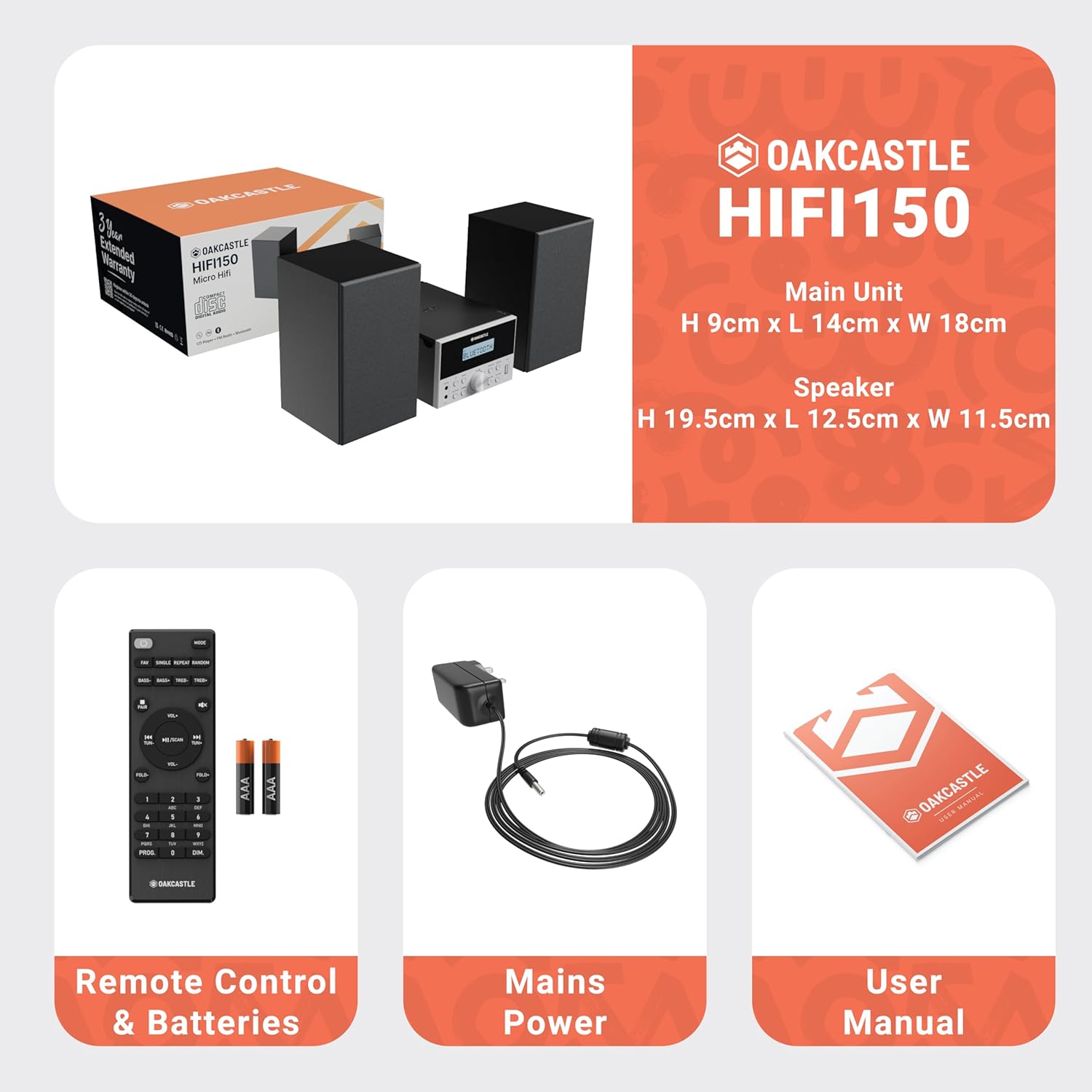
Image: The Oakcastle HIFI150 package contents, showing the main unit, two speakers, remote control with batteries, power adapter, and user manual.
Produkt overview
The Oakcastle HIFI150 features a compact design with intuitive controls and multiple connectivity options.
Frontpanelkontroller og skjerm

Image: A close-up of the Oakcastle HIFI150 main unit's front panel, highlighting the digital display, central volume knob, mode selection buttons, and front-facing AUX In and USB ports. The display shows 'BLUETOOTH'.
- Utstilling: Shows current mode, track information, and radio frequency.
- Strømknapp: Slår enheten på eller av.
- Modusknapp: Cycles through input sources (CD, FM, Bluetooth, AUX, USB).
- Volumknapp: Justerer hovedvolumet.
- Spill av/pause-knapp: Kontrollerer avspilling for CD, USB og Bluetooth.
- Hopp over/søk-knapper: Navigates tracks or tunes radio frequencies.
- AUX i port: For tilkobling av eksterne lydenheter via en 3.5 mm-kabel.
- USB-port: For avspilling av lyd files fra en USB-stasjon.
Tilkoblinger på bakpanelet
The rear panel includes connections for speakers and power.
Oppsett
1. Koble til høyttalerne
Connect the included speakers to the speaker terminals on the rear of the main unit. Ensure correct polarity (red to red, black to black) for optimal sound quality.
2. Strømtilkobling
Plug the power cable into the AC inlet on the rear of the main unit, then plug the other end into a standard wall outlet.
Bruksanvisning
Slå på/av
Trykk på Makt -knappen på frontpanelet eller fjernkontrollen for å slå enheten av eller på.
Modusvalg
Trykk på Modus button on the front panel or remote control repeatedly to cycle through the available input sources: CD, FM-radio, Bluetooth, AUX, og USB.
Bluetooth-drift
- Velge Bluetooth mode using the Mode button. The display will show 'BLUETOOTH' and the unit will enter pairing mode.
- Aktiver Bluetooth på smarttelefonen eller en annen Bluetooth-enhet og søk etter tilgjengelige enheter.
- Select 'OAKCASTLE HIFI150' from the list. Once connected, the unit will confirm the connection.
- You can now stream audio wirelessly from your device to the HIFI150.
CD-avspilling

Image: The Oakcastle HIFI150 with its top-loading CD player mechanism open, revealing a compact disc placed inside. The display shows 'CD'.
- Åpne dekselet til CD-skuffen.
- Place a CD (MP3, CD, WMA, or CD-R format) onto the spindle with the label side facing up.
- Lukk dekselet til CD-rommet.
- Velge CD mode. The unit will read the disc and begin playback automatically.
- Use the Play/Pause and Skip buttons to control playback.
FM-radiodrift

Image: The Oakcastle HIFI150 main unit with its telescopic antenna extended, displaying an FM radio frequency on its screen. The unit is placed between two speakers.
- Velge FM-radio modus.
- Trekk ut teleskopantennen for bedre mottak.
- Automatisk skanning: Press and hold the Play/Pause button to automatically scan and save available FM stations (up to 30 presets).
- Manuell innstilling: Use the Skip/Tune buttons to manually adjust the frequency.
- Tilbakekall forhåndsinnstillinger: Use the 'FAV/PROG' button on the remote to cycle through saved stations.
USB-avspilling
- Sett inn en USB -stasjon i USB -porten på frontpanelet.
- Velge USB mode. The unit will automatically detect and begin playing compatible audio files (MP3, WMA).
- Use the Play/Pause and Skip buttons to control playback.
AUX-inngang
- Koble en ekstern lydenhet (f.eks. MP3-spiller, smarttelefon) til AUX inn port on the front panel using a 3.5mm audio cable (not included).
- Velge AUX modus.
- Kontroller avspilling fra den tilkoblede eksterne enheten.
Volumkontroll
Roter Volumknapp on the front panel or use the VOL +/- knappene på fjernkontrollen for å justere lydnivået.
Bruk av fjernkontroll
The included remote control provides full functionality for the HIFI150. Ensure batteries are correctly inserted. Point the remote control towards the front panel of the main unit for optimal response.
Vedlikehold
Rengjøring
- Tørk av enheten med en myk, tørr klut.
- Ikke bruk slipende rengjøringsmidler, voks eller løsemidler, da de kan skade overflaten.
Lagring
Hvis enheten ikke skal brukes over lengre tid, må du trekke ut støpselet fra stikkontakten og oppbevare den på et kjølig og tørt sted.
Feilsøking
If you encounter issues with your HIFI150, please refer to the following common problems and solutions:
| Problem | Mulig årsak | Løsning |
|---|---|---|
| Ingen strøm | Strømkabelen er ikke tilkoblet; Strømuttaket er defekt | Sørg for at strømkabelen er ordentlig tilkoblet; prøv en annen stikkontakt. |
| Ingen lyd | Volume too low; Incorrect input mode; Speakers not connected | Increase volume; Select correct input mode; Check speaker connections. |
| CD-en spiller ikke | CD inserted incorrectly; Disc scratched/dirty; Incorrect format | Reinsert CD correctly; Clean or replace disc; Ensure disc is compatible (MP3, CD, WMA, CD-R). |
| Bluetooth kobler ikke til | Bluetooth mode not selected; Device too far; Device already connected to another unit | Select Bluetooth mode; Move device closer; Disconnect from other devices and try again. |
| Dårlig FM -mottak | Antennen ikke strukket ut; svakt signal | Fully extend the telescopic antenna; Try repositioning the unit. |
Spesifikasjoner
| Modellnummer | 1000002971 |
| Merke | Oakcastle |
| Tilkobling | Bluetooth 5.2, USB, AUX |
| Lyd utgang | 20W |
| Støttede medier | CD, MP3, WMA, CD-R, USB |
| Radio | FM Radio with 30 Presets |
| Kompatible enheter | MP3-spiller, smarttelefon, nettbrett |
| Skapmateriale | Tre |
| Farge | Svart |
| Varedimensjoner (L x B x H) | 13.7 x 17.8 x 9 cm |
| Varevekt | 2 kilo |
Garanti og støtte
The Oakcastle HIFI150 comes with an extended 3-year warranty. Registration is required to activate the full warranty period. Please refer to the warranty card included in your package or visit the official Oakcastle website for registration details and support information.
For technical assistance or further inquiries, please contact Oakcastle customer support through their official channels.


