
1. Introduksjon
This manual provides detailed instructions for the setup, operation, and maintenance of your PPLEE CR1027K Kids Digital Vibrating Alarm Clock. Designed for heavy sleepers, children, and travelers, this compact and rechargeable alarm clock offers multiple wake-up modes and a removable silicone case for durability and fun.
Front view of the PPLEE CR1027K Kids Digital Vibrating Alarm Clock.
2. Pakkens innhold
Vennligst sjekk pakken for følgende varer:
- 1 x PPLEE CR1027K Digital Vibrating Alarm Clock
- 1 x Protective Silicone Case (Little Devil Shape)
- 1 x USB-C ladekabel
- 1 x brukerhåndbok

Image showing the alarm clock, silicone case, USB-C cable, and user manual included in the package.
3. Produktet er overview
Familiarize yourself with the alarm clock's components and controls.
3.1 Front Display and Silicone Case
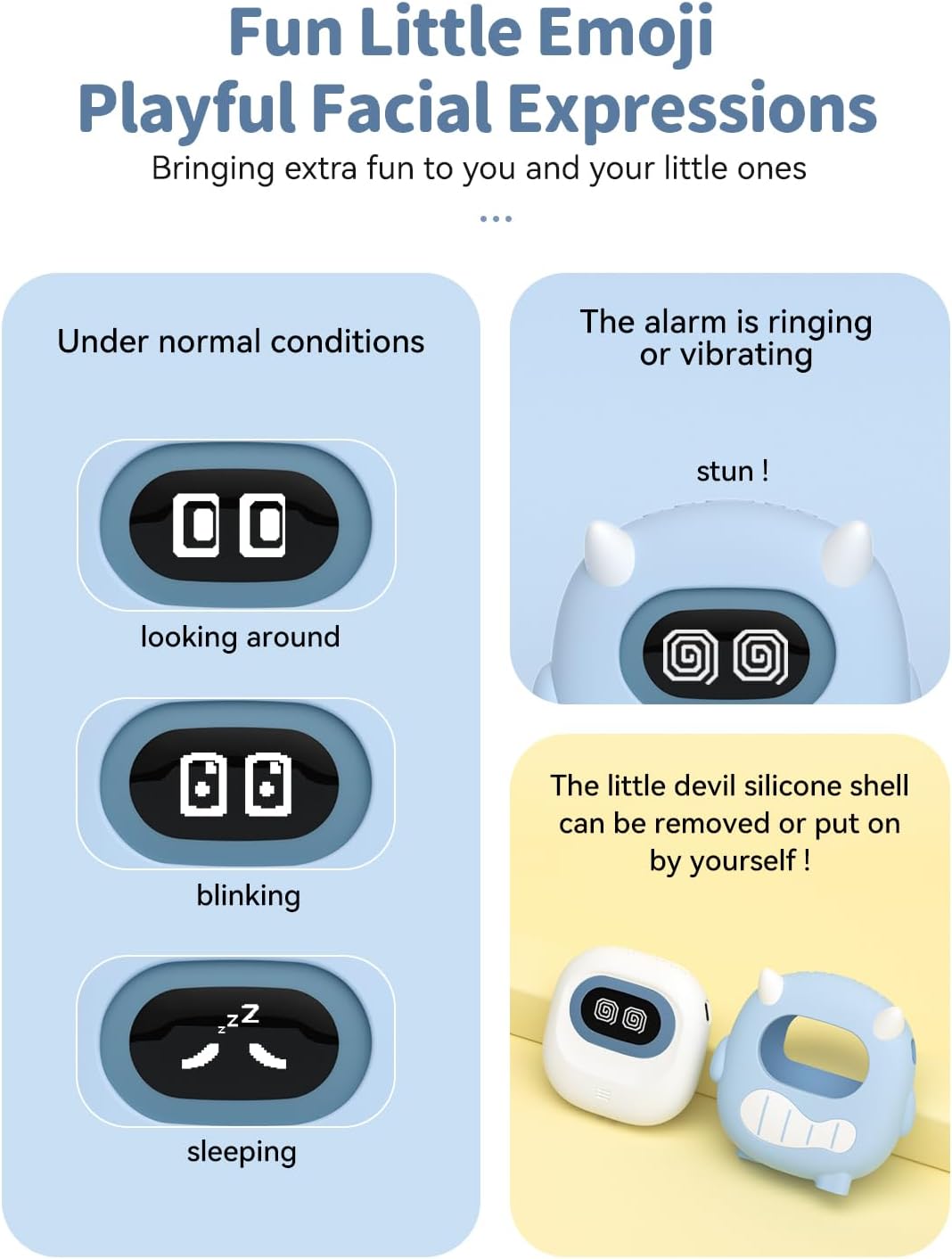
The front display shows time, date, and various emoji expressions indicating the clock's status. The silicone case is removable for cleaning or preference.

The alarm clock's display changes expressions based on its state (e.g., looking around, blinking, sleeping, alarm ringing).
3.2 Back Controls and Ports
The back of the alarm clock features various buttons and switches for setting time, alarms, and modes, along with the USB-C charging port.

Bak view of the alarm clock, highlighting the control panel and USB-C port.
4. Oppsett
4.1 Innledende lading
Before first use, fully charge the alarm clock using the provided USB-C cable. Connect the cable to the USB-C port on the side of the clock and to a standard USB power adapter (not included) or computer USB port. A full charge can last up to 160 days on the lowest alarm setting.

The alarm clock being charged via its USB-C port.
4.2 Stille inn tid og dato
Refer to the detailed instructions in the included user manual for specific steps on setting the current time, date (year/month/day), and choosing between 12H/24H/DST formats. These settings are typically adjusted using buttons on the back of the device.
5. Bruksanvisning
5.1 Stille inn alarmer (dobbelt alarm)
The clock supports two independent alarms. Use the dedicated alarm setting buttons/switches on the back to set Alarm 1 and Alarm 2. You can configure each alarm for different schedules:
- MAN-FRE: Ukedag alarm
- LØR-SØN: Helgealarm
- MAN-SØN: Everyday alarm

Illustration of the dual alarm clock functionality with different working modes.
5.2 Wake-up Modes and Vibration Levels
Choose from three wake-up modes and three vibration intensity levels to suit your preference:
- Wake-up Modes: Single Buzzer, Single Shaker, Buzzer + Shaker
- Vibrasjonsnivåer: Høy, Medium, Lav

Visual representation of the three wake-up modes and adjustable vibration levels.
5.3 Adjustable Volume
The alarm volume can be adjusted across 5 levels, ranging from 56dB to 105dB, to ensure effective waking for various users, including heavy sleepers.

Diagram illustrating the five adjustable volume levels of the alarm clock.
5.4 Slumrefunksjon
When the alarm sounds, press the top Snooze button to activate a 9-minute snooze period. The alarm will sound again after 9 minutes.

A user activating the snooze function on the alarm clock.
5.5 Barnesikring
To prevent accidental changes to settings, activate the child lock feature. Refer to the specific instructions in your manual for engaging and disengaging the child lock.

Close-up of the child lock switch, designed to prevent unintended adjustments.
6. Vedlikehold
6.1 Rengjøring
To clean the alarm clock, gently wipe the surface with a soft, dry cloth. For the silicone case, it can be removed and washed with mild soap and water, then air-dried completely before reattaching. Do not use abrasive cleaners or immerse the main unit in water.
6.2 Batteristell
The alarm clock features a built-in rechargeable battery. To prolong battery life:
- Unngå å utlade batteriet helt ofte.
- Lad enheten regelmessig, selv om den ikke er i konstant bruk.
- Oppbevar enheten på et kjølig og tørt sted når den ikke er i bruk over lengre tid.
7. Feilsøking
| Problem | Mulig årsak | Løsning |
|---|---|---|
| Clock not turning on/display blank | Low battery or power off. | Charge the alarm clock using the USB-C cable. Ensure the power switch is in the ON position. |
| Alarm not sounding/vibrating | Alarm not set, disabled, or volume/vibration level too low. | Verify alarm settings (time, days, ON/OFF status). Check wake-up mode and adjust volume/vibration intensity. |
| Incorrect time/date display | Time/date not set correctly or DST setting incorrect. | Re-enter time and date settings. Adjust 12H/24H/DST format as needed. |
| Knapper reagerer ikke | Barnesikring er aktiv. | Deactivate the child lock switch on the back of the device. |
8. Spesifikasjoner
| Trekk | Detalj |
|---|---|
| Modellnummer | CR1027K |
| Merke | PPLEE |
| Visningstype | LED |
| Strømkilde | Battery Powered (3000mAh Rechargeable Lithium Ion) |
| Batterilevetid | Up to 160 days on lowest alarm setting (single charge) |
| Produktdimensjoner | 3.35 cm B x 3.35 cm H x 1 cm D (ca.) |
| Vekt | 0.3 lb / 135 g |
| Alarmmoduser | Dual Alarms (MON-FRI, SAT-SUN, MON-SUN) |
| Wake-up Modes | Single Buzzer, Single Shaker, Buzzer + Shaker |
| Vibrasjonsnivåer | 3 (Høy, Middels, Lav) |
| Volumnivåer | 5 (56dB to 105dB) |
| Slumre varighet | 9 minutter |
| Materiale | Silicone (case), Plastic (frame) |
| Spesielle funksjoner | Removable Silicone Shell, Emoji Display, Child Lock, Date/Month/Year Display, 12H/24H/DST Format |
9. Garanti
This PPLEE product is covered by a limited warranty. Please refer to the warranty information provided with your purchase or contact customer support for details regarding coverage and duration. Keep your proof of purchase for warranty claims.
10. Støtte
For further assistance, technical support, or inquiries regarding your PPLEE CR1027K Kids Digital Vibrating Alarm Clock, please contact PPLEE customer service through the retailer's platform or visit the official PPLEE webnettsted for kontaktinformasjon.
Nettressurser:
- For product updates and FAQs, visit the PPLEE Store on Amazon.