
1. Introduksjon
This manual provides instructions for the installation, operation, maintenance, and troubleshooting of your NETGEAR XS516TM 18-Port 10G/Multi-Gigabit Ethernet Smart Switch. This device is designed to provide high-speed network connectivity with advanced management features for business environments.
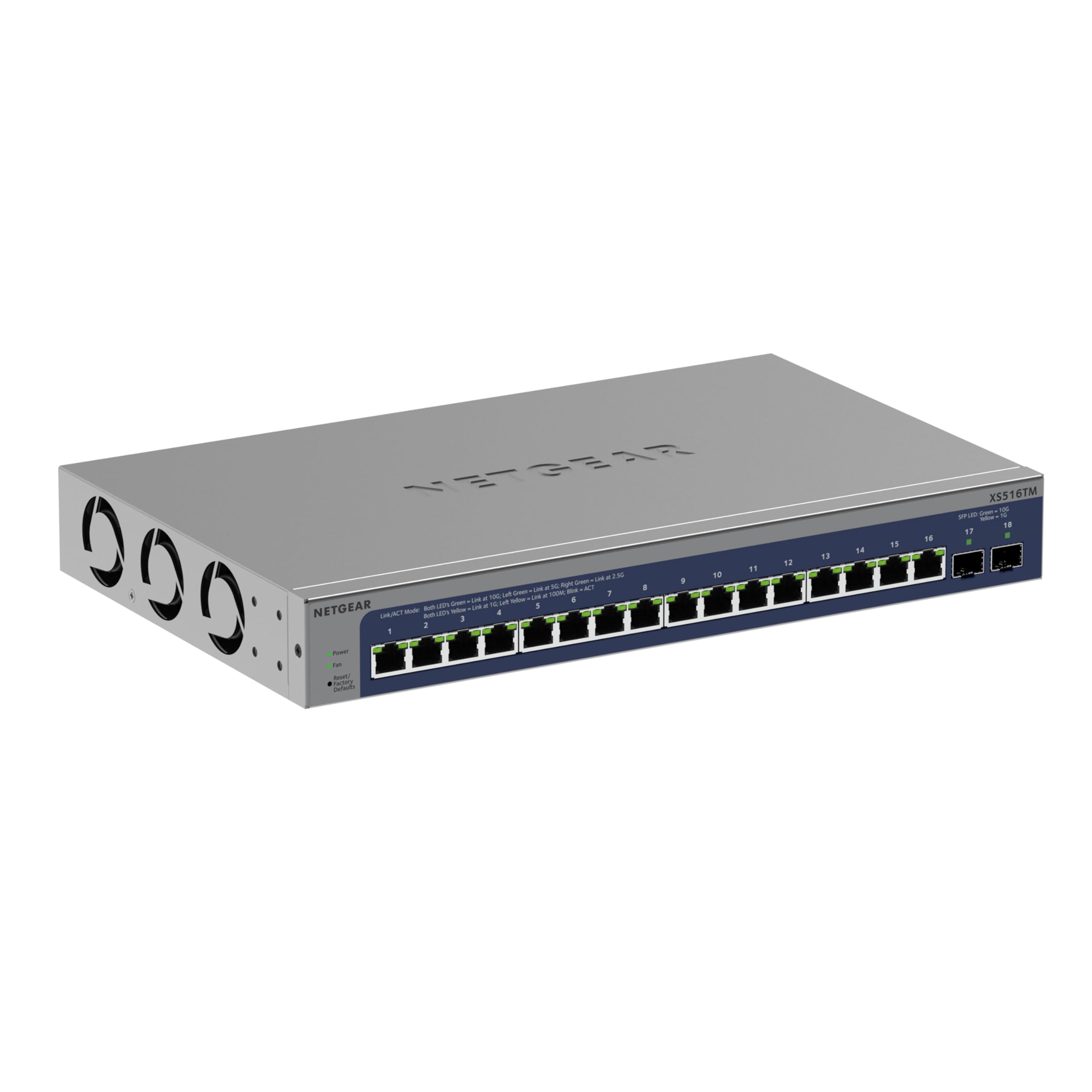
Figur 1: Foran view of the NETGEAR XS516TM Smart Switch.
2. Pakkens innhold
Verify the contents of your package. If any items are missing or damaged, contact your NETGEAR reseller.
- NETGEAR XS516TM Smart Switch
- Strømledning
- Mounting kit (for wall or rack mount)
- Gummiputer for montering på bordplaten
- Installasjonsveiledning
3. Fysisk overview
The NETGEAR XS516TM switch features 16 multi-gigabit Ethernet ports and 2 SFP+ ports for high-speed connectivity.

Figure 2: Front and rear panel of the XS516TM switch, highlighting the 16 Ethernet ports, 2 SFP+ ports, power input, and status indicators.
Frontpanelfunksjoner:
- 16 x 1G/2.5G/5G/10G Ethernet Ports: These ports support various speeds for flexible network connections.
- 2 x 10G SFP+ Ports: For high-speed fiber optic connections or direct attach copper cables.
- LED-indikatorer: Provide status information for power, link/activity, and speed for each port.
- Tilbakestill-knapp: Brukes til å gjenopprette fabrikkinnstillinger.
Funksjoner på bakpanelet:
- Strøminngang: Kobles til den medfølgende strømledningen.
- Jordingsskrue: For optional grounding.
4. Oppsett og installasjon
4.1. Monteringsalternativer
The XS516TM switch can be installed on a desktop, wall-mounted, or rack-mounted.
- Desktop installasjon: Attach the included rubber footpads to the bottom of the switch.
- Veggfeste: Use the provided mounting kit to secure the switch to a wall. Ensure the wall can support the weight of the switch and connected cables.
- Stativfeste: Use the provided rack-mount brackets to install the switch in a standard 19-inch equipment rack.
4.2. Koble til bryteren
- Connect your network devices (servers, workstations, access points, etc.) to the 1G/2.5G/5G/10G Ethernet ports using appropriate Ethernet cables.
- For high-speed uplinks or connections to other network devices, use the 10G SFP+ ports with compatible SFP+ transceivers or DAC cables.
- Connect the power cord to the switch's power input and then to an AC power outlet.
- Verify the Power LED illuminates, indicating the switch is receiving power.
5. Betjening av bryteren
The XS516TM is a Smart Switch, offering advanced management capabilities through its web-based interface and optional NETGEAR Insight cloud management.
5.1. Local Configuration and Control
Få tilgang til bryterens web-based management interface from a connected computer to configure settings such as VLANs, QoS, IGMP, security features, and more. Refer to the detailed software manual for comprehensive configuration instructions.

Figur 3: Eksample of the Smart Switch software interface for local configuration.
5.2. NETGEAR Insight Remote Management
The switch includes a 1-year subscription to NETGEAR Insight, allowing remote management of your network from anywhere. This feature provides centralized control and monitoring through a cloud-based platform without requiring additional hardware.

Figure 4: NETGEAR Insight interface for remote management on various devices.
Key features of NETGEAR Insight include:
- Multi-Location Support
- Network Scan Device Discovery
- Configuration Copy & Cloning
- Advanced PoE Configuration (if applicable to model)
- Firmware Scheduler
- SNMP Device Status
- Datahistorikk
- Enkel pålogging
- Tofaktorautentisering
- Email Alerts/Push Notifications
6. Vedlikehold
To ensure optimal performance and longevity of your NETGEAR XS516TM switch, follow these maintenance guidelines:
- Rengjøring: Hold bryteren ren og fri for støv. Bruk en myk, tørr klut til rengjøring. Ikke bruk flytende rengjøringsmidler eller sprayrengjøringsmidler.
- Ventilasjon: Ensure proper airflow around the switch. Do not block ventilation openings.
- Fastvareoppdateringer: Sjekk NETGEAR-støtten regelmessig website for the latest firmware updates. Applying updates can improve performance, add new features, and enhance security.
- Miljøforhold: Operate the switch within the specified temperature and humidity ranges to prevent damage.
7. Feilsøking
If you encounter issues with your NETGEAR XS516TM switch, refer to the following common troubleshooting steps:
- Ingen strøm:
- Sørg for at strømledningen er ordentlig koblet til bryteren og en fungerende stikkontakt.
- Sjekk om strømuttaket fungerer ved å koble til en annen enhet.
- Ingen lenkelampe:
- Verify that the Ethernet cable is properly connected to both the switch port and the connected device.
- Prøv en annen Ethernet-kabel.
- Sørg for at den tilkoblede enheten er slått på og fungerer som den skal.
- Problemer med nettverkstilkobling:
- Check the IP configuration of your devices.
- Log into the switch's management interface to check port status, VLAN settings, and other configurations.
- If using NETGEAR Insight, check the device status and logs remotely.
- Perform a factory reset if all other troubleshooting fails (refer to the "Reset Button" in Section 3).
- Langsom ytelse:
- Ensure all connected devices are operating at their optimal speeds.
- Sjekk for nettverksbelastning eller overdreven kringkastingstrafikk.
- Verify cable quality and length meet specifications for 10G/Multi-Gigabit speeds.
For more detailed troubleshooting, consult the full user manual available on the NETGEAR support website or contact NETGEAR technical support.
8. Spesifikasjoner
| Trekk | Spesifikasjon |
|---|---|
| Merke | NETGEAR |
| Modellnummer | XS516TM-100NAS |
| Antall porter | 18 (16 x 1G/2.5G/5G/10G Ethernet, 2 x 10G SFP+) |
| Dataoverføringshastighet | 10 Gigabits Per Second (max) |
| Brytertype | Managed (Smart Switch) |
| Grensesnitt | Ethernet, SFP+ |
| Varevekt | 3.49 kilo |
| Dimensjoner (H x B x D) | 1.7 x 13.0 x 8.1 tommer |
| Øvre temperaturvurdering | 50 grader Celsius |
| UPC | 606449165456 |
9. Garanti og støtte
NETGEAR provides comprehensive support and warranty for the XS516TM Smart Switch:
- Limited Lifetime Hardware Warranty: Your product is covered by a limited lifetime hardware warranty.
- Erstatning neste virkedag: In case of hardware failure, a replacement unit can be dispatched on the next business day.
- 24/7 chat-støtte: Tilgang til døgnåpen chatstøtte med en NETGEAR-ekspert for teknisk assistanse.
For warranty details, product registration, and technical support, please visit the official NETGEAR support webnettsted: www.netgear.com/support