
1. Introduksjon
This manual provides essential information for the proper setup, operation, and maintenance of your Azeyou 10.1-inch Android 14 Tablet, model AT1016U5. Please read this manual thoroughly before using your device to ensure optimal performance and safety.

Bilde 1.1: Forside og bakside view of the Azeyou 10.1-inch Android 14 Tablet.
2. Sikkerhetsinformasjon
To prevent damage to your device or injury to yourself and others, observe the following precautions:
- Ikke utsett nettbrettet for ekstreme temperaturer, direkte sollys eller høy luftfuktighet.
- Unngå å miste nettbrettet eller utsette det for harde støt.
- Use only the charger and accessories provided or approved by Azeyou.
- Hold tabletten unna vann og andre væsker.
- Do not attempt to disassemble or repair the tablet yourself. Contact customer support for assistance.
- Kast nettbrettet og batteriet på en ansvarlig måte i henhold til lokale forskrifter.
3. Pakkens innhold
Bekreft at alle varene er til stede i pakken:
- 1x Azeyou Android 14 Tablet
- 1x TYPE C Cable
- 1x Tablet Adaptor
- 1x brukerveiledning

Image 3.1: Contents included in the Azeyou Tablet package.
4. Produktet er overview
Familiarize yourself with the physical components and controls of your Azeyou Tablet.
4.1. Physical Layout

Image 4.1: Diagram showing the location of ports and buttons on the Azeyou Tablet.
- Av/på-knapp: Press to turn on/off the tablet or to lock/unlock the screen.
- Volumknapper: Juster lydvolumet.
- Tilbakestill Pinhole: Use a thin pin to reset the device if it becomes unresponsive.
- USB Type-C-port: For lading og dataoverføring.
- Micro SD -kortspor: Insert a Micro SD card for expandable storage (up to 1TB, not included).
- Kamera: Frontkamera (5 MP) og bakkamera (8 MP) for bilder og videosamtaler.
- Høyttalere: Dual multimedia box speakers for audio output.
4.2. Nøkkelfunksjoner
- Operativsystem: Android 14
- Prosessor: 2.0 GHz Octa-Core Processor (Allwinner A523)
- Utstilling: 10.1-inch IPS Touch Screen, 1280x800 resolution
- Hukommelse: 8GB RAM (4GB physical + 4GB virtual)
- Lagring: 128GB ROM, expandable up to 1TB via TF card
- Batteri: 6000mAh litiumpolymer
- Tilkobling: Wi-Fi 6 (802.11a/b/g/n/ac), Bluetooth 5.0
- Kameraer: 5 MP foran, 8 MP bak
- Ytterligere: GMS certified, Widevine L1 support

Image 4.2: Visual representation of the tablet's core features including OS, memory, cameras, and connectivity.
5. Oppsett
5.1. Lader batteriet
Before first use, fully charge the tablet. Connect the provided USB Type-C cable to the tablet's charging port and the other end to the tablet adaptor. Plug the adaptor into a power outlet. The charging indicator will show the charging status. A full charge typically takes approximately 1.5 hours.
5.2. Slå på/av
- For å slå på: Press and hold the Power/Lock button until the Azeyou logo appears on the screen.
- Slik slår du av: Trykk og hold inne av/på-knappen til strømalternativmenyen vises. Velg «Slå av» og bekreft.
- Å starte på nytt: From the power options menu, select "Restart."
5.3. Første oppsett
Når du slår på nettbrettet for første gang, følger du instruksjonene på skjermen for å konfigurere det:
- Velg ditt språk.
- Koble til et Wi-Fi-nettverk.
- Logg inn med Google-kontoen din eller opprett en ny. Dette er nødvendig for å laste ned apper fra Google Play Store.
- Review og godta vilkårene og betingelsene.
- Set up screen lock (PIN, pattern, or password) for security.
5.4. Sette inn et Micro SD-kort
To expand storage, insert a Micro SD card (not included) into the Micro SD card slot. Gently push the card until it clicks into place. Ensure the tablet is powered off before inserting or removing the card.
6. Bruksanvisning
6.1. Navigering i Android 14
Your tablet runs on Android 14, offering enhanced privacy controls and a user-friendly interface. Use touch gestures to navigate:
- Trykk på: Velg et element.
- Sveip: Bla gjennom skjermer eller lister.
- Klype: Zoom inn eller ut på bilder og web sider.
- Langt trykk: Få tilgang til kontekstmenyer eller flytt ikoner.
6.2. Wi-Fi- og Bluetooth-tilkobling
Access the Quick Settings panel by swiping down from the top of the screen to enable or disable Wi-Fi and Bluetooth. For detailed settings, go to Innstillinger > Nettverk og internett or Innstillinger > Tilkoblede enheter.
6.3. Installere applikasjoner
The Google Play Store is pre-installed. Tap the Play Store icon to browse and download applications. A Google account is required for this process.
6.4. Kamerabruk
Open the Camera app to take photos or record videos. The tablet features a 5MP front camera and an 8MP rear camera. Tap the screen to focus and press the shutter button to capture.

Bilde 6.1: Eks.amples of camera usage and dual camera setup on the Azeyou Tablet.
6.5. Display and Eye Protection
The 10.1-inch IPS display offers a 1280x800 resolution. It includes low blue light technology to reduce eye strain. Adjust display settings under Innstillinger > Skjerm.

Image 6.2: The 10.1-inch IPS display of the Azeyou Tablet.
6.6. Batterihåndtering
The 6000mAh battery provides approximately 6 hours of mixed usage. To optimize battery life, reduce screen brightness, disable Wi-Fi/Bluetooth when not in use, and close unused applications.

Image 6.3: Battery capacity and estimated usage times for the Azeyou Tablet.
7. Vedlikehold
7.1. Rengjøring av nettbrettet
Use a soft, lint-free cloth to clean the screen and body of the tablet. Do not use abrasive cleaners or solvents, as they may damage the surfaces.
7.2. Programvareoppdateringer
Sjekk regelmessig om det finnes systemoppdateringer for å sikre at nettbrettet ditt har de nyeste funksjonene og sikkerhetsoppdateringene. Gå til Innstillinger > System > Systemoppdatering.
7.3. Lagringshåndtering
Fjern unødvendige ting regelmessig files and uninstall unused apps to maintain optimal performance. You can manage storage under Innstillinger > Lagring.
8. Feilsøking
Hvis du støter på problemer med nettbrettet, kan du se følgende vanlige løsninger:
| Problem | Løsning |
|---|---|
| Nettbrettet slår seg ikke på | Ensure the battery is charged. Connect the charger and wait a few minutes before attempting to power on again. If unresponsive, use a thin pin to press the Reset pinhole. |
| Skjermen reagerer ikke | Restart the tablet by holding the Power/Lock button. If unresponsive, use the Reset pinhole. |
| Kan ikke koble til Wi-Fi | Ensure Wi-Fi is enabled in settings. Check if the router is working correctly. Try forgetting the network and reconnecting. |
| Apps are crashing or slow | Close background applications. Clear app cache (Settings > Apps > [App Name] > Storage & cache). Ensure sufficient storage space. Restart the tablet. |
| Batteriet tømmes raskt | Reduce screen brightness. Disable Wi-Fi, Bluetooth, and GPS when not in use. Close unused apps. Check battery usage in Settings > Battery. |
If the problem persists, please contact Azeyou customer support for further assistance.
9. Spesifikasjoner
Detailed technical specifications for the Azeyou 10.1-inch Android 14 Tablet (Model AT1016U5).
| Trekk | Spesifikasjon |
|---|---|
| Modellnummer | AT1016U5 |
| Operativsystem | Android 14 |
| Prosessor | Octa-Core (Allwinner A523), 2 GHz |
| VÆR | 8 GB (4 GB fysisk + 4 GB virtuell) |
| Intern lagring | 128 GB |
| Utvidbar lagring | Up to 1 TB via Micro SD card (not included) |
| Skjermstørrelse | 10.1 tommer |
| Skjermoppløsning | 1280x800 IPS |
| Bakre kamera | 8 MP |
| Frontkamera | 5 MP |
| Batterikapasitet | 6000 mAh litiumpolymer |
| Gjennomsnittlig batterilevetid | 6 Hours (mixed usage) |
| Trådløs tilkobling | Wi-Fi 6 (802.11a/b/g/n/ac) |
| Bluetooth | Bluetooth 5.0 |
| Dimensjoner (LxBxH) | 9.5 x 6.3 x 0.32 tommer |
| Varevekt | 1.68 pund |
| Farge | Grå |
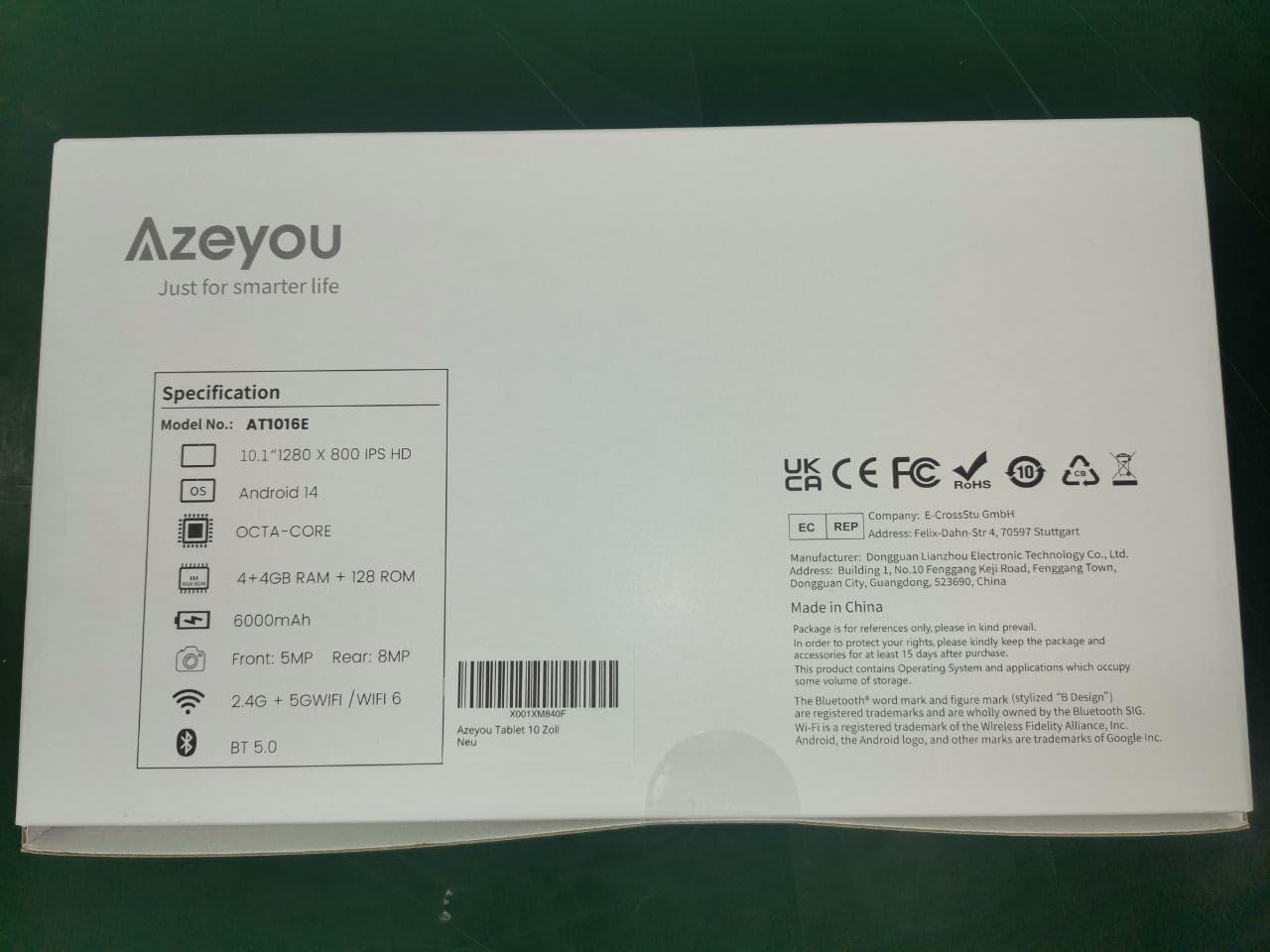
Image 9.1: Back of the product packaging displaying key specifications.
10. Garanti og støtte
Your Azeyou Tablet is covered by a manufacturer's warranty. For specific warranty terms and conditions, please refer to the documentation included with your purchase or visit the official Azeyou website. For technical support, troubleshooting assistance, or warranty claims, please contact Azeyou customer service.
Du finner mer informasjon og støtte på Azeyou Brand Store.