
Velkomst
Thank you for choosing the BYTECH BICONIC True Wireless Earbuds. This manual provides essential information on how to set up, operate, maintain, and troubleshoot your new earbuds. Please read this manual thoroughly before use to ensure optimal performance and longevity of your device.
Viktige sikkerhetsinstruksjoner
- Ikke utsett øreproppene eller ladeetuiet for ekstreme temperaturer, fuktighet eller væsker.
- Unngå å miste, støte eller demontere enheten.
- Do not use abrasive cleaners or harsh chemicals to clean the earbuds or case.
- Lytt på moderat volum for å unngå hørselsskade. Langvarig eksponering for høye lyder kan forårsake irreversibelt hørselstap.
- Oppbevares utilgjengelig for barn og kjæledyr.
- Dispose of the device responsibly according to local regulations. Do not dispose of with household waste.
Hva er inkludert
Vennligst sjekk innholdet i pakken for å sikre at alle varene er til stede:
- BYTECH BICONIC True Wireless Earbuds (Left and Right)
- Ladeetui
- Ladekabel
- Brukerhåndbok
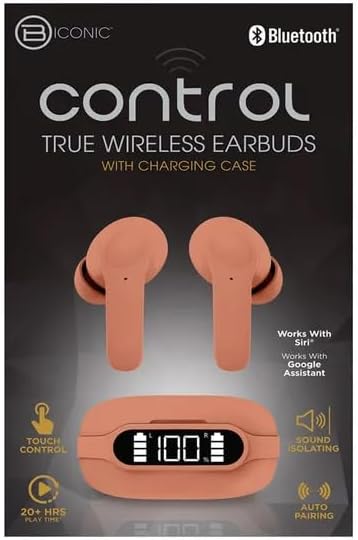
Produkt overview
Familiarize yourself with the components of your BYTECH BICONIC True Wireless Earbuds.

Komme i gang
Lader ørepluggene og dekselet
The BYTECH BICONIC earbuds come with a rechargeable battery in both the earbuds and the charging case. Ensure both are fully charged before first use.
- Plasser øreproppene i ladeetuiet, og sørg for at de er riktig plassert i sine respektive spor (V for venstre, H for høyre).
- Connect the provided charging cable to the charging port on the case and the other end to a USB power source (e.g., computer USB port, wall adapter).
- Det digitale displayet på ladeetuiet viser batterinivået. Beregn tilstrekkelig tid til full lading.
- Når den er fulladet, koble fra ladekabelen.
Bluetooth-paring
Følg disse trinnene for å koble øreproppene til den Bluetooth-aktiverte enheten din:
- Sørg for at øreproppene er ladet og i ladeetuiet.
- Åpne ladeetuiet. Øreproppene vil automatisk gå inn i paringsmodus, og en indikatorlampe på øreproppene vil blinke.
- On your device (smartphone, tablet, etc.), go to the Bluetooth settings and turn Bluetooth on.
- Søk etter available devices. You should see "BYTECH BICONIC" or a similar name appear in the list.
- Select "BYTECH BICONIC" to connect. Once connected, a voice prompt will confirm the successful pairing, and the indicator lights on the earbuds will stop flashing.
- Øreproppene kobler seg automatisk til den sist parede enheten når de tas ut av etuiet, forutsatt at Bluetooth er aktivert på enheten.
Bruksanvisning
Trykk på kontroller
The BYTECH BICONIC earbuds feature intuitive touch controls for easy management of your audio and calls.
| Handling | Funksjon |
|---|---|
| Enkelt trykk (venstre/høyre ørepropp) | Spill/pause musikk, svar/avslutt samtale |
| Dobbelttrykk (høyre øreplugg) | Neste spor |
| Dobbelttrykk (venstre øreplugg) | Forrige spor |
| Trippeltrykk (venstre/høyre ørepropp) | Aktiver stemmeassistenten (Siri/Google Assistant) |
| Langt trykk (venstre/høyre ørepropp) | Avvis anrop |
Slår av og på
- Strøm på: Ørepluggene slås automatisk på når de tas ut av ladevesken.
- Slå av: Plasser øreproppene tilbake i ladeetuiet og lukk lokket. De vil automatisk slå seg av og begynne å lade.
Vedlikehold og stell
Proper care will extend the life of your BYTECH BICONIC True Wireless Earbuds.
- Rengjøring: Use a soft, dry, lint-free cloth to clean the earbuds and charging case. Do not use liquids or aerosol cleaners.
- Lagring: Når de ikke er i bruk, oppbevar alltid øreproppene i ladeetuiet for å beskytte dem og holde dem ladet.
- Unngå ekstreme forhold: Do not expose the device to extreme heat, cold, or direct sunlight.
- Vannmotstand: Disse øreproppene er ikke vanntette. Unngå kontakt med vann eller overdreven fuktighet.
Feilsøking
Hvis du støter på problemer med øreproppene, kan du se følgende vanlige løsninger:
| Problem | Løsning |
|---|---|
| Øreplugger kan ikke pares | Sørg for at øreproppene er ladet. Slå av og på Bluetooth på enheten din. Glem enheten i Bluetooth-innstillingene og par den på nytt. |
| Kun én øreplugg fungerer | Plasser begge øreproppene tilbake i ladeetuiet, lukk lokket, vent noen sekunder, og ta dem deretter ut igjen. Sørg for at begge er ladet. |
| Ingen lyd | Check volume levels on both your device and the earbuds. Ensure earbuds are properly connected. Try playing different audio. |
| Ladeetui lader ikke | Sørg for at ladekabelen er ordentlig koblet til både etuiet og strømkilden. Prøv en annen USB-port eller strømadapter. |
Tekniske spesifikasjoner
Detailed specifications for your BYTECH BICONIC True Wireless Earbuds:
| Trekk | Detalj |
|---|---|
| Modellnummer | BC-AU-BE-144-TN |
| Tilkoblingsteknologi | Trådløs (Bluetooth) |
| Formfaktor | In-Ear (Intraurales) |
| Farge | Kafe |
| Spesielle funksjoner | Rechargeable Battery, Touch Control, Sound Isolating, Auto Pairing |
| Inkluderte komponenter | Kabel |
| Estimated Play Time | 20+ Hours (with charging case) |
Garantiinformasjon og kundestøtte
BYTECH products are designed and manufactured to the highest quality standards. For information regarding warranty coverage, please refer to the warranty card included with your purchase or visit the official BYTECH webnettstedet.
If you require further assistance or have questions not covered in this manual, please contact BYTECH customer support through their official channels. Please have your model number (BC-AU-BE-144-TN) and purchase details ready when contacting support.