
1. Introduksjon
This manual provides instructions for the safe and effective use of your GT POWER AC/DC Power Adapter, Model 109. This adapter is designed to provide power to compatible TP-Link Mesh Wi-Fi 7 Systems, specifically Deco BE63, BE10000, and BE11000 models. Please read this manual thoroughly before use and retain it for future reference.
2. Sikkerhetsinformasjon
ADVARSEL: For å redusere risikoen for brann eller elektrisk støt, følg disse instruksjonene nøye.
- Ensure the adapter's voltage and current ratings match the requirements of your device.
- Do not expose the adapter to rain or moisture.
- Do not open the adapter casing. Det er ingen deler inni som kan repareres av brukeren.
- Keep the adapter away from excessive heat sources.
- Always unplug the adapter from the power outlet before cleaning or if it will be unused for an extended period.
- Ikke bruk adapteren hvis ledningen eller støpselet er skadet.
- Denne adapteren er kun beregnet for innendørs bruk.
- The adapter features Over Voltage-beskyttelse (OVP), overstrømsbeskyttelse (OCP) og kortslutningsbeskyttelse (SCP) for forbedret sikkerhet.
3. Produktet er overview
The GT POWER AC Adapter (Model 109) is a compact power supply unit designed for specific TP-Link Deco Mesh Wi-Fi systems. It converts AC wall power to the DC power required by your device.

Figur 1: Front view of the GT POWER AC Adapter. The label indicates input voltage (AC100-240V) and output (DC12V 3A).
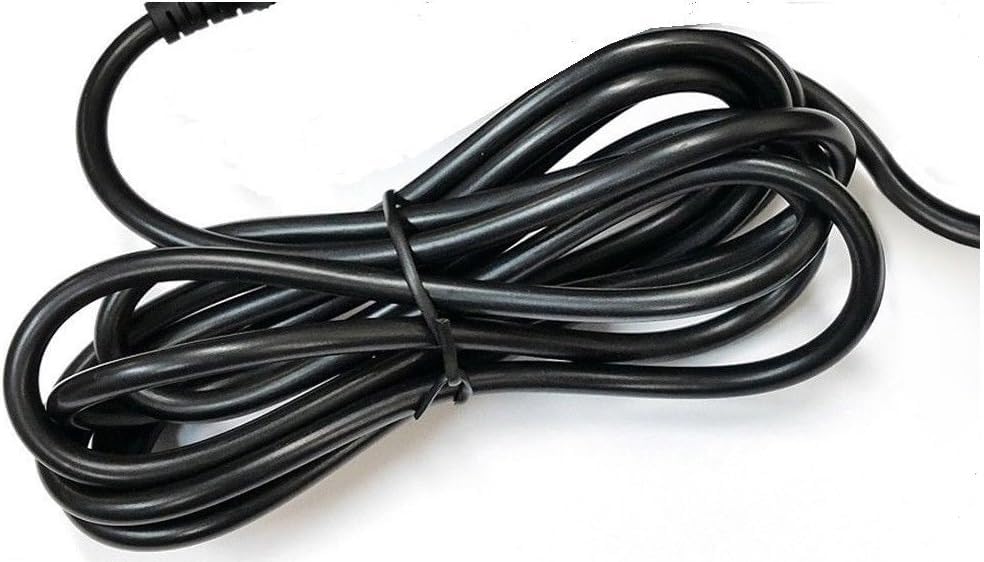
Figur 2: Side view of the adapter, highlighting the barrel connector that plugs into your device.
4. Oppsett
Follow these steps to connect your GT POWER AC Adapter to your TP-Link Deco Mesh Wi-Fi System:
- Ensure your TP-Link Deco device is powered off.
- Locate the power input port on your TP-Link Deco device. This is typically a circular port.
- Insert the barrel connector of the GT POWER AC Adapter firmly into the power input port of your Deco device.
- Koble strømadapteren til en standard 110 V AC-stikkontakt.
- Power on your TP-Link Deco device.
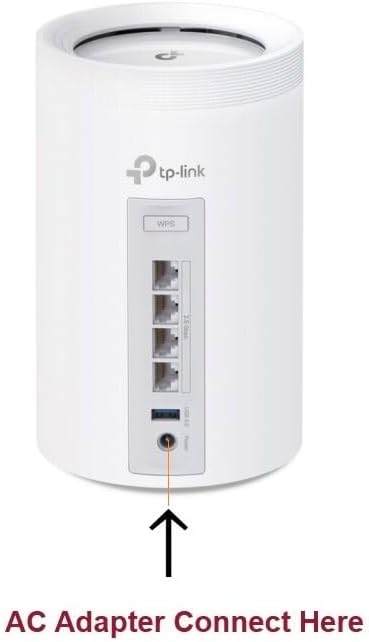
Figur 3: Example of connecting the AC adapter to a compatible TP-Link Deco device. The arrow indicates the power input port.
5. Bruksanvisning
Once properly connected and plugged into a power outlet, the GT POWER AC Adapter will continuously supply power to your TP-Link Deco device. No further user interaction is required for operation.
- Ensure the adapter is always plugged into a functional power outlet.
- Avoid disconnecting the adapter during critical operations of your Deco device.
6. Vedlikehold
The GT POWER AC Adapter requires minimal maintenance:
- Hold adapteren ren og fri for støv. Bruk en tørr, myk klut til rengjøring.
- Ikke bruk flytende rengjøringsmidler eller aerosoler.
- Regularly inspect the power cord and connector for any signs of damage. If damage is observed, discontinue use immediately.
- Oppbevar adapteren på et kjølig og tørt sted når den ikke er i bruk.
7. Feilsøking
If your TP-Link Deco device is not receiving power, consider the following:
- Ingen strøm:
- Verify the adapter is securely plugged into both the wall outlet and the Deco device.
- Test stikkontakten med en annen enhet for å sikre at den fungerer.
- Inspect the adapter's cable and connector for any visible damage.
- Intermitterende strøm:
- Sørg for at alle tilkoblinger er tette.
- Avoid bending or stressing the power cord.
Hvis problemene vedvarer, kontakt kundestøtte.
8. Spesifikasjoner
| Trekk | Detalj |
|---|---|
| Merke | GT POWER |
| Modellnummer | 109 |
| Inngang Voltage | AC 100-240V |
| Utgang Voltage/Strøm | DC 12V / 3A |
| Pluggformat | Type A (US Standard) |
| Beskyttelsesfunksjoner | OVP (Over Voltage-beskyttelse), OCP (overstrømsbeskyttelse), SCP (kortslutningsbeskyttelse) |
| UPC | 781834735527 |
9. Garanti og støtte
This GT POWER AC Adapter comes with a Ett års garantiI tillegg en 30-Day Money Back guarantee is offered.
For technical support or warranty claims, please contact the seller, GTXPower, through the platform where the product was purchased.