
1. Introduksjon
The Auronic Electric Air Dehumidifier AU3270 is designed to effectively remove excess moisture from indoor environments, helping to prevent mold growth and maintain a healthy humidity level. This appliance is suitable for spaces up to 15 square meters and can extract up to 10 liters of moisture per day. This manual provides essential information for the safe and efficient use of your dehumidifier.

Image: The Auronic Electric Air Dehumidifier AU3270 positioned in a living room, illustrating its compact design and 10-liter daily capacity for optimal dehumidification.
2. Sikkerhetsinstruksjoner
Les alle sikkerhetsinstruksjoner nøye før du bruker apparatet for å unngå skade eller materielle skader.
- Sørg for at strømforsyningen voltage matches the rating label on the dehumidifier.
- Ikke bruk avfukteren med en skadet strømledning eller støpsel.
- Hold apparatet unna varmekilder, direkte sollys og brennbare materialer.
- Ikke blokker luftinntaket eller -utløpet. Hold minst 20 cm klaring rundt enheten.
- Always place the dehumidifier on a stable, level surface to prevent water spillage.
- Trekk ut støpselet til apparatet før rengjøring, vedlikehold eller når det ikke er i bruk over lengre tid.
- Ikke senk enheten, strømledningen eller støpselet ned i vann eller andre væsker.
- Dette apparatet er ikke beregnet for bruk av personer (inkludert barn) med reduserte fysiske, sensoriske eller mentale evner, eller mangel på erfaring og kunnskap, med mindre de har fått tilsyn eller instruksjoner om bruk av apparatet av en person som er ansvarlig for deres sikkerhet.
- Barn bør overvåkes for å sikre at de ikke leker med apparatet.
3. Oppsett
3.1 Utpakking og pakkeinnhold
Carefully remove the dehumidifier from its packaging. Check that all components are present and undamaged. The package typically includes the dehumidifier unit, a drainage hose, and this user manual.

Image: Contents of the Auronic Dehumidifier package, displaying the main unit, continuous drainage hose, and user manual, along with key product dimensions.
3.2 Plassering
Place the dehumidifier on a firm, level surface in the desired location. Ensure there is at least 20 cm of free space around the air inlet and outlet for optimal airflow. The unit is effective for rooms up to 15 square meters. Avoid placing it in direct sunlight or near heat-emitting appliances.
3.3 Strømtilkobling
Plug the power cord into a grounded electrical outlet. Ensure the outlet meets the power requirements specified on the appliance's rating label.
3.4 Dreneringsalternativer
Avfukteren tilbyr to dreneringsmetoder:
- Vanntank: The unit collects condensed water in its internal 2-liter water tank. The appliance will automatically stop operating when the tank is full, and an indicator will illuminate.
- Kontinuerlig drenering: For uninterrupted operation, attach the included drainage hose to the continuous drainage port on the back of the unit. Route the hose to a suitable drain or larger container, ensuring it is sloped downwards to allow water to flow freely by gravity.
4. Bruksanvisning
4.1 Kontrollpanel overview
The dehumidifier features an intuitive digital LED display and control buttons for easy operation.
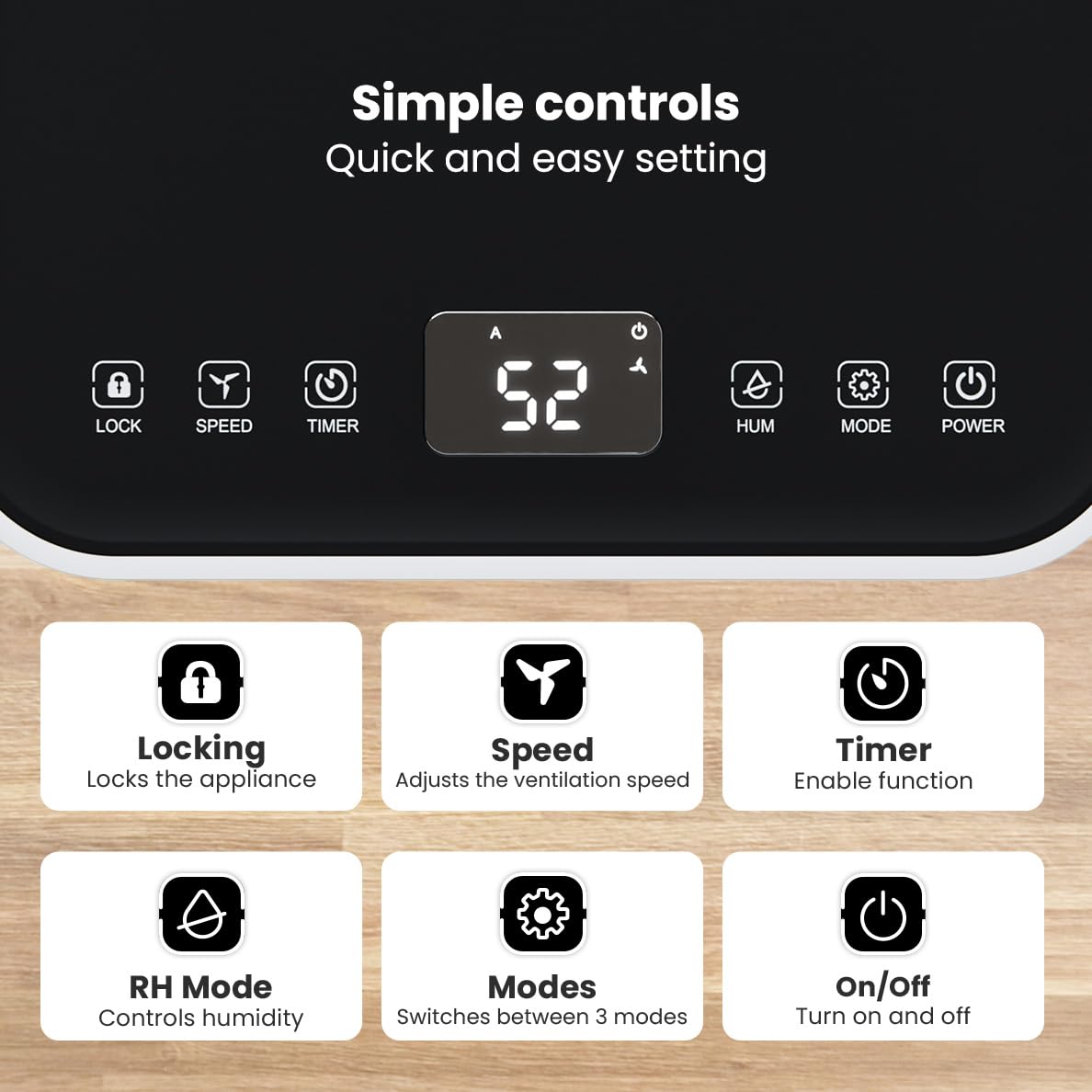
Bilde: Detaljert view of the dehumidifier's control panel, highlighting each button's function for easy setting adjustments.
- På-knapp (⏻): Slår apparatet på eller av.
- Modusknapp (⚙): Switches between the three operating modes: Automatic, Continuous, and Quiet.
- RH Mode Button (💧): Controls the desired relative humidity level. Press to set the target humidity.
- Timer-knapp (⏱): Enables the timer function for scheduled operation.
- Hastighetsknapp (⇋): Adjusts the ventilation speed (fan speed).
- Låseknapp (🔒): Låser kontrollpanelet for å forhindre utilsiktede endringer.
4.2 Driftsmoduser
Trykk på modusknappen for å bla gjennom de tilgjengelige driftsmodusene:
- Automatisk modus: The device automatically adjusts its operation based on the current room humidity to maintain a comfortable level.
- Kontinuerlig modus: Ideal for very damp environments like wet basements. The dehumidifier operates continuously regardless of the humidity level until the water tank is full or continuous drainage is active.
- Stille modus: Designed for night-time use or in areas where low noise is preferred. The dehumidifier operates at a reduced fan speed, ensuring a peaceful environment with a noise level below 36dB.

Image: A chart comparing the noise level of the Auronic Dehumidifier (42dB) to common sounds like breathing, whispering, and loud conversation, highlighting its quiet operation.
4.3 Humidity Sensor and Display
The integrated humidity sensor monitors the room's humidity level, which is displayed on the digital screen. The color of the display indicates the current humidity status:
- Blå: Humidity level is below 45%.
- Grønn: Humidity level is between 45% and 64%.
- Rød: Humidity level is above 65%.
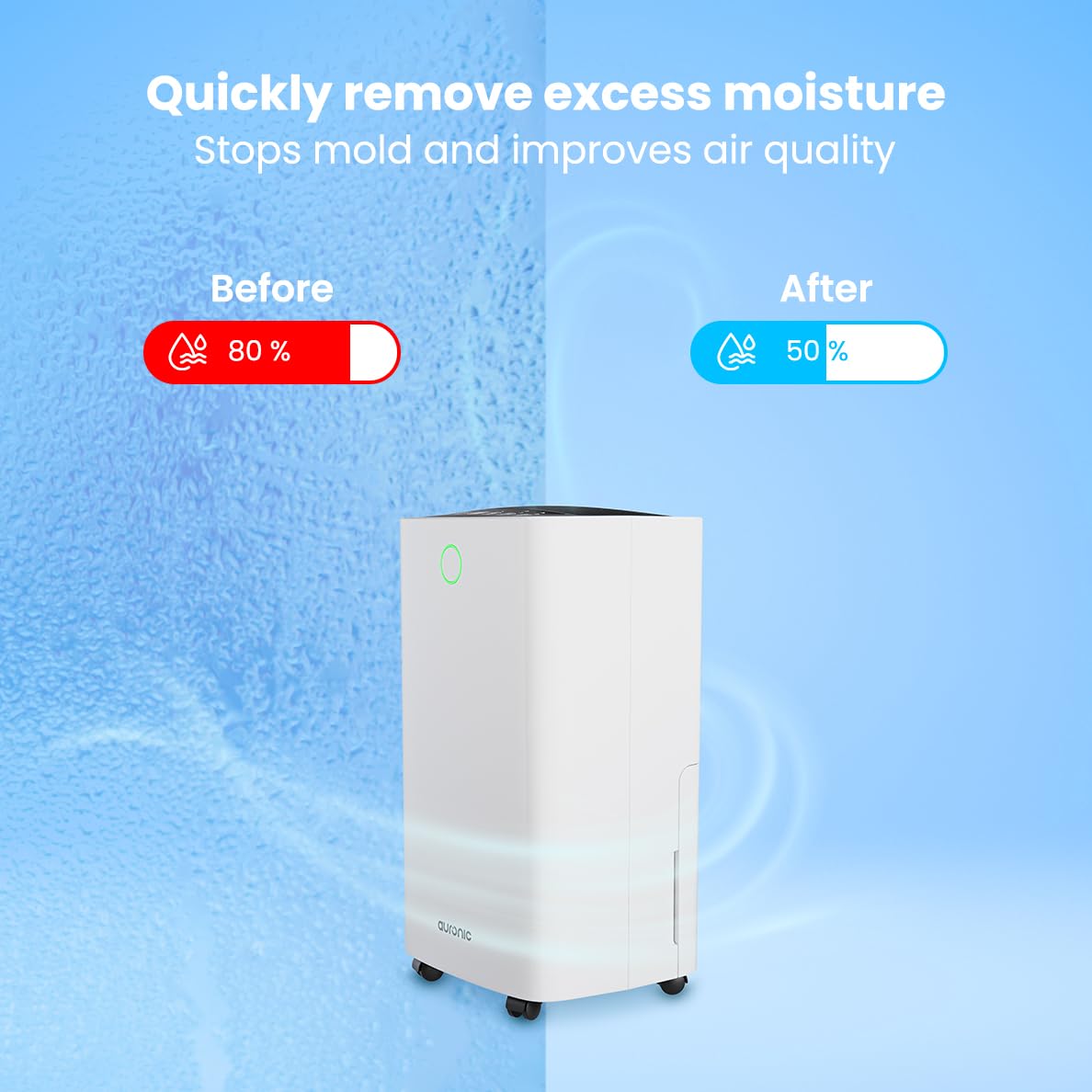
Image: A visual representation demonstrating the dehumidifier's effectiveness, showing a reduction in humidity from 80% to 50% in a room.
4.4 Tørkefunksjon for klesvask
The Auronic dehumidifier includes a laundry drying function to assist in reducing the drying time of clothes, sheets, and towels. Place the appliance in your laundry room or near drying clothes to utilize this feature, which helps to remove moisture from the air and accelerate the drying process.

Image: The dehumidifier in a bathroom setting, demonstrating its ability to extract up to 10 liters of moisture and its suitability for rooms up to 15 square meters, alongside its intelligent humidity meter, wash-dry function, and silent operation.
5. Vedlikehold
Regelmessig vedlikehold sikrer lang levetid og effektiv drift av avfukteren din.
5.1 Tømme vanntanken
When the water tank is full, the dehumidifier will stop operating, and an indicator light will turn on. Carefully pull out the water tank from the unit, empty the collected water, and then reinsert the tank firmly until it clicks into place. Ensure the tank is properly seated to resume operation.
5.2 Rengjøre luftfilteret
The air filter should be cleaned regularly (e.g., every two weeks or as needed) to maintain optimal performance. A dirty filter can reduce efficiency and increase energy consumption.
- Trekk avfukteren ut av stikkontakten.
- Finn og fjern luftfilteret (vanligvis på baksiden eller siden av enheten).
- Clean the filter using a vacuum cleaner to remove dust and debris. For heavily soiled filters, wash gently with lukewarm water and a mild detergent.
- Allow the filter to air dry completely before reinserting it into the dehumidifier.
5.3 Generell rengjøring og oppbevaring
Tørk av utsiden av avfukteren med en myk, damp cloth. Do not use abrasive cleaners or solvents. For long-term storage, ensure the water tank is empty and clean, the filter is clean and dry, and the unit is unplugged. Store the dehumidifier in a cool, dry place, preferably in its original packaging.
6. Feilsøking
Hvis du støter på problemer med avfukteren din, kan du se følgende vanlige problemer og løsninger:
| Problem | Mulig årsak | Løsning |
|---|---|---|
| Avfukteren slår seg ikke på. | Ingen strømforsyning; Strømledningen er ikke koblet til; Av/på-knappen er ikke trykket inn. | Check power connection; Ensure outlet is functional; Press the Power button. |
| Ikke noe vann samlet opp eller lav avfukting. | Room temperature too low; Humidity level already low; Air filter clogged; Air inlet/outlet blocked; Water tank not properly inserted. | Ensure room temperature is above 5°C; Check current humidity; Clean the air filter; Clear any obstructions; Reinsert water tank correctly. |
| Enheten er støyende. | Enheten står ikke på en jevn overflate; Luftfilteret er tett; Interne komponenter vibrerer. | Place on a stable, level surface; Clean the air filter; If noise persists, contact customer support. |
| Indikatoren for full vanntank lyser, men tanken er ikke full. | Float switch malfunction; Water tank not properly seated. | Remove and reinsert the water tank; Check float switch for obstructions. |
| Displayet viser en feilkode. | Intern sensorfeil eller funksjonsfeil. | Trekk ut støpselet til enheten i 5 minutter, og sett det deretter inn igjen. Hvis feilen vedvarer, kontakt kundestøtte. |
7. Spesifikasjoner
Technical specifications for the Auronic Electric Air Dehumidifier AU3270:
| Trekk | Detalj |
|---|---|
| Merke | Auronic |
| Modellnavn | AU3270 |
| Kapasitet | 10 liter/dag |
| Vanntankkapasitet | 2 liter |
| Dekning av gulvareal | Up to 15 m² (150000 Square Centimeters) |
| Wattage | 185 watt |
| Produktdimensjoner (D x B x H) | 50D x 30.5B x 26.5H centimeter |
| Varevekt | 10 kilo |
| Farge | Hvit |
| Støynivå | Below 36dB (in Quiet Mode) |
8. Garanti og støtte
8.1 Garantiinformasjon
Your Auronic Electric Air Dehumidifier AU3270 comes with a standard manufacturer's warranty. Please refer to the warranty card included in your package for specific terms, conditions, and duration. Keep your proof of purchase for warranty claims.
8.2 Kundestøtte
For any questions, technical assistance, or warranty claims, please contact Auronic customer support. Contact details can typically be found on the product packaging, the official Auronic webnettstedet eller garantikortet.