
Bodytone FIT12
Bodytone FIT12 Inxide Foldable Treadmill User Manual
Model: FIT12 Inxide
1. Viktige sikkerhetsinstruksjoner
Please read all instructions carefully before using the Bodytone FIT12 Inxide Foldable Treadmill. Retain this manual for future reference.
- Plasser alltid tredemøllen på en flat og stabil overflate.
- Ensure adequate clear space (at least 2 meters behind and 0.6 meters on each side) around the treadmill.
- Hold barn og kjæledyr unna tredemøllen under bruk.
- Always attach the safety key clip to your clothing before starting your workout. The treadmill will stop if the safety key is dislodged.
- Ikke bruk tredemøllen hvis ledningen eller støpselet er skadet, eller hvis den ikke fungerer som den skal.
- Bruk passende sportssko og klær.
- Ikke overskrid maksimal brukervekt på 90 kg (198 lbs).
- Rådfør deg med en lege før du starter et treningsprogram.
2. Produktet er overview
The Bodytone FIT12 Inxide is a foldable treadmill designed for home use, offering a blend of technology and convenience for your fitness routine.
Nøkkelfunksjoner:
- Sammenleggbar design: Compact for easy storage in small spaces.
- Bluetooth-tilkobling: Compatible with FitShow, Kinomap, and Zwift for interactive training.
- LED display: Tracks speed, time, distance, calories burned, and heart rate.
- Forhåndsinnstilte programmer: 12 varied workout programs to optimize results.
- MP3 Speakers: Integrated speakers for audio playback during workouts.
- Løpeoverflate: 42 x 120 cm (16.5 x 47.2 inches) for comfortable use.
- Maks hastighet: Up to 12 km/h (7.5 mph).
- Motor: 0.8 HP brushless DC motor for efficient and quiet operation.
Komponenter:
Familiarize yourself with the main parts of your treadmill.

Figur 2.1: Foran view of the Bodytone FIT12 Inxide Foldable Treadmill, showing the console, handlebars, and running deck.
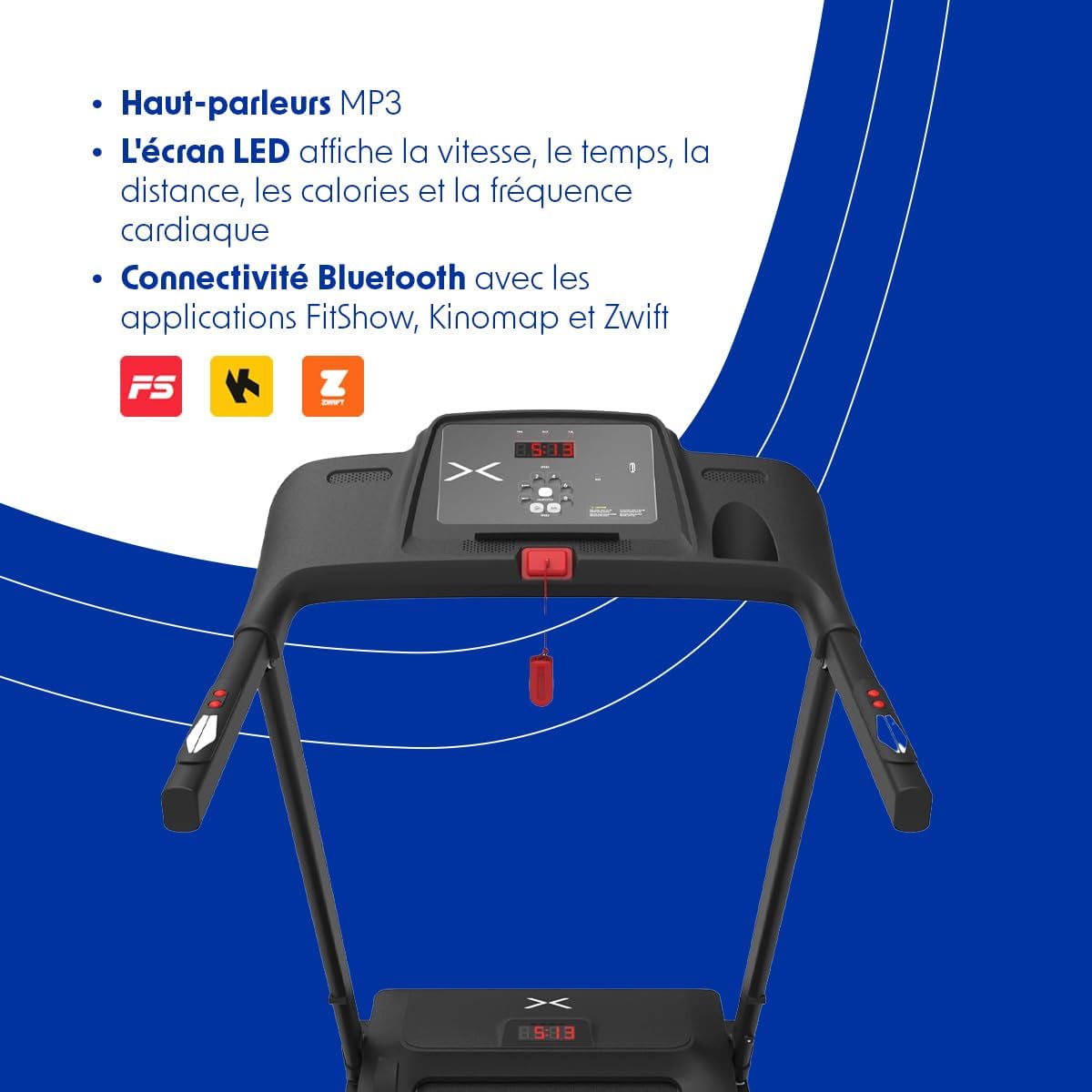
Figure 2.2: Close-up of the treadmill console, featuring the LED display, control buttons for speed and programs, and the safety key slot.

Figure 2.3: The Bodytone FIT12 Inxide Treadmill in its folded, compact position, illustrating its space-saving design.
3. Oppsett og montering
The Bodytone FIT12 Inxide Treadmill comes largely pre-assembled. Follow these steps to prepare it for use.
Folde ut tredemøllen:
- Ta tredemøllen forsiktig ut av emballasjen.
- Place the treadmill on a clear, level surface.
- Locate the locking pin or knob that secures the running deck in the folded position.
- Release the locking mechanism and gently lower the running deck until it is flat on the floor. Ensure it clicks securely into place.
- Raise the console and handlebars to their upright position and secure them with any provided locking pins or screws.
Koble til strøm:
- Connect the provided power cord to the treadmill's power input port.
- Koble strømledningen til en jordet stikkontakt.
- Ensure the power switch (usually located near the power cord input) is in the 'ON' position.

Figure 3.1: The treadmill in its folded state, emphasizing its compact and lightweight design for easy storage and portability.
4. Bruksanvisning
This section guides you through the basic operation of your Bodytone FIT12 Inxide Treadmill.
Starte en treningsøkt:
- Ensure the treadmill is plugged in and the power switch is ON.
- Fest sikkerhetsnøkkelklipsen til klærne dine og sett sikkerhetsnøkkelen inn i det angitte sporet på konsollen. Displayet vil lyse opp.
- Gå opp på tredemøllen og plasser føttene på sideskinnene.
- Press the 'START' button. The treadmill will begin with a short countdown, then the belt will start moving at a low speed.
- Adjust the speed using the '+' and '-' buttons on the console or handlebars.
Konsollfunksjoner:
LED-skjermen viser følgende målinger:
- Fart: Current running speed in km/h.
- Tid: Varigheten av treningen din.
- Avstand: Total tilbakelagt distanse.
- Kalorier: Beregnet kaloriforbrenthet.
- Hjertefrekvens: Your pulse, detected by hand sensors (if equipped and used).

Figure 4.1: The LED display on the console, illustrating how speed, calories, distance, time, and heart rate are tracked during a workout.
Forhåndsinnstilte programmer:
The treadmill includes 12 pre-set programs. To select a program:
- From standby mode, press the 'PROGRAM' button to cycle through the available programs (P1-P12).
- Once you've selected your desired program, press 'START' to begin. The treadmill will automatically adjust speed according to the program's profile.
Bluetooth-tilkobling:
Connect your treadmill to compatible fitness apps for an enhanced training experience.
- Download a compatible app (e.g., FitShow, Kinomap, Zwift) on your smartphone or tablet.
- Aktiver Bluetooth på enheten din.
- Open the app and follow its instructions to search for and connect to your Bodytone FIT12 treadmill.
- Once connected, you can control the treadmill and track your progress through the app.
Using MP3 Speakers:
Connect your audio device to the treadmill's MP3 input port (if available) or via Bluetooth (if supported by the console) to play music through the integrated speakers.
Stopp av tredemøllen:
- Press the 'STOP' button to gradually slow down and stop the treadmill belt.
- Alternativt kan du trekke sikkerhetsnøkkelen ut av sporet for å stoppe tredemøllen umiddelbart i en nødsituasjon.
5. Vedlikehold
Regelmessig vedlikehold sikrer tredemøllens levetid og optimal ytelse.
Rengjøring:
- Trekk alltid ut støpselet til tredemøllen før rengjøring.
- Tørk av konsollen og andre overflater med annonseamp klut etter hver bruk for å fjerne svette og støv.
- Ikke bruk skurende rengjøringsmidler eller løsemidler.
Remsmøring:
The running belt requires periodic lubrication to reduce friction and wear. Refer to the specific instructions provided with your treadmill's lubricant kit. Typically, lubrication is needed every 3-6 months depending on usage.
Beltejustering:
If the running belt becomes off-center or slips, it may need adjustment. Consult the detailed instructions in the full product manual or contact customer support for guidance.
6. Feilsøking
Her er løsninger på vanlige problemer du kan støte på:
| Problem | Mulig årsak | Løsning |
|---|---|---|
| Tredemøllen starter ikke. | Power cord unplugged, power switch off, safety key not inserted. | Check power connection, ensure power switch is ON, insert safety key fully. |
| Løpebeltesliper. | Beltet er for løst, beltet trenger smøring. | Juster remstrammingen (se den fullstendige håndboken), smør remmen. |
| Skjermen fungerer ikke som den skal. | Loose cable connection, console malfunction. | Check all cable connections, power cycle the treadmill. If issue persists, contact support. |
| Uvanlig støy under drift. | Loose parts, belt friction, motor issue. | Inspect for loose screws, lubricate belt, or contact customer support. |
7. Spesifikasjoner
Detailed technical specifications for the Bodytone FIT12 Inxide Treadmill:
| Trekk | Detalj |
|---|---|
| Modell | FIT12 Inxide |
| Merke | Bodytone |
| Farge | Svart |
| Motor | 0.8 HP Brushless DC |
| Fartsområde | Opptil 12 km/t (7.5 mph) |
| Løpeoverflate | 42 x 120 cm (16.5 x 47.2 tommer) |
| Visningstype | LED |
| Treningsprogrammer | 12 Forhåndsinnstilte programmer |
| Tilkobling | Bluetooth (FitShow, Kinomap, Zwift compatible) |
| Spesielle funksjoner | Built-In Speaker, Heart Rate Monitor, Lightweight, Wheeled for transport |
| Maks brukervekt | 90 kg (198 lbs) |
| Produktdimensjoner (ufoldet) | 154 x 73 x 22 cm (60.6 x XUMX x 28.7 inches) |
| Produktdimensjoner (foldet) | 66.5 x 65 x 120 cm (26.2 x XUMX x 25.6 inches) |
| Varevekt | 31 kg (68.3 lbs) |
| Inkluderte komponenter | Strømledning |
8. Garanti og støtte
For warranty information, please refer to the documentation included with your purchase or visit the official Bodytone website. If you require technical assistance or have questions not covered in this manual, please contact Bodytone customer support.
Bodytone Customer Support: www.bodytone.eu/en/contact/