
1. Introduksjon
Thank you for choosing the LONPOO LP42M Active Bookshelf Speakers. These speakers are designed to deliver high-quality audio with versatile connectivity options, suitable for various home audio setups. This manual provides essential information for safe and efficient use of your new speakers.
2. Sikkerhetsinformasjon
Les alle sikkerhetsinstruksjoner nøye før du bruker produktet. Ta vare på denne håndboken for senere referanse.
- Strømkilde: Bruk kun den medfølgende strømadapteren. Sørg for at volumettage samsvarer med din lokale strømforsyning.
- Ventilasjon: Do not block any ventilation openings. Maintain adequate space around the speakers for proper airflow.
- Vann og fuktighet: Do not expose the speakers to water, rain, or moisture. Avoid placing liquid-filled objects on or near the speakers.
- Varme: Keep the speakers away from heat sources such as radiators, heat registers, stoves, or other heat-producing appliances.
- Rengjøring: Unplug the speakers from the power outlet before cleaning. Use a soft, dry cloth. Do not use liquid cleaners or aerosol cleaners.
- Service: Ikke prøv å utføre service på dette produktet selv. Henvis all service til kvalifisert servicepersonell.
3. Pakkens innhold
Bekreft at alle varene er til stede i pakken:
- LONPOO LP42M Active Bookshelf Speaker Pair (1 powered speaker, 1 passive speaker)
- Fjernkontroll x 1
- Speaker Wire (6.56ft / 2m) x 1
- Optical Cable (4.92ft / 1.5m) x 1
- AC Power Cord (3.94ft / 1.2m) x 1

4. Produktet er overview
The LONPOO LP42M speakers feature a classic wooden design with advanced audio components and multiple connectivity options.
4.1 Front Panel (Powered Speaker)
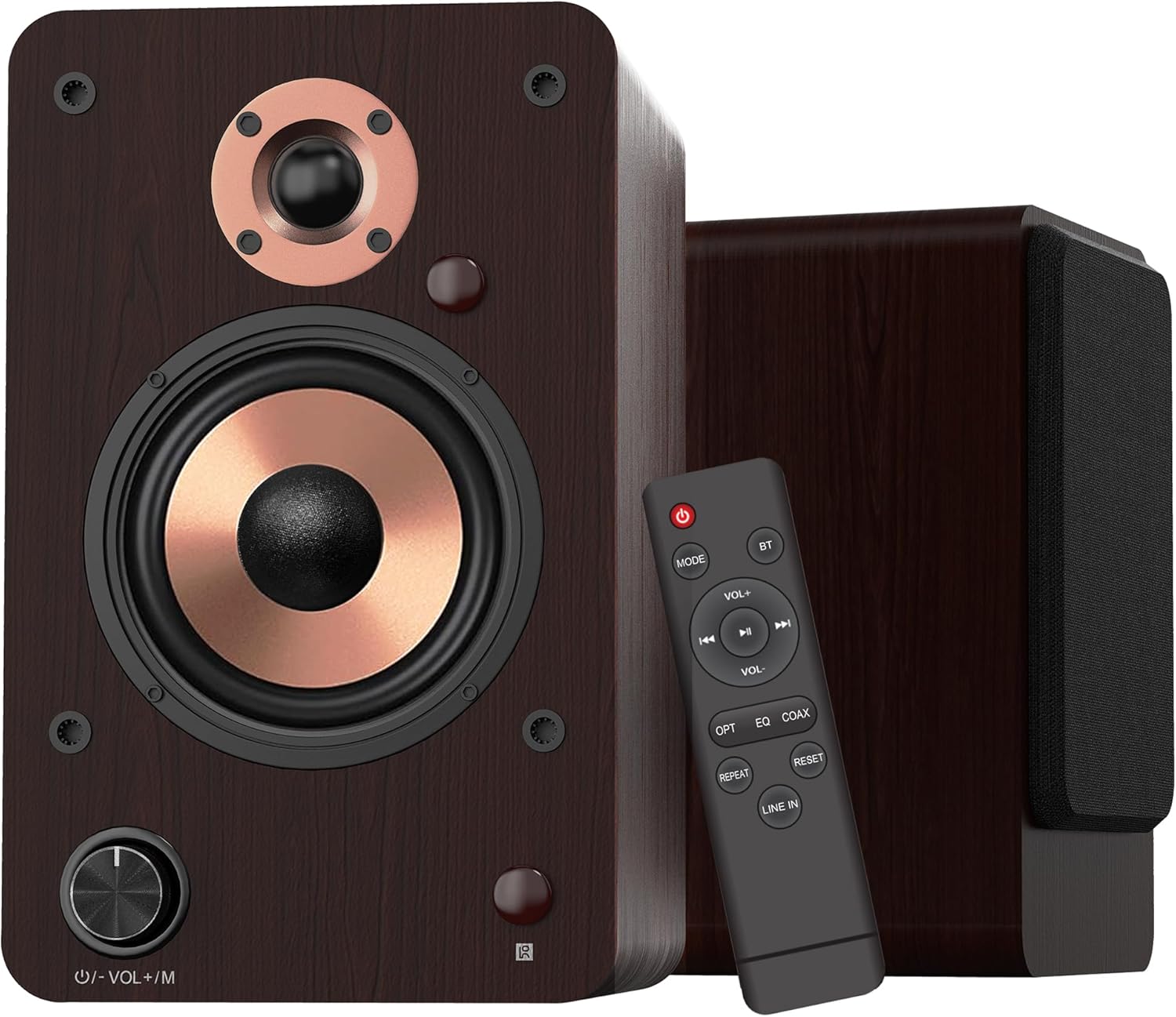
- Volum-/modusknapp: Rotate to adjust volume. Press to cycle through input modes.
- LED-indikator: Displays the current input mode (Red: Standby, Blue: Bluetooth, Green: Optical, Purple: Coaxial/USB, Yellow: AUX, Light Blue: Line-in).
4.2 Høyttalerkomponenter

- 1-tommers silkedome-diskant: Delivers crisp and clear high frequencies.
- 4-inch Aluminum Cone Woofer: Provides rich and powerful bass.
- 12mm MDF Wood Cabinet: Ensures solid construction and minimizes resonance for improved audio clarity.
4.3 Rear Panel (Powered Speaker)

- TREBLE Button: Justerer høyfrekvent utgang.
- BASS-knapp: Justerer lavfrekvent utgang.
- Strømbryteren: Slår høyttalersystemet av eller på.
- AC PORT: Kobles til strømledningen.
- TALER UT: Connects to the passive speaker using the provided speaker wire.
- LINE IN (RCA L/R): For connecting devices with RCA audio output (e.g., turntables, CD players).
- AUX IN: For connecting devices with a 3.5mm audio output.
- OPTISK: For connecting devices with optical audio output (e.g., TVs, game consoles).
- KOAKSIELL: For connecting devices with coaxial audio output.
- USB-INNGANG: For connecting USB flash drives for audio playback or connecting to a PC.
5. Oppsett
5.1 Utpakking
Fjern alle komponenter forsiktig fra emballasjen. Ta vare på emballasjen for senere transport eller oppbevaring.
5.2 Høyttalerplassering
For optimal sound quality, place the speakers on a stable surface, such as a bookshelf or speaker stands. Position them along a wall or near a corner of the room to enhance bass response. Ensure the speakers are equidistant from your listening position for a balanced stereo image.
5.3 Tilkobling av høyttalerne
Connect the powered speaker to the passive speaker using the provided speaker wire. Ensure the red wire connects to the red terminal and the white/black wire connects to the black terminal on both speakers.

5.4 Koble til lydkilder
The LP42M speakers offer multiple input options:
- Bluetooth: For trådløs tilkobling til smarttelefoner, nettbrett eller andre Bluetooth-aktiverte enheter.
- USB: Connect a USB flash drive for direct audio playback or connect to a PC using a USB cable.
- Optisk: Use the optical cable to connect to TVs, game consoles, or other digital audio sources.
- Koaksial: Use a coaxial cable to connect to compatible digital audio sources.
- RCA (Line In): Use RCA cables to connect to devices like turntables, CD players, or DVD players.
- AUX-inngang: Use a 3.5mm audio cable to connect to devices with a headphone jack.


5.5 Strømtilkobling
Connect the AC power cord to the AC port on the rear of the powered speaker, then plug the other end into a wall outlet.
6. Bruksanvisning
6.1 Strøm på/av
Vend på MAKT switch on the rear panel of the powered speaker to the 'ON' position to turn on the speakers. Flip it to 'OFF' to power down.
6.2 Inngangsvalg
Trykk på Volume/Mode Knob on the front of the powered speaker or the 'MODE' button on the remote control to cycle through the available input modes: Bluetooth, Optical, Coaxial, RCA (Line In), USB, and AUX-in. The LED indicator will change color to reflect the selected mode.

6.3 Volumkontroll
Roter Volume/Mode Knob on the front of the powered speaker clockwise to increase volume and counter-clockwise to decrease volume. Alternatively, use the 'VOL+' and 'VOL-' buttons on the remote control.
6.4-tonekontroll
Bruk DISKANT og BASS knobs on the rear panel of the powered speaker to adjust the high and low frequencies to your preference.

6.5 Bluetooth-paring
- Switch the speaker to Bluetooth mode (blue LED indicator).
- On your device (smartphone, tablet), enable Bluetooth and search for 'LP42M'.
- Select 'LP42M' to pair. Once connected, the blue LED will remain solid.
6.6 USB-avspilling
Sett inn en USB-minnepinne som inneholder MP3/WMA-lyd files into the USB port. The speaker will automatically switch to USB mode and begin playback. Use the remote control for playback functions (play/pause, next/previous track).
6.7 Fjernkontrollfunksjoner

- Strømknapp: Turns the speakers on/off (standby).
- Veibeskrivelse: Blar gjennom inndatamoduser.
- BT: Directly switches to Bluetooth mode.
- VOL+/VOL-: Justerer volumet.
- Spill av/pause, neste/forrige: Controls audio playback (USB/Bluetooth).
- OPT: Directly switches to Optical mode.
- EQ: Cycles through sound equalization presets.
- COAX: Directly switches to Coaxial mode.
- GJENTA: Repeats current track or playlist (USB).
- NULLSTILLE: Tilbakestiller innstillingene.
- LINJE INN: Directly switches to Line In (RCA) mode.
7. Vedlikehold
Riktig vedlikehold sikrer høyttalernes levetid og ytelse.
- Rengjøring: Use a soft, dry, lint-free cloth to clean the speaker cabinets. Do not use abrasive cleaners, waxes, or solvents.
- Støv: Tørk støv av høyttalergitter og overflater regelmessig for å forhindre støvopphopning.
- Miljø: Unngå å plassere høyttalere i direkte sollys, i nærheten av varmekilder eller i områder med høy luftfuktighet.
8. Feilsøking
Hvis du støter på problemer, kan du se følgende vanlige problemer og løsninger:
| Problem | Mulig årsak | Løsning |
|---|---|---|
| Ingen lyd | Power not connected; incorrect input mode; volume too low; cables loose. | Ensure power is on; select correct input mode; increase volume; check all cable connections. |
| Bluetooth kobler ikke til | Speaker not in Bluetooth mode; device too far; already paired with another device. | Switch speaker to Bluetooth mode; ensure device is within 10m range; disconnect from other devices and try pairing again. |
| Forvrengt lyd | Volume too high; poor source quality; loose cable connection. | Reduce volume on speaker and source; try a different audio source; check cable connections. |
| Fjernkontrollen virker ikke | Batteries dead; obstruction between remote and speaker; remote not pointed at sensor. | Replace batteries; remove obstructions; ensure remote is pointed at the speaker's sensor. |
9. Spesifikasjoner
| Trekk | Spesifikasjon |
|---|---|
| Høyttalertype | Aktive bokhyllehøyttalere |
| Utgangseffekt | 100 W (50 W x 2) |
| Basshøyttalerdiameter | 4 inches (Aluminum Cone) |
| Diskanthøyttalerens diameter | 1 inch (Silk Dome) |
| Frekvensrespons | 40Hz-20kHz |
| Impedans | 4 Ohm |
| Signal-til-støy-forhold (S/N) | 80dB |
| Tilkobling | Bluetooth 5.3, Optical, Coaxial, RCA (Line In), USB, AUX-in (3.5mm) |
| Bluetooth-rekkevidde | Opptil 10 meter (33 fot) |
| Kontrollmetode | Remote Control, On-speaker Knobs |
| Skapmateriale | 12mm MDF Wood |
| Dimensjoner (hver høyttaler) | 9.84" (H) x 7.07" (W) x 6.1" (L) / 25cm (H) x 18cm (W) x 15.5cm (L) |
| Vekt (par) | 5.05 kg (11.13 lbs) |
| Farge | Brun |
10. Offisielle produktvideoer
Watch these official videos for additional setup and feature demonstrations:
LONPOO Premium Bookshelf Speakers LP-42M
Video: En offisiell overview of the LONPOO LP-42M Premium Bookshelf Speakers, showcasing their design and key features.
Active Bookshelf Speaker 100W
Video: A short demonstration highlighting the active features and 100W power output of the bookshelf speakers.
11. Garanti og støtte
The LONPOO LP42M speakers come with a Limited Warranty. Please refer to the warranty card included in your package for detailed terms and conditions.
For technical support, troubleshooting assistance, or warranty claims, please contact LONPOO customer service through the official webnettstedet eller forhandleren din.