
1. Introduksjon
The Radtel RT16 FRS Two Way Radio is designed for reliable, license-free communication across 16 channels. Featuring a durable build, USB-C charging, and VOX functionality, it is suitable for various environments from outdoor activities to commercial settings.
Pakkeinnhold
Your Radtel RT16 package includes:
- 2x Radtel RT16 Two Way Radios
- 2x Rechargeable Lithium-Ion Batteries (2000mAh)
- 2x belteklips
- 2x USB-C Charger Cables
- 2x ørepropper
- 1x brukerveiledning
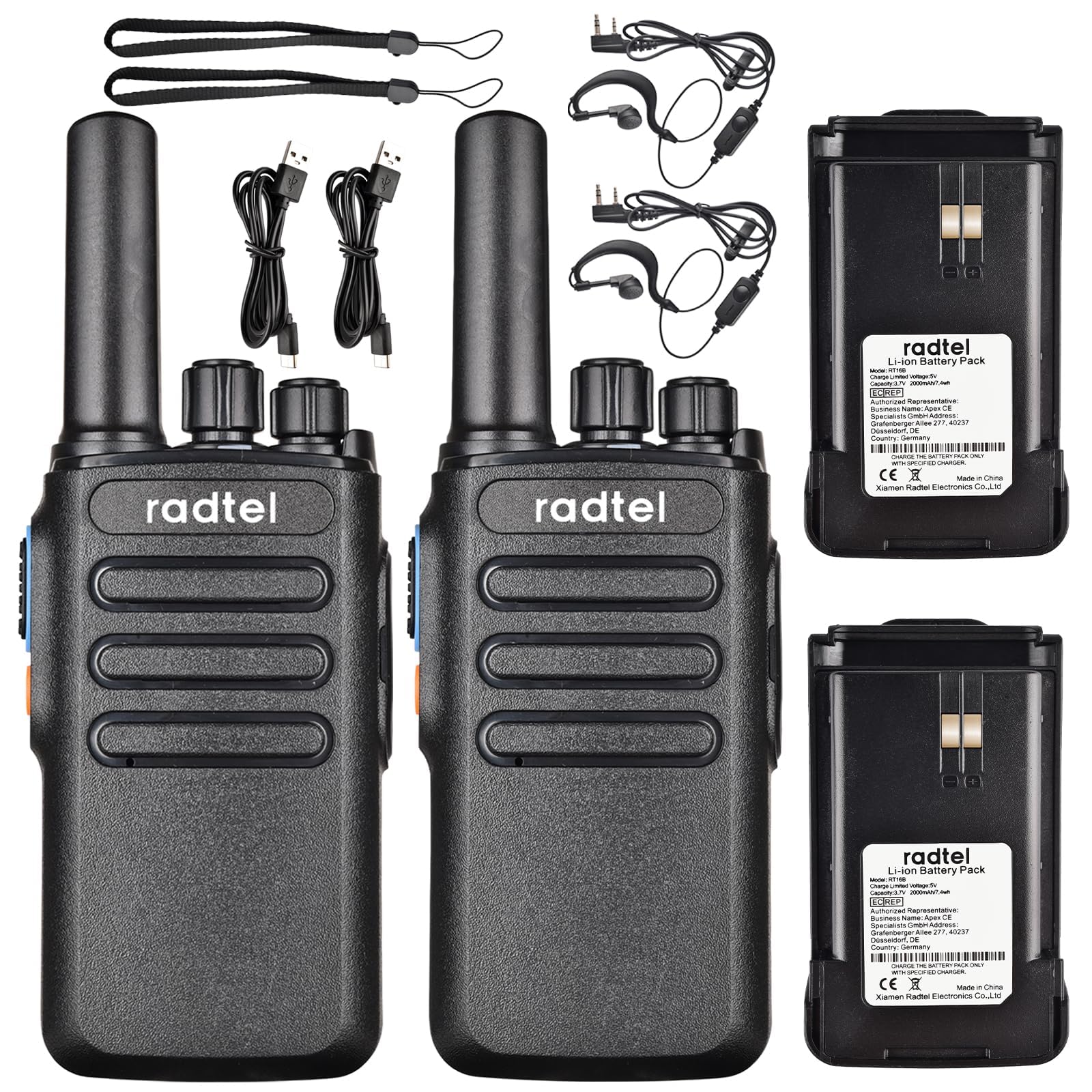
Image 1.1: Radtel RT16 Two Way Radios and included accessories.
2. Oppsett
2.1 Installasjon av batteri
- Sørg for at radioen er slått av.
- Finn batterirommet på baksiden av radioen.
- Skyv batteriet inn i batterirommet til det klikker ordentlig på plass.

Image 2.1: Battery compartment and belt clip attachment.
2.2 Feste av belteklips
- Align the belt clip with the designated slots on the back of the radio.
- Push the clip firmly until it locks into position.
2.3 Lading av batteriet
The RT16 radios feature convenient USB-C charging. Use the provided USB-C cable to charge the radio. The charging port is located at the bottom of the radio.
- Connect the USB-C cable to the charging port on the radio.
- Connect the other end of the cable to a compatible USB power source (e.g., phone charger, power bank, car adapter).
- The indicator light on the radio will show charging status (refer to the LED indicator section for details).

Image 2.2: USB-C charging options for the RT16.
3. Bruksanvisning
3.1 Av/på-funksjon og volumkontroll
To power on the radio, rotate the top-left knob clockwise until you hear a click and a voice prompt indicating the current channel. Continue rotating to adjust the volume. To power off, rotate the knob counter-clockwise until it clicks off.
3.2 Kanalvalg
The RT16 has 16 available channels. To select a channel, rotate the top-right knob. The radio will announce the selected channel number.

Bilde 3.1: Topp view of the RT16 showing power/volume and channel knobs.
3.3 Trykk og snakk-knapp (PTT)
To transmit your voice, press and hold the large button on the side of the radio. Release the button to listen.
3.4 Hodesetttilkobling
The radio supports a 2-pin K-connector headset for hands-free operation. Open the rubber cover on the side of the radio and plug in the headset connectors.

Image 3.2: Headset connection port on the RT16.
3.5 Voice Operated Exchange (VOX) Function
The VOX function allows for hands-free transmission without pressing the PTT button. The radio will automatically transmit when it detects your voice. This feature requires software activation for first use and offers 9 adjustable levels.

Image 3.3: Illustration of VOX function for hands-free use.
Activating VOX Mode
To activate VOX mode, hold down the small side button while powering on the radio. Continue holding until you hear a beep indicating activation.
Video 3.1: Demonstrates how to activate the voice control (VOX) mode on the Radtel RT16 radio.
Deactivating VOX Mode
To deactivate VOX mode, hold down the small side button while powering on the radio. Continue holding until you hear two beeps, confirming deactivation.
Video 3.2: Demonstrates how to deactivate the voice control (VOX) mode on the Radtel RT16 radio.
3.6 Language Switch Operation
The radio supports both Chinese and English voice prompts. To switch the language, turn the channel knob to channel 16. Then, power off the radio. While powering on, hold down the small side button until you hear a beep. This will switch the language mode.
Video 3.3: Instructions for switching between Chinese and English voice prompts on the Radtel RT16 radio.
4. Vedlikehold
- Hold radioen ren ved å tørke den av med en myk klutamp klut. Unngå bruk av sterke kjemikalier eller løsemidler.
- Do not immerse the radio in water as it is not water resistant.
- Oppbevar radioen på et kjølig og tørt sted når den ikke er i bruk.
- Sørg for at dekselet til USB-C-porten er ordentlig lukket for å forhindre at støv og fuktighet trenger inn.
5. Feilsøking
| Problem | Mulig årsak | Løsning |
|---|---|---|
| Ingen strøm | Lavt batteri eller ikke riktig installert. | Lad batteriet eller monter det ordentlig på nytt. |
| Kan ikke kommunisere med andre radioer | Radios are on different channels or out of range. | Ensure both radios are on the same channel. Move closer to the other radio. Check for obstructions. |
| Dårlig lydkvalitet | Weak signal, interference, or low volume. | Adjust volume. Move to an area with fewer obstructions. Change channel if interference is present. |
| VOX fungerer ikke | VOX er ikke aktivert, eller følsomheten er for lav. | Activate VOX mode (see Section 3.5). Adjust VOX sensitivity level via programming software. |
6. Spesifikasjoner
| Trekk | Detalj |
|---|---|
| Merke | Radtel |
| Modellnummer | RT16 |
| Antall kanaler | 16 |
| Frekvensområde | 462/467 MHz (FRS Band) |
| Maksimal talerekkevidde | Up to 5 Kilometers (open outdoor areas) |
| Utgangseffekt | 2W |
| Batteritype | Litiumionbatteri (2000 mAh) |
| Lader | USB-C |
| Spesielle funksjoner | Long Range, Type-C rechargeable battery, VOX Function, Channel Scan |
| Vannmotstandsnivå | Ikke vannbestandig |
| Produktdimensjoner | 1.37" D x 2.16" B x 5.9" H |
| Varevekt | 0.39 pund |
| Kompatible enheter | Other FRS two-way radios, Standard earpieces |
7. Garanti
The Radtel RT16 FRS Two Way Radio comes with a 1-Year Warranty from the manufacturer, Xiamen Radtel Electronics Co.,Ltd.
8. Støtte
For further assistance or to explore other Radtel products, please visit the official Radtel Store: