
1. Introduksjon
The GOYOJO GMS8 Digital Torque Screwdriver is a manual force-applied precision tool designed for accurate measurement and control of tightening torque during screw fastening. It is not an electric screwdriver and requires manual force application. The digital screen displays real-time torque values, ensuring precise application and preventing over-tightening or under-tightening. This tool is ideal for precision assembly, electronics repair, bicycle adjustment, optics mounting, and other tasks requiring controlled torque.
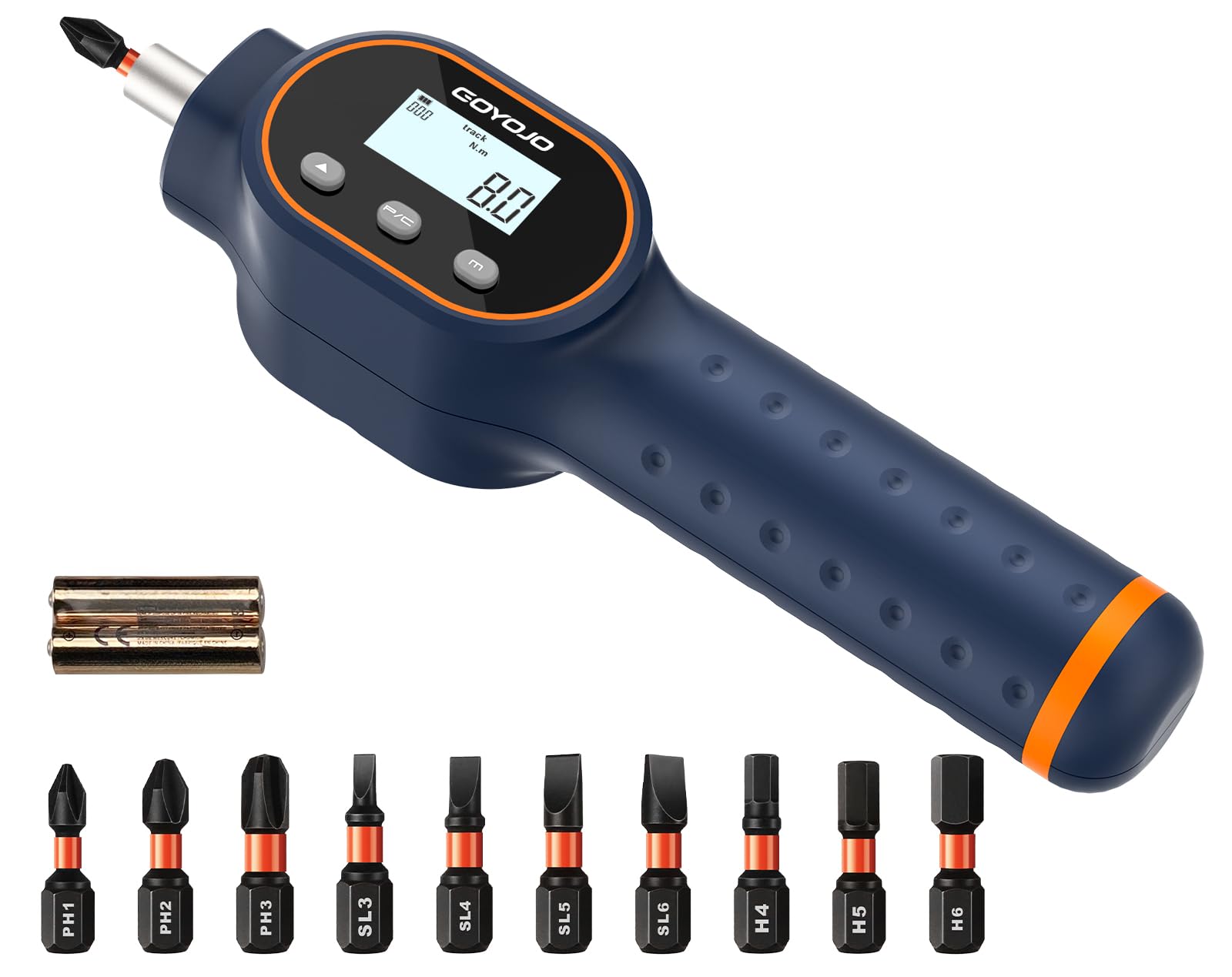
Image: GOYOJO GMS8 Digital Torque Screwdriver displaying a torque value of 6.4 Nm during use on a bicycle component.
2. Inkluderte komponenter
The GOYOJO GMS8 Digital Torque Screwdriver set includes the following items:
- 1 x Digital Torque Screwdriver (7.08-70.8 in-lbs / 0.8-8 N·m)
- 10 x bits
- 1 x produkthåndbok
- 1 x oppbevaringsveske
- 2 x AAA batterier

Image: The complete GOYOJO GMS8 Digital Torque Screwdriver kit, including the screwdriver, various bits, and storage case.
3. Produktfunksjoner
- High-Accuracy Digital Torque: Torque range of 7.08–70.8 in-lbs (0.8–8 N·m) with ±2% accuracy.
- Flere enheter: Supports 4 torque units: in-lb, ft-lb, N·m, and kg-cm.
- Real-Time Digital Display: Manual force application with real-time torque value display.
- Arbeidsmoduser: Track, Peak Hold, and Preset modes for versatile use.
- Bakgrunnsbelyst skjerm: Sikrer tydelig lesbarhet under ulike lysforhold.
- Buzzer and Visual Alerts: Provides audible and visual alerts when nearing or reaching the preset torque value to prevent over-tightening.
- Datalagring: Stores up to 999 groups of torque data for tracking and comparison.
- Magnetisk bitholder: 1/4" magnetic bit holder for quick bit changes.
- Ergonomisk design: Comfortable handle for improved control during use.
4. Oppsettveiledning
4.1 Installasjon av batteri
The GOYOJO GMS8 Digital Torque Screwdriver requires 2 AAA batteries (included). To install:
- Twist off the cap at the bottom of the screwdriver handle.
- Insert the 2 AAA batteries according to the polarity markings.
- Replace and tighten the cap securely.
Video: Demonstration of battery installation for a similar digital torque screwdriver. (Relevant segment: 01:50-02:08)
4.2-bitsinstallasjon
To install a screwdriver bit:
- Pull up the collar on the 1/4" magnetic bit holder at the tip of the screwdriver.
- Insert the desired bit into the holder.
- Release the collar to secure the bit. Ensure the bit is firmly seated.

Image: The screwdriver displaying its control buttons and the 1/4" bit holder.
Video: Demonstration of bit installation for a similar digital torque screwdriver. (Relevant segment: 00:46-00:51)
5. Bruksanvisning
5.1 Strøm på/av
To power on the device, press the 'C' button. The screen will beep and display the interface. To power off, press and hold the 'C' button.
Video: Demonstration of powering on the digital torque screwdriver. (Relevant segment: 00:40-00:45)
5.2 Modusvalg
The screwdriver offers three working modes: Track, Peak Hold, and Preset. Use the 'M' button to cycle through these modes:
- Spormodus: Displays real-time torque value as force is applied. Resets to zero when released.
- Peak Hold Mode: Captures and holds the highest torque value achieved during tightening.
- Forhåndsinnstilt modus: Allows setting a target torque value. The device will alert you when this value is approached or reached.
Image: The screwdriver's display illustrating the Peak and Track modes with their respective functions.
5.3 Torque Unit Selection
Press the 'U' button to switch between the four available torque units: N·m, lbf·ft, lbf·in, and kgf·cm.

Image: The screwdriver's display cycling through the four available torque units: in-lb, ft-lb, kgf-cm, and N·m.
5.4 Setting Target Torque (Preset Mode)
In Preset Mode, use the Up (▲) and Down (▼) arrow buttons to adjust the desired target torque value. The display will show the set value.
5.5 Using the Screwdriver
Apply manual force to tighten the screw. The screen will display the real-time torque. In Preset Mode, the device will provide alerts as you approach and reach the target torque.

Image: A collage demonstrating the GOYOJO GMS8 Digital Torque Screwdriver being used in automotive, bicycle, electronics, and woodworking applications.
Video: Demonstration of using the digital torque screwdriver to tighten screws on a workbench and an HVAC system, showing the alert system. (Relevant segments: 01:07-01:22, 01:23-01:45)
5.6 Torque Alerts
When approaching the preset torque value, the screwdriver provides both a buzzer and visual alerts (LED lights on the sides of the display) to indicate the tightening status. This helps prevent over-tightening or under-tightening.

Image: The screwdriver in use, with red LED lights indicating that the target torque is being approached or has been reached.
6. Vedlikehold
- Keep the screwdriver clean and dry. Wipe with a soft, damp klut.
- Store the device and its accessories in the provided case when not in use to protect it from dust and damage.
- Fjern batteriene hvis enheten ikke skal brukes over lengre tid for å forhindre lekkasje.
- Unngå å utsette enheten for ekstreme temperaturer eller direkte sollys.
7. Feilsøking
- Enheten slår seg ikke på: Check battery orientation and ensure batteries are not depleted. Replace if necessary.
- Unøyaktige avlesninger: Ensure the bit is correctly seated. The device supports calibration-related applications; refer to the calibration certificate for details.
- No alerts in Preset Mode: Verify that a target torque value has been set and the device is in Preset Mode.
8. Tekniske spesifikasjoner
| Spesifikasjon | Detalj |
|---|---|
| Merke | GOYOJO |
| Modellnavn | Digital Torque Screwdriver (GMS8) |
| Momentområde | 7.08–70.8 in-lb / 0.8–8 N·m |
| Nøyaktighet | ±2 % |
| Measurement Direction | Med klokken og mot klokken |
| Enheter | N·m, lbf·ft, lbf·in, kgf·cm |
| Visningstype | Digital med bakgrunnsbelysning |
| Datalagring | Opptil 999 XNUMX poster |
| Automatisk avstenging | 2 minutter uten aktivitet |
| Batteri | 2 × AAA-batterier |
| Driftsmiljø | 0–40°C, humidity ≤85% |
| Lagringsmiljø | -10–60°C |
| Varedimensjoner (L x B x H) | 19 x 4.5 x 4.5 centimeter |
| Varevekt | 200 g |
9. Garanti og støtte
GOYOJO stands behind the quality of its products. The GMS8 Digital Torque Screwdriver comes with a 3 års erstatningsgaranti for ekstra trygghet.
For technical support, warranty claims, or any inquiries regarding your product, please refer to the contact information provided in your product packaging or visit the official GOYOJO webnettstedet.