
1. Introduksjon
The Twotrees TTC450 Pro is a versatile 500W motor CNC router designed for precision engraving and cutting across a wide range of materials. With a generous working area of 460 x 460 x 80 mm and support for 4-axis modules, this machine is suitable for various applications, from artistic design to commercial series production. Its robust construction and user-friendly features make it an efficient tool for both beginners and experienced users.

Image 1.1: The Twotrees TTC450 Pro CNC Milling Machine, highlighting its suitability for beginners and its core features like large engraving area, 32-bit control board, 0.1 mm accuracy, easy assembly, GRBL base, and wide range of applications.
Video 1.1: En overview of the Twotrees TTC450 Pro CNC Router, demonstrating its ease of assembly, wide operating space, strong gantry frame, adjustable precision, larger motors, 4-axis rotary module, interchangeable models, and engraving capabilities on various materials.
2. Produktfunksjoner
- High-Speed Spindle: Features an 80W standard spindle with up to 8000 RPM and a 500W compressor spindle with up to 12,000 RPM for quieter, faster heat dissipation and uniform engraving with the 4-axis module.
- Stort arbeidsområde: Offers a spacious 460 x 460 x 80 mm work range, 70% pre-assembled to meet most engraving needs, suitable for commercial series production and artistic design, allowing for unlimited engraving possibilities.
- Robust og holdbar konstruksjon: Built with a metallic structure and high-quality screws for smoother and more stable operation.
- Offline Engraving Support: Easy to connect and operate, supporting Wi-Fi 2.4 GHz, TF card, and USB port operations.
- Millimeter Precision Engraving: Equipped with limit switches on all axes, achieving a high engraving precision of 0.05 mm, and an instant stop switch for safety.

Image 2.1: A composite image showing various components of the Twotrees TTC450 Pro CNC Router, including the spindle, control panel, Z-axis module, and power connections, highlighting its robust design.

Image 2.2: Visual comparison showing the upgrade of the gantry's side panels from 6mm to 8mm, and the X-axis motor upgrade for increased power, contributing to enhanced stability and performance.
3. Sikkerhetsinformasjon
Always prioritize safety when operating the CNC router. Read and understand all instructions before use. Failure to follow safety guidelines can result in serious injury or damage to the equipment.
- Wear appropriate personal protective equipment (PPE), including safety glasses, hearing protection, and dust masks.
- Ensure the work area is well-ventilated and clear of obstructions.
- Keep hands and loose clothing away from moving parts and the cutting tool.
- Always disconnect power before performing maintenance, cleaning, or changing tools.
- Ikke bruk maskinen hvis noen av komponentene er skadet eller ikke fungerer som de skal.
- Utilize the emergency stop button in case of unexpected operation or hazards.
- Sørg for riktig jording av maskinen for å unngå elektriske farer.

Image 3.1: This image illustrates safety enhancements such as features to prevent scalding for safer use and upgraded limit switches designed to prevent collisions and damage during operation.
4. Oppsett
The Twotrees TTC450 Pro comes largely pre-assembled, allowing for quick and easy setup. Follow these general steps for initial installation:
- Utpakking: Ta forsiktig alle komponentene ut av emballasjen og kontroller mot pakkelisten.
- Basemontering: Position the main frame on a stable, level surface.
- Gantry and Spindle Installation: Attach the gantry and spindle assembly. The machine is 95% pre-assembled, simplifying this process significantly.
- Kontrollpaneltilkobling: Connect the control panel to the main unit.
- Strømtilkobling: Connect the power supply cable to the machine and a grounded electrical outlet.
- Programvareinstallasjon: Install the necessary control software on your computer (if using PC control).

Image 4.1: This image highlights the 95% pre-assembly rate of the Twotrees TTC450 Pro, indicating that it can be installed in simple steps within 10 minutes, showcasing the main components ready for quick setup.
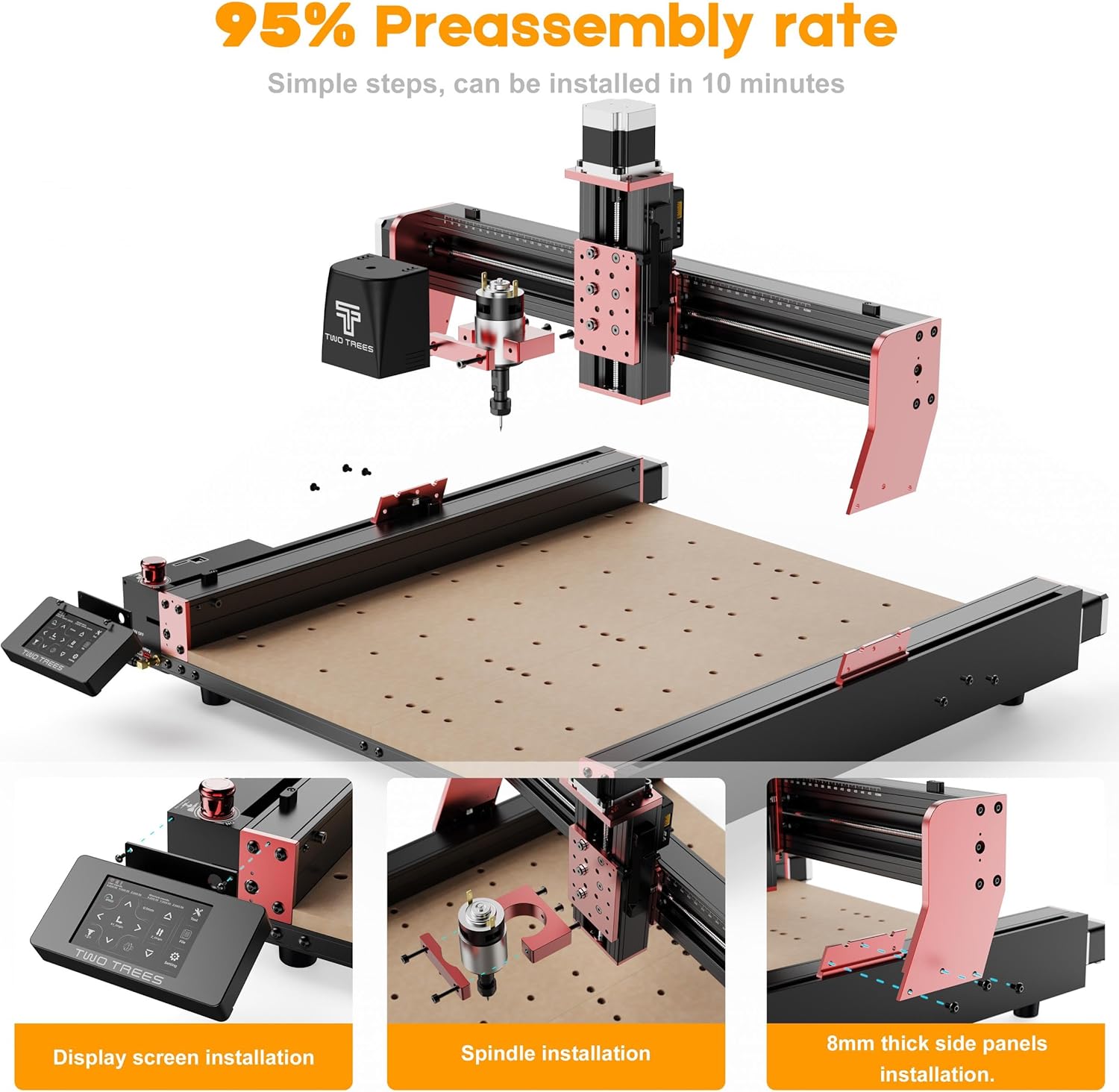
Image 4.2: This image illustrates the 95% pre-assembly rate of the Twotrees TTC450 Pro, showing simple installation steps for the display screen, spindle, and 8mm thick side panels, allowing for setup in approximately 10 minutes.

Image 4.3: This image demonstrates the 'Click and Install' process for the CNC router, showing easy connections for the spindle, power switch, and various cables, emphasizing user-friendly assembly.
5. Drift
The TTC450 Pro offers flexible operation modes, including offline control via Wi-Fi, TF card, or USB, and supports various modules for different tasks.
5.1 Bytte modus
The machine allows for easy switching between CNC milling and laser engraving modes, depending on the installed module.
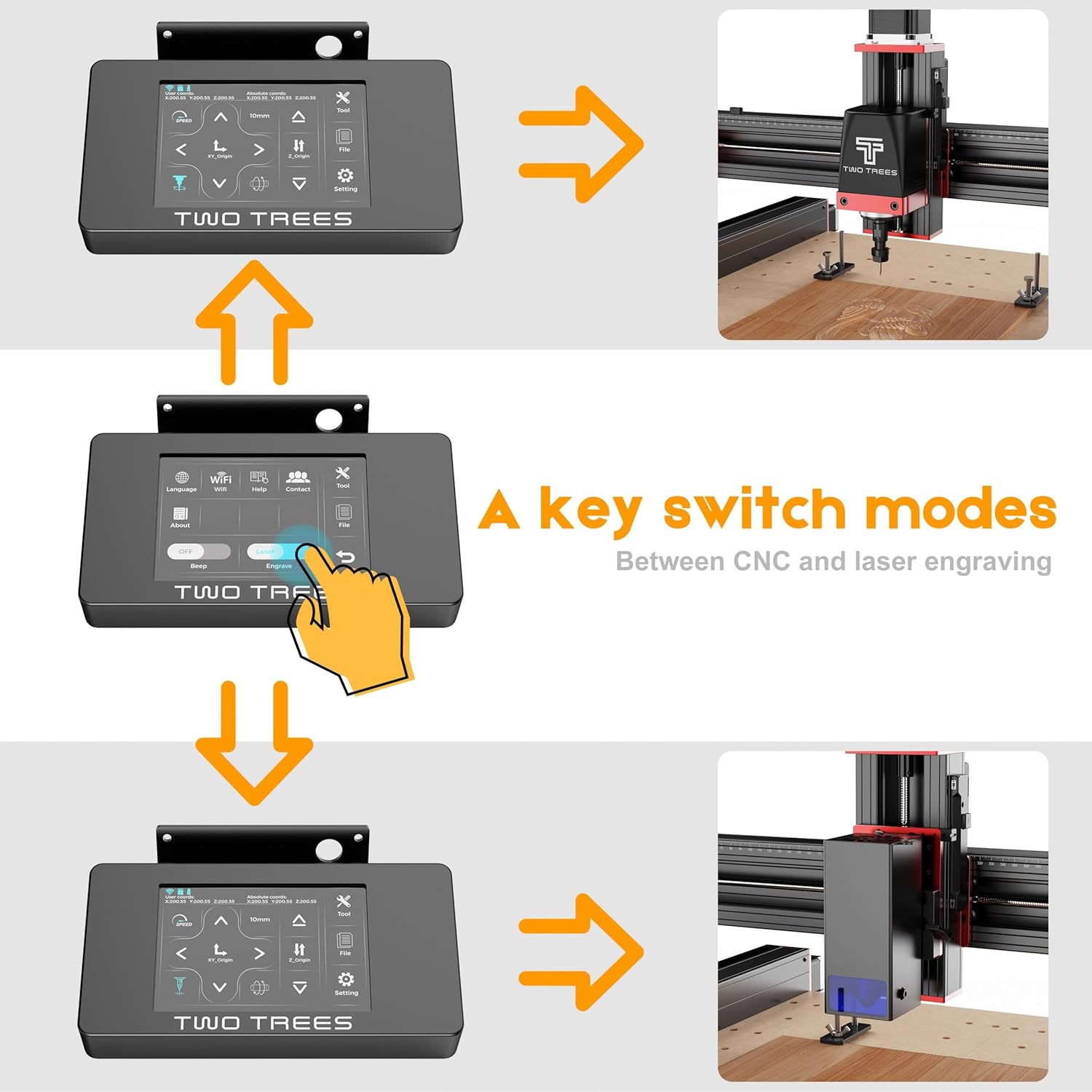
Image 5.1: This image displays the control panel of the CNC router, illustrating the process of switching between CNC and laser engraving modes with a single key, enhancing operational flexibility.

Image 5.2: This image demonstrates the ease of switching between CNC and laser engraving modes by simply replacing accessories, allowing for quick adaptation to different operational requirements.
5.2 Using the 4-Axis Module
The optional 4-axis rotary module expands the machine's capabilities, allowing for engraving on cylindrical or irregularly shaped objects.

Image 5.3: This image showcases the 4th axis rotary module in action, demonstrating its ability to engrave complex shapes and contours on cylindrical workpieces, expanding the machine's versatility.
5.3 Materialkompatibilitet
The TTC450 Pro is capable of engraving and cutting various materials, including soft metals, wood, acrylic, MDF, nylon, and PCB.

Image 5.4: This image illustrates the Twotrees TTC450 Pro's compatibility with various working modules, including a wood router machine, 500W spindle motor, and 20W laser module, to meet diverse functional requirements.
6. Vedlikehold
Regular maintenance ensures the longevity and optimal performance of your Twotrees TTC450 Pro CNC router.
- Rengjøring: Regularly clean the machine, especially the work area, rails, and spindle, to remove dust and debris.
- Smøring: Apply appropriate lubricant to moving parts, such as lead screws and linear guides, as recommended by the manufacturer.
- Verktøyinspeksjon: Inspect cutting tools for wear and replace them as needed to maintain cutting quality and prevent damage to the machine.
- Kabeladministrasjon: Sørg for at alle kablene er ordentlig tilkoblet og ikke er i klem eller skadet.
- Støvoppsamling: Utilize the dust collection system to keep the work environment clean and protect internal components from dust accumulation.

Image 6.1: This image shows an environmentally friendly dust collection bag with a 2.8L storage capacity, designed to be easily maintained without washing, ensuring a cleaner workspace.

Image 6.2: This image highlights the easier calibration feature, including the addition of a brass adjusting nut and a new design that improves precision to 0.05 mm, addressing potential precision decrease after prolonged use.
7. Feilsøking
This section provides solutions to common issues you might encounter with your TTC450 Pro CNC router.
- Maskinen slår seg ikke på: Check all power connections, ensure the power switch is in the 'ON' position, and verify the power outlet is functional.
- Spindelen roterer ikke: Ensure the spindle motor is correctly connected and the software command for spindle activation is sent. Check for any obstructions.
- Dårlig graveringskvalitet: Verify tool sharpness, material clamping, and correct feed rates/spindle speeds in your software settings. Ensure the machine is calibrated correctly.
- Maskinen svarer ikke: Check USB or Wi-Fi connection, ensure the control software is running correctly, and restart the machine and computer if necessary.
- Uvanlige lyder: Stop operation immediately. Inspect for loose components, worn bearings, or tool collisions.
8. Spesifikasjoner
| Trekk | Spesifikasjon |
|---|---|
| Produsent | To trær |
| Modellnummer | T-TTC450Pro+PJ4 |
| Produktdimensjoner | 46 x 46 x 41.3 cm |
| Arbeidsområde | 460 x 460 x 80 mm |
| Materiale | Aluminium, plast |
| Strømkilde | Elektrisk med ledning |
| Voltage | 24 volt (DC) |
| Ampslette | 5 Amperes |
| Maks rotasjonshastighet | 12000 RPM (500W spindle) |
| Graveringspresisjon | 0.05 mm |
| Inkluderte komponenter | 500W spindle accessories, Rotary axis, Rotary rollers, TTC 450 Pro |

Image 8.1: This image displays the Twotrees TTC450 Pro CNC router with its dimensions, specifically highlighting the large working area of 460x460x80mm, which creates more possibilities for daily needs.
9. Garanti og støtte
For garantiinformasjon, teknisk støtte eller serviceforespørsler, vennligst se den offisielle Twotrees-siden. webnettstedet eller kontakt kundeservicen deres direkte. Ta vare på kjøpskvitteringen som kjøpsbevis for eventuelle garantikrav.