
Acoath 3M
Endoscope Camera with Light User Manual
Brand: Acoath | Model: 3M
Introduksjon
This Acoath Dual-Lens 1920P HD Endoscope Camera is designed for detailed inspection in hard-to-reach areas. Featuring a 7.9mm probe with dual lenses and 8 adjustable LED lights, it captures sharp images and videos at 1920x1440 resolution. Its IP67 waterproof semi-rigid cable allows for versatile use in various environments, from automotive and pipeline inspections to home repairs.
Oppsett
Pakkeinnhold
- Endoscope Camera x1
- Android connector x1
- Lightning Port x1
- Type-C connector x1
- 9.8ft Semi-rigid Cable x1
- Accessories: Magnet x1, Hook x1, Mirror x1, Protective Cap x1
- Manuell x1

Image: The complete package contents, neatly arranged, showing the endoscope camera, various connectors, and accessory attachments.
App installasjon
To use the endoscope camera, you must first download the 'SUP-ANESOK' app. For iOS users, search 'UseePlus' in the App Store. For Android users, search 'UseePlus' in the Google Play Store. Ensure your device supports iOS 9.0+ or Android 7+.

Image: Step-by-step guide for downloading the required app and connecting the endoscope to a mobile device.
Koble til enheten
After installing the app, connect the endoscope camera to your smartphone or tablet using the appropriate connector (Lightning, Type-C, or Android connector). The device is designed for seamless plug-and-play operation. Once connected, open the 'SUP-ANESOK' app to begin your inspection.

Image: The endoscope camera with its main cable, control unit, and interchangeable connectors for different mobile devices.
Bruksanvisning
Dual Lens Functionality
The endoscope features a dual-lens system, allowing for both a direct front view og en side view. This enables comprehensive inspection without needing to maneuver the camera head excessively. The 2.0MP HD endoscope captures sharp, close-up images and videos at 1920x1440 resolution.

Image: Visual representation of the dual camera setup, highlighting the front and side lenses for enhanced viewing vinkler.
Justerbare LED-lys
The camera head is equipped with 8 adjustable LED lights to illuminate dark inspection areas. Use the side button on the cable to adjust the brightness of the LED lights, ensuring optimal visibility for various conditions.

Image: Detail of the endoscope's LED lights and the control switch for adjusting their brightness.
Bruk av tilbehør
The endoscope comes with several useful accessories that attach to the camera head:
- Magneter: Attach the magnet to retrieve small metallic objects from confined spaces.
- Krok: Use the hook to pull or retrieve non-metallic items.
- Speil: The side-view mirror attachment provides an alternative perspective for inspecting walls or surfaces at an angle.
- Beskyttelseshette: Use this cap to protect the camera lens when the endoscope is not in use.

Image: Detailed instructions on how to attach and utilize the various included accessories for different inspection needs.
Vanntett design
The endoscope camera features an IP67 waterproof rating, allowing it to be submerged up to 3.28 feet (1 meter) deep for up to 1 hour. This makes it suitable for inspecting pipes, drains, and other wet environments.

Image: The endoscope camera head shown in water, emphasizing its waterproof feature and durability.
Recording Photos and Videos
Once connected and the app is open, you can capture still photos or record videos directly through the app interface. Use the dedicated buttons within the app to switch between photo and video modes and to initiate recording or capture. The physical button on the cable can also be used to snap photos.
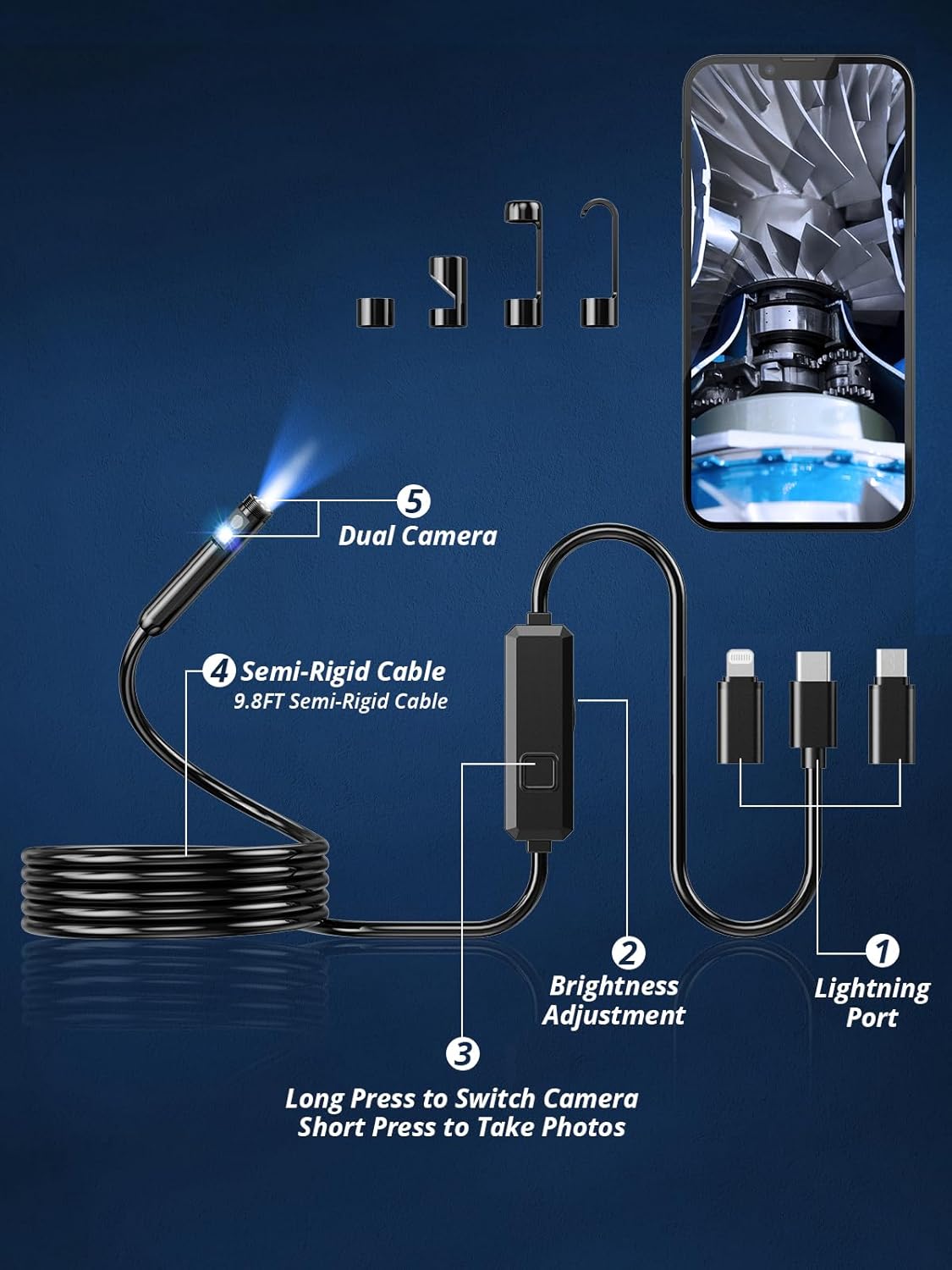
Image: The control unit on the endoscope cable, showing the buttons for adjusting light brightness and switching between cameras or taking photos.
Vedlikehold
To ensure the longevity and optimal performance of your endoscope camera, follow these maintenance guidelines:
- Etter hver bruk, spesielt i skitne eller våte omgivelser, tørk forsiktig av kameralinsen og kabelen med en myk klut.amp klut.
- Avoid using abrasive cleaners or solvents that could damage the lens or cable material.
- Store the endoscope in a cool, dry place, away from direct sunlight and extreme temperatures.
- Ensure all connectors are dry before storage to prevent corrosion.
- Use the provided protective cap for the camera lens when not in use.
Feilsøking
If you encounter issues with your endoscope camera, refer to the following common solutions:
- Product not working (iPhone): Try unplugging and re-plugging the lightning adapter.
- Product not working (Android): Make sure your phone supports OTG (On-The-Go) functionality.
- Dårlig bildeklarhet: Ensure the camera lens is clean and free from debris. Adjust the LED light brightness for better illumination.
- Problemer med apptilkobling: Verify that the app is correctly installed and updated. Ensure the endoscope is securely connected to your device.
Spesifikasjoner
| Trekk | Detalj |
|---|---|
| Modellnummer | 3M |
| Videoopptaksoppløsning | 1920x1440 |
| Kameradiameter | 7.9 mm |
| Kabellengde | 9.8ft (Semi-rigid) |
| LED-lys | 8 Justerbar |
| Vanntett vurdering | IP67 |
| Kompatibel OS | iOS 9.0+, Android 7+ |
| Produsent | Acoath |
Garanti og støtte
Acoath is dedicated to providing high-quality products and exceptional visual solutions. For any product-related inquiries, technical assistance, or warranty claims, please contact Acoath customer service. Refer to the contact information provided in your product packaging or visit the official Acoath webnettsted for støttedetaljer.

Image: The Acoath brand logo, representing their commitment to visual solutions.