
RIWUSI BC47
RIWUSI Bluetooth 5.3 Car Adapter User Manual
Modell: BC47
Produkt overview
The RIWUSI Bluetooth 5.3 Car Adapter is a versatile 2-in-1 device that combines an FM Bluetooth transmitter with a fast car charger. It is designed to provide seamless audio streaming, hands-free calling, and rapid charging capabilities in your vehicle.
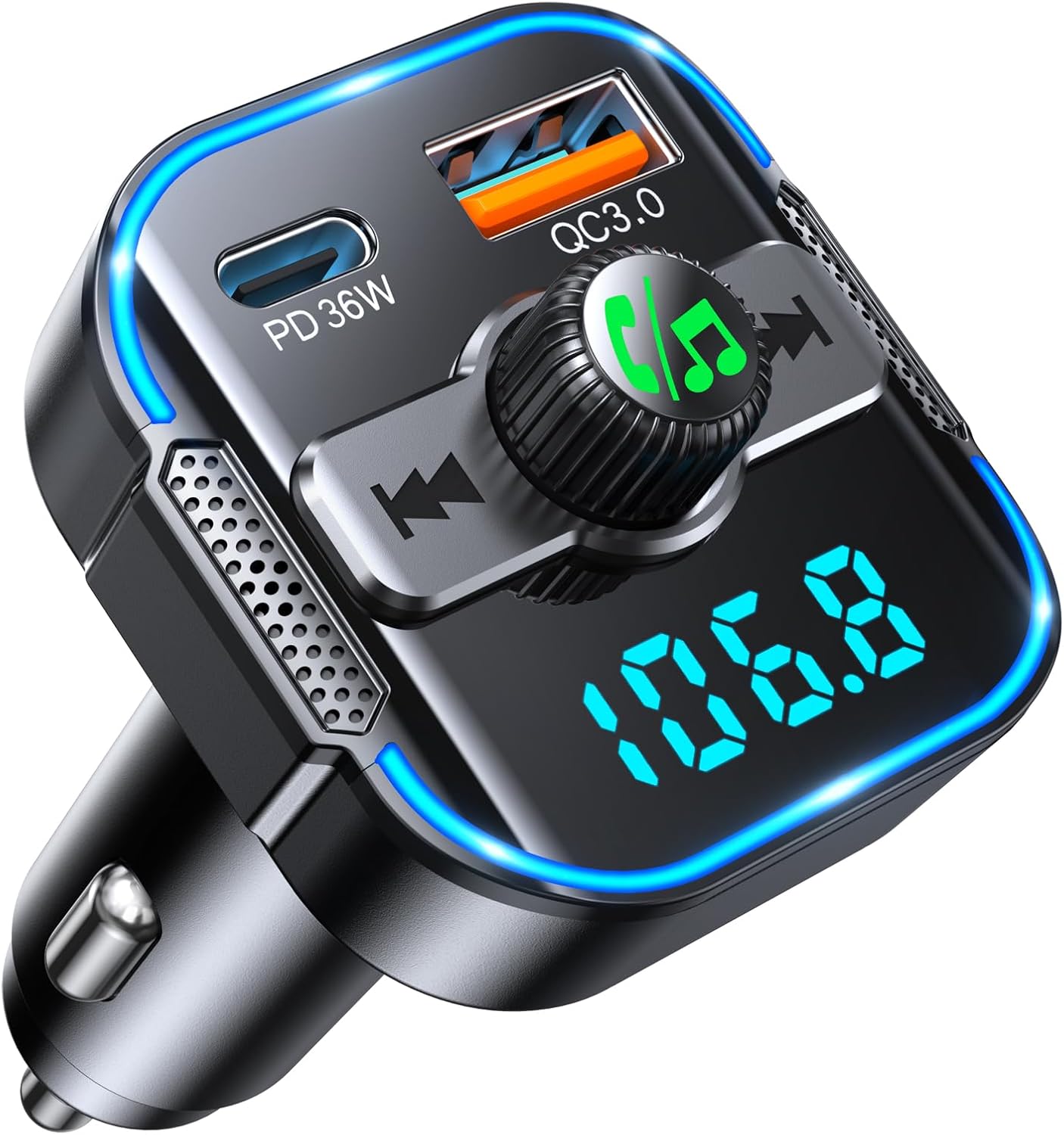
Bilde: Foran view of the RIWUSI Bluetooth 5.3 Car Adapter, showing the LED display, control knob, and dual charging ports (PD 36W and QC3.0 18W).
Nøkkelfunksjoner:
- Rapid and Secure Charging: Equipped with dual USB Type-C (PD 36W) and USB-A (QC 18W) ports, offering up to 54W total output for simultaneous fast charging. Features intelligent safety functions to prevent overcharging, overloading, overheating, and short circuits.
- Bluetooth 5.3-tilkobling: Ensures swift, stable, and smart connection for high-quality music streaming and hands-free calls with minimal audio loss. Supports quick 1-second pairing and automatic re-connection.
- Dual Microphones with CVC Noise Cancellation: Built-in noise-canceling dual microphones (CVC) effectively reduce external noise for clearer hands-free calling and navigation voice broadcasts.
- Intuitive Multi-Function Knob: Features a user-friendly design with a single button for easy call management (answer/reject/hold/call back) and seamless switching between calls and music. Long-press to activate voice assistants like Siri.
- Blue Ambient Light & Voltage Monitor: Upon plugging in, the LED screen displays the car's voltage for real-time monitoring. The ambient blue light enhances visibility and adds to the car's interior ambiance.
Oppsettveiledning
Follow these steps to set up your RIWUSI Bluetooth Car Adapter and connect it to your vehicle's audio system.
Step 1: Find a Blank FM Channel
Insert the RIWUSI Bluetooth Car Adapter into your car's cigarette lighter socket. Turn on your car radio and find an empty FM frequency (a channel with static or no broadcast). This frequency will be used to transmit audio from the adapter to your car's speakers.

Image: Illustration showing a car radio display tuned to a blank FM channel, indicating the first step of setup.
Step 2: Tune the Adapter to the Car Channel
Adjust the FM frequency on the RIWUSI adapter to match the blank FM channel you found on your car radio. Use the control knob or dedicated buttons on the adapter to change the frequency. The adapter's LED display will show the current frequency.

Image: The RIWUSI adapter displaying an FM frequency, matching the car radio's frequency for audio transmission.
Step 3: Pair with Your Mobile Device via Bluetooth
On your mobile device (smartphone, tablet, etc.), open the Bluetooth settings. Søk etter available devices and select "BC47" from the list. Once connected, the adapter's LED display may indicate a successful Bluetooth connection. You can now play audio from your device through your car's speakers.

Image: A smartphone screen showing the Bluetooth settings with "BC47" selected and connected, demonstrating the final pairing step.
Bruksanvisning
Ladeenheter:
The adapter features two charging ports: a PD 36W Type-C port and a QC3.0 18W USB-A port. Connect your devices using appropriate charging cables to utilize the fast charging capabilities. Both ports can be used simultaneously.

Image: The RIWUSI adapter with labels indicating the PD 36W and QC 18W charging ports, highlighting its 54W total output.
Musikkavspilling:
- Once paired via Bluetooth, audio from your mobile device will play through your car's FM radio.
- Bruk Multifunksjonsknapp (MFB) or the dedicated track buttons on the adapter to control music playback (play/pause, next/previous track).
- Roter MFB for å justere volumet.

Image: Visual guide showing how to adjust FM channels and volume using the adapter's controls.
Håndfri samtale:
The dual microphones ensure clear call quality by reducing ambient noise.
- Svar/avslutt samtale: Enkelttrykk på MFB.
- Avvis anrop: Trykk lenge på MFB.
- Ring siste nummer på nytt: Dobbelttrykk på MFB.

Image: Close-up of the adapter highlighting the dual microphone design for enhanced call clarity.
Aktivering av stemmeassistent:
Trykk lenge på MFB to activate your mobile device's voice assistant (e.g., Siri, Google Assistant). This allows for voice commands for navigation, calls, and music playback, enhancing driving safety.

Image: A user interacting with a voice assistant via the RIWUSI adapter, demonstrating hands-free control.
Bilbatteri Voltage Overvåking:
The LED display on the adapter shows your car's real-time voltage, allowing you to monitor the battery status for vehicle safety.

Image: The adapter displaying a voltage reading, with an accompanying chart explaining normal and irregular battery voltage områder.
Vedlikehold
To ensure the longevity and optimal performance of your RIWUSI Bluetooth Car Adapter, follow these simple maintenance guidelines:
- Rengjøring: Use a soft, dry cloth to wipe the surface of the adapter. Avoid using liquid cleaners, aerosols, or abrasive materials, as they may damage the device.
- Lagring: Når adapteren ikke er i bruk over lengre tid, må den oppbevares kjølig og tørt, unna direkte sollys og ekstreme temperaturer.
- Håndtering: Håndter enheten forsiktig. Unngå å miste den i bakken eller utsette den for harde støt, da dette kan skade interne komponenter.
- Strømkilde: Always ensure the adapter is securely plugged into a stable 12V car cigarette lighter socket.
Feilsøking
If you encounter issues with your RIWUSI Bluetooth Car Adapter, please refer to the following common problems and solutions:
| Problem | Mulig årsak/løsning |
|---|---|
| No power / Adapter not turning on. |
|
| Kan ikke koble til via Bluetooth. |
|
| Poor audio quality / Static or interference. |
|
| Ladingen er treg eller fungerer ikke. |
|
| Adapter loses connection in socket. |
|
Spesifikasjoner
| Trekk | Detalj |
|---|---|
| Modellnummer | BC47 |
| Merke | RIWUSI |
| Produktdimensjoner | 2.3 x 2 x 3.9 tommer |
| Varevekt | 2.39 unser (0.07 kilo) |
| Standard for trådløs kommunikasjon | Bluetooth 5.3 |
| Kompatible enheter | Smarttelefon |
| Medietype | MP3 |
| Ladeporter | 1x PD 36W Type-C, 1x QC3.0 18W USB-A |
| Total Charging Output | Opptil 54W |
Sikkerhetsinformasjon
Les og følg følgende sikkerhetsretningslinjer for å sikre sikker bruk og forhindre skade på enheten eller personskade:
- Avoid using the device near other wireless devices to prevent potential interference.
- Ikke utsett adapteren for ekstreme temperaturer (varme eller kalde) eller høy luftfuktighet.
- Handle the device with care to avoid leaks or damage, especially concerning any internal battery components (though this device is powered by the car's 12V socket, general electronic device care applies).
- Do not disassemble, modify, or attempt to repair the device yourself. Refer to qualified personnel for service.
- Oppbevares utilgjengelig for barn.

Image: Icons representing various safety protections including over-current, over-voltage, over-heat, over-charge, short-circuit, and anti-static.
Garanti og støtte
For any questions, technical support, or warranty inquiries regarding your RIWUSI Bluetooth 5.3 Car Adapter, please contact RIWUSI customer service. Refer to the product packaging or the official RIWUSI webnettsted for kontaktinformasjon.
RIWUSI is committed to providing high-quality products and customer satisfaction. Please retain your purchase receipt for warranty purposes.
Ask a question about this manual
Ask about setup, troubleshooting, compatibility, parts, safety, or missing instructions. Manuals+ will review the question and use this page’s manual context to help answer it.