
1. Introduksjon
The Fenton Pulse65 is a versatile portable party speaker designed for various events and environments. It delivers powerful sound, offers wireless connectivity, and features dynamic lighting. This manual provides essential information for the safe and optimal use of your Pulse65 speaker.
Nøkkelfunksjoner:
- 60W RMS (140W max) output for clear, powerful sound with deep bass.
- Bluetooth 5.3 for wireless streaming and stereo pairing (TWS).
- Dynamic multicolour light show synchronized with music.
- IPX4 splashproof design for outdoor use.
- Integrated 12-hour rechargeable battery.
- Includes a wireless UHF microphone and remote control.
- USB playback and FM radio functionality.
2. Sikkerhetsinformasjon
Vennligst les og forstå alle sikkerhetsinstruksjoner før du bruker dette produktet. Ta vare på denne håndboken for senere referanse.
- Vannmotstand: The Pulse65 is IPX4 splashproof. Do not immerse the speaker in water or expose it to heavy rain. Ensure all port covers are securely closed when used near water.
- Strømkilde: Use only the specified charging cable and power adapter. Do not attempt to open or modify the battery compartment.
- Ventilasjon: Do not block any ventilation openings. Ensure adequate airflow around the speaker.
- Rengjøring: Koble fra strømmen før rengjøring. Bruk en myk, tørr klut. Ikke bruk flytende rengjøringsmidler eller aerosoler.
- Temperatur: Avoid extreme temperatures. Do not expose to direct sunlight for extended periods or place near heat sources.
- Barn: Oppbevares utilgjengelig for barn. Dette produktet er ikke et leketøy.
3. Pakkens innhold
Bekreft at alle varene er til stede i pakken:
- Fenton Pulse65 Portable Party Speaker
- Trådløs UHF-mikrofon
- Fjernkontroll
- USB ladekabel
- Brukerhåndbok
4. Oppsett
4.1. Førstegangslading
Before first use, fully charge the speaker. Connect the provided USB charging cable to the speaker's charging port and a suitable USB power adapter (not included). The charging indicator will show the charging status. A full charge provides approximately 12 hours of playback, depending on usage volume and light effects.
4.2. Slå på/av
Trykk og hold inne Makt -knappen på kontrollpanelet for å slå høyttaleren av eller på.
4.3. Oppsett av trådløs mikrofon
The included wireless UHF microphone is pre-paired with the speaker. Ensure the microphone has fresh batteries (not included) and is powered on. The microphone's display will indicate its status.

Image: The Fenton Pulse65 speaker shown with its wireless microphone and remote control, illustrating the complete package.
5. Bruksanvisning
5.1. Kontrollpanel overview
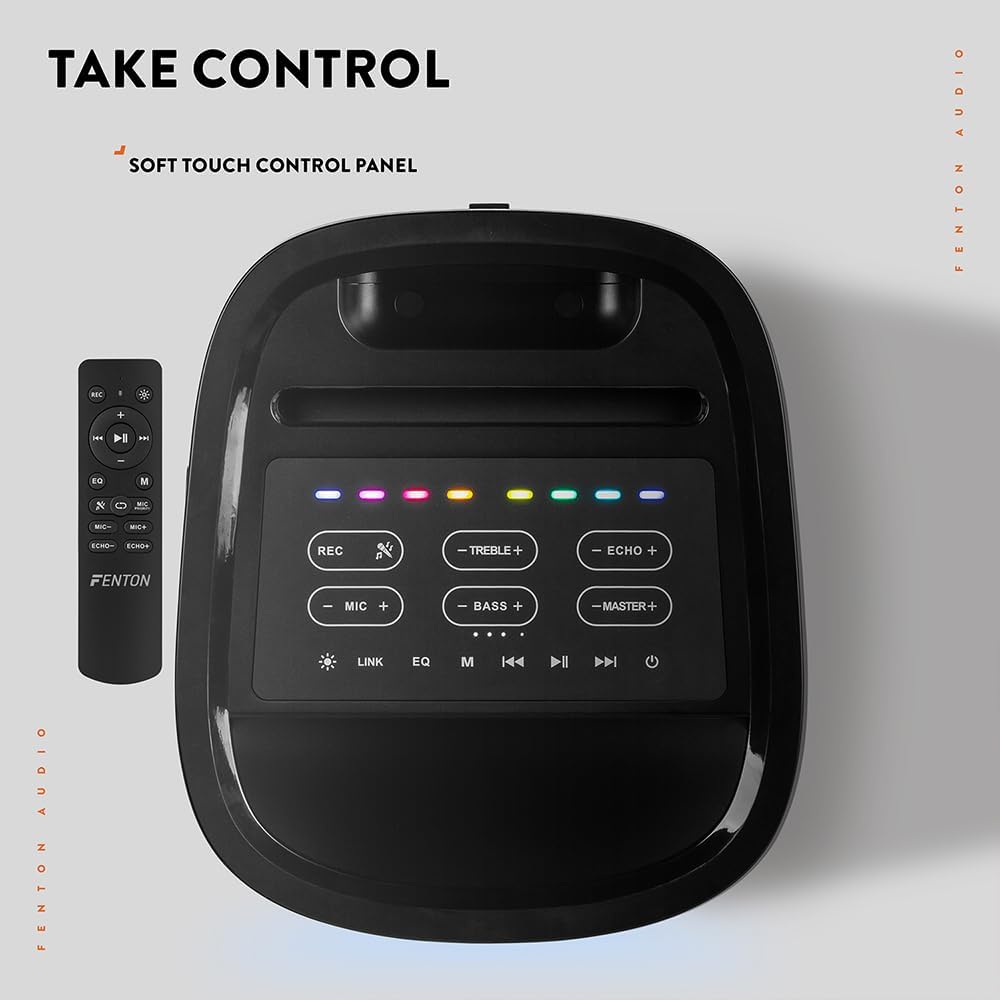
Bilde: Ovenfra og ned view of the Fenton Pulse65 speaker's soft-touch control panel, alongside the remote control, highlighting various buttons for audio and light adjustments.
The top panel features soft-touch controls for various functions:
- RECs: Ta opp lyd.
- DISKANT +/-: Juster diskantnivåene.
- EKKO +/-: Juster mikrofonens ekkoeffekt.
- Mikrofon +/-: Juster mikrofonvolumet.
- BASS +/-: Juster bassnivåene.
- MASTER +/-: Adjust overall master volume.
- LINK: Activate TWS (True Wireless Stereo) pairing.
- EQ: Bla gjennom forhåndsinnstillinger for equalizer.
- M (Modus): Switch between input modes (Bluetooth, USB, FM Radio, AUX).
- Spill av/pause: Spill av eller sett lydavspilling på pause.
- Forrige neste: Skip tracks or tune FM radio stations.
- Makt: Slå høyttaleren på/av.
5.2. Bluetooth-tilkobling
- Turn on the Pulse65 speaker.
- Trykk på M (modus) button until the Bluetooth indicator lights up or you hear a Bluetooth pairing prompt.
- Aktiver Bluetooth på mobilenheten din og søk etter tilgjengelige enheter.
- Select "Fenton Pulse65" from the list.
- Once connected, the speaker will confirm with an audible prompt.

Image: The Fenton Pulse65 speaker with a smartphone placed in its integrated dock, illustrating the Bluetooth streaming and charging capabilities.
5.3. Ekte trådløs stereo (TWS)-paring
To link two Pulse65 speakers for stereo sound:
- Ensure both Pulse65 speakers are powered on and in Bluetooth mode, but not connected to any device.
- På én høyttaler (dette vil være hovedhøyttaleren), trykk på LINK button. It will search for another Pulse65.
- The primary speaker will automatically connect to the secondary speaker. Once connected, you will hear a confirmation tone.
- Now, connect your mobile device to the primary Pulse65 speaker via Bluetooth as described in section 5.2.
- Lyden vil nå spilles av i stereo på begge høyttalerne.
5.4. USB-avspilling
Sett inn en USB-minnepinne som inneholder MP3-lyd files into the USB port on the back of the speaker. The speaker will automatically switch to USB mode and begin playback. Use the Play/Pause and Previous/Next buttons to control playback.
5.5. FM-radio
- Trykk på M (modus) -knappen for å bytte til FM-radiomodus.
- Trykk og hold inne Spill av/pause -knappen for å automatisk skanne og lagre tilgjengelige FM-stasjoner.
- Bruk Forrige/Neste knapper for å navigere gjennom de lagrede stasjonene.
5.6. Microphone and Guitar Inputs
The speaker features dedicated inputs for a wired microphone and a guitar on the rear panel. Connect your devices to these ports. Use the MIC +/- og EKKO +/- controls on the top panel to adjust the microphone's volume and echo effect.

Image: A composite image showing the rear panel of the Fenton Pulse65 speaker with its various input ports, and a front view of the speaker with a microphone, illustrating connectivity options.
5.7. Lysmoduser
The multicolour LED lights on the speaker can be controlled via the remote control or specific buttons on the control panel (if available, refer to the remote for full control). Cycle through different light patterns or turn them off as desired.

Bilde: Et nærbilde view of the Fenton Pulse65 speaker, highlighting its multicolour LED light ring on the front grille, indicating its splashproof design.
6. Vedlikehold
6.1. Rengjøring
Wipe the speaker's exterior with a soft, dry, or slightly damp cloth. Do not use abrasive cleaners, waxes, or solvents. Ensure all port covers are closed before cleaning if using a damp klut.
6.2. Oppbevaring
Oppbevar høyttaleren på et kjølig og tørt sted, unna direkte sollys og ekstreme temperaturer. Hvis du oppbevarer den over lengre tid, bør du lade batteriet til omtrent 50 % annenhver måned for å opprettholde batteristatusen.
6.3. Batteripleie
To prolong battery life, avoid fully discharging the battery frequently. Recharge the speaker when the low battery indicator appears. Do not expose the battery to excessive heat.
7. Feilsøking
If you encounter issues with your Fenton Pulse65, refer to the following common problems and solutions:
| Problem | Mulig årsak | Løsning |
|---|---|---|
| Høyttaleren slår seg ikke på. | Lavt batteri; Av/på-knappen er ikke trykket riktig inn. | Lad høyttaleren helt opp. Trykk og hold inne av/på-knappen i noen sekunder. |
| Ingen lyd fra høyttaleren. | Volumet er for lavt; Feil inngangsmodus; Enheten er ikke tilkoblet. | Increase master volume. Press 'M' to select correct input mode. Ensure Bluetooth device is connected or USB is inserted correctly. |
| Bluetooth-paring mislykkes. | Høyttaleren er ikke i paringsmodus; Enheten er for langt unna; Interferens. | Ensure speaker is in Bluetooth mode and not connected to another device. Move device closer to speaker. Turn off other Bluetooth devices. |
| Mikrofonen virker ikke. | Microphone off; Low battery in mic; Mic volume too low. | Ensure wireless mic is powered on. Replace mic batteries. Increase MIC volume on speaker. |
| TWS-paring mislykkes. | Speakers already connected to a device; Speakers too far apart. | Disconnect both speakers from any Bluetooth devices. Ensure both are in Bluetooth mode. Place speakers close together during pairing. |
8. Spesifikasjoner
- Merke: Fenton
- Modell: Puls 65
- Høyttaler Maksimal utgangseffekt: 140 watt (topp)
- Frekvensrespons: 12000 Hz
- Tilkoblingsteknologi: Bluetooth 5.3
- Lydutgangsmodus: Stereo
- Monteringstype: Bordplate
- Høyttalertype: Utendørs
- Produktdimensjoner: 49 x 34.5 x 39.5 cm
- Vekt: 7.6 kg
- Batteri: 1 Nonstandard Battery (included), 12-hour playback
- IP-vurdering: IPX4 (sprutsikker)
- Produsent: Tronios BV
- Opprinnelsesland: Kina

Image: The Fenton Pulse65 speaker displayed with its approximate dimensions (40cm height, 32cm width, 27cm depth) and an icon indicating 12 hours of battery life.
9. Garanti og støtte
For warranty information and customer support, please refer to the documentation provided with your purchase or visit the official Fenton brand store. You can find more information and contact details at the Fenton Brand Store.