
Introduksjon
This manual provides detailed instructions for the installation, operation, and maintenance of your Generic C260M Thermal Receipt Printer. Please read this manual thoroughly before using the printer to ensure proper function and to extend the product's lifespan. The C260M printer offers fast and clear printing with flexible USB and LAN connectivity, making it an ideal solution for various retail and point-of-sale environments.
Pakkeinnhold
Før du fortsetter med oppsettet, må du kontrollere at alle varene er til stede i pakken:
- C260M Thermal Printer
- Brukerhåndbok (dette dokumentet)
- Strømkabel
- USB-kabel
- LAN-kabel
Oppsettveiledning
1. Utpakking og plassering
Carefully remove the printer from its packaging. Place the printer on a stable, flat surface away from direct sunlight, excessive heat, or moisture. Ensure adequate ventilation around the device.
2. Koble til strøm
Connect the provided power cable to the printer's power port and then plug it into a standard electrical outlet. Ensure the power switch is in the 'Off' position before connecting.
3. Connecting Data Cables
The C260M printer supports both USB and LAN connections.
- USB-tilkobling: Koble den ene enden av USB-kabelen til skriverens USB-port og den andre enden til en ledig USB-port på datamaskinen eller POS-systemet.
- LAN-tilkobling: Connect one end of the LAN cable to the printer's Ethernet port and the other end to your network router or switch.

Bilde: Bak view of the C260M printer, highlighting the various connectivity ports including USB, LAN, and power input.
4. Legge i termisk papir
- Open the printer's top cover by pressing the cover release button (if applicable) or lifting it gently.
- Insert a new thermal paper roll into the paper compartment. Ensure the paper feeds from the bottom of the roll and the leading edge is straight.
- Trekk en liten mengde papir ut forbi kutteren.
- Lukk toppdekselet godt til det klikker på plass.

Image: The C260M printer with its top cover open, revealing the internal mechanism for loading a thermal paper roll.
5. Driverinstallasjon
After connecting the printer, turn on your computer/POS system. For USB connections, the operating system may automatically detect and install a generic driver. For optimal performance and LAN connectivity, it is recommended to install the official printer drivers. These drivers are typically provided on a CD with the printer or can be downloaded from the manufacturer's webFølg instruksjonene på skjermen under installasjonen.
Bruksanvisning
1. Slå på/av
To power on the printer, flip the power switch to the 'On' position. The indicator lights will illuminate. To power off, flip the switch to 'Off'.
2. Grunnleggende utskrift
Once the printer is connected and drivers are installed, you can initiate printing from your application. Ensure the printer is selected as the default or desired printer in your software settings.
3. Indicator Lights and Buttons
The printer features indicator lights and buttons for status and control:
- Strømindikator: Lyser når skriveren er slått på.
- Feilindikator: Flashes or illuminates to indicate an error (e.g., paper out, print head overheating). Refer to the troubleshooting section for details.
- Indikator for tomt papir: Lyser når papirrullen er tom eller nesten tom.
- Mateknapp: Trykk for å mate papir manuelt. Hold inne for å utføre en selvtestutskrift.
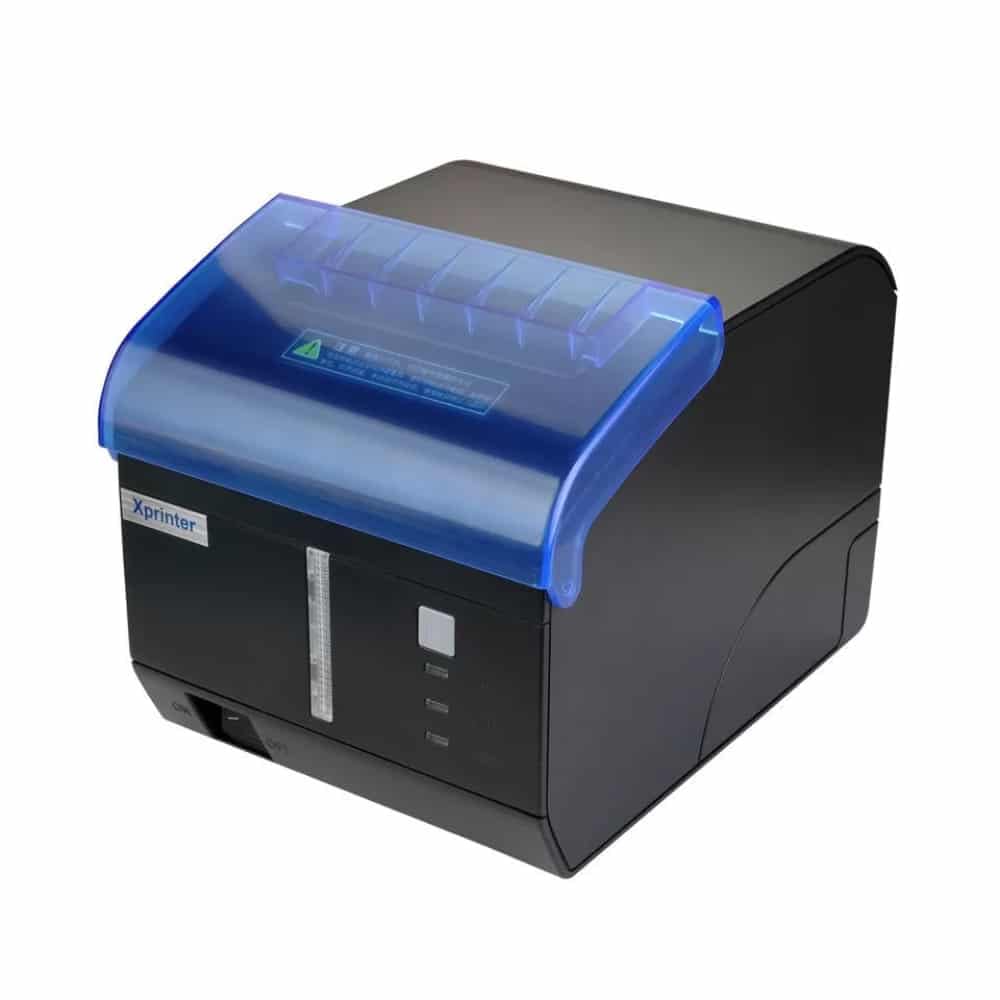
Bilde: Foran view of the C260M printer, showing the power, error, and paper out indicator lights, along with the feed button.
4. Automatic Cutter
The C260M printer is equipped with an automatic cutter that neatly cuts receipts after printing, ensuring clean and professional output.
Vedlikehold
1. Rengjøring av skrivehodet
Regular cleaning of the print head ensures optimal print quality and extends its lifespan. Use a soft, lint-free cloth dampfylt med isopropylalkohol. Tørk forsiktig av skrivehodeoverflaten. La det tørke helt før bruk.
2. Bytte papirrullen
When the paper out indicator illuminates or print quality degrades, it's time to replace the paper roll. Follow the steps outlined in the 'Loading Thermal Paper' section of the Setup Guide.
3. Generell omsorg
Keep the printer free from dust and debris. Avoid spilling liquids on the device. Do not attempt to disassemble the printer yourself, as this may void the warranty and cause damage.
Feilsøking
This section addresses common issues you might encounter with your C260M printer.
| Problem | Mulig årsak | Løsning |
|---|---|---|
| Skriveren skriver ikke ut | Power off, cable disconnected, driver issue, paper out. | Check power, reconnect cables, reinstall drivers, load paper. |
| Dårlig utskriftskvalitet | Dirty print head, low quality paper, incorrect settings. | Clean print head, use recommended thermal paper, check print settings. |
| Papirstopp | Feil papirinnlegg, fremmedlegeme. | Open cover, remove jammed paper carefully, reload paper correctly. |
| Error indicator on | General error, paper out, cover open. | Check paper, ensure cover is closed, power cycle the printer. |
Spesifikasjoner
Below are the technical specifications for the Generic C260M Thermal Receipt Printer:
- Utskriftsmetode: Direct Thermal (no ink required)
- Utskriftsbredde: Opp til 79 mm
- Utskriftshastighet: Opptil 260 mm/sekund
- Utskriftsoppløsning: 576 prikker / linje
- Støttet papir: Thermal paper roll, 79.5±0.5 mm width, 80 mm diameter
- Tilkobling: USB, LAN (Ethernet)
- Barcode Support: 1D (UPC-A, EAN-13, etc.), 2D (QR Code, PDF417)
- Cutter Life: 1.5 millioner kutt
- Levetid for utskriftshode: Up to 150 km of printing
- Hukommelse: 256 KB
- Skriverutgang: Monokrom
- Farge: Svart
- Varevekt: 1700 gram
- Produktmål (D x B x H): 18 cm x 13 cm x 14 cm
- Opprinnelsesland: Kina
Garanti og støtte
Garantiinformasjon
This product comes with a 14-day warranty from the date of purchase. Please retain your proof of purchase for any warranty claims. The warranty covers manufacturing defects under normal use. It does not cover damage caused by misuse, accidents, unauthorized modifications, or improper installation.
Kundestøtte
For technical assistance, troubleshooting, or warranty inquiries, please contact your retailer or the manufacturer's customer service. Refer to the contact information provided with your purchase documentation.