
BORNOON BRN009
BORNOON Vanity Desk with Mirror and Lights
Model: BRN009
Bruksanvisning
1. Produktet er overview
The BORNOON Vanity Desk with Mirror and Lights (Model BRN009) is designed to provide a functional and organized space for your beauty routine. This vanity features a large mirror with adjustable LED lighting, a built-in charging station, and extensive storage options including drawers, open shelves, and side cabinets. The integrated stool also offers a hidden storage compartment.
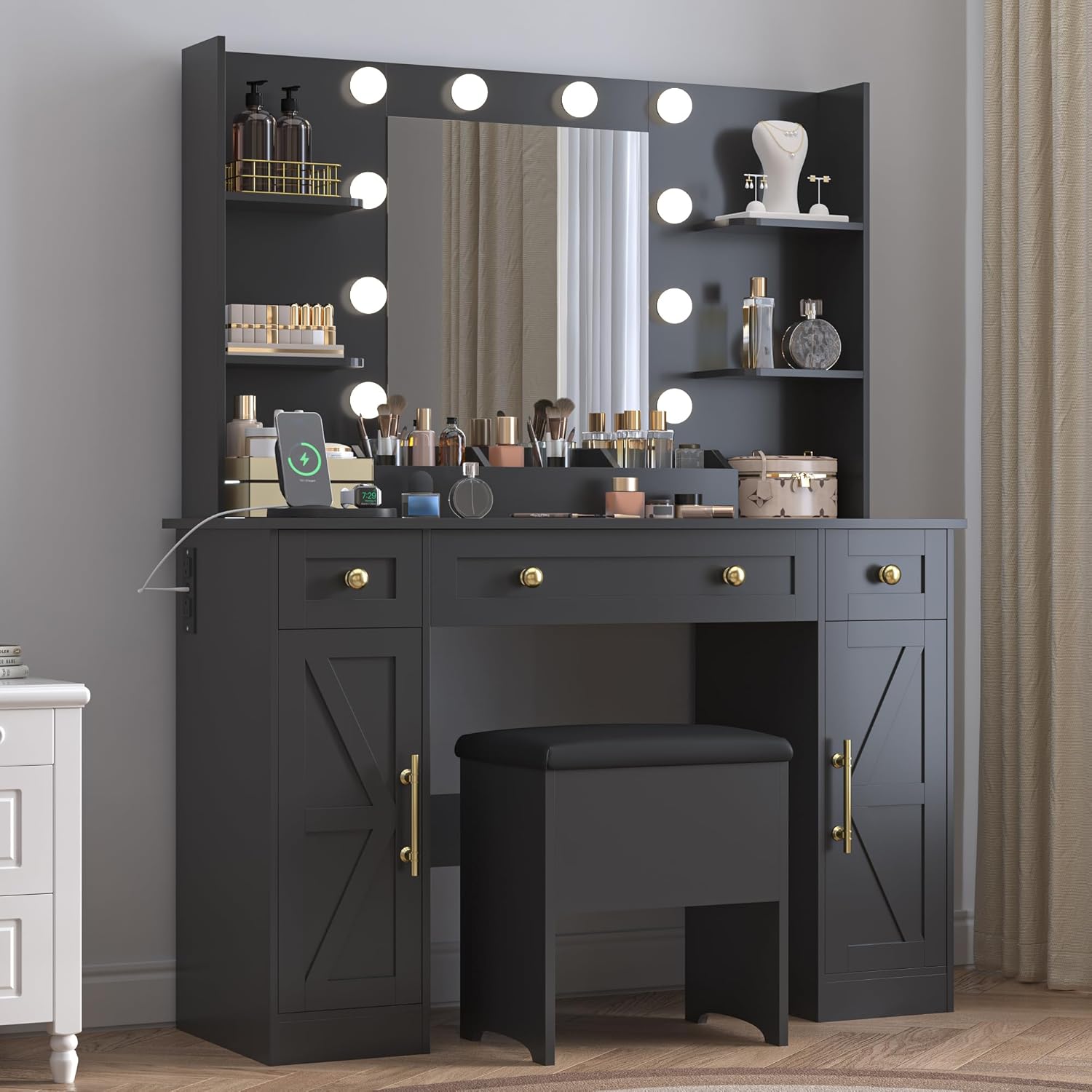
Image 1.1: The BORNOON Vanity Desk (Model BRN009) in Sophisticated Black, featuring the lighted mirror, drawers, and side cabinets.
2. Sikkerhetsinformasjon
Les og forstå alle sikkerhetsinstruksjoner før montering og bruk. Unnlatelse av å følge disse instruksjonene kan føre til personskade eller skade på produktet.
- Trekk alltid ut støpselet fra servantskapet før montering eller demontering.
- Vær forsiktig med skarpe kanter og klempunkter under montering og bruk.
- Ikke overbelast ladestasjonen.
- Keep the vanity away from heat sources and moisture.
- Følg alltid produsentens instruksjoner for sikker bruk og vedlikehold.
3. Pakkens innhold
Before beginning assembly, ensure all parts and hardware are present and accounted for. Refer to the included assembly manual for a detailed list of components. All parts are typically labeled for easy identification.
- Vanity Desk Components (panels, shelves, drawers, cabinet doors)
- Speil med integrerte LED-lys
- Charging Station unit (pre-installed or separate)
- Monteringsutstyr (skruer, plugger, kamlåser osv.)
- Assembly Tools (usually an Allen wrench; a screwdriver or drill may be required, not always included)
- Bruksanvisning
4. Monteringsinstruksjoner
Assembly of the BORNOON Vanity Desk requires careful attention to the provided step-by-step instructions. It is recommended to have a second person assist with assembly, especially for larger components like the mirror. A power drill may expedite the process, but hand tools are generally sufficient.
- Pakk ut og organiser: Pakk forsiktig ut alle komponentene og legg dem ut på en ren, myk overflate for å unngå riper. Kontroller alle delene mot den medfølgende delelisten.
- Følg trinnvis veiledning: Refer to the dedicated assembly manual included in your package. Each step is illustrated and clearly described.
- Sikre tilkoblinger: Ensure all screws, cam locks, and other fasteners are tightened securely, but do not overtighten to avoid damaging the wood.
- Install Mirror and Lighting: Carefully attach the mirror unit according to the instructions, ensuring all electrical connections for the LED lights are properly made.
- Integrert ladestasjon: Connect the charging station's power cord to a wall outlet after the vanity is fully assembled and in its final position.

Image 4.1: Overall dimensions of the vanity desk, useful for planning placement and assembly.
5. Bruksanvisning
5.1 LED opplyst speil
The integrated mirror features 10 LED bulbs with three adjustable color modes and dimmable brightness to suit various lighting needs.
- Slå på/av: Locate the touch sensor on the mirror surface to turn the lights on or off.
- Endre fargemodus: Tap the touch sensor to cycle through the three available color modes:
- Varm gul (3000K)
- Varm hvit (4000K)
- Kaldhvit (8000K)
- Juster lysstyrke: Press and hold the touch sensor to gradually increase or decrease the light brightness. Release when the desired brightness is achieved.

Image 5.1.1: Visual representation of the three adjustable light modes (Cool White, Natural White, Warm White) for optimal makeup application.

Image 5.1.2: Controls for adjusting light modes and brightness.
5.2 Ladestasjon
The vanity desk includes a built-in charging station to power your electronic devices.
- Strømuttak: Two standard AC outlets (125V/12A, 1500W MAX) are available for devices like hair dryers or curlmed strykejern.
- USB-porter: Two USB ports (5V/2A MAX) are provided for charging smartphones, tablets, and other USB-powered devices.
- Strømledning: The charging station is equipped with a 5-foot power cord for connection to a wall outlet.

Image 5.2.1: Detail of the integrated charging station with USB and AC outlets.
6. Vedlikehold
Riktig stell og vedlikehold vil forlenge levetiden og utseendet til sminkebordet ditt.
- Rengjøring av overflater: Tørk av alle overflater med en myk klutamp klut. Unngå slipende rengjøringsmidler eller sterke kjemikalier som kan skade overflaten.
- Speilpleie: Clean the mirror with a glass cleaner and a lint-free cloth. Do not spray cleaner directly onto the mirror to prevent liquid from seeping into the edges or electrical components.
- Tørke støv: Regularly dust the vanity and shelves to prevent buildup.
- Sølhåndtering: Tørk opp søl umiddelbart for å forhindre flekker eller skade på det konstruerte treverket.
- Elektriske komponenter: Ensure the charging station and light connections remain dry and free from debris.
7. Feilsøking
If you encounter issues with your BORNOON Vanity Desk, refer to the following common troubleshooting steps:
| Problem | Mulig årsak | Løsning |
|---|---|---|
| LED-lysene slår seg ikke på. |
|
|
| Ladestasjonen fungerer ikke. |
|
|
| Drawers or doors are stiff/misaligned. |
|
|
8. Spesifikasjoner
| Trekk | Detalj |
|---|---|
| Merke | BORNOON |
| Modellnummer | BRN009 |
| Rammemateriale | Konstruert tre |
| Produktdimensjoner (D x B x H) | 15.7 x 43.7 x 57.5 tommer |
| Varevekt | 104.6 pund |
| Montering påkrevd | Ja |
| LED-lysmoduser | 3 (Warm Yellow, Warm White, Cold White) |
| Ladestasjon | 2 USB Ports (5V/2A MAX), 2 AC Outlets (125V/12A, 1500W MAX) |
| Lengde på strømledningen | 5 fot |
| Farge | Sofistikert svart |
9. Garanti og støtte
BORNOON is committed to customer satisfaction. We offer a free replacement parts service for any reason, including installation errors, defects, or accidental damage over time. Our customer service team is available to ensure a seamless and worry-free experience.
For assistance, replacement parts, or any inquiries, please contact BORNOON customer service through the retailer where the product was purchased or visit the official BORNOON store online.
Online-butikk: BORNOON Store on Amazon