
1. Introduksjon
The Audizio Avola is a comprehensive audio system designed to provide a wide range of listening options. It integrates Internet Radio, DAB+, FM radio, a CD player, and Bluetooth connectivity into a single, elegant unit. This manual will guide you through the setup, operation, and maintenance of your Avola system, ensuring you can fully utilize its features for an optimal audio experience.
2. Sikkerhetsinstruksjoner
- Strømforsyning: Bruk kun den medfølgende strømadapteren. Sørg for at volumettage samsvarer med kravene i din region.
- Vann og fuktighet: Ikke utsett enheten for regn, fuktighet eller væsker. Unngå å plassere gjenstander fylt med væske, som for eksempel vaser, oppå enheten.
- Ventilasjon: Sørg for tilstrekkelig ventilasjon rundt enheten. Ikke blokker ventilasjonsåpningene.
- Varmekilder: Hold enheten unna varmekilder som radiatorer, varmeventiler, ovner eller andre apparater som produserer varme.
- Rengjøring: Disconnect the unit from the power supply before cleaning. Use a soft, dry cloth. Do not use liquid cleaners or aerosol cleaners.
- Service: Ikke forsøk å utføre service på enheten selv. Overlat all service til kvalifisert servicepersonell.
- CD-spiller: Do not insert foreign objects into the CD tray. Handle CDs by their edges to avoid scratches.
3. Pakkens innhold
Kontroller at alle varene er tilstede i emballasjen:
- 1x Audizio Avola Internet Radio
- 1x fjernkontroll
- 1x strømadapter
- 1x User Manual (Quick Start Guide)

Image: Audizio Avola unit shown with its remote control and power adapter.
4. Produktet er overview
4.1 Frontpanel

Bilde: Foran view of the Audizio Avola with the CD tray closed.
The front panel features the main display, control buttons, a CD tray, and input ports.
- Utstilling: Color display for navigation and information.
- Kontrollknapper: MENU, INFO, REC/DEL, PRESET/REPEAT, STANDBY, I/R, Play/Pause, Stop, Skip/Fast Forward/Rewind.
- CD-skuff: For å sette inn lyd-CD-er.
- TUNE/SELECT Knob: Rotate to navigate menus, press to select.
- VOLUME -knapp: Justerer lydutgangsnivået.
- USB-port: For tilkobling av USB-lagringsenheter.
- SD-kortspor: For innsetting av SD-minnekort.
- AUX-inngang: 3.5mm jack for external audio sources.
- Hodetelefonkontakt: 3.5 mm-kontakt for privat lytting.

Image: Close-up of the Audizio Avola front panel showing USB, SD, AUX, and headphone ports.
4.2 Bakpanel
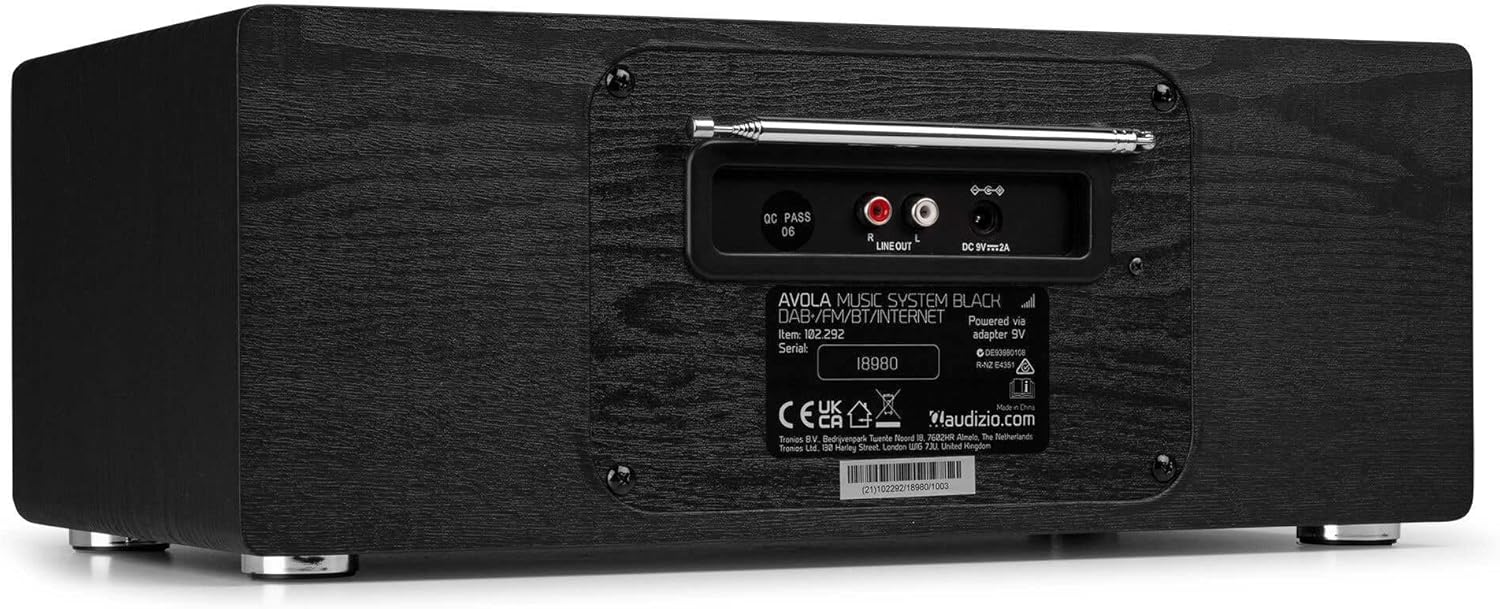
Bilde: Bak view of the Audizio Avola, highlighting the antenna and connection ports.
The rear panel houses essential connections:
- Teleskopantenne: For DAB+ and FM radio reception. Extend fully for best signal.
- LINJEUTGANG (RCA): For tilkobling til ekstern ampløftere eller høyttalere.
- DC 9V 2A Power Input: For tilkobling av strømadapter.
5. Oppsett
5.1 Strømtilkobling
- Connect the power adapter to the DC 9V 2A input on the rear of the Avola unit.
- Koble strømadapteren til en passende stikkontakt.
- The unit will enter standby mode. Press the STANDBY button on the unit or remote control to power on.
5.2 Antenneoppsett
For optimal DAB+ and FM radio reception, fully extend the telescopic antenna located on the rear panel. Adjust its position for the best signal quality.
5.3 Initial Setup (WLAN Connection)
To access Internet Radio features, the Avola must be connected to a Wi-Fi network.
- Upon first power-on, the unit may prompt you to set up the network connection. If not, press MENU, navigate to 'System Settings' and then 'Network'.
- Select 'Wi-Fi Network' and choose 'Scan' to find available networks.
- Velg Wi-Fi-nettverket fra listen.
- Enter your Wi-Fi password using the TUNE/SELECT knob to navigate characters and press to confirm each character.
- Once connected, the display will show a Wi-Fi icon.
6. Driftsmåter
6.1 Internett-radio
Access thousands of radio stations worldwide via your Wi-Fi connection.
- Press the MENU button and select 'Internet Radio'.
- Du kan bla gjennom stasjoner etter sted, sjanger eller søke etter bestemte stasjoner.
- Use the TUNE/SELECT knob to navigate and select.
- To save a station as a preset, press and hold the PRESET/REPEAT button until the preset menu appears, then select a preset number.

Image: The Audizio Avola display showing the Internet Radio interface.
6.2 DAB+-radio
Digital Audio Broadcasting Plus offers high-quality digital radio.
- Press the MENU button and select 'DAB Radio'.
- Enheten vil automatisk søke etter tilgjengelige DAB+-stasjoner.
- Use the TUNE/SELECT knob to browse and select stations.
- Save presets as described for Internet Radio.
6.3 FM-radio
Listen to traditional analog FM radio broadcasts.
- Press the MENU button and select 'FM Radio'.
- Use the TUNE/SELECT knob to manually tune or press and hold to auto-scan for stations.
- Save presets as described for Internet Radio.
6.4 CD-spiller
Spill av dine favoritt-CD-er.
- Press the MENU button and select 'CD Player'.
- Press the 'Open' button next to the CD tray to open it.
- Carefully place an audio CD onto the tray with the label side facing up.
- Press the 'Open' button again to close the tray. The unit will begin playing the CD automatically.
- Use the Play/Pause, Stop, and Skip buttons for playback control.
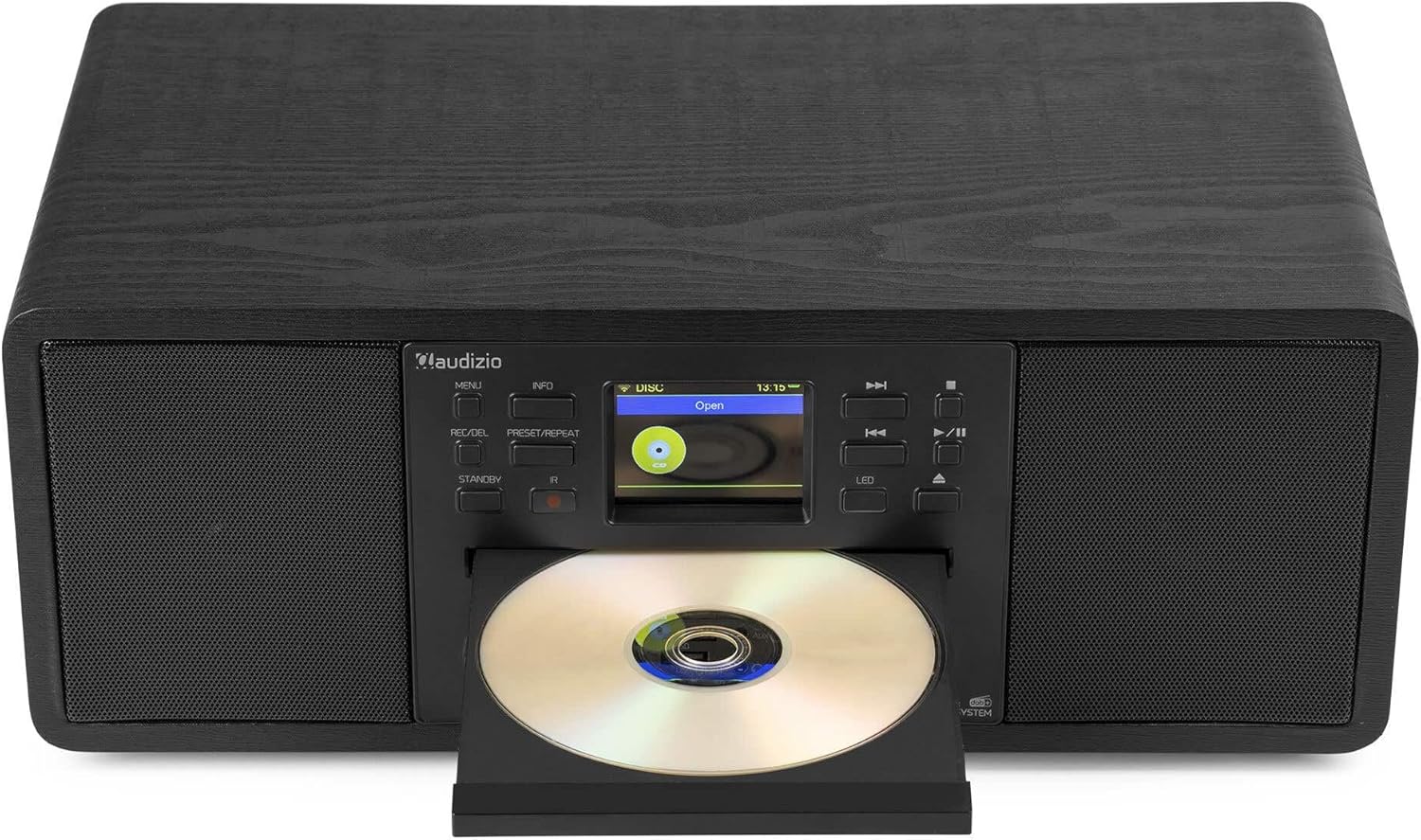
Image: The Audizio Avola with its CD tray open, ready for disc insertion.
6.5 Bluetooth-tilkobling
Strøm lyd trådløst fra smarttelefonen, nettbrettet eller andre Bluetooth-aktiverte enheter.
- Press the MENU button and select 'Bluetooth'.
- The Avola will enter pairing mode and become discoverable.
- On your Bluetooth device, search for 'Audizio Avola' in the Bluetooth settings and select it to pair.
- Once connected, the display will show 'BT Connected'. You can now play audio from your device through the Avola.

Image: The Audizio Avola display indicating a successful Bluetooth connection.
6.6 USB/SD-avspilling
Spill av lyd filefra USB-stasjoner eller SD-kort.
- Insert a USB drive into the USB port or an SD card into the SD card slot on the front panel.
- Press the MENU button and select 'USB' or 'SD' (the unit may automatically switch to the correct mode).
- Naviger gjennom din files and folders using the TUNE/SELECT knob.
- Press the TUNE/SELECT knob to play a selected track.
7. Vedlikehold
- Rengjøring av enheten: Use a soft, dry, lint-free cloth to clean the exterior of the unit. Do not use abrasive cleaners, waxes, or solvents.
- CD Lens Cleaning: If CD playback becomes erratic, use a commercially available CD lens cleaner disc to clean the laser lens.
- Lagring: Hvis enheten skal lagres over lengre tid, må den kobles fra strømforsyningen og oppbevares på et kjølig og tørt sted.
8. Feilsøking
| Problem | Mulig årsak | Løsning |
|---|---|---|
| Ingen strøm | Strømadapteren er ikke tilkoblet, eller stikkontakten er defekt. | Sjekk strømtilkoblingene. Prøv en annen stikkontakt. |
| Ingen lyd | Volume too low, mute activated, or incorrect source selected. | Increase volume. Check if mute is active. Ensure correct input source is selected. |
| Internettradio kobler seg ikke til | Feil Wi-Fi-passord, svakt signal eller nettverksproblem. | Re-enter Wi-Fi password. Move unit closer to router. Check router status. |
| DAB+/FM reception poor | Antennen er ikke strukket ut, eller signalområdet er dårlig. | Trekk den teleskopiske antennen helt ut og juster den. Prøv å flytte enheten. |
| CD-en spiller ikke | CD inserted incorrectly, dirty/scratched CD, or unsupported format. | Ensure CD is inserted label-side up. Clean or replace CD. Verify CD format (supports CD-DA, MP3). |
| Bluetooth pares ikke | Device not in pairing mode, or Avola not discoverable. | Ensure both devices are in pairing mode. Check Bluetooth settings on your device. |
9. Spesifikasjoner
| Trekk | Spesifikasjon |
|---|---|
| Modellnavn | Avola |
| Varenummer | 102.292 |
| Dimensjoner (LxBxH) | 45.8 x 25.8 x 19.7 cm |
| Vekt | 4 kg |
| Strøminngang | 220 Volt (via power adapter) |
| Speaker Output Power (Max) | 60 watt |
| Lydutgangsmodus | Stereo |
| Støttede lydformater | CD-DA, MP3 |
| Tilkoblingsteknologi | WLAN, Bluetooth, AUX, RCA |
| Kompatible enheter | MP3 Player, PC, Smartphone, Tablet |
| Farge | Svart |
10. Garanti og støtte
Audizio products are designed and manufactured to the highest standards. In the unlikely event of a problem with your product, please contact your retailer for assistance. Keep your proof of purchase for warranty claims. For further support or inquiries, please refer to the official Audizio webnettstedet eller kontakt deres kundeservice.